This book provides a platform to understand Internet of things with Raspberry Pi and the basic knowledge of the programming and interfacing of the devices and designed systems. It broadly covers introduction to Internet of Things and enabling technologies, interfacing with Raspberry Pi and Arduino and interfacing with Raspberry Pi GPIO. Internet of Things with Raspberry pi and Arduino is aimed at senior undergraduate, graduate students and professionals in electrical engineering, computer engineering including robotics.
eBook - ePub
Internet of Things with Raspberry Pi and Arduino
- 190 pages
- English
- ePUB (mobile friendly)
- Available on iOS & Android
eBook - ePub
Internet of Things with Raspberry Pi and Arduino
About this book
Information
Section II
Basics of Arduino and Raspberry Pi
4
Basics of Arduino
4.1 Introduction to Arduino
Arduino was invented at the Ivrea Interaction Design Institute. It was designed for fast prototyping, targeting the hobbyist without any programming background. Soon the user-friendly platform attracted an audience covering a wider community and started changing to adapt the latest trends in the market, from an 8-bit board to IoT products, wearable devices, and an embedded environment. Arduino boards are completely open source and can be used for application development with particular requirements. The Arduino software is user-friendly and easy to begin with a flexible environment for advanced users. It can be operated on Mac, Linux, and Window platforms. New things can be learned with Arduino.
Advantages of Arduino:
Cost: Arduino boards are less expensive compared to other microcontroller boards.
Platform: The Arduino Software (IDE) is compatible with most of the operating systems like Macintosh OSX, Windows, and Linux.
User friendly: The Arduino Software (IDE) is user-friendly, easy to begin, and has flexibility for the skilled programmers.
Open source: The Arduino is an open-source software that can be programmed with C, C++, or AVR-C languages. So a variety of modules can be designed by users.
4.1.1 Arduino Uno
The Arduino/Genuino Uno has an onboard ATmega328 microcontroller. It has 6 analog input ports (A0–A5) and 14 digital I/O ports, out of which 6 are PWM pins. Each pin can operate on 0–5 V of voltage. It operates at 16 MHz of frequency. Figure 4.1 shows the Arduino Uno board (Table 4.1).
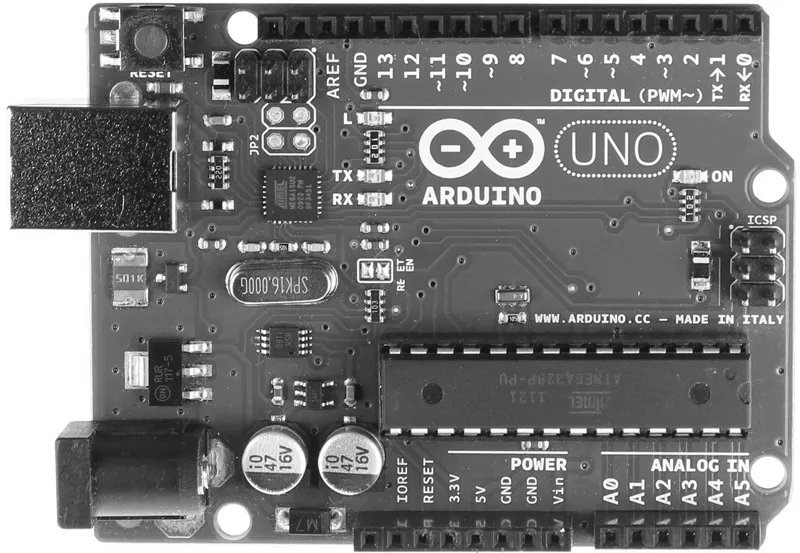
Arduino Uno board.
Pin | Description |
|---|---|
Vin | It is the external voltage to the board |
3.3 V | 3.3 V supply, on board |
+5 V | Output voltage +5 V |
GND | Ground |
IOREF | It is to select the appropriate power source by providing the voltage reference |
Serial | It can transmit and receive serial data with 0(Rx) 1(Tx) |
External Interrupts | Trigger an interrupt on low value (pins 2 and 3) |
PWM | 8 bit six PWM (3, 5, 6, 9, 10, 11) |
SPI | It supports SPI communication [10 (SS), 11 (MOSI), 12 (MISO) and 13 (SCK)] |
LED | Inbuilt LED driven |
TWI | TWI communication [A4 (SDA), and A5 (SCL)] |
AREF | Reference voltage with the analog inputs |
Reset | It is used to reset the onboard microcontroller |
4.1.2 Arduino Mega
The Arduino Mega has an onboard ATmega2560 microcontroller. It has 16 analog inputs, 54 digital I/Os, USB connection, 4 UART, a power jack, and a reset button. It operates on 16 MHz frequency. Figure 4.2 shows the Arduino Mega board (Table 4.2).
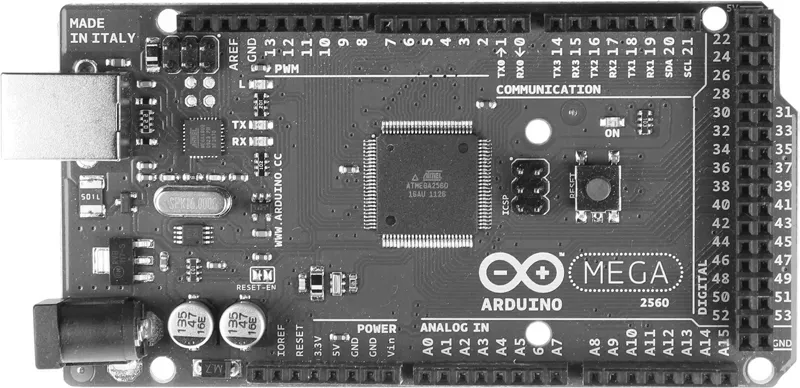
Arduino Mega board.
Pin | Description |
|---|---|
Vin | The external voltage to the Arduino board |
+5 V | Output a regulated 5 V |
3.3 V | Onboard 3.3 V supply |
GND | Ground |
IOREF | It is to select the appropriate power source by providing the voltage reference |
Serial0 | It can transmit and receive serial data with 0(Rx) and 1(Tx) |
Serial1 | It can transmit and receive serial data with 19(Rx) and 18(Tx) |
Serial2 | It can transmit and receive serial data with 14(Rx) and 16(Tx) |
External Interrupts | It triggers an external interrupt at low value with 2 (interrupt 0), 3 (interrupt 1), 18 (interrupt 5), 19 (interrupt 4), and 20 (interrupt 2) |
PWM | 8 bit PWM (pins: 2–13 and 44–46) |
SPI | It supports SPI communication [10 (SS), 11 (MOSI), 12 (MISO), and 13 (SCK)] |
LED | LED driven at pin 13 |
TWI | Supports TWI communication [pins: ... |
Table of contents
- Cover
- Half Title
- Title Page
- Copyright Page
- Table of Contents
- Preface
- Acknowledgments
- Authors
- Section I Introduction
- Section II Basics of Arduino and Raspberry Pi
- Section III Interfacing with Raspberry Pi and Arduino
- Section IV Connecting to the Cloud
- Bibliography
- Index
Trusted by 375,005 students
Access to over 1.5 million titles for a fair monthly price.
Study more efficiently using our study tools.
Frequently asked questions
Yes, you can cancel anytime from the Subscription tab in your account settings on the Perlego website. Your subscription will stay active until the end of your current billing period. Learn how to cancel your subscription
No, books cannot be downloaded as external files, such as PDFs, for use outside of Perlego. However, you can download books within the Perlego app for offline reading on mobile or tablet. Learn how to download books offline
Perlego offers two plans: Essential and Complete
- Essential is ideal for learners and professionals who enjoy exploring a wide range of subjects. Access the Essential Library with 800,000+ trusted titles and best-sellers across business, personal growth, and the humanities. Includes unlimited reading time and Standard Read Aloud voice.
- Complete: Perfect for advanced learners and researchers needing full, unrestricted access. Unlock 1.5M+ books across hundreds of subjects, including academic and specialized titles. The Complete Plan also includes advanced features like Premium Read Aloud and Research Assistant.
We are an online textbook subscription service, where you can get access to an entire online library for less than the price of a single book per month. With over 1.5 million books across 990+ topics, we’ve got you covered! Learn about our mission
Look out for the read-aloud symbol on your next book to see if you can listen to it. The read-aloud tool reads text aloud for you, highlighting the text as it is being read. You can pause it, speed it up and slow it down. Learn more about Read Aloud
Yes! You can use the Perlego app on both iOS and Android devices to read anytime, anywhere — even offline. Perfect for commutes or when you’re on the go.
Please note we cannot support devices running on iOS 13 and Android 7 or earlier. Learn more about using the app
Please note we cannot support devices running on iOS 13 and Android 7 or earlier. Learn more about using the app
Yes, you can access Internet of Things with Raspberry Pi and Arduino by Rajesh Singh,Anita Gehlot,Lovi Raj Gupta,Bhupendra Singh,Mahendra Swain in PDF and/or ePUB format, as well as other popular books in Technology & Engineering & Computer Science General. We have over 1.5 million books available in our catalogue for you to explore.