Introduction to Web Mapping
eBook - ePub

Introduction to Web Mapping

  1. 347 pages
  2. English
  3. ePUB (mobile friendly)
  4. Available on iOS & Android
eBook - ePub

Introduction to Web Mapping

About this book

A web map is an interactive display of geographic information, in the form of a web page, that you can use to tell stories and answer questions. Web maps have numerous advantages over traditional mapping techniques, such as the ability to display up-to-date or even real-time information, easy distribution to end users, and highly customized interactive content. Introduction to Web Mapping teaches you how to develop online interactive web maps and web mapping applications, using standard web technologies: HTML, CSS and JavaScript. The core technologies are introduced in Chapters 1-5, focusing on the specific aspects which are most relevant to web mapping. Chapters 6-13 then implement the material and demonstrate key concepts for building and publishing interactive web maps.

The book:


  • Gives an introduction to fundamental web technologies: HTML, CSS and JavaScript


  • Covers Leaflet, the popular open-source JavaScript library for building web maps


  • Describes the GeoJSON vector layer format and the Ajax technique for loading data


  • Shows how spatial database APIs, such as the CARTO platform, can be combined with a web map to query and display large amounts of data


  • Introduces client-side geoprocessing with the Turf.js JavaScript library, for applying spatial operators in the browser


  • Demonstrates a complex web mapping application for collecting crowdsourced data, combining Leaflet, CARTO and the Leaflet.draw plugin


  • Goes over 69 complete code examples and includes 9 solved exercises for building web maps and web pages (downloadable code is provided in the online supplement)

The book is intended for beginners with no background in web technologies or programming. Nevertheless, some prior experience with computers and programming is beneficial. The book can be used for self-study, or as a textbook in a standard undergraduate "Web mapping" course in a Geography department, intended for students specializing in Geographic Information Systems (GIS).
Frequently asked questions

Yes, you can cancel anytime from the Subscription tab in your account settings on the Perlego website. Your subscription will stay active until the end of your current billing period. Learn how to cancel your subscription.
No, books cannot be downloaded as external files, such as PDFs, for use outside of Perlego. However, you can download books within the Perlego app for offline reading on mobile or tablet. Learn more here.
Perlego offers two plans: Essential and Complete
  • Essential is ideal for learners and professionals who enjoy exploring a wide range of subjects. Access the Essential Library with 800,000+ trusted titles and best-sellers across business, personal growth, and the humanities. Includes unlimited reading time and Standard Read Aloud voice.
  • Complete: Perfect for advanced learners and researchers needing full, unrestricted access. Unlock 1.4M+ books across hundreds of subjects, including academic and specialized titles. The Complete Plan also includes advanced features like Premium Read Aloud and Research Assistant.
Both plans are available with monthly, semester, or annual billing cycles.
We are an online textbook subscription service, where you can get access to an entire online library for less than the price of a single book per month. With over 1 million books across 1000+ topics, we’ve got you covered! Learn more here.
Look out for the read-aloud symbol on your next book to see if you can listen to it. The read-aloud tool reads text aloud for you, highlighting the text as it is being read. You can pause it, speed it up and slow it down. Learn more here.
Yes! You can use the Perlego app on both iOS or Android devices to read anytime, anywhere — even offline. Perfect for commutes or when you’re on the go.
Please note we cannot support devices running on iOS 13 and Android 7 or earlier. Learn more about using the app.
Yes, you can access Introduction to Web Mapping by Michael Dorman in PDF and/or ePUB format, as well as other popular books in Physical Sciences & Probability & Statistics. We have over one million books available in our catalogue for you to explore.

Information

Part I
Introduction to Web Technologies
1
HTML
1.1 Introduction
In this chapter, we introduce the most basic and fundamental component of web technologies: HTML. As we will see, HTML is a data format used to encode the contents and structure of web pages. HTML is usually stored in plain text files with the .html file extension. Every time one accesses a web page, using a web browser, the respective HTML file for that web page is transferred and decoded into the visual image that we see on screen. Simple web pages, such as the ones we build in this chapter, are composed of nothing but HTML code contained in a single .html file.
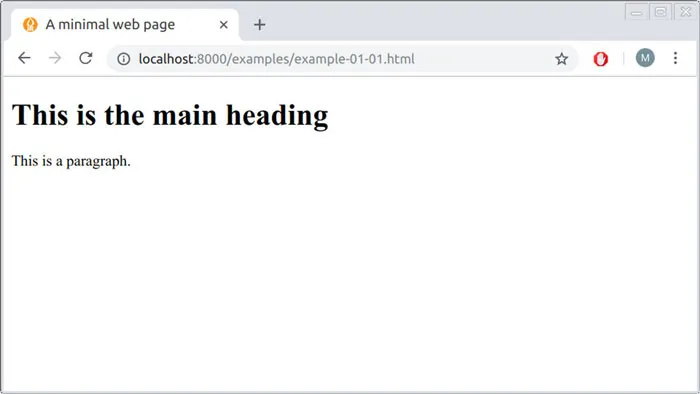
Starting from this chapter and onward, we are going to present computer code examples. Some examples are short, separate pieces of code used to illustrate an idea or concept. Other examples include the complete source code of a web page, which you can open and display in the browser, as well as modify and experiment with. The way that each of the complete code examples will appear when opened with the browser is shown in a separate figure, such as in Figure 1.1. As mentioned in Section 0.7, the online version of this book contains live versions of all ninety-plus complete examples (Appendices BC), as well as a downloadable folder with all code files to experiment with the examples on your own computer.
fig1_1
FIGURE 1.1: Screenshot of example-01-01.html
Learning programming requires a lot of practice, so it is highly recommended to open the examples on your computer as you go along through the book. Better yet, you can modify the code of each example and observe the way that the displayed result changes, to make sure you understand what is the purpose of each code component. For instance, the first example (Figure 1.1) displays a simple web page with one heading and one paragraph—you can try to modify its source code (see Section 1.4 to learn how) to change the contents of the heading and/or paragraph, to add a second paragraph below the first one, and so on.
Chapter 2 in Introduction to Data Technologies (Murrell, 2009) gives a gentle and gradual introduction to HTML as well as the practice of writing computer code1 . It is a highly recommended complementary reading to the present chapter, especially for readers who are new to computer programming.
1.2 How do people access the web?
1.2.1 Web browsers
People access the web using software known as a web browser2. Popular examples of web browsers are listed in Table 1.1.
TABLE 1.1: Popular web browsers
Browser
URL
Chrome
https://www.google.com/chrome/
Firefox
https://www.mozilla.org/en-US/firefox/
Edge
https://www.microsoft.com/en-us/windows/microsoft-edge
Internet Explorer
https://www.microsoft.com/en-us/download/internet-explorer.aspx
Safari
https://www.apple.com/lae/safari/
In order to view a web page, users might:
  • Type a URL into the address bar of the browser
  • Follow a link from another site
  • Use a bookmark
1.2.2 Web servers
When you ask your browser for a web page, typing a URL3 such as https://www.google.com in the address bar, the request is sent across the internet to a special computer known as a web server which hosts the website. Web servers are special computers that are constantly connected to the internet, and are optimized to send web pages out to people who request them. Your computer, the client, receives the file and renders the web page you ultimately see on screen. We will discuss web servers and server-client communication in Chapter 5.
When you are looking at a website, it is most likely that your browser will be receiving HTML and CSS documents from the web server that hosts the site. The web browser interprets the HTML and CSS code to create the page that you see. We will learn about HTML in Chapter (this chapter) and about CSS in Chapter 2.
Most web pages also send JavaScript code to your browser to make the page interactive. The browser runs the JavaScript code, on page load and/or later on while the user interacts with the web page. The JavaScript code can modify the content of the page. We will introduce JavaScript in Chapters 34.
1.3 Web pages
At the most basic level, a web page is a plain text document containing HTML code. This book comes with several examples of complete web pages. The examples are listed in Appendices BC. They can be viewed and/o...

Table of contents

  1. Cover
  2. Half Title
  3. Title Page
  4. Copyright Page
  5. Dedication
  6. Contents
  7. Preface
  8. Author
  9. Part I: Introduction to Web Technologies
  10. Part II: Web Mapping with Leaflet
  11. Part III: Databases
  12. Part IV: Advanced Topics
  13. Part V: Appendices
  14. Bibliography
  15. Index