![]()
Defining User-Generated Learning | |
Professional development at my school is like pudding. It can be sweet and delicious, or weird and bread.
—Anonymous
Meet Angelina
Angelina was a first-grade teacher in Los Angeles. Her class was a bustling melting pot: she taught students from seven different countries. A few of her students did not speak English, and several had individualized education plans. Each week, a consultant came to her school. During her prep period, the consultant helped Angelina revise and refine her lesson plans and units. While this type of support was helpful, it didn't meet all of Angelina's needs. Angelina was still struggling to differentiate her lessons to meet the needs of all her students. Angelina really needed to connect with other educators who were successfully reaching their English language learners and special education populations.
One day, while Angelina was surfing the web for examples of idioms to share with her students, she found a collaborative project called the Winter Wonderland Wiki. The wiki was looking for classrooms across the nation to work together on an interdisciplinary project. Students would post poems, drawings, and temperature measurements in their towns or cities, creating a global exchange about winter. As Angelina navigated the site, she realized that a teacher, just like her, was running the site. Feeling brave and a bit reckless, she fired off an e-mail to the organizer.
Within a few hours, she had a response from Mary, the organizer of the project. Mary taught second grade at an elementary school in New Jersey. Mary asked Angelina if she'd like to Skype to learn more about the project and how to set it up.
They set a time to Skype, and soon Mary's class was showing Angelina's class how to add to the project. Angelina's class was really excited to work with students across the country. One of Angelina's first graders “just couldn't believe” that it was so cold in New Jersey!
Before long, Mary and Angelina were exchanging e-mails regularly. Mary encouraged Angelina to join Twitter and follow other educators in the group. Although Twitter had always seemed silly to Angelina, she trusted Mary and signed up. Before long, Angelina was checking out a daily stream of lesson ideas and tools to use with her students.
To organize all the sites and resources that she found on Twitter, she started using Pearltrees. She would see a cool resource on Twitter, click on it, and then use the Pearltree button on her browser to save it. Pearltrees helped Angelina make collections of websites so that she and her students could easily find the games, animal information sites, and kid-friendly news sources during guided reading or math practice time. All the sites were saved online, so she could get to her resources from anywhere. Angelina's students were really excited each time she unveiled a new Pearltree in class, and many of the students’ parents started using the resources at home as well.
After about six months, Angelina was feeling very comfortable curating digital resources and sharing them with other people she followed on Twitter. Several colleagues started to notice that things were changing in Angelina's classroom, and they asked how they could get involved. Before long, Angelina was sharing her websites, tips, and tricks with almost everyone in her school.
Angelina chose to take a risk and reach out to another educator on the web. The new connection not only made her a better teacher but also made her a better learner. Angelina is one of the many teachers who have turned to user-generated learning to improve their practice.
What Is User–Generated Learning?
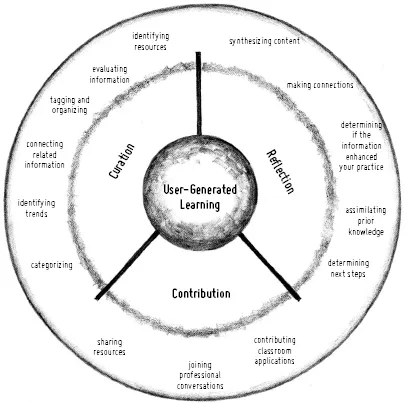
User-generated learning is learning acquired through active curation, reflection, and contribution to a self-selected collaborative space. This basically means that user-generated learning is something you do, not something you get. You have to actively participate in the process through searching, evaluating, and sharing. In user-generated learning, everyone has something to contribute. We are all experts in our own ways. This doesn't negate the importance of educational research or vetted practices. Instead, user-generated learning reflects that all adults recognize their personal applications of ideas and strategies, and this synthesis and community are a valuable part of the learning process.
Let's break down each part of the definition provided above. First, user-generated learning requires curation. Curation is defined as the careful collection of relevant resources. Just like a museum employee, teachers must find and aggregate content that is relevant to the problems they are facing in their profession. Need resources for a new unit you are teaching? Interested in trying guided reading during your reading block? Need fun sites for students to use to practice mitosis and meiosis? Curation can help! Instead of relying on a content area expert or textbook, you are responsible for finding meaningful information. Curation can occur in many forms, such as using file folders, saving pages from professional journals, or copying article excerpts to share with colleagues. However, the Internet provides fantastic new tools that allow you to find, organize, and share content in ways that were previously not possible. Further, using online tools such as Twitter, Google Reader, Pearltrees, iTunes U, and Paper. li fosters sharing. You benefit greatly from what the community selects and shares. The community essentially serves as a functional filter to help you find the best content. By using the Internet to learn from lots of teachers, not just the teachers where you work, you will find better solutions that meet your students’ needs. For example, maybe you are having difficulty engaging your students with a very traditional poetry unit that you have always taught. Curation can help you skim and search lots of different educational blogs each day for ideas. Perhaps your curation leads you to the FlickrPoet site (www.storiesinflight.com/flickrpoet/), where students can write poems and aggregate images for each word. Before long, you have students writing haiku poetry, creating really powerful visuals, and sharing their work with the school community. The right resource at the right time can really help you make a positive change for the students in your classroom.
Many of the chapters of this book were researched using my own personal system of content curation that includes Twitter, Paper.Li, and Google Reader. Later chapters of this book will focus on all these tools, and I will share some of the tips and tricks I've learned, aiding your pursuit of user-generated learning.
Reflection is the second component of user-generated learning. As you curate and consume information from a variety of sources, you must take the time to assimilate the new information with your existing background knowledge. Sometimes the information you've curated will match what you already know. Other times, it will challenge previously held beliefs. (A good curator always includes a variety of viewpoints when aggregating content.) As you wrestle with the information relative to your beliefs, your reflection will be critical. Just as there are many ways to curate, there are also many ways to reflect. You could simply write your thoughts in a small journal or word-processing document. However, you could also start your own online blog, allowing others in your learning community to comment on your reflections. Blogs are dynamic spaces for transactional, or interactive, reflection. Personally, the feedback, questions, and comments I've received on my blog (www.kristenswanson.org) have both affirmed my beliefs and challenged me as a learner. Reflection tools will be discussed in more detail in Chapter 3.
Third, user-generated learning requires a contribution to the learning community that you serve. You can select a community from physical or virtual places. At the local level, you could connect with your grade-level team, department, school, or district. At the virtual level, you could join an online forum, create a list of followers on Twitter, or identify and follow your favorite blog writers. Some people contribute to both physical and virtual communities. I contribute to both the schools where I work as well as the Twitter hashtag #edcamp. (Don't worry . . . there is more information on hashtags and Twitter coming up!) Both communities are important to me as a learner, and I try to share resources with both groups at least twice a week. That's a frequency that is manageable for me, but other people contribute on completely different schedules. As this is an individualized system, that is perfectly A-Okay!
User-generated learning is thus a three-part process: curation, reflection, and contribution. Each phase can be distinct or they can overlap. Certainly, user-generated learning is not linear or clean. It's messy. The more you become engaged with it, the harder it is to see clear distinctions between the phases. This book will explore each part of the process, providing you with tools and strategies to match your learning needs. Many times, the needs of your students or your role also drive the process. Do you teach middle schoolers? Then your Twitter list or Google Reader might include lots of middle school teachers and blogs to help you find engaging nonfiction texts geared to middle school students. (Middle school teachers typically know that anything gross, weird, or scary will get their kids’ attention right away!) Are you a school principal? Then perhaps you follow thought leaders in both business and education to help you implement your vision. You could borrow inspirational quotes from your Twitter stream for your weekly school newsletter and post pictures from school events online. Maybe you're a preservice teacher? If so, then follow everyone in education and ask lots of questions to help you find your niche!
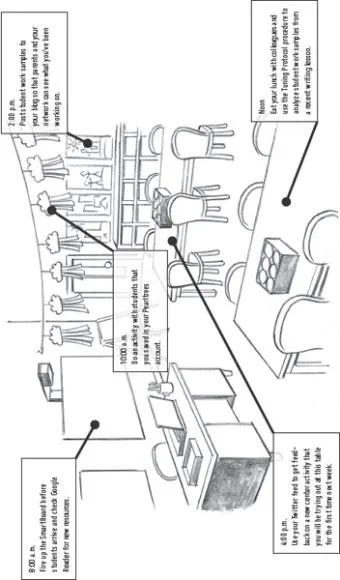
Consider the profile of “a day in the life” of an educator who practices user-generated learning (page 10). You can see that both online tools and face-to-face connections shape this teacher's classroom and teaching.
View the suggestions about this process as a buffet. Some things will fit your personality and work habits better than others. Also, some strategies are particularly suited to certain topics or subjects. Again, you are in control. You are the professional. If a strategy is not meeting your needs, change it!
It should be noted that the idea of user-generated learning provided in this book is heavily supported by the leading research on adult learning. That is why the strategies in this book are so successful for so many people. User-generated learning simply matches what we already know about adults and professional learning.
A Quick Recap of Adult Learning Theory
Research on adult learning shows that purpose, relevance, and immediacy are important to adult learners. For adult learning experiences to be successful, learners should be aware of the intention of the activity. Instruction should be problem-based instead of content-based, and planning should be collaborative. Succinctly, adults must be engaged with the content and one another to accomplish vital tasks.
Malcolm Knowles's theory of andragogy emphasizes that adult learners are self-directed (Knowles, Holton, & Swanson, 1998). They must be recognized and respected for their life experiences; positive relationships can augment the learning process. Moore and Kearsley (2004) echo this need for “closeness,” especially in virtual or online environments. Termed transactional distance, the concept describes the distance between individuals in online environments. The primary method for lessening distance is dialogue. The more people interact via discussion boards, e-mail, and video chat, the less distance they perceive. Adults thrive in learning environments where they feel connected to both the task and the related individuals.
In his book Drive, Daniel Pink (2011) cites autonomy, mastery, and purpose as the three components of establishing motivation. The typical rewards, such as money, do not motivate adults to perform at their best. Instead, giving adults the freedom to choose, problem-solve, and have control seems to produce much greater results. In his book, Pink cites research that clearly ...