eBook - ePub
Activities for Using the Internet in Primary Schools
- 160 pages
- English
- ePUB (mobile friendly)
- Available on iOS & Android
eBook - ePub
Activities for Using the Internet in Primary Schools
About this book
This text guides primary staff to Internet sites of value to the national curriculum Key Stages 1 and 2 offering appropriate ways of using ICT in the classroom. It contains practical activities, information and advice on developing and supporting class activities.
Information
PART 1
General Introduction
Introduction
A central concern of this book is that you are not buried in jargon, Many studies of the Internet seem to be designed to confuse the reader. What is an ISP? What is bandwidth? Where do we place an ISDN line? What is an URL? This book hopes to tackle these problems with its ‘How To’ boxes. When jargon is used, the shaded ‘How To’ box attempts to explain it. A basic explanation is provided here but for more detail, refer to Chapter 11.
This book is organized into four main parts: Part 1 offers a general introduction to the use of the Internet in primary education and has sections on classroom management and schemes of work; Parts 2 and 3 form the largest section of the book and contain activities in the curriculum areas of Literacy, Numeracy, Science, Geography, History, Design and Technology, Art, Music and Religious Education.
The activities are presented in a shaded box, linking the activity to the UK numeracy and literacy strategies and the QCA (Qualifications and Curriculum Agency) scheme of work for Information Technology, where appropriate. Where the schemes are not available, links to the National Curriculum are included. The links are followed by the broad outcomes that the activity aims to achieve.
Finally, Part 4 discusses the technical issues facing primary IT co-ordinators who would like to provide Internet access to all staff and pupils in their school. A short Appendix is provided specifically for the IT co-ordinator.
CHAPTER 1
Using the Internet in primary education
Why use the Internet?
This is the age of global electronic communications. Across the world, we are linking networks of computers together that enable these computers to exchange data. Millions of machines are already linked and the numbers are growing all the time. This is the reality of the Internet.
Although the Internet has been around for many years, easy and friendly access to its wealth of resources has only come about recently with the emergence of the World Wide Web, or the Web for short. One way to view the Web’s benefits is to divide its use into three areas:

These three uses of the Web blend together neatly to make it a potentially powerful tool for teaching and learning.
The Web as a resource
The Web is a source of a great deal of information. You can find details about virtually every topic under the sun. Unfortunately, although the Web does contain useful, accurate and educationally relevant resources, it also houses a great deal of trivial, misleading and educationally useless material. You will need to develop your research skills and those of your pupils if you want to avoid wasting a great deal of time aimlessly surfing the Web.
The Internet’s major strength is that all the information is available in a digital format that is readily imported into other packages such as your word processor, spreadsheet or, if it’s an image, into your graphics package. In this way, so long as you take into account copyright, much of the information downloaded from the Web can be altered, amended or completely changed to meet your needs.
The Web as a publishing medium
Another great thing about the Web is that it gives everyone the opportunity to be a publisher! Most Internet providers, that is, companies that provide you with the Internet connection, also offer space on their servers for individuals or schools to publish their own material. Teachers can share classroom resources, lesson plans and schemes of work; pupils can publish their work such as artwork or a piece of writing, and schools can advertise their classes, examination results or special events.
The Web as a tool for discussion and communication
The Internet and the Web can also be used as a communications medium, playing the role of keeping teachers in touch with both one another and with experts across the globe. Electronic mail (e-mail), on-line chat areas, discussion groups and bulletin boards can all be effectively used to support the school curriculum and administration.
Overall, the Web can enhance the teaching and learning strategies offered by teachers. But in order to achieve this, it needs to be supported by a staff development programme and integrated within teachers’ schemes of work.
Classroom management
When integrating ICT into the classroom, much depends on the IT resources already available in a school and their locations. It is all very well having activities and tasks that require the use of the Web, but as primary teachers, you face some very real problems in providing access for yourselves and your pupils.
Although the UK National Grid for Learning initiative will go some way to providing equipment to schools, many pupils will still find they need to share computers with their peers. However, there are a number of classroom strategies that might be used to counter-balance a lack of adequate access.
Classroom teaching
For classroom teaching purposes, a sound investment is the purchase of a data projector or an LCD (Liquid Crystal Display) panel that would enable the contents displayed on a computer to be viewed on an overhead projector screen. These items are extremely useful for whole classroom sessions.
A panel is a piece of equipment that sits on top of an overhead projector and costs from about £500. If your school already has a computer, and an overhead projector and screen, this is the cheapest option. However, your overhead projector must be a powerful one (over 400 watts).
An alternative is a stand-alone data projector. These do not need an overhead projector to work so all you will need is the data projector itself and a display screen. Projectors are more costly than LCD panels. They start at about £2000.

Figure 1.1 A data projector
These panels and projectors are expensive, especially since you could put the money towards buying another computer or a printer, but they really pay their way when you need to demonstrate software or Web sites to large classes. They are extremely useful for awareness-raising sessions or to deliver introductory IT lessons. However, a primary school with limited resources will have to decide whether its short-term emphasis is on providing pupils with hands-on IT experience and or on classroom presentation by the teacher.
Another strategy, if you have enough machines for your class but cannot provide Internet access at every computer, is to download and prepare resources beforehand and enable pupils to work on them off-line. It is possible to download whole sections of a Web site so that most of the materials can be accessed off-line in the very same way as they would be accessed on-line. Basically, you simulate the Web experience in your school.
You use the same Web browsers that you use to access the Internet, only now you’re accessing files on your own computer or on the local server. This is known as off-line browsing. The software that allows you to download part of or a whole Web site is given in Figure 1.2: an offline browser.
Intranets
If you’re very ambitious, you might decide not only to view materials downloaded from the Web on your local machines, but also to convert many of your school documents so they can be accessed internally via a Web browser. If you did do this, you’d be building your very own ‘Intranet’.
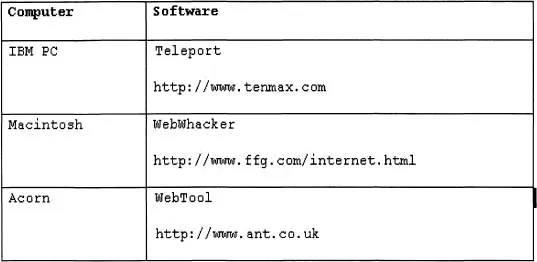
Figure 1.2 Offline browsers
An Intranet is the use of Internet technologies within a school to store and access information. Your Intranet could house memos, school policies, the school strategic plan, major documents, assessments, in fact, whatever you wanted to hold centrally (see Figure 1.3).
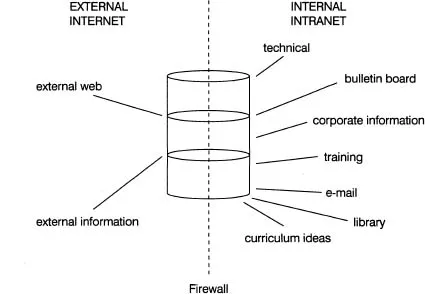
Figure 1.3 An Intranet
One problem on any internal network of computers is how best to store files and documents so that users can find and share them easily. Since Web browsers can work on most computers, whether they are a Personal Computer (PC), a Macintosh or an Acorn, setting up an internal Web-based system allows every individual with a browser on their computer and who has access to that system to add to or use the information stored on it.
Other strategies
However, for practical hands-on experiences, the computer/pupil ratio becomes crucial. When IT resources are tight, there has to be a good balance between individual and group activities and whole-class teaching. Since groups will differ in composition and size for different activities, you will need to use your professional judgement to choose the styles of teaching that are the most effective.
If there are only a limited number of machines, you may need to work with a small group of pupils, maybe as many as eight, at each computer whilst the remainder are involved in other structured activities that require minimal teacher input. The use of the Web in the classroom could involve the teacher engaging the children in discussion of a Web page whilst it is being viewed, and then participating with the children in any interactive tasks being offered by the site.
It is important that activities are well planned so that each pupil is working at his/her correct level. Activitie...
Table of contents
- Cover
- Half Title
- Title Page
- Copyright Page
- Table of Contents
- Preface
- Authors’ note
- Part 1 General introduction
- Part 2 Activities for Using the Internet in Core Subjects
- Part 3 Activities for Using the Internet in Foundation Subjects
- Part 4 Technical Issues
- Appendix: The IT co-ordinator’s checklist on networking
- Index
Trusted by 375,005 students
Access to over 1.5 million titles for a fair monthly price.
Study more efficiently using our study tools.
Frequently asked questions
Yes, you can cancel anytime from the Subscription tab in your account settings on the Perlego website. Your subscription will stay active until the end of your current billing period. Learn how to cancel your subscription
No, books cannot be downloaded as external files, such as PDFs, for use outside of Perlego. However, you can download books within the Perlego app for offline reading on mobile or tablet. Learn how to download books offline
Perlego offers two plans: Essential and Complete
- Essential is ideal for learners and professionals who enjoy exploring a wide range of subjects. Access the Essential Library with 800,000+ trusted titles and best-sellers across business, personal growth, and the humanities. Includes unlimited reading time and Standard Read Aloud voice.
- Complete: Perfect for advanced learners and researchers needing full, unrestricted access. Unlock 1.5M+ books across hundreds of subjects, including academic and specialized titles. The Complete Plan also includes advanced features like Premium Read Aloud and Research Assistant.
We are an online textbook subscription service, where you can get access to an entire online library for less than the price of a single book per month. With over 1.5 million books across 990+ topics, we’ve got you covered! Learn about our mission
Look out for the read-aloud symbol on your next book to see if you can listen to it. The read-aloud tool reads text aloud for you, highlighting the text as it is being read. You can pause it, speed it up and slow it down. Learn more about Read Aloud
Yes! You can use the Perlego app on both iOS and Android devices to read anytime, anywhere — even offline. Perfect for commutes or when you’re on the go.
Please note we cannot support devices running on iOS 13 and Android 7 or earlier. Learn more about using the app
Please note we cannot support devices running on iOS 13 and Android 7 or earlier. Learn more about using the app
Yes, you can access Activities for Using the Internet in Primary Schools by Eta De Cicco,Mike (Senior Lecturer Farmer,Claire Hargrave,De Cicco, Eta,Farmer, Mike (Senior Lecturer, University of Central England),Hargrave, Claire,Mike Farmer in PDF and/or ePUB format, as well as other popular books in Education & Education General. We have over 1.5 million books available in our catalogue for you to explore.