![]()
Part 1
Lua
Introduction to Script Programming With Lua
Before getting to the heart of the matter (coding!), let’s learn what Lua means, what a programming language is, and two tips to code like a pro.
Moon
Lua means “moon” in Portuguese. It’s pronounced “loo-ah” and not “L.U.A.” It was created in Brazil in 1993 and is now available for a wide variety of systems.
Corona SDK uses Lua as its programming language. Because Lua is very easy to learn, it has allowed Corona SDK to become one of the most accessible tools to create mobile games and applications.
A Script Is a Shopping List
Lua is a programming language, and more precisely, a scripting language.
Think of a typical shopping list:
- look for butter at the store
- if there is no butter, buy margarine
- go back home
A script is no more than a shopping list for a computer!
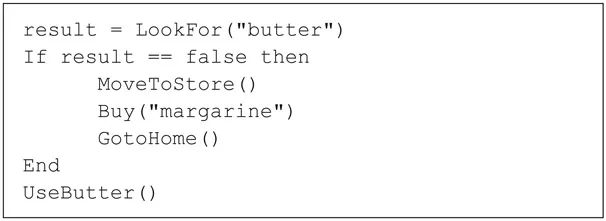
Here is an example of our shopping list in Lua code:
It’s not terribly realistic, but it’ll help you to understand what a scripting language is.
Comments
Sometimes you’ll need to explain something in your code that isn’t part of the code itself. For example, leaving a note to yourself about something you have to remember, or providing information to others who might read your code.
To insert a comment just do this:
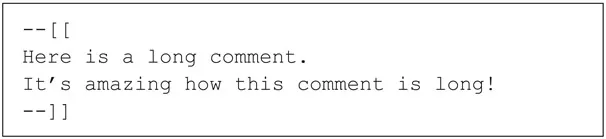
If the comment is long, do it like this:
Some Advice Regarding Comments
- Use comments often! Several weeks or months later, you’ll be happy to find these helpful reminders.
- A comment needs to provide information, not just repeat what the code already explains by itself. An example of a redundant comment would be:
- A comment is useful to deactivate a line of code temporarily. For example:
- Remove a comment when it is no longer valid.
Traces
On many occasions, you’ll need to display something that’s not for your users, but only for you. A kind of “I was here!” to check if your code is doing what you expect. (Yes, the code isn’t always obedient!)
Here is how to display a trace:
This instruction will display “David was here!” in the console when this instruction is executed.
The console is a kind of ticker that’s essential to your survival.
TOP TIP: Traces are the best and simplest way to discover bugs and fix them. It’s like having a spy in your code! You’ll learn more about traces in the chapter addressing debugging.
That’s All
That’s enough to start. Let’s now look at Lua in detail!
![]()
Get Prepared
We all love action. So, before we learn anything, let’s install Corona SDK! You’ll then be ready to enter the code from the examples and test them.
Installing Corona SDK
Corona SDK is, as its name suggests, a software development kit: a mix of tools that allow developers to create certain applications.
To enter and test our code, we’ll use the Corona Editor (which is based on a text editor called Sublime Text 2). We call this tool an IDE (Integrated Development Environment), from which you’ll enter code, compile, and launch your apps for testing.
Sublime Text is an amazing tool, and it’s the best choice from my point of view. You can use any text editor you like, of course, but you won’t get the automated features such as completion, compiling, and so forth.
Installing the SDK is simple. Just follow the officially documented steps according to your operating system.
Installing Corona SDK for Mac OS X
http://docs.coronalabs.com/guide/start/installMac/index.html
Installing Corona SDK for Windows
http://docs.coronalabs.com/guide/start/installWin/index.html
Everything working fine? Now it’s tim...