Hands-On C++ Game Animation Programming
eBook - ePub

Hands-On C++ Game Animation Programming

Learn modern animation techniques from theory to implementation with C++ and OpenGL

  1. 368 pages
  2. English
  3. ePUB (mobile friendly)
  4. Available on iOS & Android
eBook - ePub

Hands-On C++ Game Animation Programming

Learn modern animation techniques from theory to implementation with C++ and OpenGL

About this book

Learn animation programming from first principles and implement modern animation techniques that can be integrated into any game development workflow

Key Features

  • Build a functional and production-ready modern animation system with complete features using C++
  • Learn basic, advanced, and skinned animation programming with this step-by-step guide
  • Discover the math required to implement cutting edge animation techniques such as inverse kinematics and dual quaternions

Book Description

Animation is one of the most important parts of any game. Modern animation systems work directly with track-driven animation and provide support for advanced techniques such as inverse kinematics (IK), blend trees, and dual quaternion skinning.

This book will walk you through everything you need to get an optimized, production-ready animation system up and running, and contains all the code required to build the animation system. You'll start by learning the basic principles, and then delve into the core topics of animation programming by building a curve-based skinned animation system. You'll implement different skinning techniques and explore advanced animation topics such as IK, animation blending, dual quaternion skinning, and crowd rendering. The animation system you will build following this book can be easily integrated into your next game development project. The book is intended to be read from start to finish, although each chapter is self-contained and can be read independently as well.

By the end of this book, you'll have implemented a modern animation system and got to grips with optimization concepts and advanced animation techniques.

What you will learn

  • Get the hang of 3D vectors, matrices, and transforms, and their use in game development
  • Discover various techniques to smoothly blend animations
  • Get to grips with GLTF file format and its design decisions and data structures
  • Design an animation system by using animation tracks and implementing skinning
  • Optimize various aspects of animation systems such as skinned meshes, clip sampling, and pose palettes
  • Implement the IK technique for your game characters using CCD and FABRIK solvers
  • Understand dual quaternion skinning and how to render large instanced crowds

Who this book is for

This book is for professional, independent, and hobbyist developers interested in building a robust animation system from the ground up. Some knowledge of the C++ programming language will be helpful.

Frequently asked questions

Yes, you can cancel anytime from the Subscription tab in your account settings on the Perlego website. Your subscription will stay active until the end of your current billing period. Learn how to cancel your subscription.
No, books cannot be downloaded as external files, such as PDFs, for use outside of Perlego. However, you can download books within the Perlego app for offline reading on mobile or tablet. Learn more here.
Perlego offers two plans: Essential and Complete
  • Essential is ideal for learners and professionals who enjoy exploring a wide range of subjects. Access the Essential Library with 800,000+ trusted titles and best-sellers across business, personal growth, and the humanities. Includes unlimited reading time and Standard Read Aloud voice.
  • Complete: Perfect for advanced learners and researchers needing full, unrestricted access. Unlock 1.4M+ books across hundreds of subjects, including academic and specialized titles. The Complete Plan also includes advanced features like Premium Read Aloud and Research Assistant.
Both plans are available with monthly, semester, or annual billing cycles.
We are an online textbook subscription service, where you can get access to an entire online library for less than the price of a single book per month. With over 1 million books across 1000+ topics, we’ve got you covered! Learn more here.
Look out for the read-aloud symbol on your next book to see if you can listen to it. The read-aloud tool reads text aloud for you, highlighting the text as it is being read. You can pause it, speed it up and slow it down. Learn more here.
Yes! You can use the Perlego app on both iOS or Android devices to read anytime, anywhere — even offline. Perfect for commutes or when you’re on the go.
Please note we cannot support devices running on iOS 13 and Android 7 or earlier. Learn more about using the app.
Yes, you can access Hands-On C++ Game Animation Programming by Gabor Szauer in PDF and/or ePUB format, as well as other popular books in Ciencia de la computación & Gráficos computacionales. We have over one million books available in our catalogue for you to explore.

Chapter 1: Creating a Game Window

In this chapter, you will set up a simple Win32 window and bind an OpenGL context to it. You will be using OpenGL 3.3 Core throughout this book. The actual OpenGL code is going to be very minimal.
Most OpenGL-specific code will be abstracted into helper objects and functions, which will allow you to focus on animation rather than any specific graphics APIs. You will write the abstraction layer in Chapter 6, Building an Abstract Renderer, but for now, it's important to create a window ready to be drawn to.
By the end of this chapter, you should be able to do the following:
  • Open a Win32 window
  • Create and bind an OpenGL 3.3 Core context
  • Use glad to load OpenGL 3.3 Core functions
  • Enable vsynch for the created window
  • Understand the downloadable samples for this book

Technical requirements

To follow along with the code in this book, you will need a computer running Windows 10 with a recent version of Visual Studio installed. All of the downloadable code samples are built using Visual Studio 2019. You can download Visual Studio from https://visualstudio.microsoft.com/.
You can find all of the sample code for the book on GitHub at https://github.com/PacktPublishing/Game-Animation-Programming.

Creating an empty project

Throughout this book, you will be creating code from scratch as much as possible. Because of this, there will be very few external dependencies. To get started, follow these steps to create a new blank C++ project in Visual Studio:
  1. Open Visual Studio and create a new project by going to File|New|Project:
    Figure 1.1: Creating a new Visual Studio project
    Figure 1.1: Creating a new Visual Studio project
  2. You will see your project templates on the left-hand side of the window that pops up. Navigate to Installed|Visual C++|Other. Then, select Empty Project:
    Figure 1.2: Creating an empty C++ project
    Figure 1.2: Creating an empty C++ project
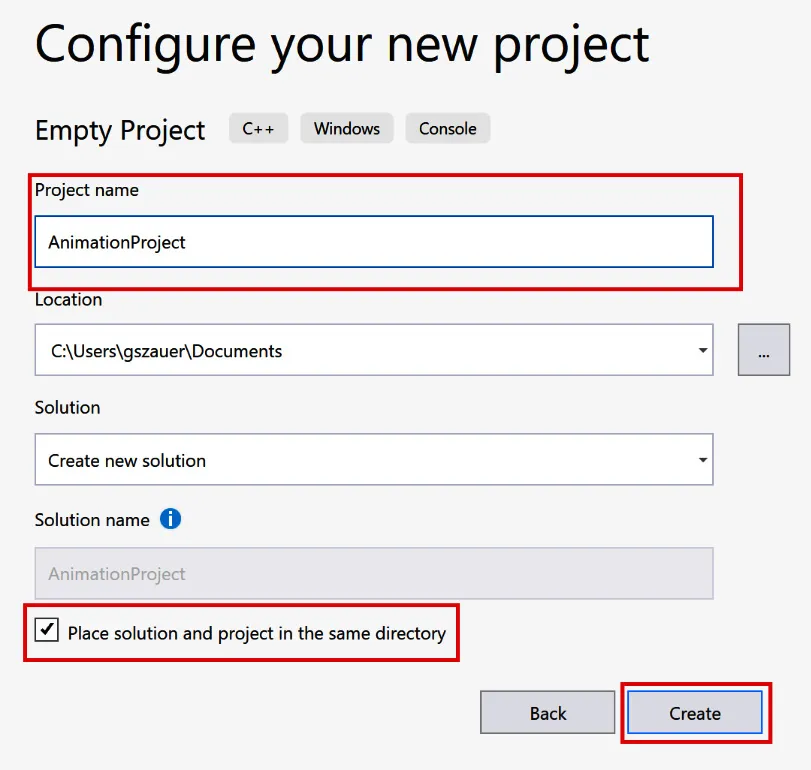
  3. Enter a project name and select a project location. Finally, click Create.
Figure 1.3: Specifying a new project name
If you have followed the preceding steps, you should have a new blank project. Throughout the rest of this chapter, you will add an application framework and an OpenGL-enabled window.

Creating the application class

It would be difficult to maintain a cluttered window entry function. Instead, you need to create an abstract Application class. This class will contain some basic functions, such as Initialize, Update, Render, and Shutdown. All of the code samples provided for this book will be built on top of the Application base class.
Create a new file, Application.h. The declaration of the Application class is provided in the following code sample. Add this declaration to the newly created Application.h file:
#ifndef _H_APPLICATION_
#define _H_APPLICATION_
class Application {
private:
Application(const Application&);
Application& operator=(const Application&);
public:
inline Application() { }
inline virtual ~Application() { }
inline virtual void Initialize() { }
inline virtual void Update(float inDeltaTime) { }
inline virtual void Render(float inAspectRatio) { }
inline virtual void Shutdown() { }
};
#endif
The Initialize, Update, Render, and Shutdown functions are the life cycle of an application. All these functions will be called directly from the Win32 window code. Update and Render take arguments. To update a frame, the delta time between the current and last frame needs to be known. To render a frame, the aspect ratio of the window must be known.
The life cycle functions are virtual. Each chapter in the downloadable materials for this book has an example that is a subclass of the Application class that demonstrates a concept from that chapter.
Next, you will be adding an OpenGL loader to the project.

Adding an OpenGL loader

There is some external code that this chapter depends on, called glad. When you create a new OpenGL context on Windows, it's created with a legacy OpenGL context. The extension mechanism of OpenGL will let you use this legacy context to create a new modern context.
Once the modern context is created, you will need to get function pointers to all OpenGL functions. The functions need to be loaded with wglGetProcAdress, which returns a function pointer.
Loading every OpenGL function in this fashion would be very time-consuming. This is where having an OpenGL loader comes in; glad will do all this work for you. An OpenGL loader is a library or some code that calls wglGetProcAdress on the functions that the OpenGL API defines.
There are several OpenGL loaders available on Windows.; this book will use glad. glad is a small library that consists of only a few files. It has a simple API; you call one function and get access to all the OpenGL functions. glad has a web-based interface; you can find it at https://glad.dav1d.de/.
Important note
When using an X Windows system, such as many popular Linux distributions, the function to load OpenGL functions is glXGetProcAddress. As with Windows, there are OpenGL loaders available for Linux as well. Not all OSes need an OpenGL loader; for example, macOS, iOS, and Android don't need a loader. Both iOS and Android run on OpenGL ES.

Getting glad

You can get glad from https://glad.dav1d.de/, a web-based generator:
  1. Go to the site, select Version 3.3 from the gl dropdown, and select Core from the Profile dropdown:...
Table of contents

  1. Hands-On C++ Game Animation Programming
  2. Why subscribe?
  3. Contributors
  4. About the author
  5. About the reviewer
  6. Packt is searching for authors like you
  7. Preface
  8. Chapter 1: Creating a Game Window
  9. Chapter 2: Implementing Vectors
  10. Chapter 3: Implementing Matrices
  11. Chapter 4: Implementing Quaternions
  12. Chapter 5: Implementing Transforms
  13. Chapter 6: Building an Abstract Renderer
  14. Chapter 7: Exploring the glTF File Format
  15. Chapter 8: Creating Curves, Frames, and Tracks
  16. Chapter 9: Implementing Animation Clips
  17. Chapter 10: Mesh Skinning
  18. Chapter 11: Optimizing the Animation Pipeline
  19. Chapter 12: Blending between Animations
  20. Chapter 13: Implementing Inverse Kinematics
  21. Chapter 14: Using Dual Quaternions for Skinning
  22. Chapter 15: Rendering Instanced Crowds
  23. Other Books You May Enjoy