Learning Music Theory with Logic, Max, and Finale is a groundbreaking resource that bridges the gap between music theory teaching and the world of music software programs. Focusing on three key programs—the Digital Audio Workstation (DAW) Logic, the Audio Programming Language (APL) Max, and the music-printing program Finale—this book shows how they can be used together to learn music theory. It provides an introduction to core music theory concepts and shows how to develop programming skills alongside music theory skills.
Software tools form an essential part of the modern musical environment; laptop musicians today can harness incredibly powerful tools to create, record, and manipulate sounds. Yet these programs on their own don't provide musicians with an understanding of music notation and structures, while traditional music theory teaching doesn't fully engage with technological capabilities. With clear and practical applications, this book demonstrates how to use DAWs, APLs, and music-printing programs to create interactive resources for learning the mechanics behind how music works.
Offering an innovative approach to the learning and teaching of music theory in the context of diverse musical genres, this volume provides game-changing ideas for educators, practicing musicians, and students of music.
A good starting point in a discussion of rhythm is tempo, the pace of music, or how slow or fast a piece of music sounds. More specifically, the tempo is the rate of the beat. The beat is music’s pulse, moving forward at regular intervals of time, and can often be heard in music’s rhythmic elements. Tempos can be indicated by descriptive names, such as Fast, Allegro (“cheerful” in Italian), Andante (“walking speed”), Up-tempo, or Moderate. Tempo can also be set precisely as a BPM number (beats per minute), which is how tempos are set in DAWs. In Logic’s LCD Display (figure 1.1), we see that the default setting is 120 BPM, meaning that there are 120 beats per minute or two beats per second. To change the BPM, click on the number and drag it up or down, or double-click on it and type in a new BPM. Tempo and the BPM can vary within a piece of music as well. BPMs and metronome-marking numbers are the same concept, and mechanical metronomes have been helping musicians keep a steady beat since their invention in 1816 by Johann Maezel.
Figure 1.1: LCD Display with tempo set as BPM = 120 in Logic.
The difference between BPM and tempo indications (such as Allegro) is significant, as the words allow for some flexibility and variation. A musician might play a piece of music with an Allegro tempo marking at a 140 BPM one day and 136 BPM the next. Additionally, even a steady-sounding human musical performance will have slight variations in the temporal distance between beats. A DAW music performance will remain precisely at the indicated BPM with exactly equal distances between beats, unless the user creates some differences. To give a DAW performance a human feel, large and small variations in tempo can be added.
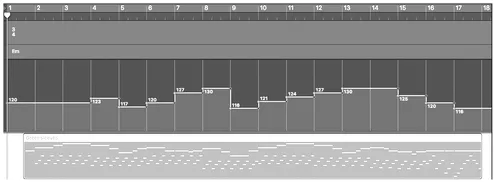
Seen in figure 1.2 is a MIDI realization of Greensleeves with thirteen tempo (BPM) changes visible in Logic’s Tempo Global Track—the top area’s horizontal lines (figure 1.2). We can create tempo changes that occur within a piece of music by editing the Tempo Global Track with the Pencil tool. The initial tempo is 120 BPM, and these added BPM tempo changes create a more human quality to the performance. This Greensleeves MIDI realization could be played on the piano, but the written music would not include these tempo changes. Pianists and other performing musicians learn how to vary the tempo slightly in performance, while still sounding steady—part of creating an interpretation or styling.
Figure 1.2:Changing BPM in Tempo Global Track in Logic.
To hear the beat and listen for changes in tempo in Logic, we can turn on the metronome. In measures 5–8 (hereafter mm. for measures and m. for measure) and mm. 9–13, we’ll hear a gradual and slight speeding up of the tempo, an accelerando (accel.). The BPM in mm. 14–17 gradually slows down, a ritardando (rit.).
In Finale, the usual method of setting the tempo is with the Expression tool (from the main menu, choose the mf icon) with which we can put input a tempo indication such as Allegro, and a BPM such as quarter note equals 120. With the Expression tool selected, double-click in the score where you want to place the tempo indication. From the Expression Selection window, choose Tempo Marks, and select a tempo. To make sure the Tempo Mark will control the BPM, in the lower portion of the Expression Selection window click Edit, and from there → Playback → Type → Tempo. Then, type in a BPM value in the Set to Value box if there isn’t a number there already. Some Tempo Marks have default BPMs, but others don’t.
DAWs define time in two main ways: musical time and clock time. Musical time provides a connection to music theory concepts, and will thus be our main focus, but we should describe how clock time is represented to provide a context.
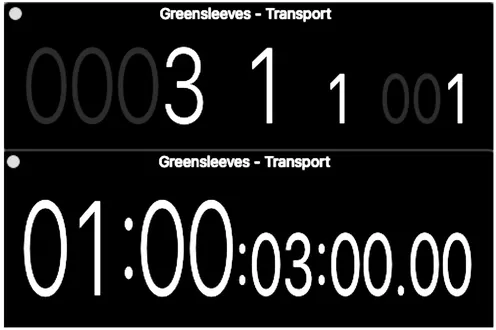
Seen in figure 1.3 are two displays in Logic (Time and Beats) showing these different versions of marking time. Time, the lower window, has clock time in the SMPTE (Society of Motion Pictures and Television Engineers) format which indicates hours, minutes, seconds, and frames (as in video frames), separated by colons. In keeping with film industry convention, the default SMPTE code starts with hour one as opposed to hour zero, although this can be changed. SMPTE time code can also display milliseconds instead of frames.
Beats (figure 1.3) displays musical time of bars, beats, divisions, and ticks. Performing musicians often use the terms bars (or measures), beats, and divisions (or subdivisions), but not ticks. Ticks (also known as PPQN—Parts or Pulses Per Quarter Note) are a smaller subdivision of a beat, and strictly a MIDI unit of time. Because they are so small, an individual tick is usually impossible to discern. A musician might say to a fellow performer, “I came in one beat late,” but no one would say, “I played that note one tick too late.”
Figure 1.3:Two versions of time (Beat and Time) in Logic.
1.2Meter
Logic’s LCD Display in figure 1.1. also shows a time signature of 44. The term time signature is simplified to TIME. The time signature represents how the pulse is organized into groups of beats, or musical meter. One unit of a meter is a measure or bar. In music notation, measures are separated by the bar line. The most common meters consist of groups of two, three, or four beats, known as duple, triple, and quadruple meter. The most common type of quadruple meter is common time, which has a 44 time signature. The first beat of a metrical pattern is often the strongest felt, and is called the downbeat. The Logic session seen in figure 1.4 demonstrates these meters as expressed by time signatures and the beats playe...
Table of contents
Cover
Half Title
Title Page
Copyright Page
Dedication
Contents
Acknowledgments
Introduction
Chapter 1: Rhythm: Tempo, Meter, Durations
Chapter 2: Rhythm: Loops and Advanced Rhythm
Chapter 3: Pitch, Intervals, Scales
Chapter 4: Triads
Chapter 5: Seventh Chords and Extensions, Chord Patterns
Chapter 6: Melody
Chapter 7: Harmonic Progressions
Chapter 8: Chromatic Harmony
Chapter 9: Chromatic Music
Chapter 10: Sound and Music Theory
Bibliography
Max Patchers and Objects
Credits
Index
Trusted by 375,005 students
Access to over 1.5 million titles for a fair monthly price.
Study more efficiently using our study tools.
Frequently asked questions
Yes, you can cancel anytime from the Subscription tab in your account settings on the Perlego website. Your subscription will stay active until the end of your current billing period. Learn how to cancel your subscription
No, books cannot be downloaded as external files, such as PDFs, for use outside of Perlego. However, you can download books within the Perlego app for offline reading on mobile or tablet. Learn how to download books offline
Perlego offers two plans: Essential and Complete
Essential is ideal for learners and professionals who enjoy exploring a wide range of subjects. Access the Essential Library with 800,000+ trusted titles and best-sellers across business, personal growth, and the humanities. Includes unlimited reading time and Standard Read Aloud voice.
Complete: Perfect for advanced learners and researchers needing full, unrestricted access. Unlock 1.5M+ books across hundreds of subjects, including academic and specialized titles. The Complete Plan also includes advanced features like Premium Read Aloud and Research Assistant.
Both plans are available with monthly, semester, or annual billing cycles.
We are an online textbook subscription service, where you can get access to an entire online library for less than the price of a single book per month. With over 1.5 million books across 990+ topics, we’ve got you covered! Learn about our mission
Look out for the read-aloud symbol on your next book to see if you can listen to it. The read-aloud tool reads text aloud for you, highlighting the text as it is being read. You can pause it, speed it up and slow it down. Learn more about Read Aloud
Yes! You can use the Perlego app on both iOS and Android devices to read anytime, anywhere — even offline. Perfect for commutes or when you’re on the go. Please note we cannot support devices running on iOS 13 and Android 7 or earlier. Learn more about using the app
Yes, you can access Learning Music Theory with Logic, Max, and Finale by Geoffrey Kidde in PDF and/or ePUB format, as well as other popular books in Media & Performing Arts & Computer Science General. We have over 1.5 million books available in our catalogue for you to explore.