![]()
CHAPTER 1
How Did We Get Here? A Brief Look at the Beginnings of Digital Lighting
When automated lighting first debuted, fixtures were extremely limited in the number of patterns that could fit in the unit. Manufacturers constantly pushed to develop fixtures with more gobos and effects in response to demand from lighting designers. However, the trade off as manufacturers developed new products was larger, heavier lighting fixtures with as many as three gobo wheels. But there is an upper limit to the size of a fixture you want to hang on a truss. These fixtures, while providing more than 20 patterns in some cases, simply took up more space in the rig. Other factors like price (some of these fixtures cost upwards of US$10,000 each) were also prohibitive. That kind of money for so few patterns was the inspiration that some major lighting manufacturers needed to find an effective way of creating a lighting fixture with a digital gobo library. The goal for those manufacturers eventually became a fixture that could have a virtually endless supply of images while enabling designers the freedom of selecting unique images instead of using stock patterns that may have been used on hundreds of other shows.
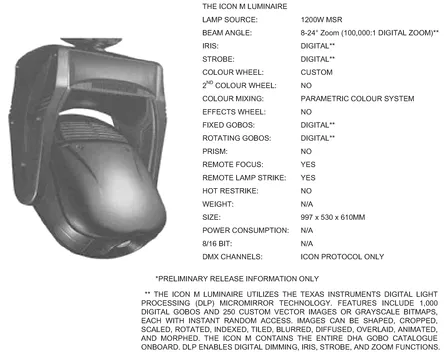
In the mid-1990s, Light & Sound Design (LSD) debuted a product called the Icon M (Medusa). When it came on the scene it was a revolutionary breakthrough in the lighting industry. While it only saw limited use and remained an inhouse product due to reasons like the fixture’s Digitial Light Processing (DLP®) micromirror technology (not used in today’s digital lighting luminaires), low output, and its need for proprietary control, it did prove that the industry could create a fixture with a much larger library of digital images.
FIGURE 1.1
Icon M spec sheet.
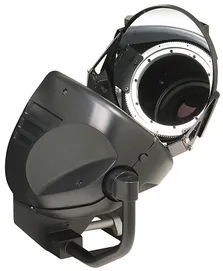
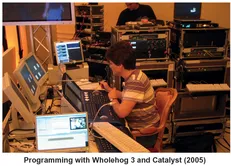
High End Systems (HES) continued the research and development on solving the digital gobo problem, and in the late 1990s HES teamed up with hardware developers Wynne Willson-Gottelier (WWG) Ltd. and SAM Show Control software developer Richard Bleasdale to develop a prototype digital lighting product, code named Vertigo. In its earliest form, Bleasdale’s control software (the foundation for today’s Catalyst Media Server software) provided the source and control of the digital images while WWG’s orbital projection head, attached to a large scale projector, provided the ability to pan and tilt the very bright source of light from mid to large size projectors (5 k to 18 k lumens) from a DMX lighting console. This prototype continued to evolve and eventually became Catalyst and the Catalyst™ Orbital Head.
FIGURE 1.2
Catalyst Orbital Head.
This was an important milestone because using Catalyst meant that the lighting programmer would have the ability to control digital images that could be fed to a projector, and the Orbital Head allowed the programmer the ability to aim the digital images anywhere on any surface while controlling the speed of the movement between focus locations as well as the keystone correction needed when projecting at angles other than 90 degrees. This breakthrough opened up the minds of everyone in the lighting industry, and video suddenly became a new aspect of the lighting programmer’s world.
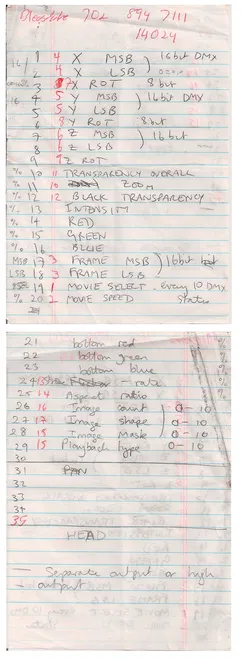
FIGURE 1.3
Early Catalyst notes. Source: Courtesy of Brad Schiller.
![]()
CHAPTER 2
Why Do LDs Want to Control Video from a Lighting Console?
While video is an exciting world of creative visuals, the design and control of video has a distinctive set of criteria that has to be met in order to effectively manage the playback of a video. As such, there are many video engineers that do not agree that controlling video from a lighting console is a good thing. In fact, most video engineers have never touched a lighting console and do not truly understand how a channel with 256 bits can control their video. So they prefer to stick with their tried and true methods of control. And that’s ok! But for the rest of us adventurers (aka lighting programmers) who want to cross over, using a lighting console is the least of the concerns. Here are some of the pros and cons typically heard when discussing using a lighting console for video control.
Pros
Lighting designers (LDs) in the past had to rely on separate personnel from a different discipline to execute video aspects of the show. Controlling a media server via DMX eliminates this problem and allows the operator to be able to playback video effects simultaneously in the same cue as other lighting fixtures are also being told to change colors, patterns, positions, etc. Also, designers who are familiar with current video equipment are always amazed at how easy it is to manipulate video images live, in real time, without re-rendering each change. Controlling video from a DMX console also enables the LD more input into the overall look and feel of the show, and the programmer working with both lighting and video is better able to balance levels between the lighting and video aspects, something which is generally very difficult to do when lighting is controlled from one location and video from another.
Positive points for controlling video from a lighting console:
- The lighting designer oversees the whole picture. What this means is that the LD can create more cohesive visual looks that combine lighting and video, and the execution of the cues will be tighter as well.
- Fewer hands in the mix. If the LD is calling the shots on how a video is played, there are fewer opportunities for missed cues or wrong videos at the wrong time.
- Simplification of control. Most media servers today can handle video camera inputs, switching, and audio output, for example. And if less video gear is needed during the show, fewer operators will be needed as well.
- Video clips can be manipulated in real time. This is a very important concept. Why? Because a pre-rendered video clip is what it is. When a video engineer plays it back using a standard video mixer, the video clip will play back exactly as it was rendered. Not so with a media server. The pre-rendered video clip is merely a suggestion of what the final composited image can be. A media server allows for real-time manipulation of video clips while being controlled from the lighting console. This means a virtually endless number of visual creations are possible because a piece of content can be affected via visual effects, color effects, size effects, etc, available both in the media server and in the lighting console.
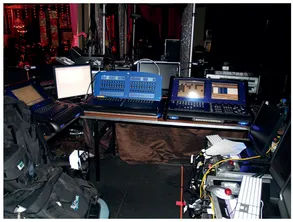
FIGURE 2.1
FOH lighting and video control.
Now for the Cons
Currently there are many choices for professional video gear available in the market, each with its own merits. Therefore, it can be difficult for the lighting designer to be in complete control of all of the video aspects used in a show. The video industry tends to favor routing the media server through a switcher so it becomes one of the sources instead of the media server handling the switching between video devices. But with the introduction into media servers of features like live camera inputs, audio inputs, and serial device control, some technically savvy lighting programmers (who are somewhat video savvy as well) are undertaking the complete integration of video control from their lighting consoles and having great success.
Negative points against controlling video from a lighting console:
- The limitations of the technology. Video equipment is highly specialized and therefore has been optimized to handle all of the tasks of video playback. Media servers and lighting consoles are digital solutions to video playback and are somewhat limited in areas including the number of video outputs, speed of accessing media, quality of output, and previewing a piece of video content. Best to know the limitations so there are no surprises on show site.
- Less time for a complete design of both elements. If an LD’s time is split between lighting and video for a performer like a big pop star, for instance, then he/she will likely not have much quality time to completely develop the cues for both. So it might be best in some cases to separate the responsibilities of video from lighting and return it to the video team.
- The workload for a single programmer to manage two time-consuming elements can be overwhelming. If one programmer is programming both lighting and video, then both may not be as thoroughly programmed and tight as they would be if the jobs were divided between two people. Therefore, it is very common on jobs where a media server(s) is being used to separate them out to a second lighting console and have a second programmer to focus strictly on the media servers.
The bottom line for deciding when to use a media server or when to stay out of video world entirely is simple: the quality of the production cannot be allowed to suffer. So, remember, just because you can control video from a lighting desk or directly from a media server does not mean you should. Considering the workload ahead of time will mean a smoother show all around.
![]()
CHAPTER 3
Convergence and the Role of the Lighting Programmer
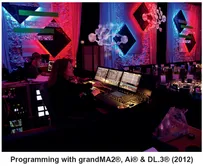
As lighting consoles continue to be upgraded with new features for the integration of video, the job of the programmer gets more complex. The development of the digital media server has unlocked a world of possibilities for designers and allowed video to be more easily integrated into a wider range of shows. This is further solidified by the continual development of new lighting/video technology (aka digital lighting). So it seems probable that at some point in a lighting programmer’s career, he/she will find him/herself programming a media server.
FIGURE 3.1 Making the magic happen.
The Responsibilities of the Media Server Programmer
Lighting programmers are primarily responsible for mood, and mood is created through the use of movement, color, intensity, and texture. Although, in most cases an artist’s image is not identified with a specific lighting cue or color; instead, the media server programmer is directly involved with conveying the artist’s ‘image’ and/or a visual message. Consequently, it is typical for the artist and/or artist’s management to be very hands on when it comes to any video content used in the show.
On a show utilizing a media server, the role of lighting programmer has changed significantly. For example, the programmer is not only responsible for making sure that the content used in the show meets the client’s expectations, he/she may also be somewhat responsible for the technical aspects of how the video will be presented through factors like screen reflectivity, size and placement, and content preparation and formatting. The lighting programmer who has a general working knowledge of these types of video elements will have an advantage over those who do not in these situations, and he/she can help to minimize the number of technical errors in the video playback.1
This leads us to a frequently asked question: Are video engineers in danger of being replaced by lighting programmers? My definitive answer is: on some gigs, yes, on some gigs no. How is that for non-committal? In all seriousness, the answer depends upon several factors, including:
- Budget
- Scale of show
- Programming and organizational abilities of the lighting programmer
- Trust in the lighting programmer to be able to handle the visual aspects of the production.
DMX controlled Digital Media Servers definitely seem to be here to stay. Today, most major lighting manufacture...