This collection of more than 40 photo assignments is designed to help all students—from beginning freshmen to experienced seniors—improve or reinvigorate their work and reach their full potential as photographers. Whether you are building a syllabus for your first photography class, revitalizing assignments for your students, or looking to add DSLR video, workflow, or color correction to your class, you will find a wealth of ideas in this wonderful working guide. The assignments begin with using the camera, and progress through learning composition and lighting, working in genres, building a portfolio and more.
- 178 pages
- English
- ePUB (mobile friendly)
- Available on iOS & Android
eBook - ePub
About this book
Information
Section 1
Beginner
Freshman
Assignment 1
Significant Photo
“To me, photography is an art of observation. It’s about finding something interesting in an ordinary place . . . I’ve found it has little to do with the things you see and everything to do with the way you see them.”
—Elliot Erwitt
Purpose: This Assignment is Meant to “Kick Start” Your Photo Career.
You should begin your career in photography photographing things that interest you in a way that makes them interesting to other people. Once you are able to do this consistently, the next step is to find things that are inherently uninteresting to you and make them interesting to other people. For this assignment, find things that are interesting to you to photograph.
The inspiration for this assignment came from the example set by photographer Harry Callahan, who would walk his neighborhood every day returning with a photograph of something he had not previously photographed or something he had previously photographed but this time photographed in a new way.
This assignment is deceptively easy—but don’t be fooled. This may be the single most important assignment you will ever do. I have used this assignment with students for more than twenty years and have found, even with experienced photographers, it changes their relationship towards their photography and image making.
Set your camera on “P” for Program (some cameras have two Program modes—for this assignment it doesn’t matter which one you use). As you progress in your study of photography you will want to take your camera off Program and use one of the other settings that allow more control over the image—but for now use P.
Beginning today, make it your goal to make one photo every day that is significant to you. At the end of the day go through every photo you have taken, whether it is one or 500, and select the one that you want to remember that day by. Even if you have taken one hundred good photos that day, limit yourself to choosing the “one” (don’t delete the others, though). Save your “one” photo in a file called Significant Photo.
Do this assignment for thirty days, one full month (a leap year doesn’t count). Harry Callahan did it for at least thirty years—don’t feel as if you need to stop at thirty days!
Make it a habit to always save the Original File Number as part of the image name. Regardless of what else you may name the image, if you preserve the original file number you will always be able to find and identify it—unless you delete it from your hard drive, in which case it no longer exits.
An example of how to name a file would be:
Original File Name and number: _DSC0134.NEF
Saved as: [Custom File Name]-0134.NEF
Saved as: [Custom File Name]-0134.NEF
Aaron Davis made the following seven photos as part of his Significant Photo assignment.

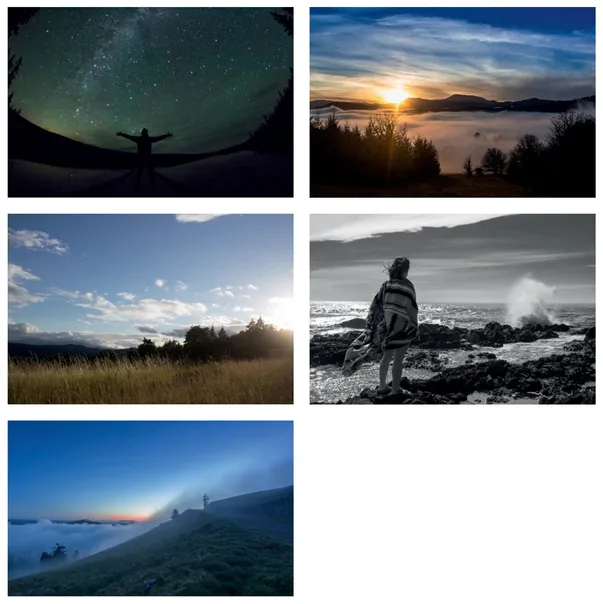
FIGURES 1.1–1.7 The seven images in this collection were chosen from those submitted by Aaron for his significant photo project. Photos by Aaron Davis.
Assignment 2
Shutter Speed
“The whole point of taking pictures is so that you don’t have to explain things with words.”
—Elliott Erwitt
Purpose: To Provide a Visual Understanding of How to Use Shutter Speed to Either Freeze or Blur Action.
If possible, perform these exercises out-of-doors in open shade. If you live in a rainy area, such as the Pacific Northwest, and cannot go out-of-doors from September until August, see if you can perform these inside a well-lit gymnasium at your school.
- Use a normal to moderate telephoto focal length lens (50mm to 135mm with a full-frame sensor).
- Set your Shooting Mode to Shutter Priority (S), or Time value (Tv) for Canon.
Shutter Speed
- Focus on a friend’s hands from about three feet away. Have them spin or shake their hands. Set the shutter speed to 1/8 and allow the in-camera meter to set the aperture for correct exposure. Make two exposures.NOTE: If the ambient light is too bright, try reducing your ISO as far as it will go (e.g., ISO 50, ISO 100). If the ambient light is too low, try increasing your ISO (e.g., ISO 400, ISO 800).
- Double the shutter speed to 1/15 and repeat the exercise.
- Double the shutter speed to 1/30.
- Double the shutter speed to 1/60.
- Double the shutter speed to 1/125.
- Double the shutter speed to 1/250.
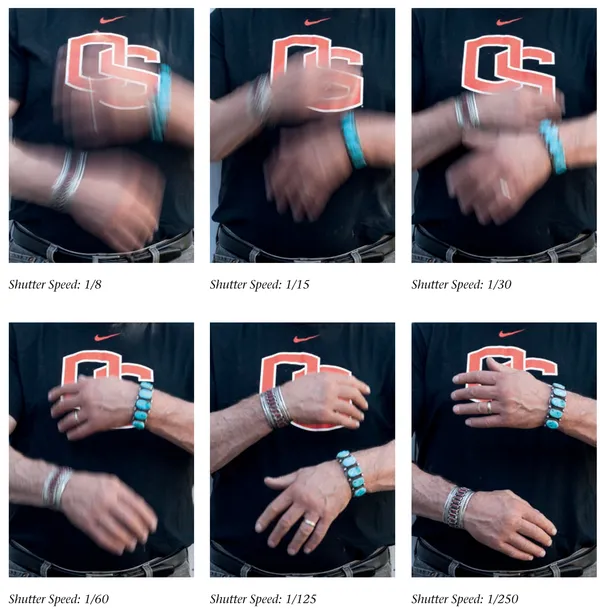
FIGURES 2.1–2.6
Review
- What difference do you expect to see between the first two images and the second two images?
- At which shutter speed do you first see any sign of stop action?
- At which shutter speed do you see your friend’s hands frozen?
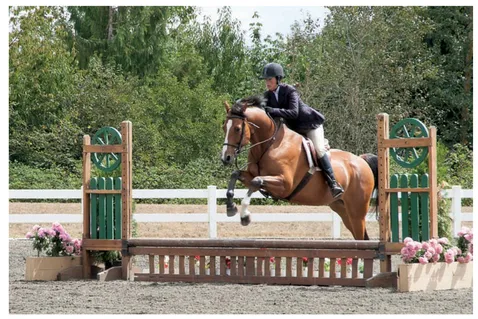
FIGURE 2.7 Kimberley Anchell, Nikon D700, 120mm, f/10 at 1/400.
Assignment 3
Horizontal Motion
“Taking an image, freezing a moment, reveals how rich reality truly is.”
—Anonymous
Purpose: To Demonstrate the Effect of Shutter Speed on Moving Subjects.
- Set the exposure mode to Shutter Priority (S), Nikon, or Time value (Tv), Canon.
- Do each of these as many times as necessary to get the hang of them.
- 1. Set your shutter at 1/30 and instruct your partner to run past you at a moderate speed. As they enter the frame, take a photo.
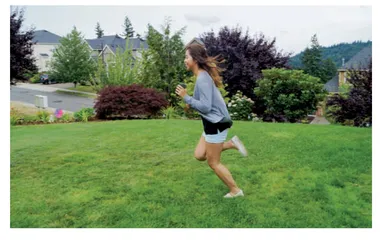
FIGURE 3.1 Th...
Table of contents
- Cover
- Title
- Copyright
- Dedication
- Contents
- Preface
- Introduction
- SECTION 1—BEGINNER (FRESHMAN)
- SECTION 2—INTERMEDIATE (SOPHOMORE)
- SECTION 3—ADVANCED (JUNIOR)
- SECTION 4—GETTING NOTICED (SENIOR)
- Contributors
- Software
- Photo Credits
- Index
Trusted by 375,005 students
Access to over 1.5 million titles for a fair monthly price.
Study more efficiently using our study tools.
Frequently asked questions
Yes, you can cancel anytime from the Subscription tab in your account settings on the Perlego website. Your subscription will stay active until the end of your current billing period. Learn how to cancel your subscription
No, books cannot be downloaded as external files, such as PDFs, for use outside of Perlego. However, you can download books within the Perlego app for offline reading on mobile or tablet. Learn how to download books offline
Perlego offers two plans: Essential and Complete
- Essential is ideal for learners and professionals who enjoy exploring a wide range of subjects. Access the Essential Library with 800,000+ trusted titles and best-sellers across business, personal growth, and the humanities. Includes unlimited reading time and Standard Read Aloud voice.
- Complete: Perfect for advanced learners and researchers needing full, unrestricted access. Unlock 1.5M+ books across hundreds of subjects, including academic and specialized titles. The Complete Plan also includes advanced features like Premium Read Aloud and Research Assistant.
We are an online textbook subscription service, where you can get access to an entire online library for less than the price of a single book per month. With over 1.5 million books across 990+ topics, we’ve got you covered! Learn about our mission
Look out for the read-aloud symbol on your next book to see if you can listen to it. The read-aloud tool reads text aloud for you, highlighting the text as it is being read. You can pause it, speed it up and slow it down. Learn more about Read Aloud
Yes! You can use the Perlego app on both iOS and Android devices to read anytime, anywhere — even offline. Perfect for commutes or when you’re on the go.
Please note we cannot support devices running on iOS 13 and Android 7 or earlier. Learn more about using the app
Please note we cannot support devices running on iOS 13 and Android 7 or earlier. Learn more about using the app
Yes, you can access Digital Photo Assignments by Steve Anchell in PDF and/or ePUB format, as well as other popular books in Education & Digital Media. We have over 1.5 million books available in our catalogue for you to explore.