Practical Guidance on the Efficient Development of High-Quality Software
Introduction to Software Engineering, Second Edition equips students with the fundamentals to prepare them for satisfying careers as software engineers regardless of future changes in the field, even if the changes are unpredictable or disruptive in nature. Retaining the same organization as its predecessor, this second edition adds considerable material on open source and agile development models.
The text helps students understand software development techniques and processes at a reasonably sophisticated level. Students acquire practical experience through team software projects. Throughout much of the book, a relatively large project is used to teach about the requirements, design, and coding of software. In addition, a continuing case study of an agile software development project offers a complete picture of how a successful agile project can work.
The book covers each major phase of the software development life cycle, from developing software requirements to software maintenance. It also discusses project management and explains how to read software engineering literature. Three appendices describe software patents, command-line arguments, and flowcharts.
The first commonly known use of the term software engineering was in 1968 as a title for a NATO conference on software engineering. An article by A. J. S. Rayl in a 2008 NASA magazine commemorating NASA’s fiftieth anniversary states that NASA scientist Margaret Hamilton had coined the term earlier (Rayl, 2008).
The nature of computer software has changed considerably in the last forty-five or so years, with accelerated changes in the last fifteen to twenty. Software engineering has matured to the extent that a common software engineering body of knowledge, known by the acronym SWEBOK, has been developed. See the article “Software Engineering Body of Knowledge” (SWEBOK, 2013) for details. Even with this fine collection of knowledge of the discipline of software engineering, the continuing rapid changes in the field make it essential for students and practitioners to understand the basic concepts of the subject, and to understand when certain technologies and methodologies are appropriate—and when they are not. Providing this foundational knowledge is the goal of this book. You will need this foundational knowledge to be able to adapt to the inevitable changes in the way that software will be developed, deployed, and used in the future.
We begin with a brief history. In the late 1970s and early 1980s, personal computers were just beginning to be available at reasonable cost. There were many computer magazines available at newsstands and bookstores; these magazines were filled with articles describing how to determine the contents of specific memory locations used by computer operating systems. Other articles described algorithms and their implementation in some dialect of the BASIC programming language. High school students sometimes made more money by programming computers for a few months than their parents made in a year. Media coverage suggested that the possibilities for a talented, solitary programmer were unlimited. It seemed likely that the computerization of society and the fundamental changes caused by this computerization were driven by the actions of a large number of independently operating programmers.
However, another trend was occurring, largely hidden from public view. Software was growing greatly in size and becoming extremely complex. The evolution of word processing software is a good illustration.
In the late 1970s, software such as Microsoft Word and WordStar ran successfully on small personal computers with as little as 64 kilobytes of user memory. The early versions of WordStar allowed the user to insert and delete text at will, to cut and paste blocks of text, use italics and boldface to set off text, change character size, and select from a limited set of fonts. A spelling checker was available. A small number of commands were allowed, and the user was expected to know the options available with each command. Lists of commands were available on plastic or cardboard templates that were placed over the keyboard to remind users of what keystroke combinations were needed for typical operations. The cardboard or plastic templates were generally sold separately from the software.
Microsoft Word and WordStar have evolved over time, as has most of their competition, including Apple’s Pages word processing software. Nearly every modern word processing system includes all the functionality of the original word processors. In addition, modern word processing software usually has the following features:
• There is a graphical user interface that uses a mouse or other pointing device. (On tablets and smartphones, this interface is based on the touch and movement of one or more fingers.)
• There is a set of file formats in which a document can be opened.
• There is a set of file formats in which a document can be saved.
• There is a set of conversion routines to allow files to be transferred to and from different applications.
• There is a large set of allowable fonts.
• The software has the capability to cut and paste graphics.
• The software has the capability to insert, and perhaps edit, tables imported from a spreadsheet.
• The software has the capability to insert, and perhaps edit, other nontextual material.
• There are facilities for producing word counts and other statistics about the document.
• There are optional facilities for checking grammar.
• The software has the capability for automatic creation of tables of contents and indices.
• The software has the capability to format output for different paper sizes.
• The software has the capability to print envelopes.
• The software has the capability to compose and format pages well enough to be considered for “desktop publishing.” Many inexpensive printers are capable of producing high-quality output.
• Automatic backups are made of documents, allowing recovery of a file if an unexpected error in the word processing software or a system crash occurs.
Because of the proliferation of printers, a word processing system must contain a large number of printer drivers. Most word processing systems often include an online help facility.
The added complexity does not come free, however. The late 1990s versions of most word processors required nine 1.44 MB floppy disks for its installation and the executable file itself was larger than four megabytes. Now such software is sold on CDs or DVDs, as downloads, or as a preinstalled option whose cost is included in the price of new computers.
Some are sold both as stand-alone systems and as part of “office suites” that are integrated with other applications, such as spreadsheets, presentation graphics software, and database management software. Microsoft Word is generally sold in such suites. Apple iWorks has recently been made available for free, and many open source packages that include many of the necessary capabilities are available also. Before Apple made the decision to make iWorks free, its three primary components, Pages, Numbers, and Keynote, were sold both separately and as an integrated suite.
The need to support many printers and to allow optional features to be installed increases word processing systems’ complexity. Most printer drivers are available as downloads.
The latest versions of most word processing systems consist of many thousands of files. New releases of the word processing software must occur at frequent intervals. If there are no releases for a year or so, then many users who desire additional features may turn to a competitor’s product.
Even if a single individual understood all the source code and related data files needed for a new release of the word processing software, there would not be enough time to make the necessary changes in a timely manner. Thus, the competitive nature of the market for word processing software and the complexity of the products themselves essentially force the employment of software development teams. This is typical of modern software development—it is generally done by teams rather than by individuals. The members of these teams are often referred to as “software engineers.” Software engineers may work by themselves on particular projects, but the majority of them are likely to spend most of their careers working as part of software development teams. The teams themselves will change over time due to completion of old projects, the start of new projects, and other changes in individuals’ careers and rapid technological changes.
The issues involved in the word processing software systems discussed in this section are typical of the problems faced by software engineers. The requirement of being able to cut and paste graphics and tables is essentially forced by the marketplace. This, in turn, requires that the cut-and-paste portion of the word processing software must interface with graphics and spreadsheet applications.
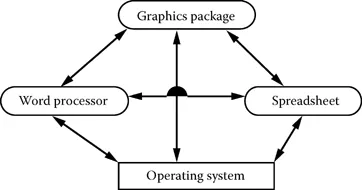
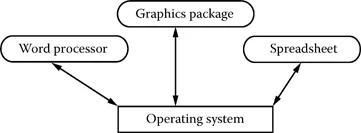
The interface can be created for each pair of possible interoperable applications (word processor and graphics package, word processor and spreadsheet, Internet browser, etc.). Alternately, there can be a single standard interface between each application (word processor, graphics package, spreadsheet, etc.) and the operating system, or some other common software. Figures 1.1 and 1.2 illustrate the two approaches. Note that Figure 1.1 indicates a system that has a central core that communicates between the various applications and the operating system.
FIGURE 1.1 A complex interconnection system.
FIGURE 1.2 A conceptually simpler interconnection system.
The design illustrated in Figure 1.2 is conceptually simpler, with the major complications of device drivers, standards, and interfaces hidden in the interfaces. In either case, the word processing software must adhere to a previously specified interface. This is typical of the software industry; software that does not interface to some existing software is rare.
This simple model illustrates the need for a systematic approach to the issue of system complexity. Clearly, the complexity of a software system is affected by the complexity of its design.
There are also quality issues involved with software. Suppose that, in its rush to release software quickly and beat its competitors to market, a company releases a product that contains serious flaws. As a hypothetical example, suppose that a word processor removes all formatting information from a file, including margins, fonts, and styles, whenever the sequence of commands Save, Check spelling, Insert page break, and Save is entered. It is unlikely that any customer using this inadequately tested version of the word processing software would ever use this product again, even if it were free.
Sometimes the decision to add new features to a product may be based on technological factors such as the Internet or the cloud. At the time that this book is being written, several companies that produce word processing software are developing new applications that are network based and require subscriptions instead of an upfront cost. Several options are possible, regardless of whether data is stored either locally or remotely:
1. Have all new software reside on the user’s local computer, as is presently the case for word processors for personal computers
2. Have a remote application be invoked over a network whenever the user selects a previously stored local document
3. Have the core of the application reside on the local computer, with specialized features invoked from a remote server only if needed
4. Have both the document and the remote application reside on the remote server
The advantage of the first alternative is that there is no change in the company’s strategy or basic system design. The risk is a lack of ability to perform advanced operations such as having a document that can be easily shared by several users who are widely scattered, or that recovery might be compromised. There is also risk of the popular perception that the software is not up to date in its performance.
Using the second alternative means that the distribution costs are essentially reduced to zero and that there is a steady revenue stream automatically obtained by electronically billing users. The software must become more complex when issues such as security of data, security of billing information, and performance response become very important.
The third alternative has some of the best features of the first two. For example, distribution costs are reduced and the minimal core of the software, which resides on a local computer, can be smaller and simpler. Unfortunately, this alternative also shares the common disadvantages of the first two in terms of technology and complexity.
The fourth alternative is the natural extension of the second and third alternatives. There are some performance drawbacks to this approach, as any user of the Internet is aware.
Performance issues are critical because of potential delays in having, say, formatting changes appear quickly on a user’s screen if remote storage is used.
There are obvious security issues if a user’s critical or confidential data is stored on a remote server beyond the control of a user or the user’s organization. The article by Richard Stallman of the Free Software Foundation (Stallman, 2010) is well worth reading on this subject.
Regardless of the choice made, it is clear that most word processing software will become more complex in the future. Word processing programs, including the one used to write this book, must interface with multiple applications to share printers and utility functions. They must also share data with other applications.
The problems just described for producers of word processing software are si...
Table of contents
Cover
Half Title
Title Page
Copyright Page
Table of Contents
Preface to the Second Edition
Preface to the First Edition
To the Instructor and the Reader
Chapter 1 Introduction
Chapter 2 Project Management
Chapter 3 Requirements
Chapter 4 Software Design
Chapter 5 Coding
Chapter 6 Testing and Integration
Chapter 7 Delivery, Installation, and Documentation
Chapter 8 Maintenance and Software Evolution
Chapter 9 Research Issues in Software Engineering
Appendix A: An Interesting Software Patent
Appendix B: Command-Line Arguments
Appendix C: Flowcharts
References
Trademarks and Service Marks
Index
Trusted by 375,005 students
Access to over 1.5 million titles for a fair monthly price.
Study more efficiently using our study tools.
Frequently asked questions
Yes, you can cancel anytime from the Subscription tab in your account settings on the Perlego website. Your subscription will stay active until the end of your current billing period. Learn how to cancel your subscription
No, books cannot be downloaded as external files, such as PDFs, for use outside of Perlego. However, you can download books within the Perlego app for offline reading on mobile or tablet. Learn how to download books offline
Perlego offers two plans: Essential and Complete
Essential is ideal for learners and professionals who enjoy exploring a wide range of subjects. Access the Essential Library with 800,000+ trusted titles and best-sellers across business, personal growth, and the humanities. Includes unlimited reading time and Standard Read Aloud voice.
Complete: Perfect for advanced learners and researchers needing full, unrestricted access. Unlock 1.5M+ books across hundreds of subjects, including academic and specialized titles. The Complete Plan also includes advanced features like Premium Read Aloud and Research Assistant.
Both plans are available with monthly, semester, or annual billing cycles.
We are an online textbook subscription service, where you can get access to an entire online library for less than the price of a single book per month. With over 1.5 million books across 990+ topics, we’ve got you covered! Learn about our mission
Look out for the read-aloud symbol on your next book to see if you can listen to it. The read-aloud tool reads text aloud for you, highlighting the text as it is being read. You can pause it, speed it up and slow it down. Learn more about Read Aloud
Yes! You can use the Perlego app on both iOS and Android devices to read anytime, anywhere — even offline. Perfect for commutes or when you’re on the go. Please note we cannot support devices running on iOS 13 and Android 7 or earlier. Learn more about using the app
Yes, you can access Introduction to Software Engineering by Ronald J. Leach in PDF and/or ePUB format, as well as other popular books in Computer Science & Project Management. We have over 1.5 million books available in our catalogue for you to explore.