Making What in IT?
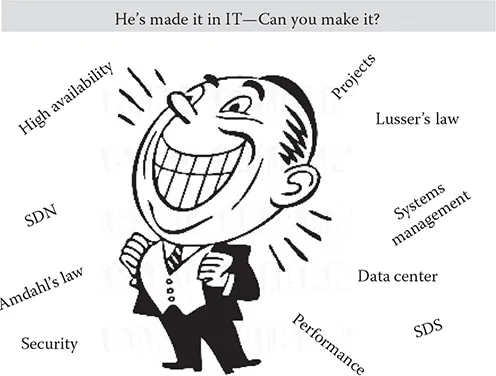
We are talking in this book about “making it in IT,” which, in simple terms, means being as good as you can be at the job and being a role model for it (Figure 1.1). But which job? Listed later are a variety of positions in IT. Am I going to cover them all? The answer is a resounding—no! What I am going to cover are the elements of disciplines and techniques that are common to all IT positions, including managers. Most of them are ageless and technology-independent but will need to be complemented by the technology knowledge pertaining to your chosen job.
Reasons for Your IT Career
There are many reasons for choosing, or perhaps falling, into IT and I am not privy to them all. Mine was of the “fall” variety after graduation. I chased two plum jobs: one with UK Atomic Energy and the other with IBM. I was offered a job at Windscale, northwest England and one at IBM, the latter offering an inferior salary. However, Windscale is about as accessible as Death Valley but enjoying about one third the temperature and 32,000 times the rainfall, and since I wasn’t married then, it would have been a very lonely place. I plumped for IBM and never regretted it. Whatever your reasons for choosing the IT route, read the following tale:
There’s an old story about two men working on a railroad track many years back. As they are laying track in the heat of the day, a person drives by and rolls down the window (not enough to let the air conditioning out, but enough to be heard). He yells, “Tom, is that you?” Tom, one of the men working on the track, replies, “Chris, it’s great to see you! It must have been 20 years … how are you?” They continue the conversation and eventually Chris drives off. When he leaves, another worker turns to Tom and says, “I know that was the owner of the railroad and he’s worth nearly a billion dollars. How do you know him?” Tom replies, “Chris and I started working on the railroad, laying track, on the same day 20 years ago. The only difference between Chris and me is that I came to work for $1.25/hour and he came to work for the railroad.”*
Pick Your Spot
Manager
Database architects
Technical (general) architects
Web administrators
Computer systems engineers/architects
Computer user support specialists
Network and computer systems administrators
Software developers, applications
Computer programmers
Information security analysts
Computer systems analysts
Data scientists
Data stewards
Business intelligence
Information management
Business analytics
Data analysts
Computer and information systems managers
Computer hardware engineers
Computer network support specialists
Computer network architects
Database administrators
Web developers*
Computer and information research scientists
Computer science teachers (various levels)
Multimedia artists and animators
Desktop publishers
Computer operators
Scientific/high-performance computing (HPC)
University computer science (CS) teaching positions
All other computer occupations, including self-employment and sales
A hybrid job that encompasses multiple skills under one heading
A job chosen by your preference to work for a specific vendor, for example, Microsoft, Cisco, IBM, Google, Facebook
An example of a hybrid job is a data and information specialist, which might encompass big data, databases, storage access methods like RAID, and so on.†
The following link explores careers in computer science and links to job descriptions, which include information such as daily activities, skill requirements, salary, and training required. It also provides links to a host of other IT-related topics, such as IT history and operating systems.
“Computer Career Descriptions:” http://www.khake.com/page17.html
The next link condenses the IT jobs world to three broad areas; consultants, project managers and developers and expands on these roles.
“The Future of IT Jobs? Its in Three Types of Roles:” http://www.zdnet.com/article/the-future-of-it-jobs-its-in-three-types-of-roles/
The following is a link to another list but covering broad areas rather than specific jobs within those areas. However, it does go on to outline what the areas cover, which should be useful instead of choosing a very specific post upfront.
“What Jobs Are Available in the Computer Industry?:” http://www.computerhope.com/issues/ch000764.htm
Some not-so-good news in this link but forewarned is forearmed.
“7 Tech Jobs Hardest Hit By Layoffs in 2015:” http://www.informationweek.com/strategic-cio/7-tech-jobs-hardest-hit-by-layoffs-in-2015-/d/d-id/1324526
Finally, there is a useful glossary of IT jobs at the following link:
“Glossary of Job Descriptions for IT:” http://www.itbusinessedge.com/itdownloads/glossary-of-job-descriptions-for-it/88859
Computer Science World
Computer science (CS) is a more esoteric subject than general IT and has its place in the IT universe. However, a CS graduate entering the normal IT world will probably need to adapt to some of the topics and disciplines outlined throughout this book. IT people making the reverse trip may be interested in a typical syllabus for a CS course, as outlined below:
- Fundamentals of computing
- Fundamentals of computer engineering
- Fundamentals of artificial intelligence (AI)
- Fundamentals of computer architecture
- Fundamentals of distributed systems
- Fundamentals of databases
- Object-oriented programming
- Cognitive topics
- Logic and modeling
- Processor microarchitecture
- Microcontrollers
- Software engineering
- Machine learning
- Symbolic AI
- Operating systems
- System architecture
- Algorithms and imperative programming
- Computer graphics and image processing
- Distributed computing
- Computer networks
- Mobile systems
- Cognitive neuroscience
- Cognitive computing in other areas
- Concurrency and process architecture
- Natural language systems
- Other subjects
Note that this is a typical syllabus and will vary widely across universities and countries. What is does do is give the IT generalist an idea what the CS landscape looks like. Likewise, the CS person can also see from later discussions in this book what the general IT world looks like.
Computer science graduates entering the world of commercial IT may feel a little uncomfortable as the environment is different from that they are used to. Many soft skills need to be taken on board, such as understanding body language, influencing people, reading upside down, suffering bores, and other vital skills.
Worry not though; you have the brains and they just need to turn a few degrees from forward to thrive in the great world of information technology.
Note: In my long experience, IT and CS a are not the same, or even similar, so don’t expect to cross the divide from one to the other with ease. There is often an urgency in commercial IT, which is not generally present in the CS environment.
2016 Hot Topics
An article hazards a guess at the five things in IT that will shape the year 2016 and possibly thereafter. These things may shape your thinking about IT skills and which direction appeals to you:
Application owners will own IT.
The data center will assume characteristics of the public cloud.
Web-scale IT architectures will become available to most enterprises.
Chief information officers (CIOs) will face increased pressure to shift spending to operating expenses.
Cyberattacks and data breaches in the cloud go from perception to reality.*
Note: One thing that seems certain as 2017 looms, based on what I am reading in the newsletters I subscribe to, is that spending on data centers/clouds is mushrooming.
Job Scope
If you consider the application of these 33 roles (under “Pick Your Spot” section) to different technologies (N) and the levels of job within them (n), then you have a large set of roles and variations, that is, 33 × N × n. This is the reason I have not attempted to partition what I am preaching into each of this myriad of categories. I would probably have gone to that great data center in the sky by then.
Let’s go, or as Ward Bond† would say in his Westerns, “wagons roll!”
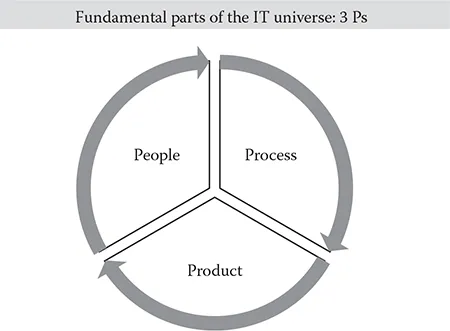
Figure 1.2 shows the standard way of describing IT in its entirety. These are the equivalent of the protons, neutrons, and electrons which make up the atom; these components make up the IT universe. Whatever IT activity you undertake, there will be elements of all three in it. If there are not, you shouldn’t be in IT.
- People refer to human aspects: skills, level of competence, initiative, etc.
- Process means the flow of activity around business activity using IT, which includes systems management and management methods.
- Products encompass the technology aspects of IT projects (hardware and software) and is part of the trinity of factors in any IT tasks, except perhaps emergency system repairs and the like. People who speak only of technology when tackling IT jobs are deluding themselves and possibly others.
IT wannabes and IT combatants should always bear these three elements in mind until it becomes second nature. Those who don’t are doomed to more failures than successes.
New Jobs
I’ve already implied that this book is an introduction to a career in IT, but it will also be a valuable resource to people already i...