- 56 pages
- English
- ePUB (mobile friendly)
- Available on iOS & Android
eBook - ePub
IT for All
About this book
This work on the teaching of information technology considers the purposes of teaching pupils with a range of special educational needs. They look at the issues of planning, teaching strategies, assessment and recording progress. The book is part of the Entitlement for All series.
Information
Chapter 1
Cracking the Code — Understanding IT
Don't Panic, this is not yet another glossary of terms, this chapter concerns itself with a description of what is meant by IT in the whole curriculum, including the National Curriculum,
What is it?
Having used the term information technology to begin this book, we wish to equate this with the wider world of educational technology. When we refer to I.T. we are describing the use of tools as a means by which we present, store or process information. Examples include Video recorders, fax machines, telephones and Sony Walkmans. Whilst many of the activities suggested in this book relate to using computers, these other devices may be equally valuable in facilitating understanding in pupils. In particular, the use of communication aids and switches have proven to be of great relevance to the education of pupils with a learning difficulty.
When we think of the purposes to which IT can be put, it can be useful to think of a range of ways a need can be met, sometimes by using the latest state of the art technology, and at other times simpler equipment, we have looked at this in terms of a continuum from low tech to high tech.

Fig1.1 Using Information technology - a continuum
IT in the National Curriculum
IT appears in the National Curriculum in two interrelated ways. Firstly, there is the notion of IT capability. That is the skills, knowledge and understanding that one needs to use IT effectively. Second, is the idea of IT across the curriculum, supporting teaching and learning in a motivating context and helping to provide access to the wider curriculum of a school.
In practice these two themes overlap, and together make up the role that IT plays in the whole curriculum.
IT Capability
In the proposals for Information Technology in the National Curriculum, IT is presented separately from Design and Technology. In the programmes of study the content of the IT capability is grouped into themes. At Key stage 1 and 2 these themes are "Communicating and Handling Information", and "Using IT to investigate", at Key stage 3 these are expanded to include "Measurement and Control Technology", and "Modelling". Whilst at Key Stage 4 these themes are reduced once again to a manageable core of communicating and handling information, and using IT to investigate. From these themes it is possible to identify the 4 strands of IT use that had been described in earlier National Curriculum documentation.
- Developing ideas and communicating information.
- Information Handling
- Modelling
- Measurement and Control
In addition, the idea of evaluating your use of Information Technology permeates each of the themes and had been referred to as "Applications and Effects".
Developing Ideas and Communicating Information
What it is
This is concerned with how we communicate information using words, pictures, symbols and sounds. As individuals we are constantly bombarded with different forms of communication in a variety of stimulating and attractive forms. However, the skills applied in this strand, relate not only to comprehension but also to the creativity of expression of ideas. All forms of Communication can be viewed as having equal weight and value.
Impact on the Classroom
Technology has a potentially enormous role to play in the development of early communication skills for pupils. For some pupils who are non-verbal, it may be possible to provide a means of expression, using a switch to indicate a choice or to give instructions. As an individuals skills develop, a pupil with severe learning difficulties might benefit greatly by making use of a word or symbol processor, to clarify, experiment with and develop ideas.
Such technology is commonplace at work and at home, the development of the ability to use such technology offers pupils a means of communicating that is both accepted and understood by the wider community.
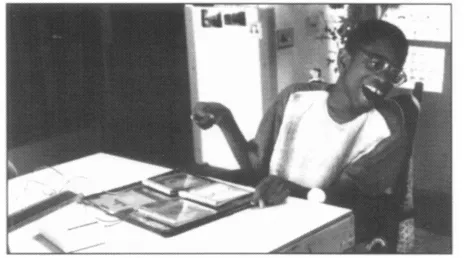
Fig. 1.2 Pupils can use a simple communication machine to initiate interaction through a range of switches.
Across the Curriculum.
The ability to communicate effectively permeates every other areas of learning. The use of IT allows full access to the skills of communication for all pupils and hence can facilitate opportunities for a pupil to be involved in music, art, English etc.
Information Handling
What it is
Information is thrown at us from a huge range of sources in society. To cope we need not only to understand how to use the media employed, we also need to develop an ability to handle and manage the information that is offered to us. Information Handling in the curriculum is about a pupil learning to collect, store and use such information in a variety of ways.
The media employed in society to communicate information is changing. Books are complemented by multimedia applications, where instead of simply reading about a journey, we can, with the click of a switch, see images of that place and hear the sounds. However, with a broadening of opportunities there needs to be the ability to select from the information available.
Impact on the Classroom
Modern technology can offer us a wide variety of means of storing information. These can range from a photo album or personal videotape, which can help
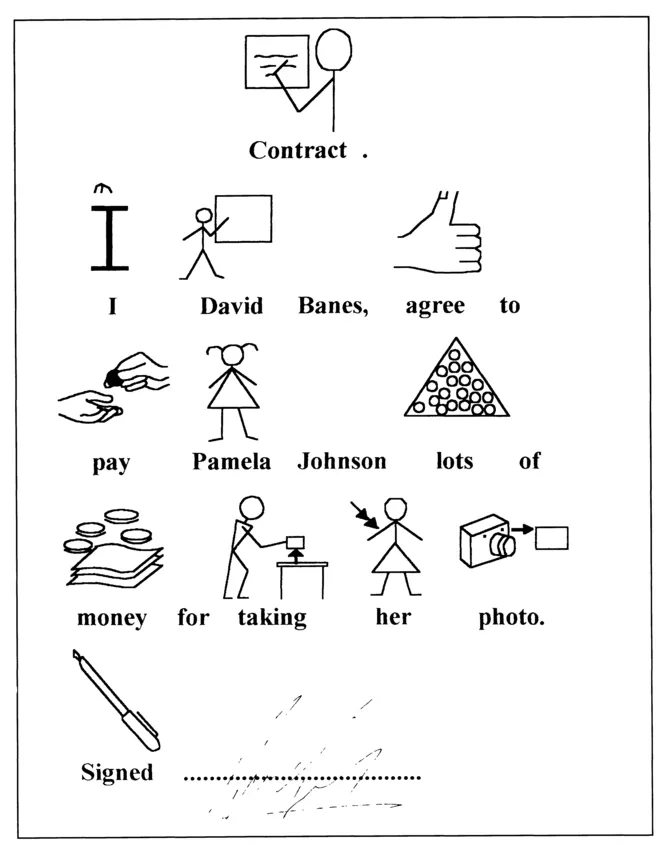
Fig. 1.3 Using "Writing with Symbols" pupils can ensure that they state clearly what they want to say.
pupils in the process of sequencing events, and which might allow a pupil to contribute meaningfully to their Record of Achievement, to using a complex database in which are stored an array of text, graphics and sounds. Such information is then accessed by pupils through a concept keyboard or a touch window.
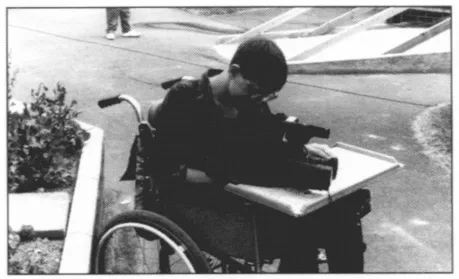
Fig. 1.4 Paul is using a video camera to record aspects of school life to discuss later.
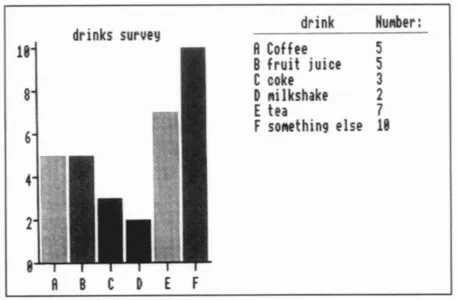
Fig. 1.5 Pupils can record data about their world using simple databases where information can be communicated graphically.
Across the Curriculum
Handling Information is an essential part of the process of making decisions and choices. In this process pupils will need to learn to sequence, categorise, sort, solve problems and make predictions. In working in the fields of maths, science, design technology and the humanities many opportunities will present themselves.
Modelling
What it is
This element of IT capability is predominantly about using the technology to create or experience a simulation of a real or imaginary situation. In such a computer world, pupils can explore objects, interact with others and test ideas and proposals in a completely safe setting.
Impact on the Classroom
For pupils with severe or profound and multiple learning difficulties the modelled world allows the opportunity to practice making decisions, and rehearse possible solutions to problems in a controlled setting. This control might relate to the number of options that are available to choose from, to the information that is provided to base a decision upon, or to the effects of a badly chosen option. In addition, pupils may be able to create their own worlds to explore.
As the pace of technological innovation gathers momentum, the complexity and interactive nature of these models becomes greater. Staff in schools are just beginning to explore some of the possibilities inherent in "Virtual Reality". These simulations may offer pupils the opportunity to explore aspects of the world to which they do have access (the kitchen of their home), but moreover to aspects of a world to which access ...
Table of contents
- Cover
- Title
- Copyright
- Contents
- Introduction
- 1 Cracking the Code — Understanding IT
- 2 Establishing Physical Access
- 3 Planning and Recording
- 4 Extended Programmes of Study
- 5 Using the Milestones as an aid to planning
- 6 IT and Integrated Schemes of Work
- Conclusion IT for all
- Glossary Useful contacts and references
Trusted by 375,005 students
Access to over 1.5 million titles for a fair monthly price.
Study more efficiently using our study tools.
Frequently asked questions
Yes, you can cancel anytime from the Subscription tab in your account settings on the Perlego website. Your subscription will stay active until the end of your current billing period. Learn how to cancel your subscription
No, books cannot be downloaded as external files, such as PDFs, for use outside of Perlego. However, you can download books within the Perlego app for offline reading on mobile or tablet. Learn how to download books offline
Perlego offers two plans: Essential and Complete
- Essential is ideal for learners and professionals who enjoy exploring a wide range of subjects. Access the Essential Library with 800,000+ trusted titles and best-sellers across business, personal growth, and the humanities. Includes unlimited reading time and Standard Read Aloud voice.
- Complete: Perfect for advanced learners and researchers needing full, unrestricted access. Unlock 1.5M+ books across hundreds of subjects, including academic and specialized titles. The Complete Plan also includes advanced features like Premium Read Aloud and Research Assistant.
We are an online textbook subscription service, where you can get access to an entire online library for less than the price of a single book per month. With over 1.5 million books across 990+ topics, we’ve got you covered! Learn about our mission
Look out for the read-aloud symbol on your next book to see if you can listen to it. The read-aloud tool reads text aloud for you, highlighting the text as it is being read. You can pause it, speed it up and slow it down. Learn more about Read Aloud
Yes! You can use the Perlego app on both iOS and Android devices to read anytime, anywhere — even offline. Perfect for commutes or when you’re on the go.
Please note we cannot support devices running on iOS 13 and Android 7 or earlier. Learn more about using the app
Please note we cannot support devices running on iOS 13 and Android 7 or earlier. Learn more about using the app
Yes, you can access IT for All by David Banes,Carole Thornett,Peter Gossage,Caroline Coles in PDF and/or ePUB format, as well as other popular books in Education & Education General. We have over 1.5 million books available in our catalogue for you to explore.