![]()
Chapter 1
Why Information and Communications Technology?
I used ICT as long ago as 1986 with three pupils. They were aged 13 and the head of English felt that they would have possibly managed a Grade D or maybe C in the GCE (General Certificate in Education) examination which has now become GCSE (General Certificate in Secondary Education).
The head of the school had asked me to justify having BBC computers in my classroom for teaching English and not using them to teach programming skills in the computer room. We both agreed that examination results should be the measure of success. Although this should not be the only judge of success, in this case it was an easily measured and independent criterion. After working with word-processing and a few other basic programs for a period of about 18 months, I entered the three pupils for their GCE exam in English a year early, in the fourth year, equivalent to Y10. The girl gained a Grade A and both of the boys Grade B. Even I was amazed at their success and this resulted in a more generous allocation of computers. This experience, coupled with that of my own son Robin, resulted in the power and uses of ICT becoming apparent to me.
Academic achievement should not be the only measurement of success: the well-being and happiness of the pupils is of paramount importance. My son explained to me, as he grew older, what school life was like for him. Since then, I have encouraged pupils to talk regularly to me about how they feel. It helps for them to know that someone in school understands their frustrations.
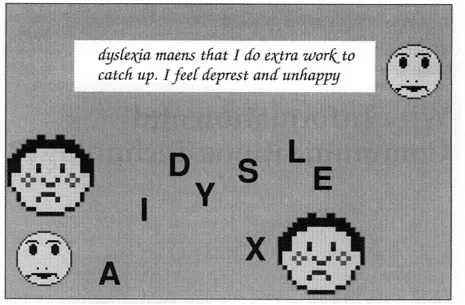
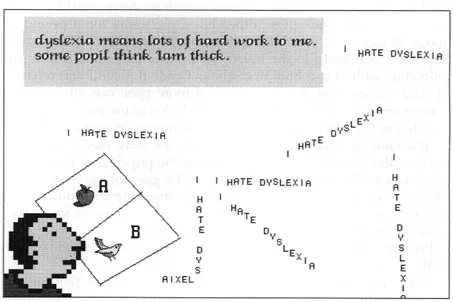
Figures 1.1 and 1.2 demonstrate the feelings of two dyslexic pupils. Both pupils were aged 11 years and were Y6.
The pupil who wrote the poem in Figure 1.1 told me that the sad faces represented how he felt people actually saw him. The moon faces are how that pupil demonstrated what he felt he was really like, being so different from his peers.
The pupil who created Figure 1.2 included an ABC book, although he was Y6. This was to represent how unhappy he was at doing what he considered to be baby work. He felt very strongly about this and added that he considered he was being punished by having to do extra work at night. He said that he could not spend much time enjoying himself, like his friends, but had to be constantly reminded of his difficulties by receiving extra tuition.
I also noted that these pupils placed various letters chaotically all over the poems and I asked why this was the case. The one pupil told me it was because he saw letters like that, floating about. The other pupil nodded in agreement. I went home and mentioned this to my son and asked him if he saw letters in words move about while he was trying to read them. He promptly replied, ‘Of course. Didn’t you know that?’
Dyslexic pupils typically feel that they must be stupid to be given the type of work they are often asked to do. This results in their having low self-confidence and sometimes in their behaviour becoming somewhat challenging. They are often unhappy and deal with their situation in their own way, which can include being switched off to literacy, becoming disruptive and so on.
For these pupils, ICT often represents an environment that they have not failed in. Providing it is used well, ICT is creative. It supports and facilitates their educational development. Using a computer will not graffiti their work with red marks, it will not tell them off or be judgemental. On the contrary it can be exciting and interesting. ICT supports the entire process of writing, by supporting the individual skills involved in that process. Above all, using ICT places the student in greater control.
Most dyslexic pupils are faced with the difficult task of trying to prove how good they are at a subject by being graded on how well they can write about it. This, in turn, is often based on how well they can read the exam questions. Currently I work with a pupil, Bill, who is in Yll. He is the captain for his house and a talented young athlete who has won many cups and medals for his athletic abilities. He captains a football team and loves sport in all of its forms. However, he will have to face either a long or short paper for his GCSE physical education examination, a paper that he will struggle to read and struggle even more to provide written answers for. This means that his final grade could be very low, due to his dyslexia, yet Bill knows the answers to the questions and he definitely has the physical ability and talent for the subject.
Currently, in Foxhills School, Technology College, pupils with dyslexia are gaining access to the exam structure and passing examinations with the help of ICT facilities. As a result of that access, they leave with better employment expectations, or increased prospects in higher or further education. ICT makes a huge difference.
When one adds to this that considerable progress can be made in the pupils’ individual reading and writing abilities, along with their thinking and study skills, the overall advantages of ICT become apparent.
How ICT is used for the benefit of dyslexic students
ICT gives access to the curriculum of the subject being taught. NC is an entitlement for all pupils in England and Wales. It has meant a return to basics approach to education requiring an even greater conformity in the provision of education. The content of the curriculum for the pupils in this country is legislated for, and has to be taught and assessed. The NC is divided into four key stages, beginning with KS1, for pupils aged between 5 and 7 years; KS2, 7-11 years; KS3, 11-14 years; and KS4, 14-16 years. In essence, the NC means an entitlement for all pupils to have access to, and be taught, a pre-determined curriculum, stipulated by legislation.
However, it is known that dyslexic pupils find accessing the curriculum particularly difficult, owing to their cluttered short-term memory, phonological processing deficits and so on. As any experienced teacher knows, pupils who feel left out for whatever reason generally become frustrated and disenchanted, which in turn often leads to their being motivationally challenged. While dyslexic pupils are receiving the specified exposure to the National Curriculum subjects, they are not achieving the same progress as other pupils. It can, therefore, be argued that NC provision is meeting the letter, but not the spirit, of the law. To rectify this, it is necessary to look beyond traditional learning techniques and embrace more accessible teaching environments.
By focusing on the specific educational needs of the dyslexic pupil, with a little creative thought, it is possible to make significant improvements using existing mainstream software applications normally used to deliver ICT NC capability and entitlement. This aspect of ICT is far more important than looking at specific software as a panacea, although some specific software will be discussed in Chapter 10.
ICT capability
It is necessary at this stage to mention ICT capability in its own right as a NC subject. ICT covers various aspects or strands, such as control and handling and communicating information. Each of these strands is divided into levels 1-10. ICT NC is an entitlement for all pupils, although many schools are short of computers and have to struggle to meet the demands of ICT NC. Cross-referencing subject requirements with ICT capability, along with the practical issues of availability of hardware and software, means that the ICT coordinators have a mammoth task when formulating a planning document. As a result, schools face a stiff challenge to deliver ICT capability and often cannot spare computers for specific students, or for specific software systems. Schools are on a very limited budget and this needs to be borne in mind.
However, ICT NC capability is ideally designed for the dyslexic individual and, when learning ICT, dyslexic students can enhance their cognitive functioning in a manner which offsets their dyslexic tendencies. The skill is to know the cognitive strengths and weaknesses of the dyslexic students and marry that into ICT capability. So while ICT NC is being delivered, the needs of the dyslexic student are capable of being met. All of this results in greater independence, leading to greater self-esteem and self-confidence. For once there is an upward spiral instead of the usual downward vicious circle of branding and social withdrawal.
NC constitutes the majority of teaching time per week in schools. Very little time is left for extras such as celebrations, dental inspections, summer fairs and other activities. There is always a shortage of available time because teachers are under pressure to cover all aspects of NC within the normal school week. This never leaves enough time for the additional extras that happen. Therefore, the individual needs of a small group of pupils, such as dyslexic pupils, are best met within the NC framework. It is fortunate that this can be done.
The dyslexic student and access to NC in all subjects
Dyslexic pupils do not have equal access to the curriculum, for they are often unable to make notes and if they do so, they cannot re-read them. Consequently, what they tried to write is a waste of time. They are typically disorganised and cannot remember the lesson content if they rely on their memories. They cannot copy notes off a blackboard for they make too many errors; this includes writing down homework and dates. They get into trouble for not finishing homework, but have no notes to write from and no idea of when the homework has to be completed. Add to this their inability to manage study skills; find relevant information and make suitable notes; build up acquired information into an assignment, and the insurmountable problems become apparent. All of the above presumes that the student who is dyslexic has managed to process the lesson content. Most dyslexics have a phonological processing deficit and cannot process speech at a normal speed.
When attempting to write an assignment, dyslexic students require some facilitation to obtain information and then struggle to cope with the organisation of the assignment itself, often becoming confused and frustrated. This is compounded by poor handwriting and weak spelling. The whole process becomes frustrating and demoralising. ICT can change most of this by:
- giving access to the curriculum of the subject;
- giving help to the pupil with dyslexia, e.g. helping memory functioning etc.; and
- giving ICT capability in its own right.
Importantly, if ICT is used creatively it will not only give access, but also self-confidence and experience. Used well, the use of ICT results in pupils overcoming their difficulties, for example with weak short-term memory, organisational skills and spelling. All of these will be dealt with in subsequent chapters.
![]()
Chapter 2
Hardware and software
In order to enable access to the curriculum one needs the computer itself. This consists of two parts: the physical equipment known as the hardware and the programs called the software. This chapter provides a demystifying introduction to these.
Computers are relatively new to society, at least as far as the majority of the population is concerned. Even now, some 20-30 years after their introduction into general industry, few people understand the technical details of how these machines actually work and, as a result, the rest of us view them with a little trepidation. Having trained teachers and other adults while at Hummec, I regularly dealt with the computer phobic, who often made up about 80 per cent of the training participants. Not surprisingly, misconceptions linger around computers, together with a fear of damaging them as they are still relatively expensive.
In general the older the person, the longer it takes for them to learn about computers and mouse control. Atypical 5-year-old child usually takes very little time to learn to control a mouse (see p. 15) and appears to have no fear of a computer. A novice adult can take weeks to control a mouse and often has fear of the machines when using them for the first time. This is understandable given that they have to pay the bill to repair it or, even worse, explain to the ICT coordinator in a school what has happened. The 5-year-old has the luxury of not having to worry about such things. However, it does mean that often adults, particularly teachers or ICT experts, place unnecessary hurdles in the way of dyslexic students trying to use a computer, because of their own misconceptions and fears. The pupils rarely have such difficulties.
Jargon is an integral part of ICT and I personally love to look at jargon words. When my first computer arrived I took six weeks to take it out of its numerous boxes, for it was so expensive, being much dearer in relative terms than most present-day machines. My sons and pupils helped me. The latter offered to stay in at breaks to work out the software and then inform me how to use it! I was always very grateful, as I was so nervous. This alone raised their confidence. I have continued to learn from my pupils and sons ever since. They never cease to amaze me and only rarely do I ever touch a manual – or Manuel, as one of my students called it.
To help those nervous about machines, I will openly admit that, although the ICT coordinator in the school was very kind and helpful, he still managed to get me very worried about the RGB lead. Apparently I placed the computer monitor too near the wall and was in danger of damaging the RGB lead! I knew this lead linked the monitor to the BBC computer, but only later did I find that the RGB lead had three wires in it, one red, one green and one blue. That was all the RGB stood for. These three leads gave white on the screen. If one of the wires in this magical RGB lead was broken the screen colour would change, or lines would go across it. I was scared over nothing more than an iron flex! I then found they were £4.99 each, so...