![]()
CHAPTER 1
Introduction
“Creatures, not characters!”
Stewart Jones
Welcome to the world of digital creature rigging. This book is a collection of theories, as well as a practical guide, to developing a better understanding of what it takes to bring believable CG creatures to life.
CG creature setup is the understanding of how to take static geometry and turn it into an articulated, living creature (of course it is not always creatures; it could be anything, such as animals, space ships, cars, humans, anything!). At the very core of it all, the task is to design and create a system of control that allows for animator input, believable deformations, and pipeline management.
Rigging is a term used to describe the creation of a system that allows animators to animate. It is the control mechanism that is not seen, at least not by the audience the final animation is intended for. In turn, a “rigger” commonly describes the people who take a lifeless 3D model and create the articulated control setups for animators to work with. There are many titles for this role in the industry, and it changes from studio to studio. Some are called “Riggers,” others are known as “Setup Artists,” “Technical Animators,” “Technical Artists,” “Animation Technical Directors (TD),” “Character TDs,” or “Creature TDs.” For the purposes of this book, we call them “Creature TDs,” but, regardless of the name, these people are often skilled in many disciplines, and it is not uncommon for a Creature TD to model, rig, animate, simulate, and program.
Creature TDs often have a large role in defining the way a creature and animation pipeline flows during production. In fact, they may be responsible for the pipelines entirely. Each and every production is different; the ability to adapt and create is definitely a trait needed to excel in this role.
This is an ever-changing field, but the foundations have changed little. A production pipeline is chaotic, but organized (at least some of the time). Everything this book covers has been designed with this sort of crazy production environment in mind. Whether you rig for games, TV, visualization, or feature film, this book covers chapters and topics relevant to your field of interest.
“Belraus” (pronounced “bell-row-us”) is the name of the chosen creature that I rig throughout this book. However, the text is written in both a “making of” style and practical tutorials that make for some rigging reference you can follow along and apply to your own creatures.
Admittedly, this book is based on, and discusses techniques specific to, Autodesk 3ds Max; however, the fundamental concepts presented are universal and can be followed regardless of which software you use now or in the future. A great creature rig is created by great Creature TDs.
Why a Book?
There are many choices when it comes to obtaining rigging information, all of them valid, and we all have preferences as to which we like best. As I thought about each company I have worked with or visited, one thing I noticed is that there are always a number of books and manuals available. Some written by staff that is specific to the pipelines and practices of the company and others written by authors of books like this one. Personally, I have a few favorite books I take with me to the office, and, although I have already read them, they serve as a great way to reference ideas and techniques quickly and easily.
This book is designed to be read, a good thing really, being a book! It has also been created to be a practical reference guide for creature rigging, one you will hopefully take with you and refer back to often.
Other methods for rigging reference are also great, but, for me, a book is the most practical and convenient.
Custom Rigs vs Auto-Riggers
Digital Creature Rigging: The Art and Science of CG Creature Setup in 3ds Max specifically covers a custom rigging method and steers away from auto-riggers. The Biped and Character Animation Toolkit (CAT) auto-rigging solutions are already built into 3ds Max and both provide great solutions for various rig setups. In fact, any creature could easily be rigged using either of these systems.
So, why are we focusing on creating custom rigging solutions throughout this text? Simply put, custom rigging is the best way to build and understand a creature system. It allows ultimate control over all aspects of the rigging process, from the tools provided, the tools you create, and the control systems you build. There are no extra hassles or quirkiness of auto-rigging systems; it also comes with no extra baggage or artificial limitations that can be present in pre-built solutions. Additionally, it also enhances your knowledge of not only the rigging systems available in 3ds Max, but also other aspects of the application, as well as the production pipeline you are working in.
Of course, there are pros and cons to a custom rigging solution, as there are pros and cons to the auto-rig solutions available. Sometimes the needs of a production either require you to work with an auto-rigging solution or it may be the only viable option because of timescales and delivery schedules. With that said, it is important for us to have an understanding of the pros and cons of all of the available rigging solutions found within 3ds Max:
Biped
Biped has been an excellent tool for many productions: it is very quick and easy to set up and, as not many things can be changed, there is not much that can go wrong. Oh, and Biped provides a pretty nice motion capture solution if you do not have access to anything more powerful, such as Autodesk Motion Builder. However, there are some serious issues that become apparent when you start using Biped. Note that I use the word “issues” deliberately, as they are not necessarily problems with the software.
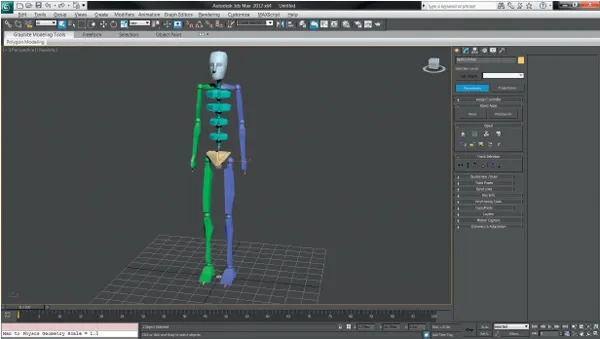
FIG 1-1 A generic Biped rig.
The default rotation controllers are quaternions, which is something that, for an animator, is very undesirable in a rig. Legacy interfaces and menu scrolling, as well as counter-intuitive tools, slow down animation. There are limitations on how you can place the bones, and this forces you to accept a solution that is not necessarily what you really want. There is also no way to change the base hierarchy of Biped without destroying the rig completely. What this means is that you may have to come up with an elaborate solution to a problem that may ultimately force you to use a custom rig attached to the Biped.
Lastly, scripting for Biped is, well, no...