Cinema 4D
eBook - ePub

Cinema 4D

The Artist's Project Sourcebook

  1. 440 pages
  2. English
  3. ePUB (mobile friendly)
  4. Available on iOS & Android
eBook - ePub

Cinema 4D

The Artist's Project Sourcebook

About this book

Make the creative leap to 3D. Realize your artistic vision with this treasure chest of instructional, practical projects. Get the essential concepts and techniques without drowning in the technical complexities.

All downloadable resources are available at http://www.taylorandfrancis.com/cw/mcquilkin-9780240814506/
Frequently asked questions

Yes, you can cancel anytime from the Subscription tab in your account settings on the Perlego website. Your subscription will stay active until the end of your current billing period. Learn how to cancel your subscription.
No, books cannot be downloaded as external files, such as PDFs, for use outside of Perlego. However, you can download books within the Perlego app for offline reading on mobile or tablet. Learn more here.
Perlego offers two plans: Essential and Complete
  • Essential is ideal for learners and professionals who enjoy exploring a wide range of subjects. Access the Essential Library with 800,000+ trusted titles and best-sellers across business, personal growth, and the humanities. Includes unlimited reading time and Standard Read Aloud voice.
  • Complete: Perfect for advanced learners and researchers needing full, unrestricted access. Unlock 1.4M+ books across hundreds of subjects, including academic and specialized titles. The Complete Plan also includes advanced features like Premium Read Aloud and Research Assistant.
Both plans are available with monthly, semester, or annual billing cycles.
We are an online textbook subscription service, where you can get access to an entire online library for less than the price of a single book per month. With over 1 million books across 1000+ topics, we’ve got you covered! Learn more here.
Look out for the read-aloud symbol on your next book to see if you can listen to it. The read-aloud tool reads text aloud for you, highlighting the text as it is being read. You can pause it, speed it up and slow it down. Learn more here.
Yes! You can use the Perlego app on both iOS or Android devices to read anytime, anywhere — even offline. Perfect for commutes or when you’re on the go.
Please note we cannot support devices running on iOS 13 and Android 7 or earlier. Learn more about using the app.
Yes, you can access Cinema 4D by Kent McQuilkin,Anne Powers in PDF and/or ePUB format, as well as other popular books in Media & Performing Arts & Film & Video. We have over one million books available in our catalogue for you to explore.

Information

1

The Power of Primitives

images
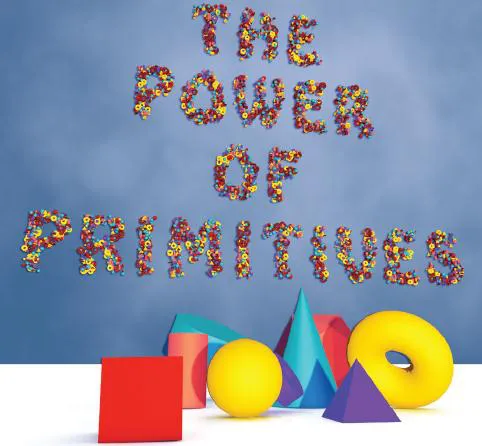
Like most 3D programs, CINEMA 4D has a set of primitive building blocks that are parametric. Basic parameters of a primitive, or critical dimensions such as, height and radius, are defined mathematically. Because the program only has to remember a few bits of information, parametric primitives are efficient. The parametric values for an object may be manipulated live in the Editor Window using the orange parametric handles, but the object’s surface has no points, polygons or edges that may be pushed and pulled into more complex forms. In the parametric state, the surface and axes of an object are not editable. Notice that every time you choose a primitive, it appears at the same place in the center of the 3D world. This is called the origin and sits at (coordinates 0,0,0), and it has a set of red (X), green (Y), and blue (Z) object axes that show how the object is oriented.

Ornament Project

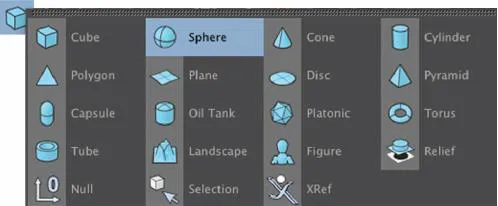
Step 1 Our first project will be a simple use of basic geometric shapes combined with some advanced shaders that will give a high level look to our scene. Begin by adding a Sphere primitive from the Polygonal Primitive drop down. Figure Ornament_01
images
Figure Ornament_01
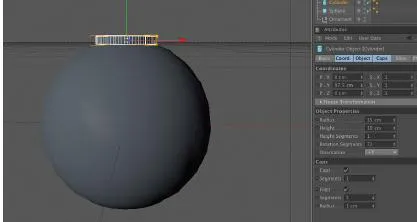
Step 2 Secondly, add a Cylinder and move it up into position by setting its P.Y = 97.5 in the Attribute Manager. Adjust the Cylinder’s shape by setting the Radius to 35, the Height to 10 and raise the Rotation Segments to 72. Lastly, we’ll round the edges of the shape by enabling Fillet Caps in the Caps tab of the Attribute Manager. Match my example by lowering the Segments to 3 and the Radius to 1. Figure Ornament_02
images
Figure Ornament_02
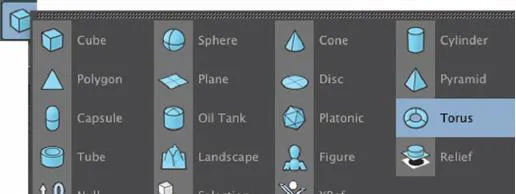
Step 3 Add a Torus to our scene by choosing it from the Primitives drop down. Figure Ornament_03
images
Figure Ornament_03
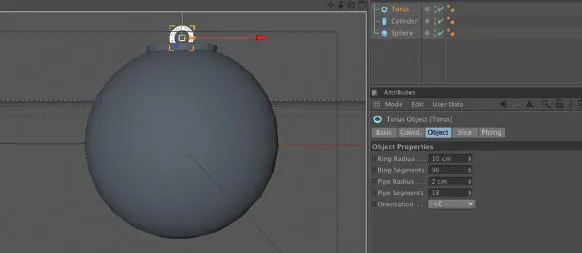
Step 4 Move this object up so that its P.Y=107, set the Ring Radius = 10, Pipe Radius = 2, and change the Orientation to +Z. Figure Ornament_04
images
Figure Ornament_04
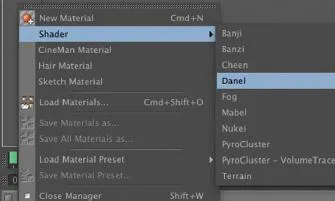
Step 5 With modeling completed, we’ll move onto the materials for these shapes. We will use some powerful shaders that are built in to CINEMA 4D to bring realism to this scene. In the Material Manager, choose File>Shader>Danel. Figure Ornament_05
images
Figure Ornament_05
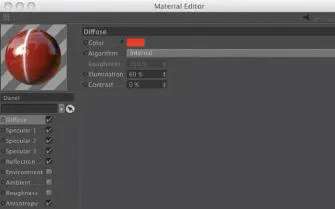
Step 6 Double click on the Danel thumbnail in the Material Manager to bring up a floating window. In the Diffuse Channel, double click on the white color thumbnail to open the ColorPicker and set the color to a Red. Figure Ornament_06
Navigate down to the Anistropy Channel and click on its checkbox to enable it. Click on the red x at the top left of this floating panel to close it. Drag the Danel thumbnail and drop it on the Sphere object in the Object Manager or right inside the Viewport. Press Cmd/Cntrl (PC) + R to render a quick preview in the Viewport.
images
Figure Ornament_06
Step 7 Create our second material by again going to Material Manager and navigating to File>Shader>Danel. Double click on the new thumbnail and, in the resulting floating panel, rename the material Metal. ...

Table of contents

  1. Cover
  2. Half Title
  3. Title Page
  4. Copyright Page
  5. Table of Contents
  6. Introduction
  7. 1 The Power of Primitives
  8. 2 Under the Hood
  9. 3 NURBS Modeling Tools
  10. 4 Deformers and Other Modeling Helpers
  11. 5 Materials in Depth
  12. 6 Better under Lights
  13. 7 Animation Basics
  14. 8 Head Shots
  15. 9 Rigging a Character
  16. 10 Cameras in Control
  17. 11 The Art of Rendering
  18. 12 A Jolt of Xpresso
  19. 13 BodyPaint: The Artist’s Connection
  20. 14 Tips on Type
  21. 15 More out of MoGraph
  22. 16 After Effects Integration
  23. 17 Dynamics and Special Effects
  24. 18 Stereoscopic Content Creation in Cinema 4D
  25. 19 Cinema 4D and Friends
  26. Index