- 310 pages
- English
- ePUB (mobile friendly)
- Available on iOS & Android
eBook - ePub
About this book
Discover the secrets of the Google SketchUp with the 16 real-world professional-level projects including parks, structures, concept art, and illustration. Google SketchUp Workshop includes all the wide variety of projects that SketchUp can be used for-architectural visualization, landscape design, video game and film conception, and more. SketchUp masters in every field will get you up to speed in this agile and intuitive software and then show you the real uses with through projects in architecture, engineering, and design.
Information
PART1
Architecture
Chapter 1
Creating Virtual Concept Models in SketchUp
Jean Thiriet is an architect, qualified in 2008 by the école nationale supérieure d’architecture de Nancy (also called EAN). A passionate user of 3D, he has been working for a practice that creates real-time virtual models since finishing his studies. His other interest is teaching, and in 2009, he created the website wip-archi.com, which is dedicated to conveying the concepts of modeling and rendering, so indispensable in today’s profession, to both students and professionals alike.
www.wip-archi.com
Project: Virtual models in SketchUp.
Tools: SketchUp 6, Artlantis, Vray, Photoshop, and Internet.
Jean Thiriet: “The last few years have seen an unprecedented boom in the use of 3D tools. More and more professionals are beginning to notice the undeniable advantages of these virtual approaches, and the growing presence of SketchUp in architecture practices is the best proof of this. In spite of its novel approach, SketchUp often still finds its place in the production pipeline at the same stage as traditional model makers: at the end of the design process. However, given the potential that it possesses, it would be interesting to try to push for new working methodologies based on a simple concept: the virtual model.”
“This model grew and was added to as the project evolved, and it was possible to use it throughout the process to create more traditional graphics (rendered images, for example), whose common origin guaranteed an overall visual coherence.”
Project Context
Although many people consider it to be a “basic” program, SketchUp can be integrated into a rich and complex creative process, while at the same time remaining quick and easy to use.
Technical Aspects
Since this project was based on existing building, the design process started with a site survey and desk study, followed by importation of all the data into AutoCAD. This laid the groundwork for future design work.
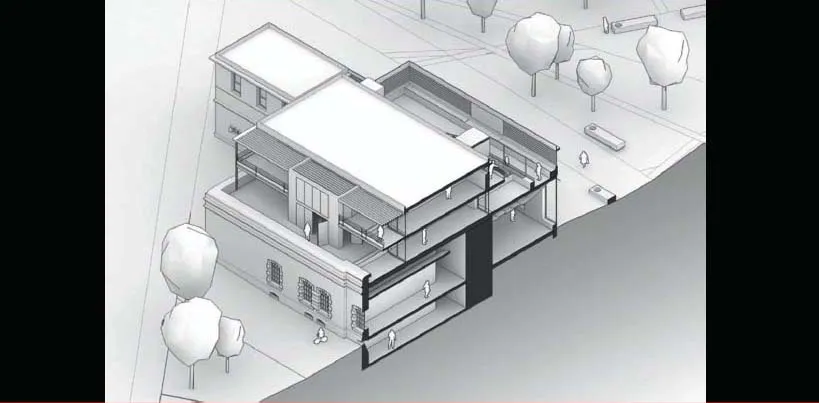
We soon realized that we would need a virtual model. Using this model, we were able to easily visualize the impact of the many design choices throughout the conceptual stage, something that is indispensable when working with renovations. The 3D construction of the surrounding site backed up this approach and made it easy to take decisions that affected the overall, wider urban vision.
The model for the conceptual phase was often constructed using a fairly empirical method, the volumes being drawn in space with neither a priori research nor the use of clearly defined structural elements (walls, windows, slabs, etc.).
As the project progressed, these purely geometric objects – which were, at this stage, fairly malleable – were transformed into groups and components that were then organized into a hierarchy of layers, the implementation of which makes sense of the whole project, making it more usable and concrete.
This free-form approach explains the success of SketchUp in the conceptual research phases, since it offers a flexibility that other architectural software that is based on parametric objects simply cannot match.
Tip
SketchUp cannot deal with groups of layers: This can make it difficult to keep a clear overview of the project, especially when the number of layers begins to grow large. Creating numbered categories allows you to get around the problem and gives you a reasonable and efficient organization (for example, 01 for the gross structure, with layers 01_Columns, 01_Slabs, 01_Walls, etc.).
Once the project design had stabilized, the next step was the presentation stage. First of all, the model showed a relative uniformity of scale and definition of space (here, at about 1:200), and details were then added to certain specific areas. This method reduced the construction time for the whole project and left more flexibility for further adjustments.
In order to create high-quality images, it is often necessary to go beyond SketchUp’s rendering capabilities, notably in terms of complex reflection effects, material rendering, or lighting calculations. There are many programs capable of utilizing the data from the 3D model, and for this project, we used two programs in particular: Artlantis Studio and Vray for SketchUp.
Artlantis is a stand-alone application that takes in the data exported from another 3D modeling program. This program offers a real-time preview of applied material effects, coupled with a very approachable interface; it makes it very easy to adjust the overall look of a scene (lights, textures, etc.).
Vray is a rendering engine, developed originally for 3D studio Max, then ported to several other programs, with SketchUp being one among them. Unlike Artlantis, it is integrated directly within Google’s program, where it posts its own toolbar. The renderer offers many advanced control possibilities, something that can put off new users at first. Luckily, sets of parameters can be saved as preset files that can be easily reused, and only a few clicks are necessary to generate a basic render.
Tip
Many websites offer these parameter files for use directly within Vray, and so it is not necessary to know all the ins and outs of the program to make use of it. The parameter files utilized here are from the website www.wip-archi.com.
The use of different pieces of software allows you to really appreciate the flexibility of SketchUp and underlines the necessity of a reasoned approach at every step of the way.
New Approaches
Treating the modeling phase as something intimately tied up with project development, and seeing the images produced as a spur to further development, rather than as an end in themselves, is quite far removed from the classic approach. However, it is bound up with the very nature of SketchUp.
Having a discussion about the model, asking yourselves the questions raised by it, and then creating renders to answer those questions are much more interesting than arbitrarily choosing some points of view in your model, simply rendering them out in 3D, and showing them to the client.
Finally, this “decompartmentalized” use of software in a dynamic, collaborative pipeline (SketchUp, Vray, Artlantis, Photoshop, Internet, etc.) and the exchange of data in various formats represent an original and efficient approach.
To illustrate this, we are going to look at three distinct cases: three images generated from the project. They were not intended to convey the same information and would, therefore, be produced using different methods. Nevertheless, they were all created from the same 3D model that formed the basis of the project.
FIG 1.1 Model of project.
An Aerial View
Presenting the building in its entirety, showing its relationship with the urban fabric, entailed the creation of an overall view that summed up the intentions and the impact of the project.
Stage 1: Define a Composition
Objectives: Make choices that optimize how the image will be read.
Data: 3D model.
Tools: SketchUp and Vray.
Here, we tried to get over a notion of the hierarchy of the elements show...
Table of contents
- Cover Page
- Title Page
- Copyright Page
- Contents
- Overview
- Part 1 Architecture
- Part 2: Engineering
- Part 3: Design
- Part 4: Set Design
- Part 5: Architectural Graphics
- Part 6: Graphic Design
- Part 7: Geology and Georeferencing
- Appendix Dynamic Components
- Index
Trusted by 375,005 students
Access to over 1.5 million titles for a fair monthly price.
Study more efficiently using our study tools.
Frequently asked questions
Yes, you can cancel anytime from the Subscription tab in your account settings on the Perlego website. Your subscription will stay active until the end of your current billing period. Learn how to cancel your subscription
No, books cannot be downloaded as external files, such as PDFs, for use outside of Perlego. However, you can download books within the Perlego app for offline reading on mobile or tablet. Learn how to download books offline
Perlego offers two plans: Essential and Complete
- Essential is ideal for learners and professionals who enjoy exploring a wide range of subjects. Access the Essential Library with 800,000+ trusted titles and best-sellers across business, personal growth, and the humanities. Includes unlimited reading time and Standard Read Aloud voice.
- Complete: Perfect for advanced learners and researchers needing full, unrestricted access. Unlock 1.5M+ books across hundreds of subjects, including academic and specialized titles. The Complete Plan also includes advanced features like Premium Read Aloud and Research Assistant.
We are an online textbook subscription service, where you can get access to an entire online library for less than the price of a single book per month. With over 1.5 million books across 990+ topics, we’ve got you covered! Learn about our mission
Look out for the read-aloud symbol on your next book to see if you can listen to it. The read-aloud tool reads text aloud for you, highlighting the text as it is being read. You can pause it, speed it up and slow it down. Learn more about Read Aloud
Yes! You can use the Perlego app on both iOS and Android devices to read anytime, anywhere — even offline. Perfect for commutes or when you’re on the go.
Please note we cannot support devices running on iOS 13 and Android 7 or earlier. Learn more about using the app
Please note we cannot support devices running on iOS 13 and Android 7 or earlier. Learn more about using the app
Yes, you can access Google SketchUp Workshop by Laurent Brixius in PDF and/or ePUB format, as well as other popular books in Computer Science & Architecture General. We have over 1.5 million books available in our catalogue for you to explore.