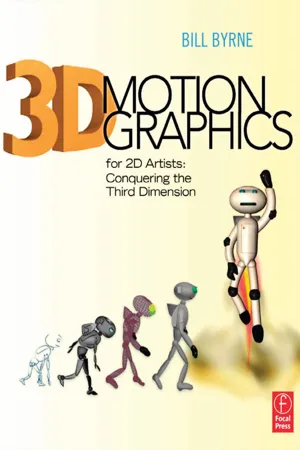
3D Motion Graphics for 2D Artists
eBook - ePub

3D Motion Graphics for 2D Artists

Conquering the Third Dimension

  1. 252 pages
  2. English
  3. ePUB (mobile friendly)
  4. Available on iOS & Android
eBook - ePub

3D Motion Graphics for 2D Artists

Conquering the Third Dimension

About this book

Add 3D to your mograph skillset! For the experienced 2D artist, this lavishly illustrated, 4 color book presents the essentials to building and compositing 3D elements into your 2D world of film and broadcast. Concepts and techniques are presented in concise, step-by-step tutorials, hundreds of which are featured throughout. Featured applications include Photoshop, Illustrator, After Effects, and Cinema 4D.

Lessons include exploring the expanded 3D functionality of the Adobe Creative Suite applications (After Effects, Photoshop, and Illustrator) through a series of practical tutorials. More advanced lessons then follow, with tutorials and insight provided in specifically geared lessons for 2D artists working in Cinema 4D, 3ds Max, and ZBrush.

4-color presentation is further enhanced by various sidebars, tips, and "gotchas" to watch for through-out the book. The downloadable resources contain hours of project files with which you can work along the tutorials in the book.
Frequently asked questions

Yes, you can cancel anytime from the Subscription tab in your account settings on the Perlego website. Your subscription will stay active until the end of your current billing period. Learn how to cancel your subscription.
No, books cannot be downloaded as external files, such as PDFs, for use outside of Perlego. However, you can download books within the Perlego app for offline reading on mobile or tablet. Learn more here.
Perlego offers two plans: Essential and Complete
  • Essential is ideal for learners and professionals who enjoy exploring a wide range of subjects. Access the Essential Library with 800,000+ trusted titles and best-sellers across business, personal growth, and the humanities. Includes unlimited reading time and Standard Read Aloud voice.
  • Complete: Perfect for advanced learners and researchers needing full, unrestricted access. Unlock 1.4M+ books across hundreds of subjects, including academic and specialized titles. The Complete Plan also includes advanced features like Premium Read Aloud and Research Assistant.
Both plans are available with monthly, semester, or annual billing cycles.
We are an online textbook subscription service, where you can get access to an entire online library for less than the price of a single book per month. With over 1 million books across 1000+ topics, we’ve got you covered! Learn more here.
Look out for the read-aloud symbol on your next book to see if you can listen to it. The read-aloud tool reads text aloud for you, highlighting the text as it is being read. You can pause it, speed it up and slow it down. Learn more here.
Yes! You can use the Perlego app on both iOS or Android devices to read anytime, anywhere — even offline. Perfect for commutes or when you’re on the go.
Please note we cannot support devices running on iOS 13 and Android 7 or earlier. Learn more about using the app.
Yes, you can access 3D Motion Graphics for 2D Artists by Bill Byrne in PDF and/or ePUB format, as well as other popular books in Media & Performing Arts & Film & Video. We have over one million books available in our catalogue for you to explore.

Information

1

INTRODUCTION

This book is designed to solve a very specific problem—flatness. Two-dimensional motion graphics designers and animators routinely hit a brick wall. You have these flat objects occupying a manufactured world, and the illusion of depth is just not enough—you want it to turn in space. More so, you have a client who is demanding that object turn in space, and you need to meet that request (or, let’s face it, someone else will).
images
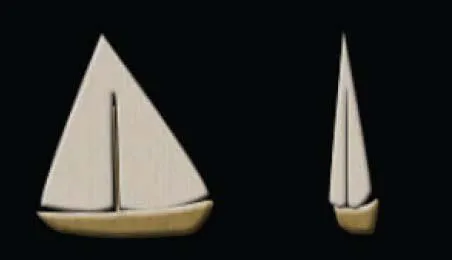
Figure 1.1 2D object turning in 3D space.
This usually leads folks to look for plug-ins for After Effects, or a three-dimensional animation application. Then a new roadblock appears (or several)—how do I use these things? First, 3D is a lot more difficult than 2D. Second, beginner resources for 3D software start you from the very, very beginning, and you may not have the time to spend spinning cubes.
This book will explore several options for 2D motion graphics artists. First, we’ll take advantage of the new and not-so-new 3D tools in Adobe software, which are quite useful and may solve a large percentage of your concerns. Second, this book will address existing tools that can be added to After Effects, like third-party plug-ins that add 3D functionality to AE. Third, we’ll dip into 3D software including Cinema 4D, ZBrush, 3dsMax, and others, starting you in the direction of developing your 3D skill set.
TIP
images
You may spin cubes in this book; I promise to keep it brief.

How to Use This Book

If you are familiar with either of my two previous textbooks, The Visual Effects Arsenal (Focal Press 2009) and Creative Motion Graphics Titling (coauthored with Yael Braha; Focal Press 2010), then you won’t find what I am about to say all that surprising. My teaching motivates my textbook writing. I am as fascinated by how people learn as I am by what they learn.
Students and professionals want books that address specific problems and solve them. They are not nearly as motivated by the guts of a software package as they are by what it can do for them. This book is designed to take people who know 2D motion graphics and animation and get them on the right path to learning 3D. This book won’t teach you everything you need to know about 3D motion graphics—learning everything about 3D animation is a lifelong pursuit.
The aim of this text is to get you started in 3D by introducing you to available options that can be added with relative ease to an existing 2D animation skill set. In many ways, this book is designed to be 3D animation from the very, very beginning. This book does assume some foreknowledge of standard 2D tools (such as Adobe After Effects, Adobe Photoshop, and Adobe Illustrator). 3D packages will be introduced like 3dsMax, Cinema 4D, ZBrush; and After Effects plug-ins like Trapcode Particular, Trapcode 3D Stroke, and more.
Even though you will be introduced to numerous tools that have infinite applications, techniques will be the focus of this book. What’s the point of learning an incredibly complex tool if you don’t get to see what it does?

2

THE TECHNIQUES OF 3D

Creating the Illusion of Depth
images
Figure 2.1 The Grid Is Broken digital painting by Bill Byrne.
The essential point of creating 3D art and animation is to create a believable world. That world can be completely false, but the audience needs to buy into your reality to some degree or it will be meaningless to them. Even the strangest realities will need to have some signposts for the audience to be able to get some sense of it. In any case, the 3D artist must build a world, a world that is also a stage.
What’s the difference? A world exists, and does things with or without the viewer. It pays the viewer little mind. A stage contains a representation of something that resembles the world for the benefit of the viewer. It’s a show. Art is always a presentation for the viewer. Flat art, such as drawings, photographs, films, and paintings have always had a limitation in that they pretend to contain true depth but are actually flat illusions of depth.
Why does this matter to you? Well, 3D animation will take the real world and recreate it within a flat space. It matters to you because in this day and age, when that “wow” factor is few and far between, what better way to engage viewers than inviting them into a completely imagined world that they can relate to and that is a complete work of your own fantasy and design?

Three Dimensions

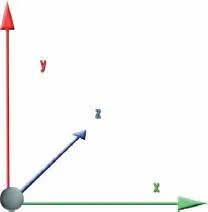
Objects in our world have three dimensions: height (represented by X space in Figure 2.2), width (Y), and depth (Z). Nonsculptural, flat art represents height and width easily because flat art is two-dimensional. Now you may be thinking, I have seen three dimensions in flat art, but that actually is not true. You’ve seen the illusion of depth. In fact, there are a series of techniques that are employed to make something appear to have depth that in fact does not.
images
Figure 2.2 Three dimensions.

Stacking or Layering

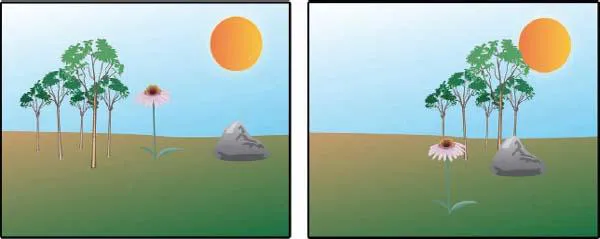
The first of these techniques is stacking or layering. What this simply means is placing objects on top of each other. Objects that are closer to the viewer should be on top of objects that are farther from the viewer.
Stacked or layered objects overlap others and this establishes distance quickly and effectively.
images
Figure 2.3 The image on the left shows various objects unstacked. The image on the right shows the same objects stacked. Notice how by simple placement of the objects on top of each other the image starts to take on a certain amount of depth.

Top and Bottom Placement

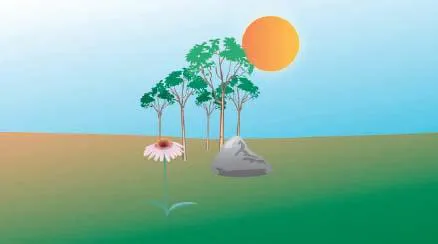
The vertical order in which objects are arranged in a frame influences the perception a viewer has of how close or far an object is from them.
images
Figure 2.4 In a landscape, the higher an object is placed in a frame, the farther it appears to be from the viewer.
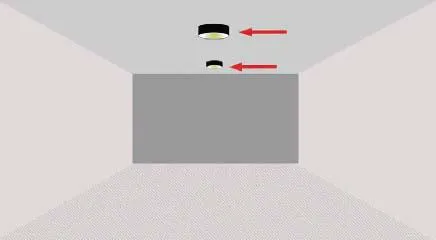
However this rule varies based on the content of your frame. For example, in Figure 2.4, an exterior space or landscape’s depth is determined by placing objects closer to the top of the frame if they are farther away from the viewer. In an interior space, the objects at the top of the frame appear closer to the viewer; see Figure 2.5.
images
Figure 2.5 In an interior space, the ceiling reverses the rule we discussed for exteriors—the top of the frame is closer to the viewer. Think of a ceiling and floor as a landscape with a ground area at the top and bottom of the frame.

Color

The use of color can also create depth in an image. Objects closest to the viewer would be the most saturated, with the brighter colors. Objects farther away will be darker or less saturated. In landscapes such as Figure 2.6 you will see that the mountains in the distance look as if ...

Table of contents

  1. Cover
  2. Half Title
  3. Title Page
  4. Copyright Page
  5. Dedication
  6. Table of Contents
  7. Acknowledgments
  8. Chapter 1 Introduction
  9. Chapter 2 The Techniques of 3D
  10. Chapter 3 The Tools of 3D
  11. Chapter 4 Photoshop 3D
  12. Chapter 5 Designing for Depth: Illustrator 3D Techniques
  13. Chapter 6 After Effects 3D Capabilities and Plug-Ins
  14. Chapter 7 Beginning 3D for Real
  15. Chapter 8 Animation in 3D
  16. Chapter 9 3D Typography
  17. Chapter 10 Cinema 4D MoGraph Tools
  18. Chapter 11 3D Scenes
  19. Chapter 12 Compositing
  20. Index