eBook - ePub
Understanding Macromedia Flash 8 ActionScript 2
Basic techniques for creatives
- 312 pages
- English
- ePUB (mobile friendly)
- Available on iOS & Android
eBook - ePub
Understanding Macromedia Flash 8 ActionScript 2
Basic techniques for creatives
About this book
Andrew Rapo and Alex Michael explain all the important programming concepts from a designer's point of view, making them completely accessible to non-programmers. Completely revised and rewritten this second edition will help you develop professional ActionScript 2 applications, and communicate knowledgably about current, Object Oriented ActionScript 2 techniques.
Divided into four sections to take you from novice to professional results:
* Flash Fundamentals: Introduces the Flash authoring environment and basic core Flash concepts.
* ActionScript 2 Fundamentals: Explains basic programming concepts and terminology, and shows how ActionScript 2 classes are constructed and used.
* Built-in Classes: Describes the built-in ActionScript classes that are available for use in applications, including the MovieClip class, Key class, Sound class, etc.
* Using ActionScript to Build a Game: Describes the development process for creating a complex Flash application and presents commercial-quality game coding examples.
Trusted by 375,005 students
Access to over 1 million titles for a fair monthly price.
Study more efficiently using our study tools.
Information

FLASH FUNDAMENTALS
01
1
An Introduction to
ActionScript 2 Programming
Tools in Flash 8
What is ActionScript?
ActionScript makes it possible to develop Flash movies that are interactive. A designer can build a beautiful Flash movie without ActionScript, but it won't be able to respond to input by the user. In the earliest versions of Flash, there was no ActionScript. In those days, Flash was used exclusively to make linear animations. Its unique ability to render vector-based animations made Flash an instant hit. When ActionScript was introduced, however, the focus of Flash development became “interactivity”. Today, Flash is the de facto standard tool for creating media-rich interactive Web applications. Because of its efficient design, it is also becoming a popular development platform for handheld devices — including mobile phones.
ActionScript is a powerful tool because of all the ways it can be used, but in the simplest sense, ActionScript is text: program code in the form of letters, numbers, symbols, etc.:
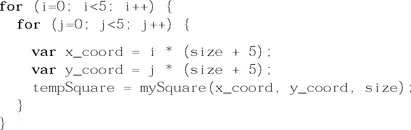
Graphics are often created by drawing with a mouse. ActionScript programs are created by typing text with a keyboard, and the essential tool for managing this text is the “text editor”. Flash provides a text editor for creating ActionScript programs, but the features of the available editor depend on the version of Flash.
Flash Versions: Pro vs. Non-Pro
The text editor in Flash 8, the “ActionScript Editor”, is included in both the Basic and Professional versions. In the previous version of Flash, MX 2004, only the Professional version included an editor for creating ActionScript 2 .as files. This implied that some users wouldn't have any need for ActionScript 2 classes. By including the ActionScript Editor in both versions of Flash 8, Macromedia has opened the door for all Flash developers to begin using ActionScript 2.
Third Party ActionScript Editors
For users of the Basic version of Flash MX 2004, three options are available. One option is to upgrade to Flash 8. The second option is to use a third-party text editor to create .as files. This is actually not a bad option. In fact, some excellent text editors exist, and some have been specifically enhanced to support the creation of ActionScript files. One of the most powerful is the Eclipse IDE (Integrated Development Environment). Eclipse is available at www.eclipse.org. A plugin is required to make it work with ActionScript files. The ASDT (ActionScript Development Tools) plugin can be downloaded from sourceforge.net/projects/aseclipseplugin/. There is even a Flash compiler plugin available for Eclipse that will check ActionScript files for errors and even generate SWF files. It is called MTASC and is available at www.mtasc.org/. Finally, there is a third plugin for Eclipse called Flashout which allows the SWF files generated by MTASC to be previewed in Eclipse. It is available at www.potapenko.com/flashout/. All of these tools are free, so they are available to anyone with the resourcefulness to get them all installed correctly. A good guide is available at:
www.actionscript.com/index.php/fw/1/towards-open-source-flash-development/
Figure 1.1 shows the Eclipse IDE workspace with an ActionScript 2 class open for editing. Eclipse offers the full suite of programming tools that professional programmers have come to expect, including source code control. Most of the examples in this book were authored using Eclipse and then tested in MX 2004 and Flash 8.

Figure 1.1 The Eclipse IDE configured for ActionScript
The third option — available to anyone — is to download a free 30-day trial of Flash 8 from www.macromedia.com. This will make it possible to try the examples in this book and decide whether or not to make an investment in Flash.
This book assumes that the reader has either Flash 8, Flash MX 2004 Professional, or the Eclipse suite described above. This chapter describes the Flash 8 authoring environment, which is very similar to the MX2004 environment. The Eclipse environment is not covered specifically, but for anyone savvy enough to get Eclipse installed, it should be easy enough to follow along.
The Flash Authoring Environment
When Flash is launched, the first thing displayed is a friendly splash screen which presents a variety of options. This can be seen in Figure 1.2. Most often, the user will create a new Flash document or open an existing one. The friendly splash screen is nice at first, but it is easy enough to use the File menu to accomplish the same thing. For those who would prefer not to see the splash screen, there is a “Don't show again” checkbox in the lower left corner.
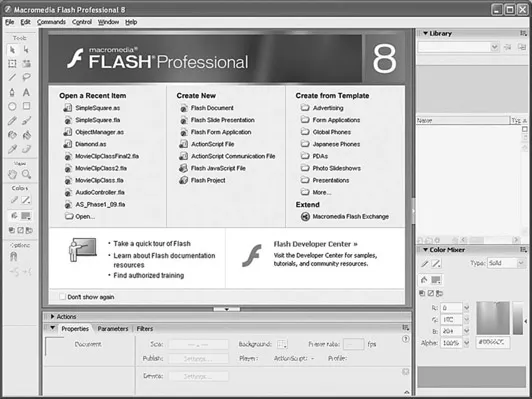
Figure 1.2 The Flash authoring environment
The Workspace
The arrangement of windows and panels in the authoring environment is called the “workspace”. The Flash workspace can be rearranged to suit any individual's tastes. By default, the workspace shows the Main Timeline at the top of the screen, the Visual Authoring Tools along the left side, the Library and Color Mixer along the right, and the Stage in the middle. Figure 1.3 shows the default workspace layout.
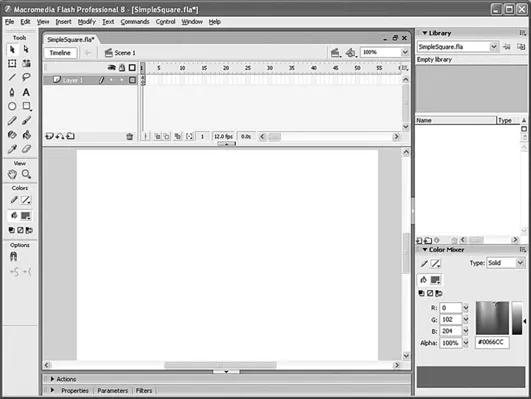
Figure 1.3 The default workspace layout
Directly beneath the Stage are the Actions and Properties panels. These can be expanded using the black triangles to the left of the panel names. Expanding the Actions panel reveals any ActionScript code on the currently active timeline frame.
Figure 1.4 shows the workspace with the “SimpleSquare.fla” opened. This example is from the ch6 folder of the examples. The actions displayed in the Actions panel belong to the first frame of the FLA's Main Timeline.
The Actions panel, itself, has three sections: the main Script pane in the middle, the ActionScript Toolbox and Script Navigator panes along the left. There is a control on the bar between the Script pane and the ActionScript Toolbox pane. It has a small, black triangle in it. Clicking on this control snaps the ActionScript Toolbox and Script Navigator panes closed. These panes are helpful when
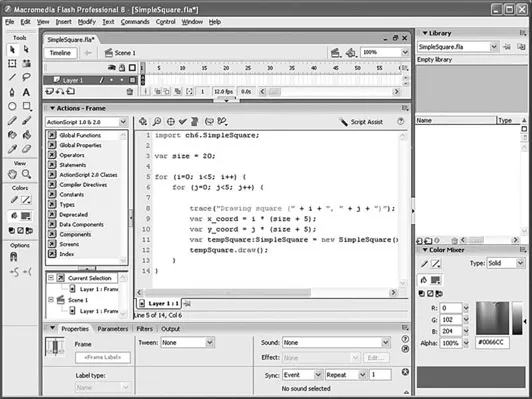
Figure 1.4 The workspace with the “SimpleSquare.fla” opened
trying to find the right class for a use in a script or when trying to locate a script in the FLA file. However, they do take up a lot of screen space. Closing them makes it possible to see more of the Script pane. Of course, on a large enough monitor, screen space may not be an issue.
FLA Files, AS Files, and SWF Files
The three main types of Flash files encountered in this book (and in most Flash development) are FLA files (.fla), AS files (.as), and SWF files (.swf). The first two types are referred to as “source” files because they are used to generate another type of files — namely SWF files. SFW files are referred to as “distributable” files. Source files contain all of the elements and instruction for generating distributable files. As a result they are typically much bigger, and often they contain proprietary content that the author would not wish to share. This proprietary content could be a full-resolution image file or an ActionScript class. Turning source files into distributable files is done by the Flash Compiler. In the process of generating SWF files, the Flash Compiler compresses image and audio files, and it also compresses the ActionScript source code by reducing it to a minimal set of “byte codes” that only the Flash Player can read. In this way, a very large FLA file which uses lots of AS files can be compiled into a very compact SWF. The SWF can then be distributed without having to include any source files and it provides some protection for the propriety of the source material.
A Word About Proprietary Code
The Flash Compiler reduces the ActionScript source code to a compact byte code which is no longer readable by most people. However, there are programs that can read this byte code and reconstitute it as human-readable ActionScript code. These programs are called “decompilers”. The output of any compiler — even C+ + and Java compilers — can be decompiled. But ActionScript distributables are especially vulnerable and the reconstituted code can be just as readable as the original source code. For this reason it is not reasonable to assume...
Table of contents
- Cover
- Half Title
- Full Title
- Copyright
- Contents
- Acknowledgments
- Introduction — Understanding Macromedia Flash 8 ActionScript 2
- Section 1 Flash Fundamentals
- Section 2 ActionScript 2.0 Fundamentals
- Section 3 Built-in Classes
- Section 4 Using ActionScript to Build a Game — Astro Sweeper
- Appendices
- Appendix A Glossary
- Appendix B Key Codes
- Index
Frequently asked questions
Yes, you can cancel anytime from the Subscription tab in your account settings on the Perlego website. Your subscription will stay active until the end of your current billing period. Learn how to cancel your subscription
No, books cannot be downloaded as external files, such as PDFs, for use outside of Perlego. However, you can download books within the Perlego app for offline reading on mobile or tablet. Learn how to download books offline
Perlego offers two plans: Essential and Complete
- Essential is ideal for learners and professionals who enjoy exploring a wide range of subjects. Access the Essential Library with 800,000+ trusted titles and best-sellers across business, personal growth, and the humanities. Includes unlimited reading time and Standard Read Aloud voice.
- Complete: Perfect for advanced learners and researchers needing full, unrestricted access. Unlock 1.4M+ books across hundreds of subjects, including academic and specialized titles. The Complete Plan also includes advanced features like Premium Read Aloud and Research Assistant.
We are an online textbook subscription service, where you can get access to an entire online library for less than the price of a single book per month. With over 1 million books across 990+ topics, we’ve got you covered! Learn about our mission
Look out for the read-aloud symbol on your next book to see if you can listen to it. The read-aloud tool reads text aloud for you, highlighting the text as it is being read. You can pause it, speed it up and slow it down. Learn more about Read Aloud
Yes! You can use the Perlego app on both iOS and Android devices to read anytime, anywhere — even offline. Perfect for commutes or when you’re on the go.
Please note we cannot support devices running on iOS 13 and Android 7 or earlier. Learn more about using the app
Please note we cannot support devices running on iOS 13 and Android 7 or earlier. Learn more about using the app
Yes, you can access Understanding Macromedia Flash 8 ActionScript 2 by Andrew Rapo,Alex Michael in PDF and/or ePUB format, as well as other popular books in Computer Science & Digital Media. We have over one million books available in our catalogue for you to explore.