This handy textbook covers all you will need to know to learn to communicate using email and the internet.
Learning Made Simple books give readers skills without frills. They are matched to the main qualifications, in this case ECDL, ICDL and CLAIT, and written by experienced teachers and authors to make often tricky subjects simple to learn. Every book is designed carefully to provide bite-sized lessons matched to learners' needs.
Using full colour throughout, and written by leading teachers and writers, Learning Made Simple books help readers learn new skills and develop their talents.
Whether studying at college, training at work, or reading at home, aiming for a qualification or simply getting up to speed, Learning Made Simple books give readers the advantage of easy, well-organised training materials in a handy volume with two or four-page sections for each topic for ease of use.
Let’s start by clearing up a common confusion – the Internet and the World Wide Web are not the same thing.
The Internet is the basis of hardware, software and data and the connections that join it all together. It consists of millions of computers – of all shapes and sizes – in tens of thousands of computer networks, throughout the world. They are joined through a mixture of special high-speed cables, microwave links and ordinary public and private telephone lines.
The World Wide Web is one of the ways of organising and looking at the information held on the Internet. It is probably the most important way – and certainly the simplest – but there are others (see page 8).
What’s in it for me?
If you have access to the Internet, you have access to:
400+ million host computers. These are the ones that provide services and information, any of which could be useful to you in your work, your travelling, your academic research or your hobbies.
Over 1 billion people. You will already know of friends and relations who are on the Internet, and you will probably discover more once you start using it – and you could find new friends, customers, fellow enthusiasts, problem-solvers.
Terabytes (thousands of gigabytes) of files containing programs – including the software that you need for working on the Internet – books, articles, pictures, video, sounds and much else.
A whole raft of services, such as financial advice, banking, stock market information and trading, airline and train times and reservations, news and weather reports, small-ads and electronic shopping malls.
Who owns the Net?
The computers, networks and connections that make up the Internet are owned and run by thousands of separate businesses, government agencies, universities and individuals but no-one owns the Internet as a whole.
Take note
There will be even more computers and people on-line by the time you read this! The Internet has grown at a phenomenal rate – if the number of users continues to grow at its current rate, everyone in the World will be online in about five years. I don’t quite think so…
The World Wide Web
This is the fastest-growing aspect of the Internet. It consists of billions of pages, held in millions of computers, joined together by hypertext links and viewed through a web browser, such as Internet Explorer (Chapter 2). The links allow you to jump from one page to another, which may be on the same machine or on one far, far away. The sheer number of pages, and the fact that millions are added or changed every day, mean that there can be no comprehensive index to the Web, but there are directories and search engines (Chapter 4) to help you to find what you want.
Some pages are simple text, but most are illustrated with graphics. Some have video or sound clips that you can enjoy on-line; other have links to files – programs, documents, pictures or multimedia clips – that you can download into your computer. Some pages work interactively, or act as places where people can meet and ‘chat’ by typing or talking.
Take note
Words in bold italics are in the Jargon on page 9.
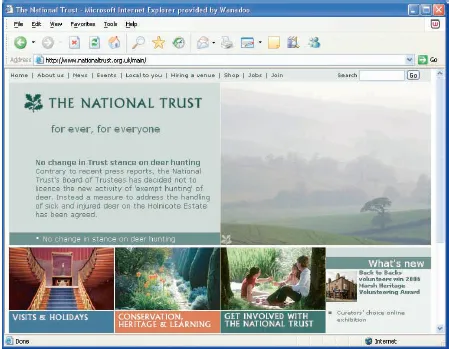
The old meets the new. The National Trust runs one of the most popular web sites in the UK, with thousands of visitors every day.
Electronic mail
These are messages sent to other individuals on the Internet. Think of them more like memos than postal mail. A message can be easily copied to other users; and when you receive an incoming message, you can attach your reply to it, or forward it on to a third party. You can also attach documents and graphics files to messages (see Files by mail, page 86).
The mail will sometimes get through almost instantaneously, but at worst it will be there within a few hours. The delay is because not all of the computers that handle mail are constantly in touch with each other. Instead, they will log on at regular intervals to deal with the mail and other services.
Key points about e-mail:
• E-mail is fast, cheap and (generally) very reliable.
• Every service provider offers e-mail access.
• As with snail mail, to send someone e-mail you need their address, and the best way to get that is to ask them.
Take note
E-mail software, such as Outlook Express, can be run off-line, and this is an good way to handle your mail if you use a dial-up connection. Go on-line to collect any new mail and to send any messages that you have written, then hang up the phone, read your mail and write your replies and new messages at your leisure, without clocking up phone charges.
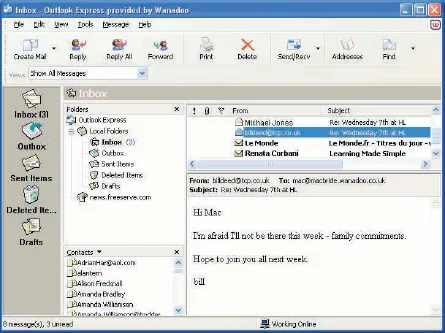
Outlook Express is probably the most widely-used e-mail program – and it’s certainly one of the simplest to use.
WWW URLs
Don’t you just love TLAs (Three Letter Acronyms)? The Internet is full of them. A WWW URL is a World Wide Web ...
Table of contents
Cover
Title
Copyright
Contents
Preface
1 The Internet
2 Internet Explorer
3 Navigating the Web
4 Searching the Web
5 Data from the Web
6 E-mail software
7 Using e-mail
8 Organising e-mail
9 Creating web pages
Index
Trusted by 375,005 students
Access to over 1.5 million titles for a fair monthly price.
Study more efficiently using our study tools.
Frequently asked questions
Yes, you can cancel anytime from the Subscription tab in your account settings on the Perlego website. Your subscription will stay active until the end of your current billing period. Learn how to cancel your subscription
No, books cannot be downloaded as external files, such as PDFs, for use outside of Perlego. However, you can download books within the Perlego app for offline reading on mobile or tablet. Learn how to download books offline
Perlego offers two plans: Essential and Complete
Essential is ideal for learners and professionals who enjoy exploring a wide range of subjects. Access the Essential Library with 800,000+ trusted titles and best-sellers across business, personal growth, and the humanities. Includes unlimited reading time and Standard Read Aloud voice.
Complete: Perfect for advanced learners and researchers needing full, unrestricted access. Unlock 1.5M+ books across hundreds of subjects, including academic and specialized titles. The Complete Plan also includes advanced features like Premium Read Aloud and Research Assistant.
Both plans are available with monthly, semester, or annual billing cycles.
We are an online textbook subscription service, where you can get access to an entire online library for less than the price of a single book per month. With over 1.5 million books across 990+ topics, we’ve got you covered! Learn about our mission
Look out for the read-aloud symbol on your next book to see if you can listen to it. The read-aloud tool reads text aloud for you, highlighting the text as it is being read. You can pause it, speed it up and slow it down. Learn more about Read Aloud
Yes! You can use the Perlego app on both iOS and Android devices to read anytime, anywhere — even offline. Perfect for commutes or when you’re on the go. Please note we cannot support devices running on iOS 13 and Android 7 or earlier. Learn more about using the app
Yes, you can access Communicating with Email and the Internet by P K McBride in PDF and/or ePUB format, as well as other popular books in Computer Science & Business General. We have over 1.5 million books available in our catalogue for you to explore.