- 496 pages
- English
- ePUB (mobile friendly)
- Available on iOS & Android
eBook - ePub
Real-time 3D Character Animation with Visual C++
About this book
Do you have some experience and a reasonable knowledge of C++ and want to write your own computer games? Have you ever looked at a PC or Playstation (R) game with characters running and leaping through an exciting landscape and wondered how it was done? If so then this book will give you all the information you need to achieve this goal, whether you are a hobby programmer, student or even a professional wanting to add that third dimension to your website.
Nik Lever takes you through the journey from the basics of 3D manipulation all the way to morph objects and sub-division surfaces. On the way you get Visual C++ project files to study and software that runs on the Windows desktop. The downloadable resources give you a full-featured development environment for 3D character animation, so even if you find some of the maths and the code hard to follow straight away you can still create your own games. The game engine (Toon3DCreator) provided free and fully functional on the downloadable resources, even has an ActiveX control that allows you to distribute your work on the Internet. All source code for Toon3D is included on the downloadable resources. You will also get an insight into the artist's problems; learn how to keep the characters interesting while not exhausting the game engine.
Understand the complete picture and make the most of your skills to help you succeed in, or break into the computer gaming industry with this comprehensive guide to programming for real-time 3D character animation.
Information
1 3D basics
In this chapter we are going to introduce the 3D basics. We will look at how to store the information required for a computer to display a 3D object. In addition, we will consider the maths required to manipulate this object in 3D space and then convert this to a 2D display. We need a sufficiently general scheme that will allow us to store and manipulate the data that can be displayed as a box, a teapot or an action hero. The method generally used is to store a list of points and a list of polygons. Throughout this book, all the source code is designed to handle polygons with three or four sides.
In later chapters we will leave most low-level operations to a graphics library, which will manage most of the mathematical manipulation. In this book we use the graphics library, OpenGL. But to ease the creation of seamless mesh characters, we will need to do some of our own manipulation of point data; to understand how this code operates you will need to follow the methods outlined in this chapter.
OpenGL is the most widely adopted graphics standard
From the OpenGL website www.opengl.org
‘OpenGL is the premier environment for developing portable, interactive 2D and 3D graphics applications. Since its introduction in 1992, OpenGL has become the industry's most widely used and supported 2D and 3D graphics application programming interface (API), bringing thousands of applications to a wide variety of computer platforms. OpenGL fosters innovation and speeds application development by incorporating a broad set of rendering, texture mapping, special effects and other powerful visualization functions. Developers can leverage the power of OpenGL across all popular desktop and workstation platforms, ensuring wide application deployment.’
Describing 3D space
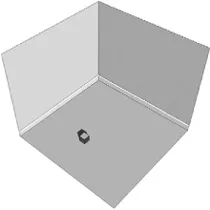
First let's imagine a small box lying on the floor of a simple room (Figure 1.1).
How can we create a dataset that describes the position of the box? One method is to use a tape measure to find out the distance of the box from each wall. But which wall? We need to have a frame of reference to work from.
Figure 1.2 shows the same room, only this time there are three perpendicular axes overlaid on the picture. The point where the three axes meet is called the origin. The use of these three axes allows you as a programmer to specify any position in the room using three numerical values.
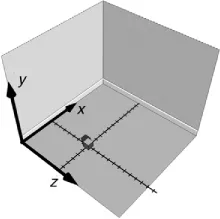
In Figure 1.2, the two marked lines perpendicular to the axes give an indication of the scale we intend to use. Each slash on these lines represents 10 cm. Counting the slashes gives the box as 6 along the x-axis and 8 along the z-axis. The box is lying on the floor, so the value along the y-axis is 0. To define the position of the box with respect to the frame of reference we use a vector,
[6, 0, 8]
In this book, all vectors are of the form [x, y, z].
The direction of the axes is the scheme used throughout this book. The y-axis points up, the x-axis points to the right and the z-axis points out of the screen. We use this scheme because it is the same as that used by the OpenGL graphics library.
Transforming the box
To move the box around the room we can create a vector that gives the distance in the x, y and z directions that you intend to move the box. That is, if we want to move the box 60 cm to the right, 30 cm up and 20 cm towards the back wall, then we can use the vector [6, 3, 2] (recall that the scale for each dash is 10 cm) to move the box. The sum of two vectors is the sum of the components.
[x, y, z]=[x1, y1, z1] + [x2, y2, z2]
where x = x1 + x2, y = y1 + y2 and z = z1 + z2
For example, [12, 3, 10] = [6, 0, 8] + [6, 3, 2]
Describing an object
The simplest shape that has some volume has just four points or vertices. A tetrahedron is a pyramid with a triangular base. We can extend the idea of a point in 3D space to define the four vertices needed to describe a tetrahedron. Before we can draw an object we also need to define how to join the vertices. This leads to two lists: a list of vertices and a list of faces or polygons.
The vertices used are:
A: [ 0.0, 1.7, 0.0]
B: [–1.0, 0.0, 0.6]
C: [ 0.0, 0.0, –1.1]
D: [ 1.0, 0.0, 0.6]
B: [–1.0, 0.0, 0.6]
C: [ 0.0, 0.0, –1.1]
D: [ 1.0, 0.0, 0.6]
To describe the faces we give a list of the vertices that the face shares:
1: A,B,D
2: A,D,C
3: A,C,B
4: B,C,D
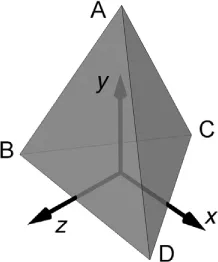
Although the triangles ABD and ADB appear to be the same, the order of ...
Table of contents
- Front Cover
- Half Title
- Dedication
- Title Page
- Copyright
- Contents at a glance
- Supplementary Resources Disclaimer
- About the author
- Introduction
- Chapter 1: 3D basics
- Chapter 2: Drawing points and polygons the hard way
- Chapter 3: Drawing points and polygons the easy way with OpenGL
- Chapter 4: OpenGL lighting and textures
- Chapter 5: Creating low polygon characters
- Chapter 6: Texture mapping
- Chapter 7: Setting up a single mesh character
- Chapter 8: Keyframe animation
- Chapter 9: Inverse kinematics
- Chapter 10: Importing geometry and animation from Lightwave 3D
- Chapter 11: Importing geometry and animation from 3DS Max
- Chapter 12: Motion capture techniques
- Chapter 13: Collision detection
- Chapter 14: Using morph objects
- Chapter 15: Using subdivision surfaces
- Chapter 16: Using multi-resolution meshes
- Chapter 17: The scene graph
- Chapter 18: Web 3D, compression and streaming
- Appendix A: Using Toon3D Creator
- Appendix B: MFC Document/View architecture – a short introduction
- Appendix C: Further information
- Index
Trusted by 375,005 students
Access to over 1.5 million titles for a fair monthly price.
Study more efficiently using our study tools.
Frequently asked questions
Yes, you can cancel anytime from the Subscription tab in your account settings on the Perlego website. Your subscription will stay active until the end of your current billing period. Learn how to cancel your subscription
No, books cannot be downloaded as external files, such as PDFs, for use outside of Perlego. However, you can download books within the Perlego app for offline reading on mobile or tablet. Learn how to download books offline
Perlego offers two plans: Essential and Complete
- Essential is ideal for learners and professionals who enjoy exploring a wide range of subjects. Access the Essential Library with 800,000+ trusted titles and best-sellers across business, personal growth, and the humanities. Includes unlimited reading time and Standard Read Aloud voice.
- Complete: Perfect for advanced learners and researchers needing full, unrestricted access. Unlock 1.5M+ books across hundreds of subjects, including academic and specialized titles. The Complete Plan also includes advanced features like Premium Read Aloud and Research Assistant.
We are an online textbook subscription service, where you can get access to an entire online library for less than the price of a single book per month. With over 1.5 million books across 990+ topics, we’ve got you covered! Learn about our mission
Look out for the read-aloud symbol on your next book to see if you can listen to it. The read-aloud tool reads text aloud for you, highlighting the text as it is being read. You can pause it, speed it up and slow it down. Learn more about Read Aloud
Yes! You can use the Perlego app on both iOS and Android devices to read anytime, anywhere — even offline. Perfect for commutes or when you’re on the go.
Please note we cannot support devices running on iOS 13 and Android 7 or earlier. Learn more about using the app
Please note we cannot support devices running on iOS 13 and Android 7 or earlier. Learn more about using the app
Yes, you can access Real-time 3D Character Animation with Visual C++ by Nik Lever in PDF and/or ePUB format, as well as other popular books in Computer Science & Computer Graphics. We have over 1.5 million books available in our catalogue for you to explore.