The Savvy Student's Guide to Online Learning
eBook - ePub

The Savvy Student's Guide to Online Learning

  1. 122 pages
  2. English
  3. ePUB (mobile friendly)
  4. Available on iOS & Android
eBook - ePub

The Savvy Student's Guide to Online Learning

About this book

The Savvy Student's Guide to Online Learning prepares students of all kinds for contemporary online learning. While technologies and formats vary, this book serves as an authoritative resource for any student enrolling in an online degree program or taking an online course.

Topics covered include:

• How to become a great online student

• Creating an online presence

• Interaction and communication techniques

• Online group projects and individual work

• Technological requirements and how to get technical support

• Online classroom "netiquette" and time management

The authors, both experts in online education, introduce the information and skills required of successful online students to navigate this new learning landscape with confidence. A highly useful companion website provides video presentations that explain the different types of online learning as well as a real online course with activities for students to practice and interact with other learners around the world.


Frequently asked questions

Yes, you can cancel anytime from the Subscription tab in your account settings on the Perlego website. Your subscription will stay active until the end of your current billing period. Learn how to cancel your subscription.
No, books cannot be downloaded as external files, such as PDFs, for use outside of Perlego. However, you can download books within the Perlego app for offline reading on mobile or tablet. Learn more here.
Perlego offers two plans: Essential and Complete
  • Essential is ideal for learners and professionals who enjoy exploring a wide range of subjects. Access the Essential Library with 800,000+ trusted titles and best-sellers across business, personal growth, and the humanities. Includes unlimited reading time and Standard Read Aloud voice.
  • Complete: Perfect for advanced learners and researchers needing full, unrestricted access. Unlock 1.4M+ books across hundreds of subjects, including academic and specialized titles. The Complete Plan also includes advanced features like Premium Read Aloud and Research Assistant.
Both plans are available with monthly, semester, or annual billing cycles.
We are an online textbook subscription service, where you can get access to an entire online library for less than the price of a single book per month. With over 1 million books across 1000+ topics, we’ve got you covered! Learn more here.
Look out for the read-aloud symbol on your next book to see if you can listen to it. The read-aloud tool reads text aloud for you, highlighting the text as it is being read. You can pause it, speed it up and slow it down. Learn more here.
Yes! You can use the Perlego app on both iOS or Android devices to read anytime, anywhere — even offline. Perfect for commutes or when you’re on the go.
Please note we cannot support devices running on iOS 13 and Android 7 or earlier. Learn more about using the app.
Yes, you can access The Savvy Student's Guide to Online Learning by Kristen Sosulski,Ted Bongiovanni in PDF and/or ePUB format, as well as other popular books in Education & Education General. We have over one million books available in our catalogue for you to explore.

Information

Publisher
Routledge
Year
2013
Print ISBN
9780415655972
eBook ISBN
9781135136666
Edition
1

Chapter 1
Getting a Strong Start Online

As an online student, you will use many of the same skills you have developed in school and life, but you will also build new ones. After reading this chapter, you will understand different course formats, know how to make a positive first impression online, allocate time for your online studies and see how you learn best. At the core, online learning is learning. The key difference? You will be using digital tools instead of analog ones. Instead of going to a physical classroom, you will be learning, communicating, interacting, and participating in digital spaces.

What Are Common Online Course Formats?

There are a few different formats for online courses: at your own pace; live online in real time; or some combination of the two:
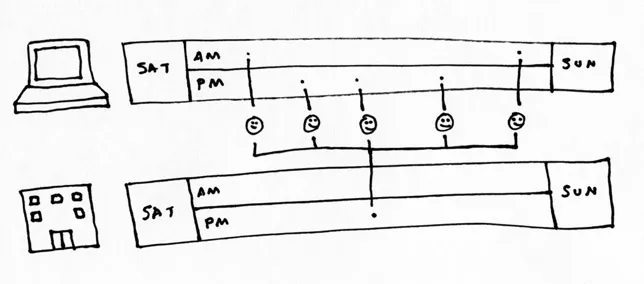
At Your Own Pace (also known as asynchronous). You follow a schedule established by your instructor and complete assignments, readings, and participation activities on a regular basis (usually a few times a week). A common misconception is that you are just interacting with materials and working independently. Instead, your instructor will provide you with regular, personalized feedback. You’ll also engage in online conversations with your class.
Figure 1.1 Taking an online course at your own pace
Real-Time Online (also known as synchronous). Your teacher and your classmates are all online at the same time. You interact via text, voice, video, or some combination. When signing up for these courses you will know the meeting schedule ahead of time (e.g., Tuesdays and Thursdays at 6:30 p.m.).
Figure 1.2 Taking an online course with online meetings blended or hybrid
Blended or Hybrid. Some time is spent learning online at your own pace, and some on in-class learning. This means you’ll be attending class on site part of the time. The remainder of the class meetings will take place online. This is a popular format for intensive programs, whereby students meet in person once at the beginning, middle and end of a course or program.
Figure 1.3 Taking a blended course with in-person meetings and online coursework

Preparing Yourself to Study and Engage with Course Materials

Online courses require significant effort on the part of both the professor and the students. One of the most common remarks that we hear from faculty and students alike is: “I am surprised by how much work learning online is … I find my online courses are more demanding.”
ifig00001.webp
1.1 Assess your readiness to take an online course. Refer to Appendix A.
On-site courses set the bar for online courses. Traditionally, accrediting organizations measure classroom time to determine credit hours. A 3-credit course at a U.S. university or college meets for 2 to 3 hours per week over 15 weeks. For every hour spent in class, instructors expect students to spend 2 hours outside class. Over an entire semester, that adds up to a minimum of 45 hours of class time and 90 hours of student preparation time. Online courses use the same numbers but instead of attending classes, students complete assignments—including contributing to online discussions, reflecting on what they know and what they are learning, working collaboratively with peers on projects, and more. Finally, many institutions offer online courses in compressed formats. Instead of meeting over 15 weeks, students complete courses in 5 to 6 weeks. Though the duration may be shorter, the total amount of time your instructors expect you to invest holds constant.
To do well in an online course, you must manage your time effectively. You will need to find new ways to pace yourself, because class goes on throughout the week. Students in face-to-face courses use class meetings as guideposts to help prepare for class. Each meeting functions as an interim deadline, and there are fewer consequences for putting off work. For online courses, expect to spend considerable time every week working on assignments, participating in online conversations, and collaborating on projects with your peers. One way to ensure that you spend enough time on your class is to set up specific times that you login to work.
On site, much of the teaching happens in the interactions that students have with one another and their professors. Unlike an on-site class where students turn in assignments during class, online, students complete multiple assignments and meet interim deadlines all week long. For example, in Ted’s Research Methods class, students complete a weekly group research assignment, due on Wednesdays. In addition, they complete a learning journal reflection on Sundays. They do all this work in addition to producing early draft papers, writing a final paper and delivering a final group presentation.

Join Your Online Courses

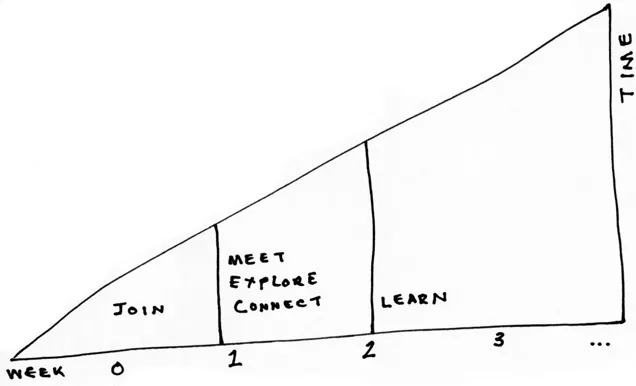
Figure 1.4 shows how an online class progresses. Before the course officially begins you sign on, meet your professor and peers, and introduce yourself.
Figure 1.4 Sequence of activities in an online course
At this early phase, we recommend that you review the syllabus, assignments, and readings. This step will help prepare you for the coming weeks, where you will engage in the course readings, discussions, and assignments.
For on-site classes, the work usually begins with the first class session. Online classes work a bit differently. Before class begins, you will receive an email from your institution with your account information, which includes details of where to sign in as well as your username and password. Think of these credentials as your digital identification card. Expect to receive this information about a week before the official start date of the course.
ifig00001.webp
1.2 Managing lots of passwords. Instead of creating weak passwords or using the same one, use a password manager to keep track of all of your usernames and passwords. Alternatively, maintain a plain text file of passwords, and store it on an external USB drive and store it away from the computer.
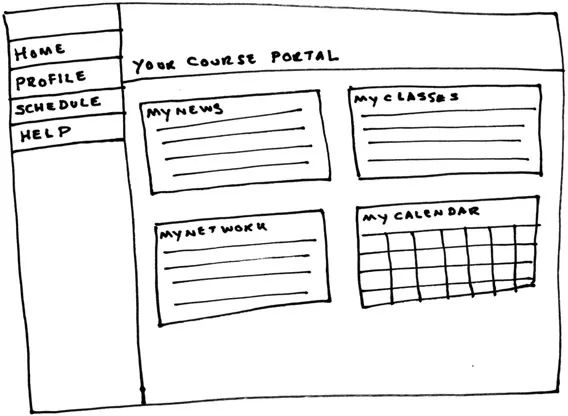
Once you have this information, you can sign into your institution’s online learning environment—which is often described as a “learning management system,” or LMS for short. This LMS portal page contains links to your courses, announcements from your institution, and perhaps an activity stream—news about what people are working on or thinking about (see Figure 1.5 for an example). We recommend signing in as soon as you receive your account details so that you can make sure that your username and password work and that you have access to the correct courses. You’ll also have a chance to build your online profile (see Chapter 3 for details).
ifig00001.webp
1.3 For Open-Ed courses, like those offered by Udacity and Coursera, you’ll have to create your own login.
ifig00002.webp
1.1 Curious what an online course looks like? Create an account at http://savvyonlinestudent.com/tryit and try it. We’ll refer back to this site throughout the book.
Figure 1.5 The portal page for an LMS

Explore Your Course

Once inside, one of the first things you should see is a welcome announcement from your instructor that highlights the course’s learning objectives. You’ll also see a link to the course syllabus. Much as with on-site courses, the syllabus provides a roadmap for what’s to come. Read the syllabus carefully (see the example on p. 8).
It sets out course objectives, assignments, required readings, and meeting times, if any. Use this first v...

Table of contents

  1. Cover
  2. Title
  3. Copyright
  4. Contents
  5. Preface
  6. Acknowledgments
  7. Introduction
  8. 1 Getting a Strong Start Online
  9. 2 Your Online Learning Toolkit
  10. 3 The Digital You
  11. 4 Getting to Know Your Faculty and Peers
  12. 5 Participating in Your Online Course
  13. 6 Working in Teams
  14. 7 Individual Work
  15. 8 Evaluating Performance
  16. 9 Being a Great Online Student
  17. Appendix A: Are You Ready To Take an Online Course?
  18. Appendix B: When Technology Fails
  19. Bibliography
  20. Index