Location filming is growing in popularity with the abundance of affordable cameras. You don't need a studio, a broadcast truck, or even extensive knowledge of how to use a 16mm film camera--all you need is a digital camera, and you can take your job on the road and shoot wherever action is happening! This book will give you the knowledge and confidence you need to take your on-location shooting skills to the next level.
Better Location Filming is packed with the things you will need to know to have great results while shooting your documentary, interview, sporting event, fashion or glamour event, or current affairs/news show. Beyond introductory techniques, the author will tell you how to plan, troubleshoot, handle legal requirements and issues, and of course - he'll teach you all about location filming equipment. Practical and filled with hands-on pointers, this book is perfect for working and aspiring film & video professionals seeking a leg up in their careers.
As a bonus, advanced tips are included for novices who are ready to take shooting techniques to the next level.
- 288 pages
- English
- ePUB (mobile friendly)
- Available on iOS & Android
eBook - ePub
About this book
Information
Chapter 1
Location Filming Equipment
The choice of equipment available today for location filming is simply huge, ranging from small prosumer units capable of HDV (high definition video) and AVCHD (advanced codec high definition, capable of storing full HD, and 1920 × 1080 resolution onto memory cards and hard disk drives). Then through to SONY’s DigiBetacams, XDCAM with its HD resolution and hard disk storage, Panasonic P2, up to top ranging HDCAM-SR cameras with 14-bit multiframe rate and either 4:4:4 or 4:2:2 output rates. Whether you are in the market to purchase a kit or are hiring on a regular basis, you can spend many, many hours looking at different cameras and audio gear and then comparing specifications, prices, weights, etc. Reaching a decision on what is best for you and whether this choice will then retain its value and usefulness over the coming years is a major job in itself and very time consuming.
In this chapter, I’ll help you define some basics about video kits that will help narrow down how you make that choice. As far as possible we’ll categorize types of cameras and kits and highlight the types of shooting they are best at, so that the choice is again made a bit easier. We’ll be looking at the types of cameras from a camera operator’s point of view to see what benefits each camera brings to everyday working.
It’s impossible to list all video cameras in this book as new ones will soon be out in the marketplace, but the ones here are used consistently and probably will be for a long time to come, and therefore there is a good chance that we will be either buying them or hiring them at some point of time.
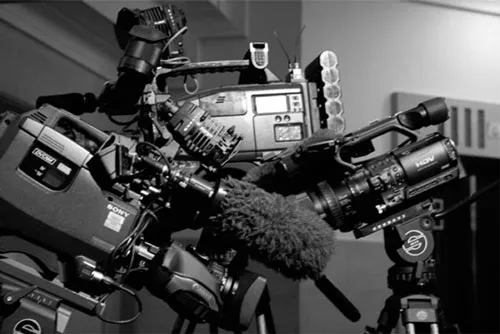
Fig 1.1 SONY HVR-Z1e, Ikegami HL-DV7w, SONY DSR 450WSPL pack shot. “Location video cameras, big and small. SONY HVR-Z1e, Ikegami HL-DV7w DVCAM plus SONY’s DVCAM the DSR 450WSPL.”
In Chapter 6, we’ll talk about standardizing the way you work with any and every camera from the humblest palmcorder to mighty ENG kits (Figure 1.2) and the point of this is to prove that it’s not the camera that matters so much but the operator and that you will work faster making less mistakes with this process in mind. Armed with this knowledge you’ll be able to pick up any new kit that’s just appeared and soon be able to film as confidently with it as you were with your old kit.
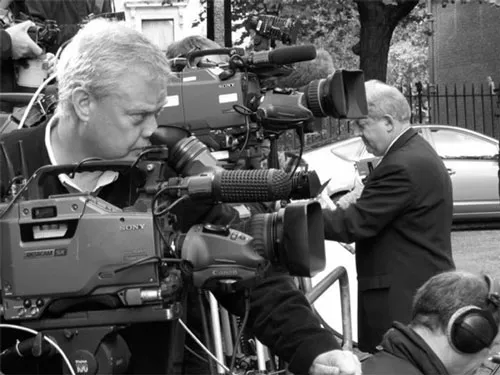
Fig 1.2 Cameraman at 10 Downing Street. “Location shooting comes in all forms, here its news and current affairs in London.”
If you work for a TV station or any large production company, then there is a good chance that your kit has been provided for you, possibly without your input. If this is so then jump ahead to the sections about the kit that is relevant to you. If you are freelance or take contract work, then it’s crucial that your kit suits the video work you intend to do and has a good shelf life; you don’t want to be repurchasing after a short period if your kit doesn’t do the job correctly or it records in a format that is to be replaced in the near future.
If you hire or use other people’s kits, then it will be important for you to know the fundamentals about each individual camera and how the important functions are located and accessed, and this will make your life easier when you come to use them.
If you are in the process of choosing a new camera system, then the following list may help you decide the priorities that will affect your purchase. There are so many decisions to be made before buying a new location shooting kit that it’s worthwhile trying to look objectively at the main points that matter. It applies to most types and levels of video cameras from semi-pro up to full blown HD:
- Firstly and most importantly you need to check out the post-shooting workflow taking you all the way from video gathering and editing to graphics and sound dubbing (if you use this facility). There are now multiple systems and ways to take in camera rushes, edit, and then package the final cut that it will almost always affect the camera and format you shoot on. The main point here is that you don’t want to end up with a shooting kit that makes the editing long and difficult. So check and recheck that the format you are choosing has a smooth, sensible progress through editing, and don’t choose a format on the basis that “it will soon be supported with edit software.” Go for a tried and tested route and ask the retailers hard direct questions about the level of support for that format.
- What tape/disk format does the camera kit use? Can your existing decks and software handle it?
- Will your existing clients be happy to use this camera format or do they only want to work with their existing decks and formats?
- Will the rushes digitize/transfer quickly and efficiently with your existing edit software?
- Will you need to buy new lenses or can your existing lenses be used on the new camera? Can it accept third party lenses from pro makers such as Canon and Fujinon?
- Check any lens coming with a new camera to see what maximum aperture it works at. Does this stated aperture change when the lens zooms into its tight end? If it does alter aperture (ramping down) then decide if this will affect your day-by-day shooting as a few less stop of light could mean you end up having to use extra lighting on your locations.
- What batteries will it take and can you use an existing battery system or will new ones be needed? A new battery system always seems to work out as an expensive option after you’ve bought new chargers and a few battery units.
- What audio capabilities does the new unit have, how many tracks, what bit rate, and are the connectors industry standard? Will your existing audio gear work correctly with this kit?
- What digital compression does the camera provide for its tapes? DigiBetacam is a mild 2:1 compression, whereas all DVCAMs are 5:1. Getting technical for a brief instance it’s worth noting that the DV system uses a different compression system than DigiBetacam, which is more efficient. As DV editing is now very common, DigiBetacam tapes are often compressed to DV for postproduction work. HD compression takes its starting point from the DV system, which is a modern technique.
- And then you’ll have to look at the camera’s performance: Is it 3 CCDs? What size are they? Larger sensors mean less noise. How does it handle its luminance, chrominance, and color signals, and what sampling ration is used?
Sampling is the description of how many times each second a signal is looked at. A DV camera will sample the Y (luminance part of the signal or brightness) at 13.5 MHz (13.5 million times per second). It then compares this to the other two main video components, R – Y (red minus the luminance) and B – Y (blue minus the luminance) and expresses it as a ratio. While DV is 4:2:0 in PAL (Phase Alternating Line) or 4:1:1 in NTSC (National Television System Committee), DigiBeta is 4:2:2.
However Panasonic DVC Pro is 4:1:1 and is DV compression, and DVC Pro 50 and Pro 100 are also DV compressions and used on HD cameras.
A very good description of sampling and how it can be compared can be found in Jon Fauer’s Focal Press book Shooting Digital Video. This book is not overly technical and you can quickly see how the whole system works.
So let’s take a look at the smaller kits first.
The latest generation of prosumer/semi-pro cameras such as SONY HVR-Z1e, Canon XL-H1, and JVC 251 all offer versions of high definition video known as HDV. This was a joint development by SONY, Canon, JVC, and Sharp and was introduced in 2003. Its basic purpose is to take the line resolutions of HD at 1080i or 720p and encode them onto DV tape. SONY used the 1080i, whereas others used 720p. Canon also uses 1080i and Panasonic can shoot both (full HD for TV is 1920 × 1080). These cameras are smaller than a full blown ENG camera, such as a SONY DVCAM DSR 570 or 450, and if you believe the manufacturers’ marketing releases, they will do everything perfectly well for 100.1% of the time.
So that’s sorted out then…
These are the kits that TV companies are giving out to staff in order to shoot their own shows, packages, and clips. These are also being used for mainstream TV more and more, and in their own way they are fantastic tools. But they are not ideal for every type of shooting, as they will not perform as perfectly as ENG cameras (electronic newsgathering cameras is a generic term for the larger, portable cameras that you see shooting TV news, sport, and features material). These are of broadcast quality, with high picture resolution, many manual functions, separate lenses, plus a high price tag. And at times the smaller video cameras will simply make your working life harder. The key is to find out as much about the kit and what it can/can’t do before using it and avoid being tempted by endless menu functions that are not going to help you or functions that only have a limited benefit on your day’s work. It must be relevant and useful and not just a gimmick.
In these new prosumer cameras, many functions are hidden in the camera’s menu systems making them slow to access and increasing the chance of having the wrong function switched on in a menu somewhere and the operator not being aware of it. Other major functions such as aperture control are sometimes in strange positions, not where you expect them to be, and work slightly differently than the ENG kits. The original SONY HVR-Z1e has a small silver aperture wheel mounted on the front of the camera’s body, which is awkward if you want to adjust it quickly while shooting, and you can easily go the wrong way, stopping the camera down when you meant to open it up and vice versa (Figures 1.3 and 1.4).
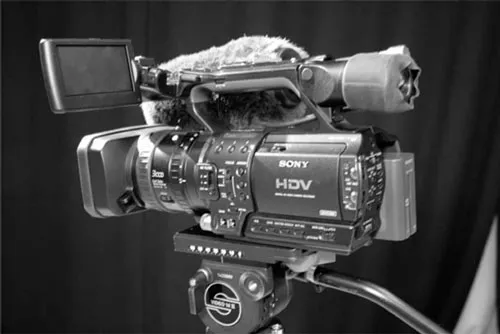
Fig 1.3 SONY Z1 camera. “Sony HVR-Z1e”.
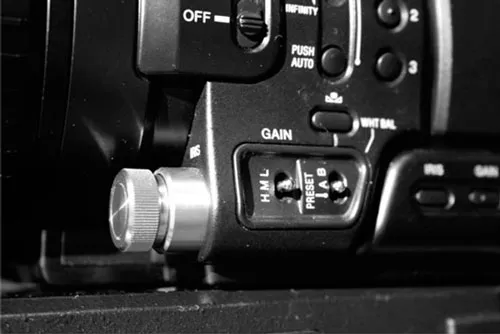
Fig 1.4 SONY Z1 aperture wheel close-up. “Someone at SONY decided to put the aperture ring down here…why I wonder?”
Why didn’t they leave the aperture ring on the lens, where every camera person in the world has been used to finding it and where it works best? If a car manufacturer decided to put the steering wheel in the back seats, everyone would be totally bewildered. I want my steering wheel in front of the driver’s seat please, and as a cameraman the aperture control back on the lens…
Audio outputs and inputs on these prosumer cameras are now starting to be XLR as standard instead of phonos, which are much better and easier to use as the XLR is balanced ...
Table of contents
- Cover
- Half Title
- Title Page
- Copyright
- Contents
- Acknowledgements
- Introduction
- About The Author
- Chapter 1. Location Filming Equipment
- Chapter 2. Setting up Location Monitors and Cameras
- Chapter 3. Operating Tips and Techniques
- Chapter 4. High-Definition Shooting
- Chapter 5. Location Audio
- Chapter 6. Interview Shooting Techniques
- Chapter 7. Shooting Sequences
- Chapter 8. Shooting for the Edit
- Chapter 9. Location Lights
- Chapter 10. Choosing Video Lights and Specialist Lights
- Chapter 11. Location Lighting Tips and Setups
- Chapter 12. Cutaways, GV’s, B Roll, Etc...
- Chapter 13. News and Current Affairs
- Chapter 14. Location Filming Abroad
- Chapter 15. Health and Safety for Location Shooting
- Chapter 16. Staying Fit and Well on Location
- Index
Trusted by 375,005 students
Access to over 1.5 million titles for a fair monthly price.
Study more efficiently using our study tools.
Frequently asked questions
Yes, you can cancel anytime from the Subscription tab in your account settings on the Perlego website. Your subscription will stay active until the end of your current billing period. Learn how to cancel your subscription
No, books cannot be downloaded as external files, such as PDFs, for use outside of Perlego. However, you can download books within the Perlego app for offline reading on mobile or tablet. Learn how to download books offline
We are an online textbook subscription service, where you can get access to an entire online library for less than the price of a single book per month. With over 1.5 million books across 990+ topics, we’ve got you covered! Learn about our mission
Look out for the read-aloud symbol on your next book to see if you can listen to it. The read-aloud tool reads text aloud for you, highlighting the text as it is being read. You can pause it, speed it up and slow it down. Learn more about Read Aloud
Yes! You can use the Perlego app on both iOS and Android devices to read anytime, anywhere — even offline. Perfect for commutes or when you’re on the go.
Please note we cannot support devices running on iOS 13 and Android 7 or earlier. Learn more about using the app
Please note we cannot support devices running on iOS 13 and Android 7 or earlier. Learn more about using the app
Yes, you can access Better Location Shooting by Paul Martingell in PDF and/or ePUB format, as well as other popular books in Media & Performing Arts & Film & Video. We have over 1.5 million books available in our catalogue for you to explore.