Producing Videos has been called the 'bible' of video making. A bestseller over many years, it offers a comprehensive and user friendly guide to all aspects of video production - from the first chapter on using a camera (if it doesn't go in easily, don't force it) to the chapter on distribution (no matter what happens, always hold onto your master).
All the elements of video production are covered: camera operation; scriptwriting; composition; budgeting; preproduction planning; lighting and sound recording; interview techniques; field production and studio shoots; digital editing; digital postproduction techniques; video streaming and other forms of online distribution.
This edition has been fully revised and updated to cover developments in technology, promotion and distribution. It includes tips from over 120 experienced video teachers from around the world, and is illustrated with over 600 photographs and 200 diagrams.
Producing Videos is the best handbook available for learning the basics of video making. It is an ideal guide for students, and for anyone who has a flip camera burning a hole in their pocket and aspirations to become the next hot new director.
'Whether you are a beginner or veteran filmmaker, Martha Mollison's Producing Videos serves as a comprehensive guide to all aspects of video production.' - Greg Walters, Portland Community College
'An invaluable resource for developing my students' video journalism skills.' - Kay Nankervis, Charles Sturt University
- 576 pages
- English
- ePUB (mobile friendly)
- Available on iOS & Android
eBook - ePub
About this book
Information
1
THE CAMERA
The way to learn video is by doing it. So swing that camera up to your eye and have a go! You can’t hurt the camera, unless you drop it or get it soaked.
You already know plenty about screen images: you know what you like, what you don’t like, and what you want to see from your shoot.
Now—how to get it.
The most effective way to learn video is to make a start and then ask the questions you need as you go along. No one can learn a hundred buttons at once, so work at your own pace.
Usually you’ll be working in a group, so what one person forgets, another person generally understands and can explain. Don’t be afraid to ask other people—next time you may remember something that they’ve forgotten.
Most people start off thinking that video production is about technical knowledge. Of course that’s part of it. But almost no one produces a video on their own.
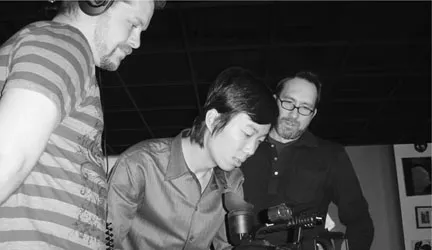
Everyone finally concurs that the shot is right. Tianli Ma on camera, Tristian Spillman on sound and Erik Fauske teacher, Portland Community College.
Video work is group work, and it relies on the combined efforts of a good team. When the crew members communicate well with each other, and everyone feels their contribution is needed and respected, people really start to fire with creativity.
That lifts the production to a higher level. Okay, where to start …
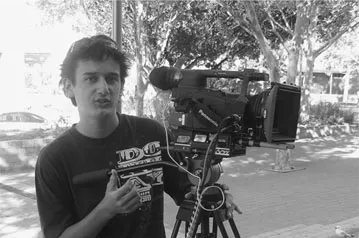
Jason Sharp tries out the P2. Central TAFE, Perth.
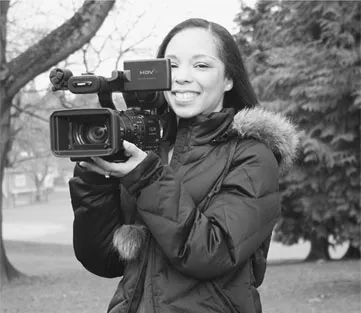
Sharon Thomson heads out with a DVCAM.
(Courtesy of Portland Community Media)
The Power Supply
There are two ways to power up the camera. You can either use a battery or you can connect the camera to the electrical outlet on the wall, using the AC adaptor.
The Camera Battery
Most cameras operate on rechargeable batteries. These are usually NiMH (nickel metal hydride) batteries or lithium ion batteries. Both types are much lighter in weight and run for longer than the old NICAD batteries, which are now out of favour due to the toxic heavy metal, cadmium, that they contain.
Lithium ion batteries have the added advantage of being totally free from developing a memory. The dreaded memory effect causes a battery which is repeatedly used for a short time and then recharged again to start acting like a short-term battery. Hopefully you won’t encounter this problem, but if you do, you should know that ‘memorised’ batteries can regain their full power by being totally drained and totally recharged several times in a row.
The camera and battery are designed so you can only attach the battery to the camera in the right way. If you try to do it upside down or backwards, it won’t go.
This leads us to:
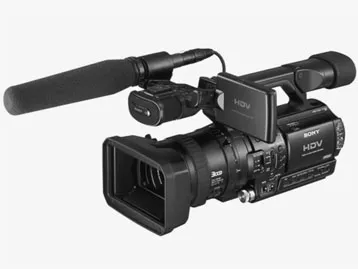
Photo courtesy of Metro Screen.
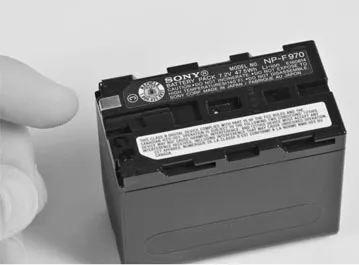
The metal contacts must make the right connections in order to pass their power.
THE FIRST LAW OF VIDEO
If it doesn’t go easily, don’t force it.
In video, everything is made to insert or connect easily. If you’re having trouble connecting something, you’re doing it wrong.
If you think pushing harder will do the trick, you’re doubly wrong.
If you try to force something in video, you’ll break it.
If you learn nothing else on the first day, learn this.
If you look at the battery, which is a dark and uninspiring lump of a thing, you’ll see that it has little metal contacts on it somewhere. They’re the gateway for the battery’s stored electrical power to get into the camera. These contacts must connect with their counterparts on the camera.
In many compact consumer cameras, it’s necessary to swing the camera eyepiece out of the way before you can line up the battery correctly for attachment.
Both the camera attachment spot and the battery will have arrows to guide you, and you can expect to hear a satisfying little click when the battery locks into place, but it’s a good idea when you’re new at this to give the battery a little wiggle just to make sure it’s secure.
When you want to detach the battery from the camera, look for a little button called battery release or eject. It’s usually very close to where the battery connects to the camera. When you push it, the battery attaching lock will be released and the battery can be removed.
Of all the various and sundry extra bits in video, the battery looks the most robust. But there are ways you can damage it.
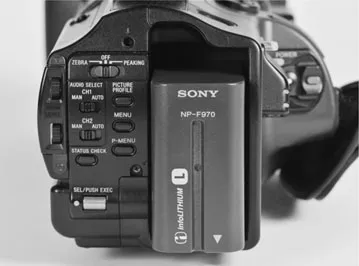
When connected correctly, the battery won’t wobble.
How to Avoid Battery Problems
- Don’t drop it. The cells inside can be broken by shock. Then the battery won’t work.
- Don’t short-circuit it by allowing a metal object to touch it across its contacts. So would you carry it in your pocket with lots of loose change?
- Don’t expose it to fire or water.
- Allow time to ‘break in’ new batteries. New batteries are in a discharged condition when sold. You should plan to do an overnight (twelve-hour) charge on a new battery before you have to use it. It can take two to four times of fully charging and fully discharging a new battery before it’s ‘formed’.If your charger stops before your new battery is fully charged, don’t worry—that’s quite a common occurrence. Just remove the new battery from the device and reconnect it. Charging should start up again.
- Exercise the batteries. Batteries should be used every two or three weeks to stay in good shape. They self-discharge over time, so if they’ve been idle for a while you may need to break them in again.
- Store batteries in a cool, clean, dry place.
- Clean dirty battery contacts with a cotton swab and alcohol.
- Don’t leave it behind. Batteries are unobtrusive little numbers and fade into the surroundings quite easily. It’s not at all hard to leave one under a chair, on top of a piano or on the floor of a car.The problem is, their appearance belies their value. Unlike the AA cells in your digital stills camera, video batteries are expensive to replace.
Battery End Game
Batteries do eventually die. After 500–800 charge/discharge cycles, or a couple of years of regular use, they’ll start showing their age by reduced runn...
Table of contents
- Cover
- Title Page
- Copyright Page
- Dedication Page
- Contents
- Acknowledgments
- Greeting
- 1 The Camera
- 2 Image Control
- 3 Composition and Framing
- 4 The Camera’s View
- 5 Telling the Story
- 6 Video Formats
- 7 Video Storage: Thanks for the Memory
- 8 Editing Basics
- 9 Editing Concepts
- 10 Editing: Getting More Technical
- 11 Microphones
- 12 Having the Right Connections
- 13 Location Sound
- 14 Sound Postproduction
- 15 Safety on the Set
- 16 Lighting
- 17 Using Lighting Equipment
- 18 Production Options
- 19 Video for Empowerment
- 20 Scriptwriting
- 21 Doing Short Dramas
- 22 Budgeting
- 23 Preproduction
- 24 The Location Shoot
- 25 Studio Layout and Equipment
- 26 Studio Roles
- 27 Studio Procedures
- 28 Operating the Vision Mixer
- 29 Operating the Studio Audio Mixer
- 30 Studio Interviews
- 31 The H.O.T. Studio (Host Operated Television)
- 32 Copyright
- 33 Distribution
- Glossary
- Index
Trusted by 375,005 students
Access to over 1.5 million titles for a fair monthly price.
Study more efficiently using our study tools.
Frequently asked questions
Yes, you can cancel anytime from the Subscription tab in your account settings on the Perlego website. Your subscription will stay active until the end of your current billing period. Learn how to cancel your subscription
No, books cannot be downloaded as external files, such as PDFs, for use outside of Perlego. However, you can download books within the Perlego app for offline reading on mobile or tablet. Learn how to download books offline
Perlego offers two plans: Essential and Complete
- Essential is ideal for learners and professionals who enjoy exploring a wide range of subjects. Access the Essential Library with 800,000+ trusted titles and best-sellers across business, personal growth, and the humanities. Includes unlimited reading time and Standard Read Aloud voice.
- Complete: Perfect for advanced learners and researchers needing full, unrestricted access. Unlock 1.5M+ books across hundreds of subjects, including academic and specialized titles. The Complete Plan also includes advanced features like Premium Read Aloud and Research Assistant.
We are an online textbook subscription service, where you can get access to an entire online library for less than the price of a single book per month. With over 1.5 million books across 990+ topics, we’ve got you covered! Learn about our mission
Look out for the read-aloud symbol on your next book to see if you can listen to it. The read-aloud tool reads text aloud for you, highlighting the text as it is being read. You can pause it, speed it up and slow it down. Learn more about Read Aloud
Yes! You can use the Perlego app on both iOS and Android devices to read anytime, anywhere — even offline. Perfect for commutes or when you’re on the go.
Please note we cannot support devices running on iOS 13 and Android 7 or earlier. Learn more about using the app
Please note we cannot support devices running on iOS 13 and Android 7 or earlier. Learn more about using the app
Yes, you can access Producing Videos by Martha Mollison in PDF and/or ePUB format, as well as other popular books in Media & Performing Arts & Digital Media. We have over 1.5 million books available in our catalogue for you to explore.