Visual Studio 2019 In Depth
eBook - ePub

Visual Studio 2019 In Depth

Discover and make use of the powerful features of the Visual Studio 2019 IDE to develop better and faster mobile, web, and desktop applications

  1. English
  2. ePUB (mobile friendly)
  3. Available on iOS & Android
eBook - ePub

Visual Studio 2019 In Depth

Discover and make use of the powerful features of the Visual Studio 2019 IDE to develop better and faster mobile, web, and desktop applications

About this book

Comprehensive guide to study the version updates from JDK9.0 to JDK13.0 Key Features

  • Learn the journey of Java from its initial days till date.
  • Learn how to implement modular programming in java9.
  • Study the updates in different versions of Java from version 9.0 to 13.0.
  • Understand the need and working of reactive programming.
  • Learn to migrate the pre-existing Java code to new versions.
  • Learn how to use jshell to test a new API before using in a project.


Description
Version release is one of the important phases of success of any programming language. Over the years, Java had made many improvements in its API to make to reliable and flexible to use. This book aims at providing you information related to all the updates from JDK9.0 to JDK13.0 in one place.This book starts with a brief history of Java. It covers how Java has evolved as a complete programming language over the years by launching different versions. You will learn the concept of module system and other important concepts introduced in JSE9.0 and JSE10.0. Moving ahead, the book will take you through updates in JDK11.0. Concepts like Epsilon, ZGC, and Nest-Based access control have also been discussed.Though the version updates are good to learn, they create complexities in updating the existing code to make it compatible with the new version. This book talks in detail about how you can migrate your legacy code to match up with the new versions. It also covers how to use jshell, a tool used to test your code snippet without writing the complete application class, with numerous examples. Further, this book covers in detail the concept of reactive programming. Concepts like publisher, subscriber, subscription and back-pressure have been discussed with examples.At the end of the book, you will learn about the very recent updates which have been released by Java. The chapters talk about JDK12.0 and JDK13.0. They cover concepts like Shenondaoh, microbenchmark suit, modified switch expression from JDK12.0. Though, Java13 is still a hot-plated dish, this book gives you a fair idea about what are the new updates which have been proposed in this version. What You Will Learn
By the end of this book, you will be able to implement the updates provided in different versions of Java. This book has covered the updates from version 9.0 to 13.0. You will be able to work with the Java Module System. You will be able to test the new API using jshell. Along with this, you will be able to migrate your legacy code to match the recommendations of new versions of Java. Who This Book is For This book covers the new version updates in Java. So, prior knowledge of Java is recommended before reading this book. Though we are covering the versions from JSE9.0 onwards, it is not necessary that the reader should be expert in the earlier versions. If you are keen to know the recent developments in Java API, this is the perfect book for you. Table of Contents
1. Insights of Versioning
2. What's new in Java9
3. Understanding JDK10 – Step towards JDK11
4. Dive in JDK11
5. Migrating the code
6. Working with JShell
7. Reactive Programming and Concurrency Updates
8. What next in Java12
9. Introduction to Java13 About the Author
Mandar Jog is a passionate Java Trainer with over 15 years of experience in retail and corporate training. He has global certifications like SCJP and SCWCD. His areas of expertise are Java, J2EE (Spring, Hibernate). He has delivered more than 500 training sessions on Core Java, Web Technologies, Hibernate, Spring Boot, Angular, etc. His LinkedIn profile: https://www.linkedin.com/in/mandar-jog-0ba9a01b/
Frequently asked questions

Yes, you can cancel anytime from the Subscription tab in your account settings on the Perlego website. Your subscription will stay active until the end of your current billing period. Learn how to cancel your subscription.
At the moment all of our mobile-responsive ePub books are available to download via the app. Most of our PDFs are also available to download and we're working on making the final remaining ones downloadable now. Learn more here.
Perlego offers two plans: Essential and Complete
  • Essential is ideal for learners and professionals who enjoy exploring a wide range of subjects. Access the Essential Library with 800,000+ trusted titles and best-sellers across business, personal growth, and the humanities. Includes unlimited reading time and Standard Read Aloud voice.
  • Complete: Perfect for advanced learners and researchers needing full, unrestricted access. Unlock 1.4M+ books across hundreds of subjects, including academic and specialized titles. The Complete Plan also includes advanced features like Premium Read Aloud and Research Assistant.
Both plans are available with monthly, semester, or annual billing cycles.
We are an online textbook subscription service, where you can get access to an entire online library for less than the price of a single book per month. With over 1 million books across 1000+ topics, we’ve got you covered! Learn more here.
Look out for the read-aloud symbol on your next book to see if you can listen to it. The read-aloud tool reads text aloud for you, highlighting the text as it is being read. You can pause it, speed it up and slow it down. Learn more here.
Yes! You can use the Perlego app on both iOS or Android devices to read anytime, anywhere — even offline. Perfect for commutes or when you’re on the go.
Please note we cannot support devices running on iOS 13 and Android 7 or earlier. Learn more about using the app.
Yes, you can access Visual Studio 2019 In Depth by Sunny Sharma,Ockert J. du Preez in PDF and/or ePUB format, as well as other popular books in Computer Science & Software Development. We have over one million books available in our catalogue for you to explore.

SECTION I

Getting Started

Introduction

In the Getting Started section, we will discover all the installation options as well as learn how to install Visual Studio 2019 to suit our needs. We will take a look at the Integrated Development Environment (IDE) and all its associated windows. Next, in Chapter 3: Visual Studio 2019 IntelliSense, we will take a look at IntelliSense and see how it can save hundreds of keystrokes while writing a big program. Finally, we will explore the language changes in C# 8.0 and .NET Core 3.0.
This section will have the following chapters:
  1. Installation
  2. Visual Studio IDE
  3. Intellisense
  4. Language and Coding Changes in C# 8
  5. .NET Core 3.0

CHAPTER 1

Getting Started with Visual Studio 2019

The first version of Visual Studio was released in 1997, and it was the first time all Microsoft’s programming tools were integrated into one common IDE. Now, more than 20 years later, the technology landscape has changed tremendously, and Visual Studio has adapted continuously with it. Therefore, Visual Studio 2019 includes the best and newest tools to work with modern-day problems and technologies properly.
In this chapter, we will focus on installing Visual Studio 2019. We will cover all the options and add-ons to install and explore the new Visual Studio 2019 features, including DevOps, IntelliCode, new Debugging windows updates, new Open Windows, and many more!

Structure

  • Why Visual Studio 2019?
  • Requirements and prerequisites
  • Visual Studio 2019 Editions
  • Installation options
  • Choose what to install
  • Launching Visual Studio 2019

Objective

In this chapter we will cover Visual Studio 2019 in general. It will cover the requirements to install it, how to install it, and how to start using Visual Studio 2019. Most importantly, it will answer the question: why Visual Studio 2019?

Why Visual Studio 2019?

The answer is simple: productivity. Visual Studio 2019 allows us to create, debug, and deploy desktop, web, and mobile applications with great ease. Visual Studio 2019 boasts a powerful debugger and vast amount of debugging windows, which aid in exception handling and debugging. Developer productivity in Visual Studio 2019 is increased immensely with the widening of the Code Editor, Code Health, and Document Indicator tools and quick project creation. Working in a team is also easier and better with the addition of DevOps. Visual Studio 2019 also has an inviting IDE with windows such as the Solution Explorer, Server Explorer, Team Explorer, Data Sources, Properties window and the Toolbox window.
Visual Studio 2019 also has many new features, which we will go into as well. First, let us understand some of the well-known Windows for the newbies reading this book.

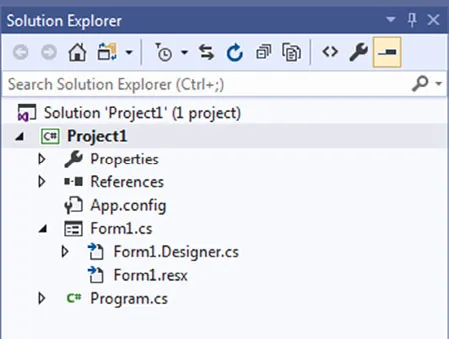
The Solution Explorer

The Solution Explorer window shows all the files in our projects, including classes, references, forms, or pictures. It serves as a quick way to switch between windows as well as do project or solution-oriented tasks, which are as follows:
  • Renaming of files
  • Adding references quickly
  • Removing project items
  • Adding project items
The following screenshot displays the Solution Explorer window:
Figure 1.1: Solution Explorer

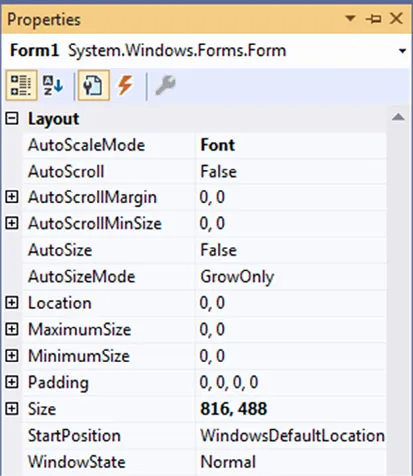
The Properties window

The Properties window hosts all the Properties of an object such asforms, any controls on the form, web pages, the project or solution itself. Properties are characteristics of objects; for example, its name, size, location, color, or file name. Properties describe objects. The following screenshot displays the Properties window:
Figure 1.2: Properties window
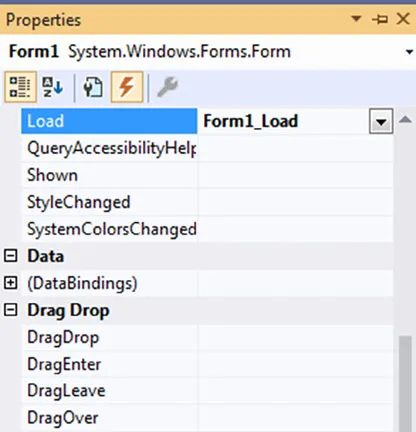
In the Properties window, we can also add the event handlers for the controls on the form, web page, or mobile screen; it looks similar to the following screenshot:
Figure 1.3: Properties window events
Each object has different events, and our job as developers would be to program these events to suit our purpose. In the preceding screenshot, we will notice that Load has an event. This event is named Form1_Load.
The naming convention of an event is Objectsname_eventname. The specific event’s name is added to the object’s name. This makes it easy for us to identify and search for certain events when the need arises.

The Data Sources window

The Data Sources Configuration Wizard window allows us to add data sources to our project. A data source is explained as a place or object from which we obtain data. This can be a database such as Microsoft SQL Server, Microsoft Access, Oracle, and so on. The following screenshot displays the Data Source Configuration Wizard window:
Figure 1.4: Add Data Source
Specify the location of the obtained data, then the table name, stored procedure name, or query name, which will fetch the data or contains the data. After a data source is added, we can use it throughout our Windows form, web page, or mobile screen.

The Server Explorer window

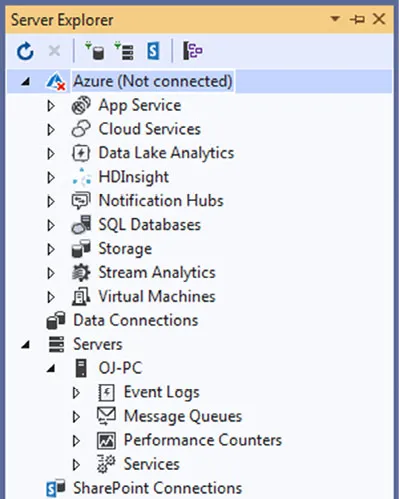
The Server Explorer window shows the details of all the servers that we are connected to. These include Cloud Services, SQLDatabases, and Virtual Machines, as shown in the following screenshot:
Figure 1.5: Server Explorer
It i...

Table of contents

  1. SECTION I: Getting Started
  2. SECTION II: Tools
  3. SECTION III: Advanced Tools
  4. SECTION IV: Extensions
  5. Index