Step-by-step guide on becoming a JavaScript guru Key Features
The JavaScript Language
Control-flow statements
Loops
Classes
Prototypes
Modules
Generators
Arrays
Regular Expressions
Error Handling
Description From start to finish, this book will cover all the intricacies of the JavaScript language! You will get an overview of all the Statements, Functions, and Operators. Then you will learn the fun stuff which includes: Classes, Prototypes, Promises, and Generators. You will learn about arrays and how to make your scripts achieve logic in your scripts. Lastly, you will learn how to combine JavaScript with other languages. What will you learn By the end of this book, you will be able to create basic and advanced web applications. You will be able to structure your web pages and its data into proper objects and classes and make use of them productively. Who this book is for People who are new to software development and want to learn JavaScript will find this book useful. This book can also be used by JavaScript users for a quick reference for the fundamentals and new features. Table of Contents 1. Overview of the power of JavaScript and its purpose 2. JavaScript Objects 3. JavaScript Statements 4. JavaScript Operators 5. JavaScript Functions 6. Classes 7. Prototypes 8. Properties 9. Promises 10. Generators 11. Modules 12. Variables 13. Control-flow statements 14. Loops 15. Code Quality 16. Arrays 17. Regular Expressions 18. Partials and Currying 19. JavaScript and Other Languages About the Author Ockert du Preez started learning programming. He is a self-taught developer. He has written several articles over the years detailing his programming quests and adventures. He is a former Microsoft Most Valuable Professional for.NET (2008 - 2017), ex moderator article reviewer, and current article writer for CodeGuru, Developer.com, DevX, and Database Journal.His Visual Studio 2019 book: https://bpbonline.com/collections/visual-studio/products/visual-studio-2019-in-depth His Blog: https://www.codeguru.com/member.php/Hannes+DuPreez/ His LinkedIn Profile: https://www.linkedin.com/in/ockert-du-preez-432783139/
Section 2 dives right into the real power of JavaScript. Understanding what makes JavaScript tick is pivotal in creating extremely powerful websites and web applications. In this section, you will learn how to create classes, and then move on to prototypes, properties and promises, finally generators, and modules.
This section will have the following chapters:
Classes
Prototypes
Properties
Promises
Generators
Modules
CHAPTER 6
JavaScript Classes
Introduction
A JavaScript class creates the structure of its child objects. Although JavaScript is not a full-on object-oriented programming (OOP) language, it still contains many an OOP feature. Learning how to work with classes is essential to create proper reusable objects.
In this chapter, we will focus on JavaScript classes. You will learndifferent ways to create classes and how to instantiate child objects from classes. Properties and methods are next. You will learn how to create basic properties and methods to give your classes better structure and better adaptability. Lastly, you will get a quick introduction to inheritance. There is a lot of work, so let’s get started!
Structure
What are classes?
Creating a class
Class declarations
Class expressions
Properties
Properties of properties
Methods
Static methods
Inheritance
Objectives
Learn what classes are
Understand the concepts of properties
Understand the concepts of methods
Learn what inheritance is
What are classes?
A class, in OOP is a template or blueprint from which objects can be created. A class in JavaScript is a type of function which can be created with a class declaration or a class expression.
Creating a class
There are essentially two ways to create a class in JavaScript; they are:
Declaring a class
Using a class expression
Let’s have a look at examples for each.
Class declarations
To declare a class, all you need to do is to use the class keyword and supply name of the class, with a constructor. A constructor is a special type of method where the object can be initialized, and it gets called automatically. You can also supply arguments (parameters) to the class here and initialize them as well. Initialization is the assignment (setting) of an initial value for an object or variable. Here is an example:
class Student {
constructor(studentName, studentCourse) {
this. studentName = studentName;
this. studentCourse = studentCourse;
}
}
In the above code, we created a class named Studentis created. The constructor function gets two arguments supplied to it. These two arguments are studentName and studentCourse.
Let’s take it a step further.
The following sample shows how to declare a class, initialize some of its objects, and make use of a class from code outside of the class:
Open a text editor of your choice and enter the following HTML and JavaScript code
Save the file with an HTML extension, for example Chapter 6.1.html.
Double-click the file to open it in the default browser.
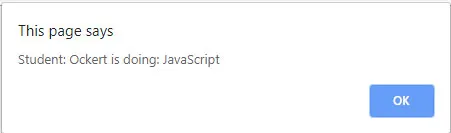
An alert-box similar to the next screenshot will appear:
Figure 6.1: Class Declaration in action
Let me explain what happens in the codewe have created the Student class and its constructor. Then, we initialize the studentName and studentCourse variables. Inside the Student class you created a function named showInfo. The showInfo function displays an alert box with the supplied studentName and studentCourse. Then, we created a Student object name student (notice that JavaScript is case sensitive). Inside the student object, you supply details such as your name (or mine in this case) and the course. Lastly, you invoke the showInfo function from the student object, and this displays the alert box shown in Figure 6.1.
Now that you know how to create a class let’s see how to create class expressions to create classes.
Class expressions
Classes, just like functions, can be defined inside expressions, as explained in Chapter 5: Functions. Class expressions can be named or unnamed. Let’s do an example on both.
The following sample shows an unnamed class expression example:
Open a text editor of your choice and enter the following HTML and JavaScript code
var student = new Student(‘Ockert’, ‘JavaScript’);
student.showInfo();
</script>
</body>
</html>
Save the file with an HTML extension, for example Chapter 6.2.html.
Double-click the file to open it in the default browser.
OK, so ...
Table of contents
Cover Page
Title Page
Copyright Page
Dedication
About the Author
Acknowledgements
Preface
Errata
Table of Contents
SECTION I: Introductory Concepts
SECTION II: The Power of JavaScript
SECTION III: Using JavaScript Productively
SECTION IV: Advanced Concepts
SECTION V: JavaScript and Friends
Trusted by 375,005 students
Access to over 1.5 million titles for a fair monthly price.
Study more efficiently using our study tools.
Frequently asked questions
Yes, you can cancel anytime from the Subscription tab in your account settings on the Perlego website. Your subscription will stay active until the end of your current billing period. Learn how to cancel your subscription
No, books cannot be downloaded as external files, such as PDFs, for use outside of Perlego. However, you can download books within the Perlego app for offline reading on mobile or tablet. Learn how to download books offline
Perlego offers two plans: Essential and Complete
Essential is ideal for learners and professionals who enjoy exploring a wide range of subjects. Access the Essential Library with 800,000+ trusted titles and best-sellers across business, personal growth, and the humanities. Includes unlimited reading time and Standard Read Aloud voice.
Complete: Perfect for advanced learners and researchers needing full, unrestricted access. Unlock 1.5M+ books across hundreds of subjects, including academic and specialized titles. The Complete Plan also includes advanced features like Premium Read Aloud and Research Assistant.
Both plans are available with monthly, semester, or annual billing cycles.
We are an online textbook subscription service, where you can get access to an entire online library for less than the price of a single book per month. With over 1.5 million books across 990+ topics, we’ve got you covered! Learn about our mission
Look out for the read-aloud symbol on your next book to see if you can listen to it. The read-aloud tool reads text aloud for you, highlighting the text as it is being read. You can pause it, speed it up and slow it down. Learn more about Read Aloud
Yes! You can use the Perlego app on both iOS and Android devices to read anytime, anywhere — even offline. Perfect for commutes or when you’re on the go. Please note we cannot support devices running on iOS 13 and Android 7 or earlier. Learn more about using the app
Yes, you can access JavaScript for Gurus by Ockert J. du Preez in PDF and/or ePUB format, as well as other popular books in Computer Science & Software Development. We have over 1.5 million books available in our catalogue for you to explore.