Learn how to create and deploy a SPA in C# with Blazor Key Features
Get familiar with the basic and advanced concepts of the Blazor framework
Understand how to implement JavaScript interop in Blazor
Learn how to inject the service dependency in Blazor
Learn how to implement security using Authentication and authorization
Deploy and host your Blazor app on IIS and Azure
Description Blazor is a new, open-source, and SPA web framework that allows you to build a web application using C# and HTML. Blazor enables you to write C# code instead of JavaScript. This book is a comprehensive guide about the new modern Blazor framework. It begins with an introduction to the Blazor and its components and concepts. It explains how you can start the development process, what tools you can use to develop an application, and how you can deploy it. You will then learn more about Databind, Eventbinding, layout, routing, JavaScript interop, and Dependency Injection. Concepts such as Authentication and authorization, error handling are also covered. Towards the end, you will learn how to deploy your Single Page Application Using Blazor. What will you learn
Explore and use a various way to create a Blazor component
Get familiar with the working of Data Binding, Event Binding, Layouts, Routing, and Validation
Learn how to invoke JavaScript functions from.NET methods
Preserving State in Server-Side Blazor applications
Authentication and Authorization using Facebook API & Google API
Host and Deploy your Blazo app on IIS and Azure
Who this book is for This book is for web developers who want to use Blazor to build web apps. This book will also help and guide web developers who are currently using Blazor. Table of Contents 1. An Introduction to Blazor 2. Components and Structure for Blazor Applications 3. Blazor Concepts 4. Dependency injection in Blazor 5. JavaScript interop 6. State management 7. Authentication and Authorization 8. Handle & Log errors in Blazor Application 9. Getting Started with Blazor Using Visual Studio 2019 10. Hosting and Deployment About the Author Jignesh Trivedi is working as a software developer with a leading organization and having more than 14 years of experience. He is very passionate about Microsoft Technologies. He is an author, speaker, and Microsoft MVP. He loves building great products and POC (proof of concepts) using the best available technologies. He loves to share his knowledge by contributing to the Developer community. His LinkedIn Profile: https://www.linkedin.com/in/jignesht24
The Blazor is a new web framework that can run in any browser. Using the Blazor framework, you can create a rich and modern Single Page Application (SPA). It allows us to create both server-side and client-side applications. The server application code runs on the server and communicates with UI by SignalR. The client application runs in the browser on mono via WebAssembly.
In this chapter, we’ll cover the following topics
What is Web Assembly?
What is Blazor?
Prerequisite Blazor development
Features of Blazor
Blazor supported platforms
Creating our first Blazor application
How Blazor application renders in the browser?
Understand Blazor booting process
Render tree in Blazor application
Blazor Client-side
Blazor Server-side
Objectives
Understand WebAssembly and Blazor
Understand the features of Blazor
Know prerequisite to start Blazor application development
Know Blazor supported platforms
Understand the internal working of Blazor application
Understand the type of Blazor application
What is Web Assembly?
WebAssembly is an open standard and defined a portable binary code format. It was developed at the World Wide Web Consortium (W3C). The most modern browser supports the WebAssembly without any plug-in. It is similar to low-level assembly language with a compact binary that runs with a near equal performance provided by native language. It can also run along with JavaScript, and both can work together. It enables you to create high-performance applications on web pages. It is not a replacement for JavaScript. It is also referred to as WASM. Following are some features of WebAssembly:
Efficient and fast
Open and debuggable
Hardware independent
Language independent
Platform independent
Part of the open web platform
memory-safe
Developers do not write code directly in the WebAssembly but write code in high-level languages such as C#, F#, and so on. The respective language code compiler compiles code into WebAssembly bytecode, and it runs on the client (that is, a web browser) where this translated into native machine code. The execution performance is nearly equal to JavaScript, but there is overhead of downloading the WASM module and setting it up. However, it is a one-time activity. It provides a sandboxed execution model with the same security models that exist for JavaScript. You can call JavaScript function from the WebAssembly module and vice versa.
Currently, WebAssembly runs under a web browser is the most common scenario, but its future is not limited to the web. It may be more useful in mobile apps, desktop apps, and many more.
As the name suggests itself, it is more likely an assembly language that consumed by the machine. Developers cannot write code directly in WebAssembly, but code written in a high-level language, and then it compiledinto WebAssembly. This is done by any of the following three ways:
WebAssembly-based interpreter: In this way, language is not translated into WebAssembly but interpreter for the language written in WebAssembly. Currently, Ruby and Python have interpreters that translated code to WebAssembly.
Direct compilation: Some of the language compilers has the ability to translate source code into WebAssembly. Currently, C/C++, Kotlin/Native, and Rust compiler have a native way to generate WebAssembly.
Third-party tools: If the language does not have native support to generate WebAssembly, you can use a third party tool/utility to convert source code to WebAssembly.
The WebAssembly is not the replacement of the JavaScript. It is designed to work with JavaScript and compatible with other web technologies such as HTML and CSS. The higher-level languages such as C#, VB.net, C++, and so on. can be compiled into WebAssembly that runs under the same browser sandbox environment as JavaScript code is running.
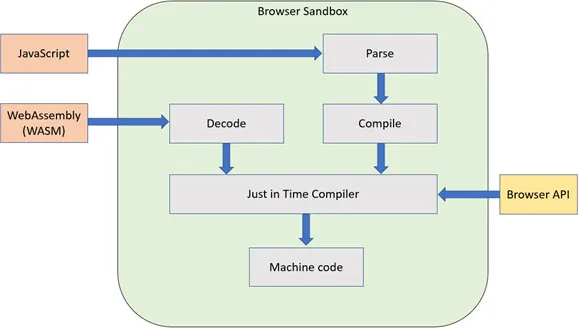
When JavaScript code gets executed, first goes through the process of parsing and compilation, and then, the Just in Time (JIT) compiler performs speculative execution of binary code. The WebAssembly modules are compiled in a higher-level language, and they are already parsed and compiled, so they go through a decoding phase before executed by JIT. Typical execution of JavaScript and WebAssembly in browser sandboxas shown in the following Figure 1.1: JavaScript and WebAssembly execution in Browser sandbox:
Figure 1.1: JavaScript and WebAssembly execution in Browser sandbox
As you have seen here, both JavaScript and WebAssembly code execution are similar at the JIT compiler.
Security considerations
WebAssembly does not provide full access to the computer environment on that it executed. All the interaction with the environment (such as I/O access, OS Call) can be done by invoking function provided by Embedder. The Embedder can be defined as security policies. The WebAssembly is translated source code to machine code and run on the host hardware, so it is vulnerable for side-channel attacks on hardware. The embedder may have to do something to isolate WebAssembly computations.
WebAssembly limitations
The WebAssembly is very powerful but has a certain limitation:
The WebAssembly does not have support for direct access to DOM and Browser API.
The WebAssembly has to rely on JavaScript interop to update the DOM and access the browser API such as SVG, Canvas, and built-in APIs (history, local storage, location, and so on).
The JavaScript script has its own garbage collection, but WebAssembly does not have a garbage collector. It uses mono GC for the Blazor application.
Facts about WebAssembly
There are a few facts about the WebAssembly listed as follows:
Is WASM kill JavaScript?
No, WASM is not a replacement for JavaScript, but it was created to meet the performance requirement of the web application.
Is WASM a new programming language?
It is not a programming language, but it is the intermediate binary format that works as a compiler for higher-level languages such as C, C++, and rust. The end-goal of WASM had not become a programming language, but it is binary text representation.
Can other programming languages write WASM code other than C and Rust?
The WASM is not a programming language, but it more like the compiler. Many high-level languages such as C# supported by WASM. There are few limitations with WASM that describe previously.
Is it an upgraded version of Silverlight?
No, it is not an upgraded version of Silverlight. The Silverlight required plug-in to run the application on the browser, whereas WebAssembly does not require any plug-in.
These are the facts about the WebAssembly that one must know before they start working with it.
What is Blazor?
Browser + Razor(Blazor) is a new web framework for building Single Page Application (SPA) using .NET Core framework that uses Mono WebAssembly runtime.
The Mono is an open-source framework sponsored by Microsoft for implementation of the .NET framework (based on the open standard for C# and Common Language Runtime (CLR)). It allows you to write code that runs on cross-platform, targeting macOS, Linux, iOS, Android, and Windows. It provides .NET Standard support and has been compiled to WebAssembly. The Mono runtimes compiled into WebAssembly and using Mono Intermediate Language (IL), it loads and executes .NET assemblies. In this way, the .NET works in the browser. This runtime bootstraps by the JavaScript file and download the dlls. This JavaScript also provides access to browser API those required to run code. In short, our code gets compiled to .NET standard dlls, and those are downloaded by the browser and the Mono runtimes compiled to WebAssembly.
Mono runs under WebAssembly in two modes: Interpreted and Ahead-of-time (AOT).
Interpreted mode
In interpreted mode, the mono runtime compiled to WebAssembly but not our code (in the form of assembly). The browser loadedour .NET assembly (which is in the form of dlls) and executed by mono runtime. This execution model is very similar to desktop CLR. The desktop CLR uses JIT compilation to make execution faster, but Mono is much closer to the pure interpretation model. Figure 1.2: interpreted compilation mode shows the graphical representationof interpreted compilation mode working:
Figure 1.2: interpreted compilation mode
In this model, our .NET assemblies are executed by mono runtime. It results in a performance delay.
Ahead-of-time compiled mode
In this mode, our .NET assemblies are ...
Table of contents
Cover Page
Title Page
Copyright Page
Dedication
About the Author
About the Reviewer
Acknowledgement
Preface
Errata
Table of Contents
1. An Introduction to Blazor
2. Components and Structure for Blazor Applications
3. Blazor Concepts
4. Dependency Injection
5. JavaScript Interop
6. State Management
7. Authentication and Authorization
8. Handle Exception and Log Error
9. Getting Started with Blazor Using Visual Studio 2019
10. Hosting and Deployment
Trusted by 375,005 students
Access to over 1.5 million titles for a fair monthly price.
Study more efficiently using our study tools.
Frequently asked questions
Yes, you can cancel anytime from the Subscription tab in your account settings on the Perlego website. Your subscription will stay active until the end of your current billing period. Learn how to cancel your subscription
No, books cannot be downloaded as external files, such as PDFs, for use outside of Perlego. However, you can download books within the Perlego app for offline reading on mobile or tablet. Learn how to download books offline
Perlego offers two plans: Essential and Complete
Essential is ideal for learners and professionals who enjoy exploring a wide range of subjects. Access the Essential Library with 800,000+ trusted titles and best-sellers across business, personal growth, and the humanities. Includes unlimited reading time and Standard Read Aloud voice.
Complete: Perfect for advanced learners and researchers needing full, unrestricted access. Unlock 1.5M+ books across hundreds of subjects, including academic and specialized titles. The Complete Plan also includes advanced features like Premium Read Aloud and Research Assistant.
Both plans are available with monthly, semester, or annual billing cycles.
We are an online textbook subscription service, where you can get access to an entire online library for less than the price of a single book per month. With over 1.5 million books across 990+ topics, we’ve got you covered! Learn about our mission
Look out for the read-aloud symbol on your next book to see if you can listen to it. The read-aloud tool reads text aloud for you, highlighting the text as it is being read. You can pause it, speed it up and slow it down. Learn more about Read Aloud
Yes! You can use the Perlego app on both iOS and Android devices to read anytime, anywhere — even offline. Perfect for commutes or when you’re on the go. Please note we cannot support devices running on iOS 13 and Android 7 or earlier. Learn more about using the app
Yes, you can access Building a Web App with Blazor and ASP .Net Core by Jignesh Trivedi in PDF and/or ePUB format, as well as other popular books in Computer Science & Software Development. We have over 1.5 million books available in our catalogue for you to explore.