eBook - ePub
IoT based Projects
Realization with Raspberry Pi, NodeMCU and Arduino
- English
- ePUB (mobile friendly)
- Available on iOS & Android
eBook - ePub
IoT based Projects
Realization with Raspberry Pi, NodeMCU and Arduino
About this book
Create your own IoT projects KEY FEATURES
- Comprehensive coverage of various aspects of IoT concepts
- Covers various Arduino boards and shields
- Simple language, crystal clear approach and straight forward comprehensible presentation
- Adopting user-friendly style for the explanation of circuits and examples
- Includes basics of Raspberry Pi and related projects DESCRIPTION
The book has been written in such a way that the concepts are explained in detail. It is entirely based on the practical experience of the authors while undergoing projects with students and industries, giving adequate emphasis on circuits and code examples. To make the topics more comprehensive, circuit diagrams, photographs and code samples are furnished extensively throughout the book. The book is conceptualized and written in such a way that the beginner readers will find it very easy to understand and implement the circuits and programs. The objective of this book is to discuss the various projects based on the Internet of Things (IoT). WHAT YOU WILL LEARN
- Internet of Things, IoT-Based Smart Camera, IoT-Based Dust Sampler
- Learn to create ESP8266-Based Wireless Web Server and Air Pollution Meter Using Raspberry Pi, Smart Garage Door, Baggage Tracker, Smart Trash Collector, Car parking system, Home Automation
- Windows 10 on Raspberry and know to create Wireless Video Surveillance Robot Using Raspberry Pi WHO THIS BOOK IS FOR
Students pursuing BE/BSc/ME/MSc/BTech/MTech in Computer Science, Electronics, Electrical. TABLE OF CONTENTS
1. ESP8266-Based Wireless Web Server
2. Air Pollution Meter Using Raspberry Pi
3. Smart Garage Door
4. Baggage Tracker
5. Smart Trash Collector
6. Car parking system
7. Home Automation
8. Environmental Parameter Monitoring
9. Intelligent System for the Blind
10. Sign to Speech Using the IoTs
11. Windows 10 on Raspberry
12. Wireless Video Surveillance Robot Using Raspberry Pi
13. IoT-Based Smart Camera
14. IoT-Based Dust Sampler and Air Quality Monitoring System AUTHOR BIO
Dr. Rajesh Singh is currently associated with Lovely Professional University as a professor with more than sixteen years of experience in academics. Dr. Anita Gehlot is currently associated with Lovely Professional University, Punjab, as an associate professor with more than twelve years of experience in academics. Dr. Lovi Raj Gupta is the Executive Dean, Faculty of Technology & Sciences, Lovely Professional University. Ms. Navjot Rathour is associated with Lovely Professional University as an assistant professor with more than eight years of experience in academics. Mahendra Swain is a PhD Scholar at Lovely Professional University, Jalandhar, Punjab. He has completed his B.Tech in ECE from Centurion University of Technology and Management, Bhubaneswar. He has completed his M.Tech from Lovely professional University. Bhupendra Singh is the Managing Director of Schematics Microelectronics and provides Product design and R&D support to industries and Universities.
Frequently asked questions
Yes, you can cancel anytime from the Subscription tab in your account settings on the Perlego website. Your subscription will stay active until the end of your current billing period. Learn how to cancel your subscription.
No, books cannot be downloaded as external files, such as PDFs, for use outside of Perlego. However, you can download books within the Perlego app for offline reading on mobile or tablet. Learn more here.
Perlego offers two plans: Essential and Complete
- Essential is ideal for learners and professionals who enjoy exploring a wide range of subjects. Access the Essential Library with 800,000+ trusted titles and best-sellers across business, personal growth, and the humanities. Includes unlimited reading time and Standard Read Aloud voice.
- Complete: Perfect for advanced learners and researchers needing full, unrestricted access. Unlock 1.4M+ books across hundreds of subjects, including academic and specialized titles. The Complete Plan also includes advanced features like Premium Read Aloud and Research Assistant.
We are an online textbook subscription service, where you can get access to an entire online library for less than the price of a single book per month. With over 1 million books across 1000+ topics, we’ve got you covered! Learn more here.
Look out for the read-aloud symbol on your next book to see if you can listen to it. The read-aloud tool reads text aloud for you, highlighting the text as it is being read. You can pause it, speed it up and slow it down. Learn more here.
Yes! You can use the Perlego app on both iOS or Android devices to read anytime, anywhere — even offline. Perfect for commutes or when you’re on the go.
Please note we cannot support devices running on iOS 13 and Android 7 or earlier. Learn more about using the app.
Yes, you can access IoT based Projects by Rajesh Singh,Dr. Rajesh Singh,Dr. Anita Gehlot,Dr.Lovi Raj Gupta, Navjot,Rathour,Mahendra Swain,Bhupendra Singh in PDF and/or ePUB format, as well as other popular books in Computer Science & Computer Networking. We have over one million books available in our catalogue for you to explore.
Information
CHAPTER 1
ESP8266-based Wireless Web Server
The ESP8266 is a low-cost Wi-Fi microchip with full TCP/IP stack manufactured in 2014. This chapter discusses the open source platform, NodeMCU with ESP8299 WiFi SoC. The circuit diagram and interfacing steps are discussed to understand the working of NodeMCU to control the home appliances with the web server.
Introduction
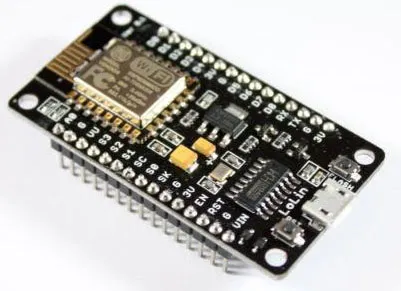
To understand the interfacing of NodeMCU, a system is designed to control the home appliances with the local server. NodeMCU is an open source IoT platform. It includes firmware which runs on the ESP8266 Wi-Fi SoC. NodeMCU, as shown in Figure 1.1, provides access to the GPIO (General Purpose Input/Output):

Figure 1.1: NodeMCU
For developing purposes, the pin description is shown in following Table 1.1:

Table 1.1: ESP8266 pin description
The home appliances can be controlled with NODEMCU through relays. Figure 1.2 shows the detailed block diagram of the system and Table 1.2 shows the component list required for the system. It shows the block diagram of the system. It comprises NodeMCU, LCD, power supply, and electrical appliances:

Figure 1.2: Block Diagram
Table 1.2 shows the list of components required to design the system:
| Component/Specification | Quantity |
| Power supply 12V/1Amp | 1 |
| Node MCU | 1 |
| Solid state relay board | 4 |
| Extension board for four appliances | 4 |
| Power supply extension | 1 |
| ISP programmer | 1 |
| LCD16*2 | 1 |
| LCD patch | 1 |
| +5V power supply | 1 |
Table 1.2: Components List
Circuit diagram
The circuit diagram of the system is shown in Figure 1.3 and the description of the system is as follows:
- NodeMCU D0 pin is attached to RS pin of LCD
- RW pin of LCD is connected to Ground
- NodeMCU D1 pin is attached with E pin of LCD
- NodeMCU D2 pin is attached with D4 pin of LCD
- NodeMCU D3 is attached with D5pin of LCD
- NodeMCU D4 pin is attached with D6 pin of LCD
- NodeMCU D5 pin is attached with D7 pin of LCD
- Pin 1 and pin 16 of LCD is connected with Ground
- Pin 2 and pin 15 of LCD is connected with +Vcc

Figure 1.3: Circuit diagram
Program
Let’s see the following program:
//for hot spot#include <ESP8266WiFi.h>#include <WiFiClient.h>#include <ESP8266WebServer.h>#include <ESP8266mDNS.h>int Analog = A0;#include <LiquidCrystal.h>// initialize the library with the numbers of the interface pinsLiquidCrystal lcd(D0, D1, D2, D3, D4, D5);//for hotspotMDNSResponder mdns;const char* ssid = “ESPServer_RAJ”; // add your credentials hereconst char* password = “RAJ@12345”;String webString=””;ESP8266WebServer server(80);String webPage = “”;String web=””;int pin1 = D6; // assign integer to pin D6int pin2 = D7; // assign integer to pin D7int pin3 = D8; // assign integer to pin D8int pin4 = D0; // assign integer to pin D0int TEMP_level=0; // assume variablevoid setup(){lcd.begin(20, 4); // initialize LCDlcd.print(“robot Monitoring”); // print string on LCDwebPage +=”<h2>ESP8266 Web Server new</h2><p>TEMP METER <a href=\”TEMP\”><button> TEMPERATURE (oC)</button></a></p>”;// for temperaturewebPage += “<p>BULB-STATUS <a href=\”BULBON\”><button>ON</button></a> <a href=\”BULBOFF\”><button>OFF</button></a></p>”;webPage += “<p>FAN-STATUS <a href=\”FANON\”><button>ON</button></a> <a href=\”FANOFF\”><button>OFF</button></a></p>”;webPage += “<p>EXHAUST FAN-STATUS <a href=\”EXHAUSTFANON\”><button>ON</button></a> <a href=\”EXHAUSTFANOFF\”><button>OFF</button></a></p>”;webPage += “<p>GYSER-STATUS <a href=\”GYSERON\”><button>ON</button></a>&...Table of contents
- Cover Page
- Title Page
- Copyright Page
- About the Authors
- Acknowledgement
- Preface
- Errata
- Table of Contents
- 1. ESP8266-based Wireless Web Server
- 2. Air Pollution Meter Using Raspberry Pi
- 3. Smart Garage Door
- 4. Baggage Tracker
- 5. Smart Trash Collector
- 6. Car Parking System
- 7. Home Automation
- 8. Environmental Parameter Monitoring
- 9. Intelligent System for the Blind
- 10. Sign-in to Speech Using the IoTs
- 11. Windows 10 on Raspberry
- 12. Wireless Video Surveillance Robot Using Raspberry Pi
- 13. IoT-based Smart Camera
- 14. IoT-based Air Quality Monitoring System Using NodeMCU