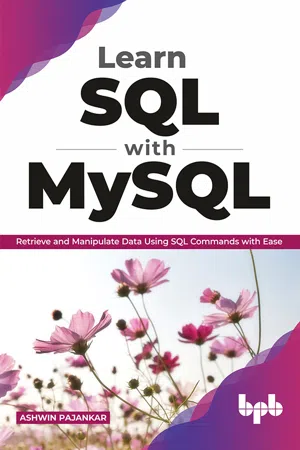
Learn SQL with MySQL
eBook - ePub

Learn SQL with MySQL

Retrieve and Manipulate Data Using SQL Commands with Ease

  1. English
  2. ePUB (mobile friendly)
  3. Available on iOS & Android
eBook - ePub

Learn SQL with MySQL

Retrieve and Manipulate Data Using SQL Commands with Ease

About this book

A step-by-step guide that will help you manage data in a relational database using SQL with ease Key Features

  • Understand the concepts related to relational databases.
  • Learn how to install MariaDB and MySQL on Windows, Linux and tools to access it.
  • Learn how to connect Python and Pandas to MySQL/MariaDB.

  • Description
    This book starts with the concepts in RDBMS (Relational Database Management Systems) and SQL (Structured Query Language). The first few chapters cover the definitions and a brief explanation of all the important concepts. They also cover the installation of MariaDB and MySQL on Windows and Raspberry Pi, as well as the setup of various tools used to connect to MySQL and MariaDB server processes. We will also understand how to install sample schemas and how to use basic SQL queries. Then we move on to the SELECT query in detail. The book explores the data retrieval aspect of SQL queries in detail with the WHERE clause and NULL handling in detail. The book also explores the functions available in MySQL. Those are single row and group functions. Then we explore how to combine the data from multiple sources. The technique is known as Joins, and we will learn ANSI style and the old-style syntax for all the types of Joins. The last part explores the DDL and DMLs in depth. We also learn the concepts of Transactions and Constraints. The book explores how we can run the SQL queries from a Python 3 program and load a pandas DataFrame with the data from a table in a schema in the MySQL database. What will you learn
  • Understand the basics of MySQL and MariaDB.
  • Get familiar with MySQL Arithmetic Operators, DDL, DML, DCL & TCL commands.
  • Understand the concept of Single-Row Functions and Group Functions in detail.
  • Retrieve data from multiple sources using the Joins.

  • Who this book is for
    This book is designed for beginners as well as professionals alike. The book will also be useful to Data Scientists, Data Analysts, Database Administrators, and Data Engineers. Table of Contents
    1. Introduction and Installation
    2. Getting Started with MySQL
    3. Getting Started with SQL Queries
    4. The WHERE clause in detail
    5. Single Row Functions
    6. Group Functions
    7. Joins in MySQL
    8. Subqueries
    9. DDL, DML, and Transactions
    10. Views
    11. Python 3, MySQL, and Pandas About the Author
    Ashwin is an experienced veteran who, for the past 25 years, has been working with STEM (Science, Technology, Engineering, and Mathematics). In his career, Ashwin has worked for more than 7 years as an employee for various IT companies and Software Product Companies. He has written more than 2 dozen books on Arduino, Python programming, Computer Vision, IoT, databases, and other popular topics with BPB and other international publications. He has also reviewed many other technical books. He also creates courses for BPB and other platforms and teaches to 60000 students online. He has been working as a freelancer since 2017. He got his first taste in writing in 2015 when he wrote his first book on Raspberry Pi. In his free time, Ashwin makes videos for his Youtube channel, which has 10000 subscribers now.
    Outside work, Ashwin volunteers his spare time as a STEM Ambassador, helping, coaching, and mentoring young people in taking up careers in technology. Your Blog links: https://www.youtube.com/ashwinpajankar Your LinkedIn Profile: https://www.linkedin.com/in/ashwinpajankar/
Tools to learn more effectively

Saving Books

Saving Books

Keyword Search

Keyword Search

Annotating Text

Annotating Text

Listen to it instead

Listen to it instead

CHAPTER 1

Introduction and Installation

I recommend all the readers to read the preface and the table of contents. It has a lot of information about what we can expect in the book. So, if you have not read it, I recommend going through it line by line.
In this chapter, we are going to start the exciting journey of learning SQL with widely used and adopted open-source database software MySQL and MariaDB. We will also have a look at a few essential concepts that are important before we start hands-on. Finally, we will learn in detail how to install MySQL and MariaDB on major OS platforms. So, let us start an incredible journey of learning SQL with MySQL and MariaDB.

Structure

We will learn the following topics in this chapter:
  • Basic concepts related to Databases, DBMS, and SQL
  • Hands-on with SQL using “Tryit Online SQL Editor.”
  • MySQL and its installation on Windows
  • MariaDB and installation on Windows and Linux

Objective

The objective of this chapter is to make the readers comfortable with the basic concepts related to the topic of the Database. Also, the readers will be able to install the MySQL and MariaDB on the different Operating Systems. Readers will also learn to use an online SQL Editor, the Tryit Online SQL Editor. All the software that we learn to install in this chapter will be used throughout the rest of the book.

Databases, DBMS, and SQL

A database is data collected and stored in an organized form. It can be stored, accessed, and processed in electronic format or in the paper-format too. Before the advent of computers, people and organizations used to store records in tabular forms in books and papers. These were precursors to modern relational database systems. Today, in the 21st century, we store and process almost all the databases in the electronic format.
Databases that use a relational model for storing and processing data are known as relational databases. E. F. Codd first proposed the relational data model in his research paper “A Relational Model of Data for Large Shared Data Banks”in 1970. Almost all the relational databases use Structured Query Language (SQL) for processing the data stored in the Database. In the relational model, the related entities are stored in a tabular data structure known as a table. Modern relational databases are often Object-Relational Databases. They can be easily interfaced with the programming languages that support the concept of Objects. There are other historical and current data models too. Following is the list of a few of them:
  • Hierarchical database model
  • Network model
  • Object model
  • Document model
  • Key–value model
  • Associative model
  • Correlational model
  • Multidimensional model
  • Multivalue model
  • Semantic model
  • XML database
  • Named graph (GraphDB)
  • Triplestore/Resource Distribution Framework (RDF)
A Database Management System is a software that interacts with the Database, Operating System, programming languages, and end-users to collect, store, process, and analyze the data stored in the Database. A DBMS that works with relational databases is Relational DBMS, and similarly, a DBMS that works with the object-relational data model is Object-Relational DBMS.
DBMS and Databases are vast topics that require several dedicated books themselves. We will be encountering a lot of DBMS concepts while learning SQL. We will absorb those concepts wherever we encounter them in this book.

A Bit of Hands-on with SQL

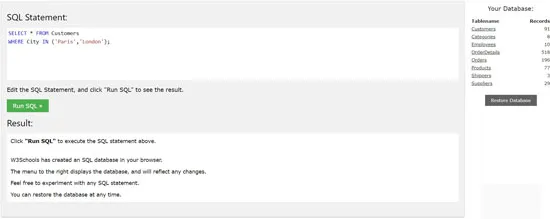
We have learned in the earlier section that SQL is a query-based languagefor interacting with the Database. We can try demonstrations with SQL without even installing any of the DBMS software. All we need is a computer with an internet connection. w3schools.comhas a very nice online SQL editor and a sample database with a few tables. It is known as Tryit Online SQL Editor. It is intended for quickly practicing SQL skills. While it is not a full-featured database product, we can certainly practice a lot of queries here. So, let us get started. Open a web browser on your computer and visit the URL https://www.w3schools.com/sql/trysql.asp?filename=trysql_op_in. It will show the following page:
Figure 1.1
We can see a text area occupying a big part of the page. We also already have the text SELECT * FROM Customers WHERE City IN (Paris’, ’London); already present in the text area. This text is known as a query. A query is a SQL statement that a database engine runs to perform some operation on the Database. In this case, the Database is local and is in our browser and memory (RAM). We can see a green button that says Run SQL. To the right, it displays the member tables in the Database and the number of records in those tables listed against them.
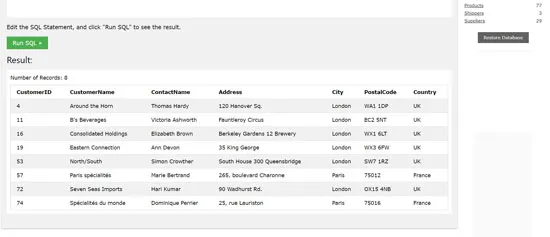
Let us run the query in the text area. It will show the following output:
Figure 1.2
The query is simple. It selects all the records from the table Customers where the column City has values London and Paris. Modify the query like SELECT * FROM Customers; execute it again. It will show all the records in the table Customers. A semicolon, in the end, is not mandatory. Remove the semicolon and run the query.
The queries are not case sensitive except when they are referring to the data in the tables. We can write the above query such as select * from customers, and it will run without any problem. However, the string data in the Database is case sensitive. The query select * from customers where city in (paris’, ’london) is not the same as select * from customers where city in (Paris’, ’London). Run both the queries separately and observe that the earlier(the one with the names of cities in lowercase) does not yield any rows in the output as in the column City, the table Customer, all the ci...

Table of contents

  1. Cover Page
  2. Title Page
  3. Copyright Page
  4. Dedication
  5. About the Author
  6. About the Reviewer
  7. Acknowledgement
  8. Preface
  9. Errata
  10. Table of Contents
  11. 1. Introduction and Installation
  12. 2. Getting Started with MySQL
  13. 3. Getting Started with SQL Queries
  14. 4. The WHERE Clause in Detail
  15. 5. Single Row Functions
  16. 6. Group Functions
  17. 7. Joins in MySQL
  18. 8. Subqueries
  19. 9. DDL, DML, and Transactions
  20. 10. Views
  21. 11. Python 3, MySQL, and Pandas

Frequently asked questions

Yes, you can cancel anytime from the Subscription tab in your account settings on the Perlego website. Your subscription will stay active until the end of your current billing period. Learn how to cancel your subscription
No, books cannot be downloaded as external files, such as PDFs, for use outside of Perlego. However, you can download books within the Perlego app for offline reading on mobile or tablet. Learn how to download books offline
Perlego offers two plans: Essential and Complete
  • Essential is ideal for learners and professionals who enjoy exploring a wide range of subjects. Access the Essential Library with 800,000+ trusted titles and best-sellers across business, personal growth, and the humanities. Includes unlimited reading time and Standard Read Aloud voice.
  • Complete: Perfect for advanced learners and researchers needing full, unrestricted access. Unlock 1.4M+ books across hundreds of subjects, including academic and specialized titles. The Complete Plan also includes advanced features like Premium Read Aloud and Research Assistant.
Both plans are available with monthly, semester, or annual billing cycles.
We are an online textbook subscription service, where you can get access to an entire online library for less than the price of a single book per month. With over 1 million books across 990+ topics, we’ve got you covered! Learn about our mission
Look out for the read-aloud symbol on your next book to see if you can listen to it. The read-aloud tool reads text aloud for you, highlighting the text as it is being read. You can pause it, speed it up and slow it down. Learn more about Read Aloud
Yes! You can use the Perlego app on both iOS and Android devices to read anytime, anywhere — even offline. Perfect for commutes or when you’re on the go.
Please note we cannot support devices running on iOS 13 and Android 7 or earlier. Learn more about using the app
Yes, you can access Learn SQL with MySQL by Ashwin Pajankar in PDF and/or ePUB format, as well as other popular books in Computer Science & Computer Science General. We have over one million books available in our catalogue for you to explore.