- English
- ePUB (mobile friendly)
- Available on iOS & Android
eBook - ePub
About this book
This book is primarily a summary of research done over 10 years in multimedia and virtual reality, which fits within a wider interest of exploiting psychological theory to improve the process of designing interactive systems. The subject matter lies firmly within the field of HCI, with some cross-referencing to software engineering.
Extending Sutcliffe's views on the design process to more complex interfaces that have evolved in recent years, this book:
*introduces the background to multisensory user interfaces and surveys the design issues and previous HCI research in these areas;
*explains the basic psychology for design of multisensory user interfaces, including the Interactive Cognitive Subsystems cognitive model;
*describes elaborations of Norman's models of action for multimedia and VR, relates these models to the ICS cognitive model, and explains how the models can be applied to predict the design features necessary for successful interaction;
*provides a design process from requirements, user and domain analysis, to design of representation in media or virtual worlds and facilities for user interaction therein;
*covers usability evaluation for multisensory interfaces by extending existing well-known HCI approaches of heuristic evaluation and observational usability testing; and
*presents two special application areas for multisensory interfaces: educational applications and virtual prototyping for design refinement.
Information
Publisher
Psychology PressYear
2003Print ISBN
9780415650311
9780805839500
Edition
1eBook ISBN
9781135644369
1
Background and Usability Concepts
This chapter introduces usability problems in multimedia and virtual reality (VR), motivates the need for Human-Computer Interface design advice, and then introduces some knowledge of psychology that will be used in the design process. Multimedia and VR are treated as separate topics, but this is a false distinction. They are really technologies that extend the earlier generation of graphical user interfaces with a richer set of media, 3D graphics to portray interactive worlds, and more complex interactive devices that advance interaction beyond the limitations of keyboards and the mouse. A better description is to refer to these technologies as multisensory user interfaces, that is, advanced user interfaces that enable us to communicate with computers with all of our senses. One of the first multisensory interfaces was an interactive room for information management created in the "put that there project" in MIT. A 3D graphical world was projected in a room similar to a CAVE-like (Collaborative Automated Virtual Environment) environment. The user sat in a chair and could interact by voice, pointing by hand gesture and eye gaze. Eye gaze was the least effective mode of interaction, partly because of the poor reliability of tracking technology (which has since improved), but also because gaze is inherently difficult to control. Gazing at an object can be casual scanning or an act of selection. To signal the difference between the two, a button control had to be used.
Design of VR and multimedia interfaces currently leaves a lot to be desired. As with many emerging technologies, it is the fascination with new devices, functions, and forms of interaction that has motivated design rather than ease of use, or even utility of practical applications. Poor usability limits the effectiveness of multimedia products which might look good but do not deliver effective education (Scaife, Rogers, Aldrich, & Davies, 1997; Parlangeli, Marchigiani, & Bognara, 1999); and VR products have a catalogue of usability problems ranging from motion sickness to difficult navigation (Wann & Mon-Williams, 1996). Both multimedia and VR applications are currently designed with little, if any, notice of usability (Dimitrova & Sutcliffe, 1999; Kaur, Sutcliffe, & Maiden, 1998). However, usability is a vital component of product quality and it becomes increasingly important once the initial excitement of a new technology dies down and customers look for effective use rather than technological novelty (Norman, 1999). Better quality products have a substantial competitive advantage in any market, and usability becomes a key factor as markets mature. The multimedia and VR market has progressed beyond the initial hype and customers are looking for well-designed, effective, and mature products.
The International Organization for Standardization standard definitions for usability (ISO, 1997, Part 11), encompass operational usability and utility, that is, the value of a product for a customer in helping him or her achieve their goal, be that work or pleasure. However, usability only contributes part of the overall picture. For multisensory UIs, quality and effectiveness have five viewpoints:
- Operational usability—How easy is a product to operate? This is the conventional sense of usability and can be assessed by standard evaluation methods such as cooperative evaluation (Monk & Wright, 1993). Operational usability concerns design of graphical user interface features such as menus, icons, metaphors, movement in virtual worlds, and navigation in hypermedia.
- Information delivery—How well does the product deliver the message to the user? This is a prime concern for multimedia Web sites or any information-intensive application. Getting the message, or content, across is the raison d'être of multimedia. This concerns integration of multimedia and design for attention.
- Learning—How well does someone learn the content delivered by the product? Training and education are both important markets for VR and multimedia and hence are key quality attributes. However, design of educational technology is a complex subject in its own right, and multimedia and VR are only one part of the design problem.
- Utility—This is value of the application perceived by the user. In some applications this will be the functionality that supports the user's task; in others, information delivery and learning will represent the value perceived by the user.
- Aesthetic appeal—With the advent of more complex means of presenting information and interaction, the design space of UIs has ex-panded. The appeal of a UI is now a key factor, especially for Web sites. Multisensory interfaces have to attract users and stimulate them, as well as being easy to use and learn.
Usability of current multimedia and VR products is awful. Most are never tested thoroughly, if at all. Those that have been are ineffective in information delivery and promoting learning (Rogers & Scaife, 1998). There are three approaches for improving design. First, psychological models of the user can be employed, so that designers can reason more effectively about how people might perceive and comprehend complex media. Secondly, design methods and guidelines that build on the basic psychology can provide an agenda of design issues and more targeted design advice, that is, design guidelines. Design for utility is a key aspect of the design process. This involves sound requirements and task analysis (Sutcliffe, 2002c), followed by design to support the user's application task, issues that are addressed in general HCI design methods (Sutcliffe, 1995a). The third approach is to embed soundly-based usability advice in methods supported by design advisor tools; however, development of multimedia and VR design support tools is still in its infancy, although some promising prototypes have been created (Faraday & Sutcliffe, 1998b; Kaur, Sutcliffe, & Maiden, 1999).
DESIGN PROBLEMS
Multisensory user interfaces open up new possibilities in designing more exciting and usable interfaces, but they also make the design space more complex. The potential for bad design is increased. Poorly designed multimedia can bombard users with excessive stimuli to cause headaches and stress, and bad VR can literally make you sick. Multimedia provides designers with the potential to deliver large quantities of information in a more attractive manner. Although this offers many interesting possibilities in design, it does come with some penalties. Poorly designed multimedia can, at best, fail to satisfy the user's requirements, and at worst may be annoying, unpleasant, and unusable. Evidence for the effectiveness of multimedia tutorial products is not plentiful; however, some studies have demonstrated that whereas children may like multimedia applications, they do not actually learn much (Rogers & Scaife, 1998). VR expands the visual aspect of multimedia to develop 3D worlds, which we should experience with all our senses, but in reality design of virtual systems is more limited. Evaluations of VR have pointed to many usability problems ranging from motion sickness to spatial disorientation and inability to operate controls (Darken &Sibert, 1996; Hix et al., 1999; Kaur, Sutcliffe et al., 1999). Multisensory interfaces may be more exciting than the familiar graphical UI, but as with many innovative technologies, functionality comes first and effective use takes a back seat. Muitisensory UIs imply three design issues:
- Enhancing interaction by different techniques for presenting stimuli and communicating our intentions. The media provide a "virtual world" or metaphor through which we interact via a variety of devices.
- Building interfaces which converge with our perception of the real world, so that our experience with computer technology is richer.
- Delivering information and experiences in novel ways, and empowering new areas of human-computer communication, from games to computer-mediated virtual worlds.
Human-computer communication is a two-way process. From computer to human, information is presented by rendering devices that turn digital signals into analogue stimuli, which match our senses. These "output" devices have been dominated by vision and the VDU, but audio has now become a common feature of PCs; devices for other senses (smell, taste, touch) may become part of the technology furniture in the near future. From human to computer the design space is more varied: joysticks, graphics tablets, data gloves, and whole body immersion suits just give a sample of the range. The diversity and sophistication of communication devices, together with the importance of speech and natural language interaction, will increase in the future. However, the concept of input and output itself becomes blurred with multisensory interfaces. In language, the notion of turn-taking in conversation preserves the idea of separate (machine-human) phases in interaction, but when we act with the world, many actions are continuous (e.g., driving a vehicle) and we do not naturally consider interacting in terms of turn-taking. As we become immersed in our technology, or the technology merges into a ubiquitous environment, interacting itself should become just part of our everyday experience.
To realize the promise of multisensory interaction, design will have to support psychological properties of human information processing:
- Effective perception—This is making sure that information can be seen and heard, and the environment has been perceived as naturally as possible with the appropriate range of senses.
- Appropriate comprehension—This is making sure that the interactive environment and information is displayed in a manner appropriate to the task, so the user can predict how to interact with the system. This also involves making sure users pick out important parts of the message and follow the "story" thread across multiple media streams.
- Integration—Information received on different senses from separate media or parts of the virtual world should make sense when synthesized.
- Effective action—Action should be intuitive and predictable. The system should "afford" interaction by suggesting how it should be used and by fitting in with our intentions in a cognitive and physical sense.
Understanding these issues requires knowledge of the psychology of perception and cognition, which will be dealt with in more depth in chapter 2. Knowledge of user psychology can help to address design problems, some of which are present in traditional GUIs; others are raised by the possibilities of multisensory interaction, such as the following:
- Helping users to navigate and orient themselves in complex interactive worlds.
- Making interfaces that appeal to users, and engage them in pleasurable interaction.
- Suggesting how to design natural virtual worlds and intuitive interaction within the demands of complex tasks and diverse abilities in user populations.
- Demonstrating how to deliver appropriate information so that users are not overloaded with too much data at any one time.
- Suggesting how to help the user to extract the important facts from different media and virtual worlds.
An important design problem is to make the interface predictable so that users can guess what to do next. A useful metaphor that has been used for thinking about interaction with traditional UIs is Norman's (1986) two gulfs model:
- The gulf of execution from human to computer: predictability and user guidance are the major design concerns.
- The gulf of evaluation from computer to human: understanding the output and feedback are the main design concerns.
In multisensory UIs, the gulf of execution involves the communication devices, for example, speech understanding, gesture devices, and the predictability of action in virtual worlds, as well as standard input using menus, message boxes, windows, and so forth. In VR, affordances are a key means of bridging the gulf of execution by providing intuitive cues in the appearance of tools and objects that allow users to guess how to act. Designers have a choice of communication modalities (audio, visual or haptic), and the particular hardware or software device for realizing the modality, for example, pen and graphics tablet for gesture, keyboard for alphanumeric text, speech for language, mouse for pointing, and so forth. For the gulf of evaluation, that is, computer to user communication, the designer also has a choice of modality, device, and representation. Choosing communication devices is becoming more complex as interaction becomes less standardized. As we move away from the VDU, keyboard, and WIMP (Windows, Icons, Mice, Pointers) technology to natural language interaction and complex visual worlds, haptic (pressure, texture, touch sensations), olfactory (smell), and even gustatory (taste) interaction may become common features. However, devices are only part of the problem. Usability will be even more critical in the design of dialogues. In multisensory environments, we will interact with multiple agents, and have computer-mediated communication between the virtual presences of real people and realistic presences of virtual agents. Dialogues will be multiparty and interleaved, converging with our experience in the real world. Furthermore, we will operate complex representations of machinery as virtual tools, control virtual machines, as well as operating real machines in virtual environments (telepresence and telerobotics). Dialogue is going to be much more complex than picking options from a menu.
ARCHITECTURES AND DEVICES
The design space of multisensory interfaces consists of several interactive devices; furthermore, interfaces are often distributed on networks. Although the software and hardware architecture is not the direct responsibility of the user interface designers, system architectures do have user interface implications. The more obvious of these are network delays for high bandwidth media such as video. In many cases the user interface designers will also be responsible for software development of the whole system, so a brief review of architectural issues is included here.
Multimedia Architectures
The basic configuration for multimedia variants of multisensory systems is depicted in Fig. 1.1. A set of media-rendering devices produces output in visual and audio modalities. Moving image, text, and graphics are displayed on high resolution VDUs; speakers produce speech, sound, and music output. Underlying the hardware rendering devices are software drivers. These depend on the storage format of the media as well as the device, so print drivers in Microsoft Word are specific to the type of printer, for example, laser, inkjet, and so forth. For VDU output, graphics and text are embedded in the application package or programming environment being used; so for Microsoft, video output drivers display .avi files, whereas for Macintosh, video output is in QuickTime format.
On the input side, devices capture media from the external world, in either analogue or digital form. Analogue media encode images and sound as continuous patterns that closely follow the physical quality of image or sound; for instance, film captures images by a photochemical process. Ana logue devices such as video recorders may be electronic but not digital, because they store the images as patterns etched onto magnetized tape; similarly, microphones capture sound waves which may be recorded onto magnetic audio tape or cut into the rapidly vanishing vinyl records as pat' terns of grooves corresponding to sounds. Analogue media cannot be processed directly by software technology; however, digital capture and storage devices are rapidly replacing them. Digital cameras capture images by a fine-grained matrix of light sensitive sensors that convert the image into thousands to millions of microscopic dots or pixels that encode the color and light intensity. Using 24 bits (24 zeros or ones) of computer storage per pixel enables a wide range of 256 color shades to be encoded. Pictures are composed of a mosaic of pixels to make shapes, shades, and image components. Sound is captured digitally by sampling sound waves and encoding the frequency and amplitude components. Once captured, digital media are amenable to the software processing that has empowered multimedia technology. Although analogue media can be displayed by computers with appropriate rendering devices, increasingly, most media will be captured, stored, and rendered in a digital form.
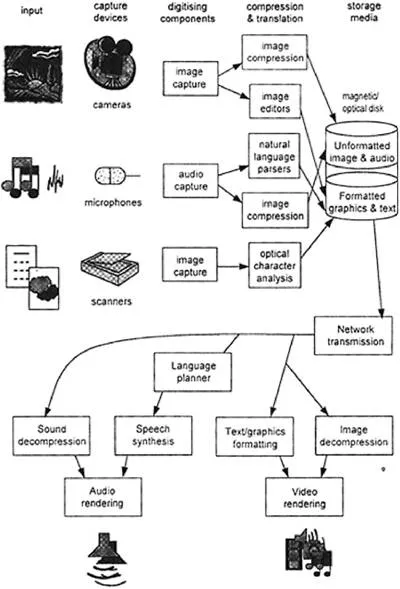
FIG. 1.1 Software architecture for handling multiple media.
Compression and translation components form a layer between capture devices and storage media. Translation devices are necessary to extract information from input in linguistic media. For speech, these devices are recognizers, parsers, and semantic analyzers of natural language understanding systems; however, text may also be captured from printed media by OCR (optical character recognition or interpretation) software, or by handwriting recognition from graphics tablet or stylus input as used on Palm Pilot™. Translation is not necessary for nonlinguistic media, although an input medium may be edited before storage; for instance, segments of a video or objects in a still image may be marked up to enable subsequent computer processing. Compression services are necessary to reduce disk storage for video and sound. The problem is particularly pressing for video because storing pictures as detailed arrays of pixels consumes vast amounts of disk space; for example, a single screen of 1096 x 784 pixels using 24 bits to encode color for each pixel consumes approximately 1 megabyte of storage. As normal speed video consumes 30 frames per sec, storage demands can be astronomic.
When the media are retrieved, components are necessary to reverse the translation and compression process. Moving image and sound media are decompressed before they can be rendered by image or sound-creating devices. Linguistic-based media will have been stored as encoded text. Text may either be displayed in visual form by word processor software or document processors (e.g., Acrobat and PDF files), but to create speech, additional architectural components are needed. Speech synthesis requires a planner to compose utterances and sentences and then a speech synthesizer to generate the spoken voice. The last step is complex, as subtle properties of the huma...
Table of contents
- Cover Page
- Title Page
- Copyright Page
- Preface
- 1: Background and Usability Concepts
- 2: Cognitive Psychology for Multimedia Information Processing
- 3: Models of Interaction
- 4: Multimedia User Interface Design
- 5: Designing Virtual Environments
- 6: Evaluating Multisensory User Interfaces
- 7: Applications, Architectures, and Advances
- Appendix A: Multimedia Design Guidelines From ISO 14915, Part 3—General Guidelines for Media Selection and Combination
- Appendix B: Generalized Design Properties
- References
- About the Author
Trusted by 375,005 students
Access to over 1.5 million titles for a fair monthly price.
Study more efficiently using our study tools.
Frequently asked questions
Yes, you can cancel anytime from the Subscription tab in your account settings on the Perlego website. Your subscription will stay active until the end of your current billing period. Learn how to cancel your subscription
No, books cannot be downloaded as external files, such as PDFs, for use outside of Perlego. However, you can download books within the Perlego app for offline reading on mobile or tablet. Learn how to download books offline
Perlego offers two plans: Essential and Complete
- Essential is ideal for learners and professionals who enjoy exploring a wide range of subjects. Access the Essential Library with 800,000+ trusted titles and best-sellers across business, personal growth, and the humanities. Includes unlimited reading time and Standard Read Aloud voice.
- Complete: Perfect for advanced learners and researchers needing full, unrestricted access. Unlock 1.5M+ books across hundreds of subjects, including academic and specialized titles. The Complete Plan also includes advanced features like Premium Read Aloud and Research Assistant.
We are an online textbook subscription service, where you can get access to an entire online library for less than the price of a single book per month. With over 1.5 million books across 990+ topics, we’ve got you covered! Learn about our mission
Look out for the read-aloud symbol on your next book to see if you can listen to it. The read-aloud tool reads text aloud for you, highlighting the text as it is being read. You can pause it, speed it up and slow it down. Learn more about Read Aloud
Yes! You can use the Perlego app on both iOS and Android devices to read anytime, anywhere — even offline. Perfect for commutes or when you’re on the go.
Please note we cannot support devices running on iOS 13 and Android 7 or earlier. Learn more about using the app
Please note we cannot support devices running on iOS 13 and Android 7 or earlier. Learn more about using the app
Yes, you can access Multimedia and Virtual Reality by Alistair Sutcliffe in PDF and/or ePUB format, as well as other popular books in Computer Science & Computer Science General. We have over 1.5 million books available in our catalogue for you to explore.