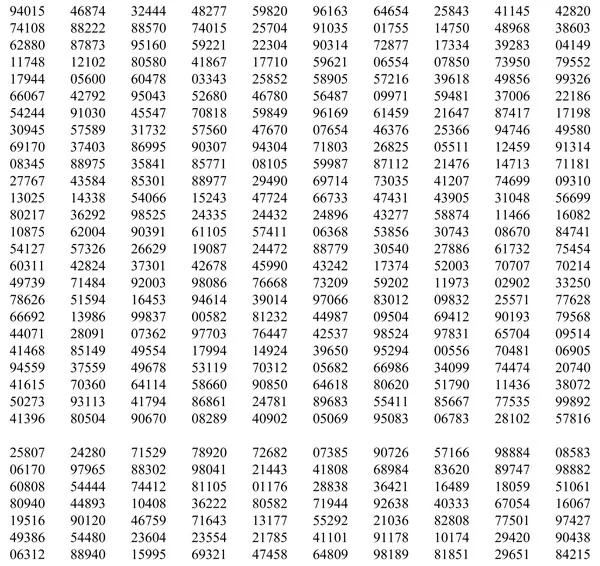
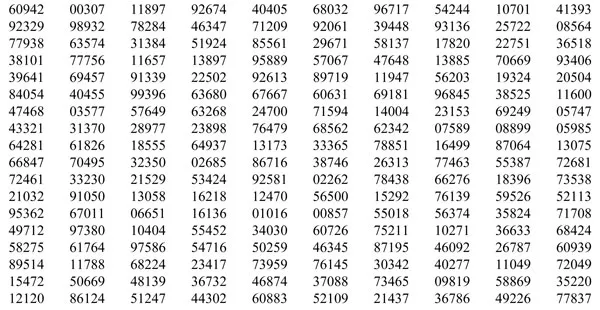
This title describes how best to use statistical data to produce professional reports on library activities. The authors cover data gathering, sampling, graphical representation of data and summary statistics from data, and also include a section on trend analysis. A full bibliography and a subject index make this a key title for any information professional..
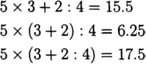
First×and÷(there is no priority between × and÷; any order will do) then+and−(there is no priority between +and−; any order will do). Use of brackets (…) gives priority to the calculations inside the brackets.
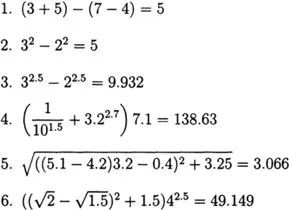
Examples
Exercises
Calculate with a pocket calculator (see also Appendix 3 describing universal keys on a pocket calculator).
Note that all • denote decimals. The multiplication sign × is omitted in combination with brackets.
Appendix 3: Basic Arithmetic on Pocket Calculators
No matter how powerful and cheap personal computers may become, there will always be a need for a pocket calculator. Indeed, for simple arithmetic operations pocket calculators are faster and easier to use. They are relatively cheap and can be used anywhere.
Note that computers usually have a calculator utility, which performs the same operations as a pocket calculator.
There are basically two ways of performing arithmetic operations on a calculator: one based on the usual mathematical notation, and one based on the Polish notation (this system is used by Hewlett-Packard calculators). We begin by explaining the first and simplest method. (Note, though, that some types of calculators may have keys that differ slightly from the ones described here.)
Here the
, and
keys are used as in primary school mathematics, so one presses the keys as follows: 681
27
and the result is shown as 18 387.
Combinations of these elementary operations are possible, as described in Appendix 2. Other keys are
the square root key
the square key
Usually these keys are combined on one button:
9
shows 3;
4
shows 16.
For one of these operations, use the “second function” key
The key
means: 1 divided by the number you key in.
An example: 9
gives 0.1111… 5
3 gives 53=125
Finally, the
key reverses the sign:
an example: 5
yields −5.
In the system based on the Polish notation there is one big difference: the=is not present (at least not in the sense used above). To perform addition, subtraction, multiplication and division one has to do the following:
: this yields the sum of 5 and 7, which is 12. Similarly,
Appendix 4 List of Notation
Symbol
Explanati...
Table of contents
Cover
Title Page
Copyright
Contents
Preface
Introduction
Part1: Information about the library
Part 2: Descriptive statistics
Part 3: Inferential statistics
Conclusions
Appendix 1: Table of random numbers
Appendix 2: Logic of calculations
Appendix 3: Basic arithmetic on pocket calculators
Appendix 4: List of notation
Bibliography
Subject index
Trusted by 375,005 students
Access to over 1.5 million titles for a fair monthly price.