- 288 pages
- English
- ePUB (mobile friendly)
- Available on iOS & Android
eBook - ePub
About this book
Forms that Work: Designing Web Forms for Usability clearly explains exactly how to design great forms for the web. The book provides proven and practical advice that will help you avoid pitfalls, and produce forms that are aesthetically pleasing, efficient and cost-effective. It features invaluable design methods, tips, and tricks to help ensure accurate data and satisfied customers. It includes dozens of examples - from nitty-gritty details (label alignment, mandatory fields) to visual designs (creating good grids, use of color).
This book isn't just about colons and choosing the right widgets. It's about the whole process of making good forms, which has a lot more to do with making sure you're asking the right questions in a way that your users can answer than it does with whether you use a drop-down list or radio buttons. In an easy-to-read format with lots of examples, the authors present their three-layer model - relationship, conversation, appearance. You need all three for a successful form - a form that looks good, flows well, asks the right questions in the right way, and, most important of all, gets people to fill it out. Liberally illustrated with full-color examples, this book guides readers on how to define requirements, how to write questions that users will understand and want to answer, and how to deal with instructions, progress indicators and errors.
This book is essential reading for HCI professionals, web designers, software developers, user interface designers, HCI academics and students, market research professionals, and financial professionals.
- Provides proven and practical advice that will help you avoid pitfalls, and produce forms that are aesthetically pleasing, efficient and cost-effective
- Features invaluable design methods, tips, and tricks to help ensure accurate data and satisfied customers
- Includes dozens of examples -- from nitty-gritty details (label alignment, mandatory fields) to visual designs (creating good grids, use of color)
- Foreword by Steve Krug, author of the best selling Don't Make Me Think!
Information
Relationship
1 Persuading People to Answer
If you understand people, you design better forms
How people react to forms
Readers, rushers, and refusers
Pick the right moment to ask a question
Relationship varies question by question
Three rules that influence response rates
Rule 1: Establish trust
Rule 2: Reduce social costs
Rule 3: Increase rewards
A small reward: give them a form when they want one
How long can your form be?
Who will answer your questions?
Design for physical abilities and differences
Find out about your users by asking them
Find out how users perceive the form
Do you know enough about your users?
Make your facts about users into pictures of real people by creating personas
Summary
If you understand people, you design better forms
When your form asks your user a question, you want an answer—a piece of information that the user has and you do not. This represents an investment, even if it is only a tiny one, by the user in the relationship with your organization.
The quality of the information that you can collect depends on the quality of the relationship at the moment when you ask the question.
In this chapter, we start with how people react to forms—how their relationship with the organization influences their reactions.
Then we explain how a theory from questionnaire design, “Social Exchange Theory,” shows that we need to establish trust, offer rewards, and make forms easier to encourage people to answer.
And then the really crucial point: understanding your users. What makes them feel like trusting you? What reward do they want? What do they think of your organization?
How people react to forms
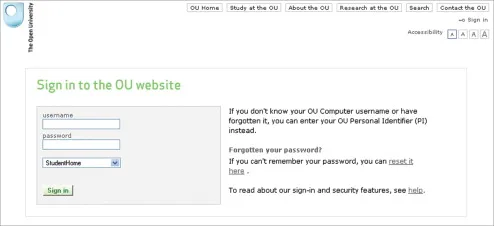
Let’s look over the shoulder of two people as they work through a small form. This one is from the Open University.
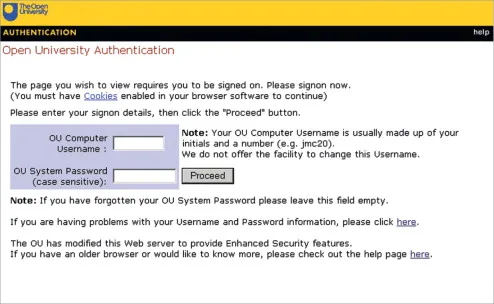
We’ll start with Mike. He’s retired from a job where he never used computers, and he’s only recently got one. He’s just joined the University, and he’s signing on for the first time. He really wants to get this right.
When Mike sees the form, he’s a bit worried. He glances first at the fields to type into, but he sees that there’s a lot of text and he feels that he should read all of it.
He reads “You must have Cookies enabled in your browser software to continue” and thinks “Well, I haven’t changed anything on this computer since I got it, so I’ll have to hope that it’s OK.”
Then he gets to “case sensitive” and thinks “Eh? Not sure what that means. I’m going to have to hope it’s OK again.”
Despite his negative reaction, Mike really wants to sign up, so he persists.
Mike is a classic reader. He reads everything and will persist through the form until he succeeds with it.
Mike’s interaction with the form is shown on the next page.
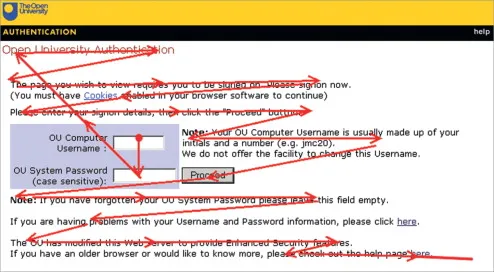
One interaction pattern with a form: glance at the boxes and then read it.
Rita is also a student at the Open University, but she is a year into her studies. She’s younger and has used computers for years. She uses this form at least once a day. She hasn’t read the text for months. Her usage pattern is like this:

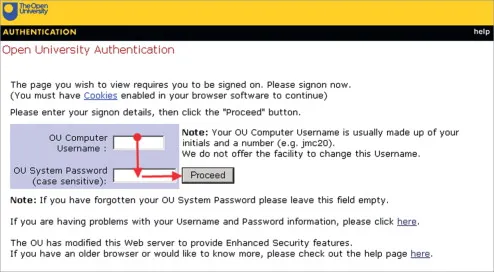
Another interaction pattern with a form: find the boxes, type, done.
To Rita, the form really looks like this; the area in focus is very small.
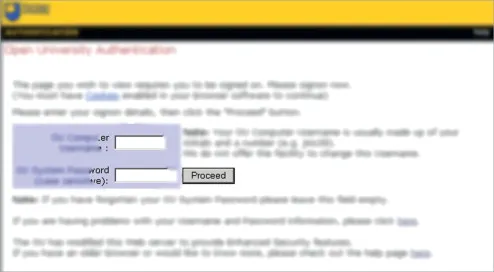
That Open University form is a few years old. Here’s the new, redesigned version:
Readers, rushers, and refusers
Our first user, Mike, overcame his initial discomfort with the form and reacted by reading it. His desire to continue the relationship won.
Our second user, Rita, knows this form well enough to rush through it.
Other users might simply have nothing to do with the form. Perhaps being asked to sign in is off-putting, or more effort than it’s worth.
Users of forms can be:

Readers | These users carefully read the form. |
Rushers | These users rush in and begin completing fields, reading only when they think it is necessary. |
Refusers | These users won’t have anything to do with the form. |
Most of us have forms that we rush, forms that we read, and forms that we refuse. For example, a taxation form with penalties for supplying incorrect information generally gets closer attention than the “yes, send me the e-newsletter” form in the margin of an interesting website. And a user encountering a website registration form might have any of these three reactions; it all depends on the value the user puts on continuing to use that website.

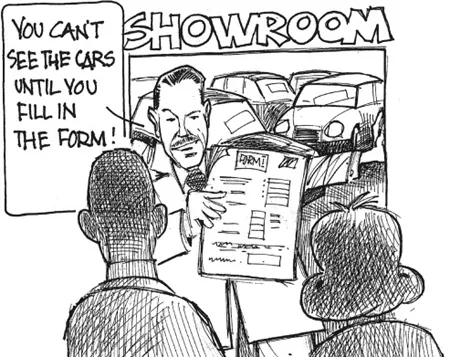
Think back to the last time you signed for a parcel. Did you rush, read, or refuse when you were given the receipt to sign?
Pick the right moment to ask a question
Asking for informatio...
Table of contents
- Cover
- Halftitle
- Series Editors
- Title
- Copyright
- Foreword
- Acknowledgements
- Author Biography
- Image Credits
- Introduction: What is a form?
- Part 1 Relationship
- Part 2 Conversation
- Part 3 Appearance
- Part 4 Testing
- Further Reading
- References
- Index
Trusted by 375,005 students
Access to over 1.5 million titles for a fair monthly price.
Study more efficiently using our study tools.
Frequently asked questions
Yes, you can cancel anytime from the Subscription tab in your account settings on the Perlego website. Your subscription will stay active until the end of your current billing period. Learn how to cancel your subscription
No, books cannot be downloaded as external files, such as PDFs, for use outside of Perlego. However, you can download books within the Perlego app for offline reading on mobile or tablet. Learn how to download books offline
Perlego offers two plans: Essential and Complete
- Essential is ideal for learners and professionals who enjoy exploring a wide range of subjects. Access the Essential Library with 800,000+ trusted titles and best-sellers across business, personal growth, and the humanities. Includes unlimited reading time and Standard Read Aloud voice.
- Complete: Perfect for advanced learners and researchers needing full, unrestricted access. Unlock 1.5M+ books across hundreds of subjects, including academic and specialized titles. The Complete Plan also includes advanced features like Premium Read Aloud and Research Assistant.
We are an online textbook subscription service, where you can get access to an entire online library for less than the price of a single book per month. With over 1.5 million books across 990+ topics, we’ve got you covered! Learn about our mission
Look out for the read-aloud symbol on your next book to see if you can listen to it. The read-aloud tool reads text aloud for you, highlighting the text as it is being read. You can pause it, speed it up and slow it down. Learn more about Read Aloud
Yes! You can use the Perlego app on both iOS and Android devices to read anytime, anywhere — even offline. Perfect for commutes or when you’re on the go.
Please note we cannot support devices running on iOS 13 and Android 7 or earlier. Learn more about using the app
Please note we cannot support devices running on iOS 13 and Android 7 or earlier. Learn more about using the app
Yes, you can access Forms that Work by Caroline Jarrett,Gerry Gaffney in PDF and/or ePUB format, as well as other popular books in Computer Science & Databases. We have over 1.5 million books available in our catalogue for you to explore.