
- 550 pages
- English
- ePUB (mobile friendly)
- Available on iOS & Android
eBook - ePub
Ethereal Packet Sniffing
About this book
This book provides system administrators with all of the information as well as software they need to run Ethereal Protocol Analyzer on their networks. There are currently no other books published on Ethereal, so this book will begin with chapters covering the installation and configuration of Ethereal. From there the book quickly moves into more advanced topics such as optimizing Ethereal's performance and analyzing data output by Ethereal. Ethereal is an extremely powerful and complex product, capable of analyzing over 350 different network protocols. As such, this book also provides readers with an overview of the most common network protocols used, as well as analysis of Ethereal reports on the various protocols. The last part of the book provides readers with advanced information on using reports generated by Ethereal to both fix security holes and optimize network performance.
- Provides insider information on how to optimize performance of Ethereal on enterprise networks.
- Book comes with a CD containing Ethereal, Tethereal, Nessus, Snort, ACID, Barnyard, and more!
- Includes coverage of popular command-line version, Tethereal.
Information
Chapter 1
Introducing Network Analysis
Solutions in this Chapter:


Introduction
“Why is the network slow?” “Why can’t I access my e-mail?” “Why can’t I get to the shared drive?” “Why is my computer acting strange?” If you are a systems administrator, network engineer, or security engineer you have probably heard these questions countless times. Thus begins the tedious and sometimes painful journey of troubleshooting. You start by trying to replicate the problem from your computer. Sure enough, you can’t get to anything on the local network or the Internet either. Now what? Go to each of the servers and make sure they are up and functioning? Check that your router is functioning? Check each computer for a malfunctioning network card?
What about this scenario: you go to your main access switch, or border router, and configure one of the unused ports for port mirroring. You plug in your laptop, fire up your network analyzer, and see thousands of User Datagram Protocol (UDP) packets destined for port 1434 with various, apparently random, Internet Protocol (IP) addresses. You immediately apply access filters to block these packets from entering or exiting your network until you do more investigating. A quick search on the Internet holds the answer. The date is January 25, 2003, and you have just been hit with the SQL Slammer worm. You were able to contain the problem relatively quickly thanks to your knowledge and use of your network analyzer.
What is Network Analysis and Sniffing?
Network analysis is the process of capturing network traffic and inspecting it closely to determine what is happening on the network. A network analyzer decodes, or dissects, the data packets of common protocols and displays the network traffic in human-readable format. Network analysis is also known by several other names: traffic analysis, protocol analysis, sniffing, packet analysis, and eavesdropping to name a few. Sniffing tends to be one of the most popular terms in use today. However, as you will see later in this chapter, due to malicious users it has had a negative connotation in the past.
A network analyzer can be a standalone hardware device with specialized software, or it can simply be software that you install on your desktop or laptop computer. Network analyzers are available both free and commercially. Differences between network analyzers tend to depend on features such as the number of supported protocol decodes, the user interface, and graphing and statistical capabilities. Other differences include inference capabilities, such as expert analysis features, and the quality of packet decodes. Although several network analyzers all decode the same protocols, some may decode better than others.

Sniffer (with a capital “S”) is a trademark owned by Network Associates referring to its Sniffer product line. However, it has become common industry usage that a “sniffer” (with a lower case “s”) is a program that captures and analyzes network traffic.
Figure 1.1 shows the Ethereal Network Analyzer display windows. A typical network analyzer displays the captured traffic in three panes:
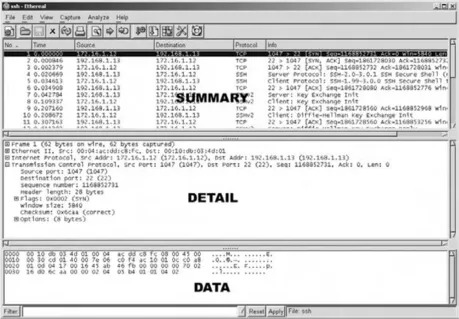
Figure 1.1 Example Network Analyzer Display
A network analyzer is a combination of hardware and software. Although there are differences in each product, a network analyzer is composed of five basic parts:
Table of contents
- Cover
- Title page
- Table of Contents
- Copyright
- Acknowledgments
- Author
- Contributors
- Technical Editor and Contributor
- Series Editor
- Technical Reviewer
- Foreword
- Chapter 1: Introducing Network Analysis
- Chapter 2: Introducing Ethereal: Network Protocol Analyzer
- Chapter 3: Getting and Installing Ethereal
- Chapter 4: Using Ethereal
- Chapter 5: Filters
- Chapter 6: Other Programs Packaged with Ethereal
- Chapter 7: Integrating Ethereal with Other Sniffers
- Chapter 8: Real World Packet Captures
- Chapter 9: Developing Ethereal
- Appendix: Supported Protocols
- About the CD
- Index
Trusted by 375,005 students
Access to over 1.5 million titles for a fair monthly price.
Study more efficiently using our study tools.
Frequently asked questions
Yes, you can cancel anytime from the Subscription tab in your account settings on the Perlego website. Your subscription will stay active until the end of your current billing period. Learn how to cancel your subscription
No, books cannot be downloaded as external files, such as PDFs, for use outside of Perlego. However, you can download books within the Perlego app for offline reading on mobile or tablet. Learn how to download books offline
Perlego offers two plans: Essential and Complete
- Essential is ideal for learners and professionals who enjoy exploring a wide range of subjects. Access the Essential Library with 800,000+ trusted titles and best-sellers across business, personal growth, and the humanities. Includes unlimited reading time and Standard Read Aloud voice.
- Complete: Perfect for advanced learners and researchers needing full, unrestricted access. Unlock 1.5M+ books across hundreds of subjects, including academic and specialized titles. The Complete Plan also includes advanced features like Premium Read Aloud and Research Assistant.
We are an online textbook subscription service, where you can get access to an entire online library for less than the price of a single book per month. With over 1.5 million books across 990+ topics, we’ve got you covered! Learn about our mission
Look out for the read-aloud symbol on your next book to see if you can listen to it. The read-aloud tool reads text aloud for you, highlighting the text as it is being read. You can pause it, speed it up and slow it down. Learn more about Read Aloud
Yes! You can use the Perlego app on both iOS and Android devices to read anytime, anywhere — even offline. Perfect for commutes or when you’re on the go.
Please note we cannot support devices running on iOS 13 and Android 7 or earlier. Learn more about using the app
Please note we cannot support devices running on iOS 13 and Android 7 or earlier. Learn more about using the app
Yes, you can access Ethereal Packet Sniffing by Syngress in PDF and/or ePUB format, as well as other popular books in Computer Science & Computer Science General. We have over 1.5 million books available in our catalogue for you to explore.