eBook - ePub
PC Interfacing
About this book
The main links with your PC and the outside world are the centronic port, used for connecting the printer, the RS232 port, used for the mouse, and the games port for a joystick. This book explores how these input/output (I/O) ports can be put to use through a range of other interfacing applications. This is especially useful for laptop and palmtop PCs which cannot be fitted with internal I/O cards. A novel approach is taken by this book, combining the hardware through which the ports can be explored, and the software programming needed to carry out a range of experiments.Circuits are provided for simple testing tools, and three experimental boards - which can also be purchased ready-made.A huge range of applications are considered, turning the PC into a flexible core of a variety of systems. External devices considered include opto-isolator drivers, power drivers, LED drivers, relay drivers, special driver ICs, and methods of driving opto-isolated zero-crossing solid state relays, stepper motors, sound generating devices and displays. Ways of gathering information from the outside world are given, as well as connection to digital devices, remote control and digital communication. As well as teaching in this field, Pei An has written numerous articles for magazines such as Electronics World and Electronics Today International.
- A hands-on guide to exploring your PC's input/output ports
- Covers the hardware and software aspects of interfacing
- An exciting project-based approach to an important subject area
Information
Topic
DesignSubtopic
UI/UX Design1
Centronic, RS232 and game ports
The Centronic, RS232 and game ports are the most common I/O ports that a modern computer has. Some notebook computers may not have a game port, but the Centronic and the RS232 ports are the universal features of all types of computers.
Originally, these ports were designed for specific applications. Centronic ports are used for connecting computers to printers; RS232 ports for connecting printers, modems and mice; and game ports for connecting joysticks. They can also be used for other interfacing applications. Peripheral devices designed for these ports not only provide the easiest way of connection to computers but also offer a universal hardware solution for all computers. Therefore, it would be very useful to understand how these ports work and how to make the best use of them.
1.1 The Centronic port
The Centronic port, also known as the printer port or the parallel port, is an industrial standard interface designed for connecting printers to a computer. A computer at least has one such a port installed. The port may come with the computer’s mother-boards or with plug-in I/O cards. Adding more Centronic ports is easy and inexpensive. In total, four Centronic ports may be installed on a computer and they have logic names LPT1 to LPT4.
This book describes the Centronic port from the point of view that it is used as a general purpose I/O interface. Operations specific to printers are not discussed in detail.
1.1.1 Port connectors
The port connectors on a computer and on a printer are different. The one on the computer is a 25 pin D-type female connector (Figure 1.1(a)), and the latter is a 36-pin female Centronic-type connector (Figure 1.1(b)). The pin functions of the two connectors are shown in Figure 1.1. To connect a printer to a computer, a printer cable is used (Figure 1.2). The length of the cable must not exceed 5 metres. The Centronic interface is not for long distance operations.
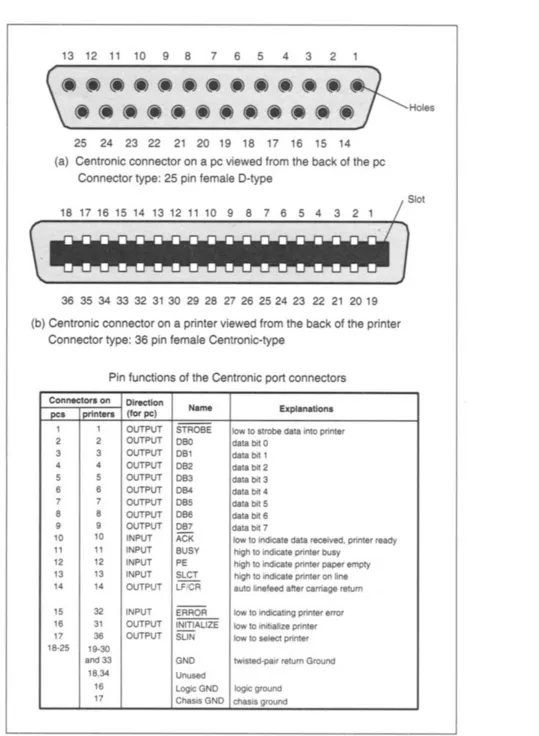
Figure 1.1 Pin-out of the Centronic port connectors on computers and printers
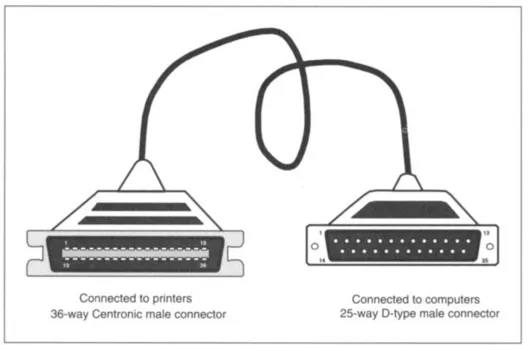
Figure 1.2 The printer lead
1.1.2 Internal hardware organization
The circuit of a generic Centronic port inside a PC is shown in Figure 1.3. Eight-bit data is latched into IC1 by writing to a port having an address: base address+0. This operation pulls down -WRITE_DATA. The output of the data forms the Data group. Data can be read into the computer from the same address via IC2 under the control of -READ_DATA. When reading data, the output from IC1 must be in high impedance state. This is achieved by making pin 1 (OUTPUT ENABLE) of IC1 high. A 6-bit control word is latched to IC3 by writing to base address+2 which pulls down -WRITE_CONTROL. Bit 0 to bit 3 are output to the port connector to form the Control group. Some of the lines are inverted by open-collector inverters (IC6 and IC7). All the output lines are pulled to +5V by 4k7 resistors. These bits can be read back into the computer at the same address via IC4a under the control of -READ_CONTROL. Bit 4 of the control byte enables the interrupt and bit 5 enables or disables the output of IC1. Five lines in the port connector (the Status group) can be read into the computer via IC4b under the control of -READ_STATUS. The address associated with this is base address+1. These inputs are pulled to +5V by 4k7 resistors and one of the lines is inverted.
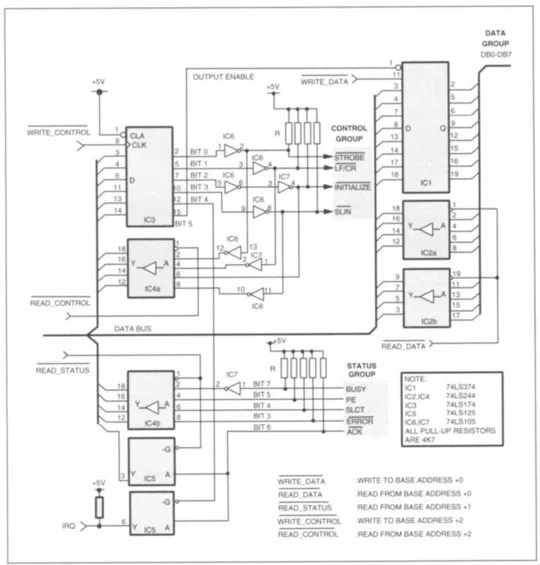
Figure 1.3 Circuit diagram ...
Table of contents
- Cover image
- Title page
- Table of Contents
- Dedication
- Copyright
- Preface
- Acknowledgements
- Trade mark notice
- Chapter 1: Centronic, RS232 and game ports
- Chapter 2: Tools for experimenters
- Chapter 3: Software drivers for the experimental boards
- Chapter 4: Expanding the Centronic, RS232 and game ports
- Chapter 5: Drivers for external devices
- Chapter 6: Gathering information from the external world
- Chapter 7: Connecting other digital devices
- Chapter 8: Computer remote control and network applications
- Further reading
- Index
Trusted by 375,005 students
Access to over 1.5 million titles for a fair monthly price.
Study more efficiently using our study tools.
Frequently asked questions
Yes, you can cancel anytime from the Subscription tab in your account settings on the Perlego website. Your subscription will stay active until the end of your current billing period. Learn how to cancel your subscription
No, books cannot be downloaded as external files, such as PDFs, for use outside of Perlego. However, you can download books within the Perlego app for offline reading on mobile or tablet. Learn how to download books offline
Perlego offers two plans: Essential and Complete
- Essential is ideal for learners and professionals who enjoy exploring a wide range of subjects. Access the Essential Library with 800,000+ trusted titles and best-sellers across business, personal growth, and the humanities. Includes unlimited reading time and Standard Read Aloud voice.
- Complete: Perfect for advanced learners and researchers needing full, unrestricted access. Unlock 1.5M+ books across hundreds of subjects, including academic and specialized titles. The Complete Plan also includes advanced features like Premium Read Aloud and Research Assistant.
We are an online textbook subscription service, where you can get access to an entire online library for less than the price of a single book per month. With over 1.5 million books across 990+ topics, we’ve got you covered! Learn about our mission
Look out for the read-aloud symbol on your next book to see if you can listen to it. The read-aloud tool reads text aloud for you, highlighting the text as it is being read. You can pause it, speed it up and slow it down. Learn more about Read Aloud
Yes! You can use the Perlego app on both iOS and Android devices to read anytime, anywhere — even offline. Perfect for commutes or when you’re on the go.
Please note we cannot support devices running on iOS 13 and Android 7 or earlier. Learn more about using the app
Please note we cannot support devices running on iOS 13 and Android 7 or earlier. Learn more about using the app
Yes, you can access PC Interfacing by Pei An in PDF and/or ePUB format, as well as other popular books in Design & UI/UX Design. We have over 1.5 million books available in our catalogue for you to explore.