eBook - ePub
Learning Processing
A Beginner's Guide to Programming Images, Animation, and Interaction
- 472 pages
- English
- ePUB (mobile friendly)
- Available on iOS & Android
eBook - ePub
Learning Processing
A Beginner's Guide to Programming Images, Animation, and Interaction
About this book
The free, open-source Processing programming language environment was created at MIT for people who want to develop images, animation, and sound. Based on the ubiquitous Java, it provides an alternative to daunting languages and expensive proprietary software. This book gives graphic designers, artists and illustrators of all stripes a jump start to working with processing by providing detailed information on the basic principles of programming with the language, followed by careful, step-by-step explanations of select advanced techniques.The author teaches computer graphics at NYU's Tisch School of the Arts, and his book has been developed with a supportive learning experience at its core. From algorithms and data mining to rendering and debugging, it teaches object-oriented programming from the ground up within the fascinating context of interactive visual media.Previously announced as "Pixels, Patterns, and Processing"
- A guided journey from the very basics of computer programming through to creating custom interactive 3D graphics
- Step-by-step examples, approachable language, exercises, and LOTS of sample code support the reader's learning curve
- Includes lessons on how to program live video, animated images and interactive sound
Information
Subtopic
Computer GraphicsIndex
Computer ScienceLesson 1
The Beginning
Chapter 1 Pixels
Chapter 2 Processing
Chapter 3 Interaction
Chapter 1
Pixels
“A journey of a thousand miles begins with a single step.”
—Lao-tzu
In this chapter:
– Specifying pixel coordinates.
– Basic shapes: point, line, rectangle, ellipse.
– Color: grayscale, “RGB.”
– Color transparency.
Note that we are not doing any programming yet in this chapter! We are just dipping our feet in the water and getting comfortable with the idea of creating onscreen graphics with text-based commands, that is, “code”!
1.1 Graph Paper
This book will teach you how to program in the context of computational media, and it will use the development environment Processing (http://www.processing.org) as the basis for all discussion and examples. But before any of this becomes relevant or interesting, we must first channel our eighth grade selves, pull out a piece of graph paper, and draw a line. The shortest distance between two points is a good old fashioned line, and this is where we begin, with two points on that graph paper.
Figure 1.1 shows a line between point A (1,0) and point B (4,5). If you wanted to direct a friend of yours to draw that same line, you would give them a shout and say “draw a line from the point one-zero to the point four-five, please.” Well, for the moment, imagine your friend was a computer and you wanted to instruct this digital pal to display that same line on its screen. The same command applies (only this time you can skip the pleasantries and you will be required to employ a precise formatting). Here, the instruction will look like this:
line(1,0,4,5);
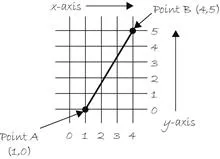
Fig. 1.1
Congratulations, you have written your first line of computer code! We will get to the precise formatting of the above later, but for now, even without knowing too much, it should make a fair amount of sense. We are providing a command (which we will refer to as a “function”) for the machine to follow entitled “line.” In addition, we are specifying some arguments for how that line should be drawn, from pointA (0,1) to point B (4,5). If you think of that line of code as a sentence, the function is a verb and the arguments are the objects of the sentence. The code sentence also ends with a semicolon instead of a period.
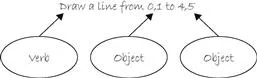
Fig. 1.2
The key here is to realize that the computer screen is nothing more than a fancier piece of graph paper. Each pixel of the screen is a coordinate—two numbers, an “x” (horizontal) and a “y” (vertical)—that determine the location of a point in space. And it is our job to specify what shapes and colors should appear at these pixel coordinates.
Nevertheless, there is a catch here. The graph paper from eighth grade (“Cartesian coordinate system”) placed (0,0) in the center with the y-axis pointing up and the x-axis pointing to the right (in the positive direction, negative down and to the left). The coordinate system for pixels in a computer window, however, is reversed along the y-axis. (0,0) can be found at the top left with the positive direction to the right horizontally and down vertically. See Figure 1.3.

English:_________________________________________________________________
Code:_________________________________________________________________
English:_________________________________________________________________
Code:___________________________________...
Table of contents
- Cover image
- Title page
- Table of Contents
- Copyright
- Acknowledgments
- Introduction
- Lesson 1: The Beginning
- Lesson 2: Everything You Need to Know
- Lesson 3: Organization
- Lesson 4: More of the Same
- Lesson 5: Putting It All Together
- Lesson 6: The World Revolves Around You
- Lesson 7: Pixels Under a Microscope
- Lesson 8: The Outside World
- Lesson 9: Making Noise
- Lesson 10: Beyond Processing
- Appendix: Common Errors
- Index
Trusted by 375,005 students
Access to over 1.5 million titles for a fair monthly price.
Study more efficiently using our study tools.
Frequently asked questions
Yes, you can cancel anytime from the Subscription tab in your account settings on the Perlego website. Your subscription will stay active until the end of your current billing period. Learn how to cancel your subscription
No, books cannot be downloaded as external files, such as PDFs, for use outside of Perlego. However, you can download books within the Perlego app for offline reading on mobile or tablet. Learn how to download books offline
Perlego offers two plans: Essential and Complete
- Essential is ideal for learners and professionals who enjoy exploring a wide range of subjects. Access the Essential Library with 800,000+ trusted titles and best-sellers across business, personal growth, and the humanities. Includes unlimited reading time and Standard Read Aloud voice.
- Complete: Perfect for advanced learners and researchers needing full, unrestricted access. Unlock 1.5M+ books across hundreds of subjects, including academic and specialized titles. The Complete Plan also includes advanced features like Premium Read Aloud and Research Assistant.
We are an online textbook subscription service, where you can get access to an entire online library for less than the price of a single book per month. With over 1.5 million books across 990+ topics, we’ve got you covered! Learn about our mission
Look out for the read-aloud symbol on your next book to see if you can listen to it. The read-aloud tool reads text aloud for you, highlighting the text as it is being read. You can pause it, speed it up and slow it down. Learn more about Read Aloud
Yes! You can use the Perlego app on both iOS and Android devices to read anytime, anywhere — even offline. Perfect for commutes or when you’re on the go.
Please note we cannot support devices running on iOS 13 and Android 7 or earlier. Learn more about using the app
Please note we cannot support devices running on iOS 13 and Android 7 or earlier. Learn more about using the app
Yes, you can access Learning Processing by Daniel Shiffman in PDF and/or ePUB format, as well as other popular books in Computer Science & Computer Graphics. We have over 1.5 million books available in our catalogue for you to explore.