eBook - ePub
Malware Forensics
Investigating and Analyzing Malicious Code
- 592 pages
- English
- ePUB (mobile friendly)
- Available on iOS & Android
eBook - ePub
Malware Forensics
Investigating and Analyzing Malicious Code
About this book
Malware Forensics: Investigating and Analyzing Malicious Code covers the complete process of responding to a malicious code incident. Written by authors who have investigated and prosecuted federal malware cases, this book deals with the emerging and evolving field of live forensics, where investigators examine a computer system to collect and preserve critical live data that may be lost if the system is shut down. Unlike other forensic texts that discuss live forensics on a particular operating system, or in a generic context, this book emphasizes a live forensics and evidence collection methodology on both Windows and Linux operating systems in the context of identifying and capturing malicious code and evidence of its effect on the compromised system. It is the first book detailing how to perform live forensic techniques on malicious code.
The book gives deep coverage on the tools and techniques of conducting runtime behavioral malware analysis (such as file, registry, network and port monitoring) and static code analysis (such as file identification and profiling, strings discovery, armoring/packing detection, disassembling, debugging), and more. It explores over 150 different tools for malware incident response and analysis, including forensic tools for preserving and analyzing computer memory. Readers from all educational and technical backgrounds will benefit from the clear and concise explanations of the applicable legal case law and statutes covered in every chapter. In addition to the technical topics discussed, this book also offers critical legal considerations addressing the legal ramifications and requirements governing the subject matter.
This book is intended for system administrators, information security professionals, network personnel, forensic examiners, attorneys, and law enforcement working with the inner-workings of computer memory and malicious code.
- Winner of Best Book Bejtlich read in 2008!
- http://taosecurity.blogspot.com/2008/12/best-book-bejtlich-read-in-2008.html
- Authors have investigated and prosecuted federal malware cases, which allows them to provide unparalleled insight to the reader
- First book to detail how to perform "live forensic" techniques on malicous code
- In addition to the technical topics discussed, this book also offers critical legal considerations addressing the legal ramifications and requirements governing the subject matter
Information
Chapter 1
Malware Incident Response: Volatile Data Collection and Examination on a Live Windows System
Solutions in this chapter:

Introduction
This chapter demonstrates the value of preserving volatile data, and provides practical guidance on preserving such data in a forensically sound manner. The value of volatile data is not limited to process memory associated with malware, but can include passwords, Internet Protocol (IP) addresses, Security Event Log entries, and other contextual details that can provide a more complete understanding of the malware and its use on a system.
In a powered-up state, a subject system contains critical ephemeral information that reveals the state of the system. This volatile data is sometimes referred to as stateful information. Incident response forensics, or live response, is the process of acquiring the stateful information from the subject system while it remains powered on. As we discussed in the introductory chapter, the Order of Volatility should be considered when collecting data from a live system to ensure that critical system data is acquired before it is lost or the system is powered down. Further, because the scope of this chapter pertains to live response through the lens of a malicious code incident, the preservation techniques outlined in this section are not intended to be comprehensive or exhaustive, but rather to provide a solid foundation relating to malware on a live system.
Often, malicious code live response is a dynamic process, with the facts and context of each incident dictating the manner and means in which the investigator will proceed with his investigation. Unlike other forensic contexts wherein simply acquiring a forensic duplicate image of a subject system’s hard drive would be sufficient, investigating a malicious code incident on a subject system will almost always require live response to some degree. This is because much of the information the investigator needs to identify the nature and scope of the malware infection, resides in stateful information that will be lost when the computer is powered down.
This chapter provides an overall methodology for preserving volatile data on a Windows system during a malware incident, and uses case scenarios to demonstrate the collection process as well as the strengths and shortcoming of the data acquired in this process.
Building Your Live Response Toolkit
When conducting Live Response Forensics it is paramount to implement known trusted tools to acquire data from the target system. Because a target system has been potentially compromised, we cannot rely upon the native programs, dependency and system files to conduct our examination, as the attacker may also have modified these files. As a result, we need to select the tools we intend to implement during live response and determine the linked libraries and other modules that each tool invokes.i Through this method we can copy all the required dependencies to our live response CD in the respective directories, with the associated tools to potentially reduce system interaction and limit invoking potentially compromised files, tainting the reliability of our examination. We need to emphasize that this may only potentially reduce interaction with the operating system; although most executables will seek dependencies from the same directory in which invoked, executables from newer versions of the Windows operating system (XP and newer) look to specified locations on the operating system.ii
In addition to potentially reducing interaction with the host system, it is helpful to identify and document the dependencies of the tools for the purpose of determining files accessed and system changes made as a result of using the tools. You can identify the file dependencies of a tool by loading it into a Portable Executable file analysis tool like Dependency Walker (depends.com) or PEView, as shown in Figure 1.1.
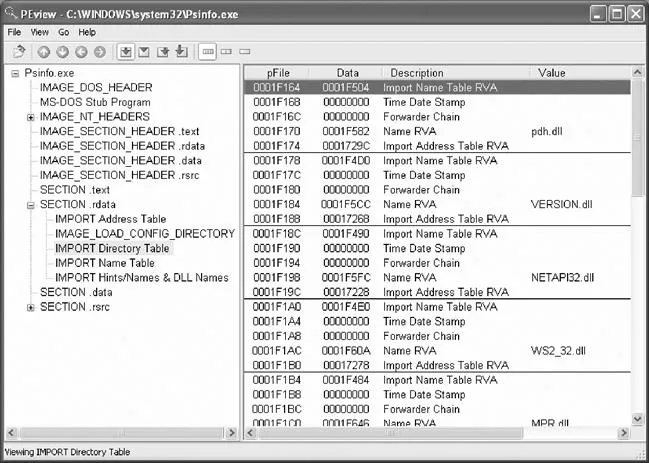
Figure 1.1 Identifying Required Libraries for psinfo with PEView
Since many of the tools used for incident response may also be used by attackers, it is necessary to mark our tools in some way to differentiate them. An obvious approach is to change the names of the executables, but it is also recommended to insert some data, such as your initials, in each executable. This can be achieved using a hex editor and adding the text to an area of the header that will not impact the operation of the tool. For instance, to differentiate a digital investigator’s PRCView utility discussed later in this chapter, open the executable in a hex editor, and add a few distinctive bytes at offset 600 immediately following the PE header. Running the tool after this modification will ensure that the marking process did not break the executable. For each tool, keeping a note of the mark that was entered, the original filename (pv.exe) and hash (5daf7081a4bb112fa3f1915819330a3e), along with the new filename (ec-pv.exe) and hash (88a2cacaa309bcc809573a239209e2a6) allows for later identification.
Caveats
Tool marking generally involves only a few characters, and may not be appropri...
Table of contents
- Cover
- Content
- Title
- Copyright
- Dedication
- Acknowledgements
- Authors
- Technical Editor
- Introduction
- Chapter 1. Malware Incident Response
- Chapter 2. Malware Incident Response
- Chapter 3. Memory Forensics
- Chapter 4. Post-Mortem Forensics
- Chapter 5. Post-Mortem Forensics
- Chapter 6. Legal Considerations
- Chapter 7. File Identification and Profiling
- Chapter 8. File Identification and Profiling
- Chapter 9. Analysis of a Suspect Program
- Chapter 10. Analysis of a Suspect Program
- Index
- Errata
Trusted by 375,005 students
Access to over 1.5 million titles for a fair monthly price.
Study more efficiently using our study tools.
Frequently asked questions
Yes, you can cancel anytime from the Subscription tab in your account settings on the Perlego website. Your subscription will stay active until the end of your current billing period. Learn how to cancel your subscription
No, books cannot be downloaded as external files, such as PDFs, for use outside of Perlego. However, you can download books within the Perlego app for offline reading on mobile or tablet. Learn how to download books offline
Perlego offers two plans: Essential and Complete
- Essential is ideal for learners and professionals who enjoy exploring a wide range of subjects. Access the Essential Library with 800,000+ trusted titles and best-sellers across business, personal growth, and the humanities. Includes unlimited reading time and Standard Read Aloud voice.
- Complete: Perfect for advanced learners and researchers needing full, unrestricted access. Unlock 1.5M+ books across hundreds of subjects, including academic and specialized titles. The Complete Plan also includes advanced features like Premium Read Aloud and Research Assistant.
We are an online textbook subscription service, where you can get access to an entire online library for less than the price of a single book per month. With over 1.5 million books across 990+ topics, we’ve got you covered! Learn about our mission
Look out for the read-aloud symbol on your next book to see if you can listen to it. The read-aloud tool reads text aloud for you, highlighting the text as it is being read. You can pause it, speed it up and slow it down. Learn more about Read Aloud
Yes! You can use the Perlego app on both iOS and Android devices to read anytime, anywhere — even offline. Perfect for commutes or when you’re on the go.
Please note we cannot support devices running on iOS 13 and Android 7 or earlier. Learn more about using the app
Please note we cannot support devices running on iOS 13 and Android 7 or earlier. Learn more about using the app
Yes, you can access Malware Forensics by Eoghan Casey,Cameron H. Malin,James M. Aquilina in PDF and/or ePUB format, as well as other popular books in Computer Science & Cyber Security. We have over 1.5 million books available in our catalogue for you to explore.