- 86 pages
- English
- ePUB (mobile friendly)
- Available on iOS & Android
eBook - ePub
About this book
Everyone wants privacy and security online, something that most computer users have more or less given up on as far as their personal data is concerned. There is no shortage of good encryption software, and no shortage of books, articles and essays that purport to be about how to use it. Yet there is precious little for ordinary users who want just enough information about encryption to use it safely and securely and appropriately--WITHOUT having to become experts in cryptography.
Data encryption is a powerful tool, if used properly. Encryption turns ordinary, readable data into what looks like gibberish, but gibberish that only the end user can turn back into readable data again. The difficulty of encryption has much to do with deciding what kinds of threats one needs to protect against and then using the proper tool in the correct way. It's kind of like a manual transmission in a car: learning to drive with one is easy; learning to build one is hard.
The goal of this title is to present just enough for an average reader to begin protecting his or her data, immediately. Books and articles currently available about encryption start out with statistics and reports on the costs of data loss, and quickly get bogged down in cryptographic theory and jargon followed by attempts to comprehensively list all the latest and greatest tools and techniques. After step-by-step walkthroughs of the download and install process, there's precious little room left for what most readers really want: how to encrypt a thumb drive or email message, or digitally sign a data file.
There are terabytes of content that explain how cryptography works, why it's important, and all the different pieces of software that can be used to do it; there is precious little content available that couples concrete threats to data with explicit responses to those threats. This title fills that niche.
By reading this title readers will be provided with a step by step hands-on guide that includes:
- Simple descriptions of actual threat scenarios
- Simple, step-by-step instructions for securing data
- How to use open source, time-proven and peer-reviewed cryptographic software
- Easy to follow tips for safer computing
- Unbiased and platform-independent coverage of encryption tools and techniques
- Simple descriptions of actual threat scenarios
- Simple, step-by-step instructions for securing data
- How to use open source, time-proven and peer-reviewed cryptographic software
- Easy-to-follow tips for safer computing
- Unbiased and platform-independent coverage of encryption tools and techniques
Information
Chapter 1
Using Gnu Privacy Guard
Bob lives in Sylvania, a tiny nation ruled by a dictator who forbids all printed dissent and criticism. However, emboldened on a visit to the United States, Bob wrote his own brief editorial, on a cocktail napkin while sitting at the airport bar, waiting to board his plane home. It begins:
Free Sylvania!
Those two words alone could send Bob to the Sylvanian gulag if discovered back home. As the exhilaration of creation wears off, Bob downloads and installs Gnu Privacy Guard1 to encrypt his work. He’s been told it’s good for encryption, and it’s free, so why not?
Bob’s plane leaves Logan in 15 minutes, and when he starts reading the tutorial for GnuPG, he panics: it goes on at great length about public key encryption and key pairs and generating key pairs and generating revocation certificates, and even when he gets to the part about encrypting a file, it says he’ll need someone else’s public key to encrypt to. Bob quietly starts to freak out.
Fortunately for Bob, he’s sitting next to a man who picks up on Bob’s anxiety and offers to help. This good Samaritan is actually named Sam, and he just happens to know all about GnuPG. After they introduce themselves, Sam says, “Listen Bob, I can help you get it all sorted out, don’t worry. We’ve even got time for a drink before they board your flight.”
1.1 Keeping Data Secret, for a Novice GnuPG User
After seating themselves in the lounge, Sam says, “You’re in a hurry and need to encrypt a file. You’ve just installed GnuPG but don’t know much about encryption, so your best bet is to use single-key encryption with a strong passphrase. It’s easy: all you need is GnuPG, no need to set anything up.”
Sam explains, “Using symmetric (secret) key encryption I can make sure no one can see the contents but me (and whoever I share the passphrase with). That’s how I’d do it if I was in a hurry and didn’t have time to study tutorials or books.”
Bob looks pointedly at his watch, then the departure board, but Sam continues, “Symmetric encryption is easy with GnuPG because I don’t need to generate my own public key pair or get anyone else’s key: I just enter an encryption command and enter a strong passphrase for my encrypted file. Are you ready?”
1.2 The Simplest Example: GnuPG Symmetric Encrypting Text
Sam opens his laptop and a terminal window, and explains to Bob: “I think of GnuPG commands as if they’re sentences; every GnuPG sentence starts with ‘gpg’, and there are grammar rules in this sentence like ‘options first, then files’ and ‘options before commands’. You have to be careful to follow the grammar, but it’s usually easy. Here’s how I encrypt a file called example.txt2,” and he types:

“Oh crud, what the…” Sam, reading the GnuPG error messages onscreen after he hit <Enter>, realizes he misspelled the filename. “Oops, that’s what you get when the filename doesn’t exist in the current directory; it happens all the time and isn’t a big deal. And if you get an error message that doesn’t make sense, you can usually get help by searching for that message on your favorite web search engine.” Sam retypes the command and is prompted for a passphrase3 (twice):

“OK, I entered a passphrase, but now, nothing. Or is it?” Sam says as he shows Bob a directory listing4 that includes a new file called example.txt.gpg. “When GnuPG creates new files, it names them by adding the .gpg extension.”
Sam continued: “Here’s my thinking when I enter that command. First, gpg=’run GnuPG’. Then, -c, an abbreviation for the command --symmetric, for single-key encryption. If I used the -e option (--encrypt) that would be for doing public key encryption; I’ll show you public key encryption later, if you like.” Sam sipped his drink.
“So that’s my command: ‘GnuPG, encrypt something!’. ‘Something’ is whatever comes after the command, in this case a file called example.txt in the current directory5. I hit <Enter> and I’m prompted to enter a passphrase, and it should be something hard to crack. Good passphrases are hard to come up with, but they should be longer than 8–10 characters at the very least, and should appear as random as possible, including upper and lower case letters, symbols and numbers. It will be hard to remember, but it will also be hard for someone to guess. Just remember that if you forget it, you won’t be able to decrypt your file either.”
Bob asks, “How do I decrypt this file? Do I need GnuPG to decrypt?”
1.3 Decrypting a File (Symmetric Key)
Sam said: “It’s easy to decrypt a file, but you do need GnuPG (or compatible software6) to do it. Here’s how,” Sam says as he types the command and hits <Enter>, entering a passphrase when prompted:
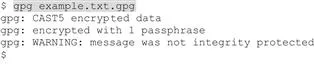
“Sam, what does that WARNING mean?” Bob asks. “Oh, don’t worry about that: GnuPG can be a chatty little program, and not always completely clear. The first two lines mean the file was encrypted with the CAST5 algorithm--the default for GnuPG single-key encryption, with one passphrase. The last line means the file wasn’t digitally signed.”
Sam continues: “The messages tell you the file was encrypted successfully. GnuPG stored the decrypted file, named example.txt, to disk; now both files are in my directory. I didn’t have to explicitly say I’m decrypting (though I could have used the --decrypt option for clarity). Often you can just enter gpg <file_name> and GnuPG ‘does the right thing’ with the file--if it’s GnuPG compatible7, like if it’s an encrypted file and you enter a valid passphrase. If you enter a file that’s not GnuPG compatible, you’ll get an error, GnuPG won’t assume you want to encrypt unless you tell it explicitly, with -c for symmetric encryption, or -e for public key.”
Bob spoke up: “Hang on, Sam, do I have to save it to a file? I’m not sure I want to save my secrets as plaintext on my hard drive.”
Sam answers, “That’s a good point. You’d probably rather just use the --decrypt or -d command, because GnuPG sends its output directly to the standard output (that’s a fancy name for the terminal window, or console).” He types a few lines, and says, “here’s what it looks like, I’m really just telling the computer: ‘run GnuPG and decrypt (some file)’ ”:
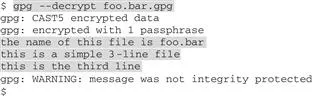
Sam went on: “After I enter the passphrase, GnuPG prints the decrypted file out to the console--it’s highlighted here, a 3-line text file. This is a simple way to decrypt files with GnuPG: just enter gpg -d <filename> (whatever the filename actually is); if the file can be decrypted GnuPG just splashes it out to the screen, no worries about having incriminating evidence saved on your disk, either.”
As Bob peers at the screen, Sam goes on: “Bob, you should know that when I have a plaintext file and I encrypt it, GnuPG creates a new file for the encrypted version (that’s what we call ciphertext) but nothing happens to the original plaintext file. It’s still sitting there, so you should securely erase8 the plaintext file, not just delete it, if you’re worried about someone finding it. Otherwise it could get you in trouble.”
Bob says, “But I’d rather not save a dangerous secret on my disk at all, ever; even if I delete it, it can still be recovered--can’t it?” Sam answers, “Yes, it often can be recovered, but there are ways to make it harder…” when Bob interrupts: “Is there any way I can encrypt something without saving plaintext to the disk at all?”
As the flight attendant announces “All passengers attention. Now please board Sylvania Air Flight 789,” over the intercom, the men finish their drinks and start packing up. “Listen Bob,” Sam says, “here’s my card: g...
Table of contents
- Cover image
- Title page
- Table of Contents
- Copyright
- To the Reader
- Preface. What Is This?
- Introduction
- Chapter 1. Using Gnu Privacy Guard
- Chapter 2. Selected FAQs on Using GnuPG
- Chapter 3. Public Keys
- Chapter 4. Public Key Functions
- Chapter 5. More About Signatures
- Chapter 6. Working with Public Keys
- Chapter 7. Editing and Revoking a Public Key
- Chapter 8. Security Practices and Tips
- Postscript
Trusted by 375,005 students
Access to over 1.5 million titles for a fair monthly price.
Study more efficiently using our study tools.
Frequently asked questions
Yes, you can cancel anytime from the Subscription tab in your account settings on the Perlego website. Your subscription will stay active until the end of your current billing period. Learn how to cancel your subscription
No, books cannot be downloaded as external files, such as PDFs, for use outside of Perlego. However, you can download books within the Perlego app for offline reading on mobile or tablet. Learn how to download books offline
Perlego offers two plans: Essential and Complete
- Essential is ideal for learners and professionals who enjoy exploring a wide range of subjects. Access the Essential Library with 800,000+ trusted titles and best-sellers across business, personal growth, and the humanities. Includes unlimited reading time and Standard Read Aloud voice.
- Complete: Perfect for advanced learners and researchers needing full, unrestricted access. Unlock 1.5M+ books across hundreds of subjects, including academic and specialized titles. The Complete Plan also includes advanced features like Premium Read Aloud and Research Assistant.
We are an online textbook subscription service, where you can get access to an entire online library for less than the price of a single book per month. With over 1.5 million books across 990+ topics, we’ve got you covered! Learn about our mission
Look out for the read-aloud symbol on your next book to see if you can listen to it. The read-aloud tool reads text aloud for you, highlighting the text as it is being read. You can pause it, speed it up and slow it down. Learn more about Read Aloud
Yes! You can use the Perlego app on both iOS and Android devices to read anytime, anywhere — even offline. Perfect for commutes or when you’re on the go.
Please note we cannot support devices running on iOS 13 and Android 7 or earlier. Learn more about using the app
Please note we cannot support devices running on iOS 13 and Android 7 or earlier. Learn more about using the app
Yes, you can access Simple Steps to Data Encryption by Peter Loshin in PDF and/or ePUB format, as well as other popular books in Computer Science & Computer Science General. We have over 1.5 million books available in our catalogue for you to explore.