- 204 pages
- English
- ePUB (mobile friendly)
- Available on iOS & Android
eBook - ePub
About this book
PIC Projects and Applications Using C details how to program the PIC microcontroller in the C language. The book takes a learn-by-doing approach, with applications covering topics such as inputs, outputs, keypads, alphanumeric displays, analogue-to-digital conversion, radio transmitters and receivers, data EEPROM, interrupts and timing. To aid debugging, the book provides a section detailing the use of the simulator and in-circuit debugger.
With this book you will learn:
- How to program the PIC microcontroller in C
- Techniques for using the simulator and debuggers to find faults on your code
- The ins and outs of interfacing circuits, such as radio modules and liquid crystal displays
- How to use the PIC on-board functions, such as interrupts and timing modules, and make analogue measurements
- Relevant parts of the language are introduced and explained when required for those new to the subject
- Core principles are introduced gradually for self-paced learning
- Explains how and why a software program works, and how to alter and expand the code
Information
Chapter 1
Introduction to the Microcontroller and C
This chapter is an introduction to the microcontroller memory, in the latest 18F series of devices and how it can be written to using the C programming language.
Keywords
Memory
PIC18F1220
register
Port
C language
Bit
A microcontroller is an integrated circuit that has a number of memory locations embedded inside it which are used to store instructions that are to be executed. These locations are called registers, and instructions are written to these registers to enable the microcontroller to perform an operation.
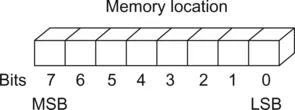
The memory location is 8 bits wide which means it can store 8 bits of information (Figure 1.1). The 8 bits in the memory are identified by numbers starting on the right with the least significant bit, bit 0, and moving to the left to the most significant bit, bit 7.
Suppose we wish to turn on an LED connected to an output pin, as shown in Figure 1.2. An instruction has to be written to the output port register to output a logic 1 to turn the LED on or output a logic 0 to turn it off.
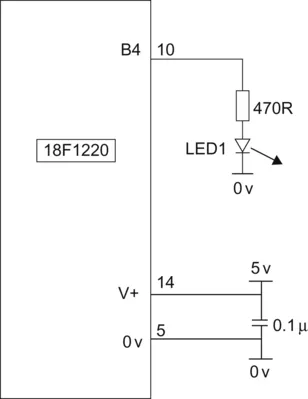
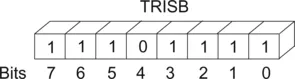
The microcontroller we will use in this book is a PIC18F1220 manufactured by Microchip, although the codes can easily be adapted for other Microchip microcontrollers. The PIC18F1220 has 16 inputs/outputs (I/O) which means it has 16 inputs or outputs which can be configured as inputs or outputs by instructing the microcontroller via a register, the tristate (TRIS) register (Figure 1.3). TRIS means the port pin can be (i) an input, or an output which is switched (ii) high or (iii) low, three states.
The memory locations in the microcontroller are 8 bits wide so 16 I/O will require two 8 bit registers called PORTA and PORTB.
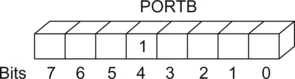
Suppose we wish to turn on an LED which we are going to connect to bit 4 on PORTB. We first of all have to instruct the microcontroller to ensure that PORTB bit 4 is an output. At the moment it does not matter what the rest of PORTB is doing, so now let’s make bit 4 an output and the other 7 bits inputs. We do this with the following instruction:
TRISB = 0b11101111;
0b means the number is a binary one.
Note a 1 sets the pin as an input, a 0 sets the pin as an output.
Now that PORTB bit 4 is an output, we can write a logic1 to it with:
PORTBbits.RB4 = 1; (Figure 1.4).
There are several ways in which we can give the microcontroller instructions, called programming. These program languages are assembly, basic, C, or a number of flowchart languages. The language that we are going to use in this book is the C programming language, which is a high-level language that is very versatile. The previous book “PIC in Practice” written by the author, DW Smith, used the assembly language to program the microcontroller.
C is a very comprehensive and versatile language, which usually means there is a lot to learn. Throughout this book I will introduce the C language as and when required and only those instructions that are needed to perform the control. So you will not need to become a C programmer in order to program the micro in C!
Chapter 2
First C Program
This chapter explains how to install and use the two current Microchip Integrated Development Environments, MPLAB and MPLABX. The explanation is centred around a basic program, flashing a light emitting diode on and off. The chapter explains how to install the IDE, how the program is written, compiled and then programmed into the microcon...
Table of contents
- Cover image
- Title page
- Table of Contents
- Copyright
- Preface
- Chapter 1: Introduction to the Microcontroller and C
- Chapter 2: First C Program
- Chapter 3: Using Eight Outputs
- Chapter 4: Inputs
- Chapter 5: Keypad Scanning
- Chapter 6: Analogue to Digital Conversion
- Chapter 7: Alpha Numeric Display
- Chapter 8: Porting Code to Other Microcontrollers
- Chapter 9: Timer/Counter Modules
- Chapter 10: Interrupts
- Chapter 11: Fault Finding, Using the Simulator, and the In-Circuit Debugger
- Chapter 12: Radio Transmitters and Receivers
- Chapter 13: EEPROM Data Memory
- Chapter 14: Projects
- Chapter 15: C Extra
- Appendix A: Data Sheets
- Appendix B: Useful Contacts
- Index
Trusted by 375,005 students
Access to over 1.5 million titles for a fair monthly price.
Study more efficiently using our study tools.
Frequently asked questions
Yes, you can cancel anytime from the Subscription tab in your account settings on the Perlego website. Your subscription will stay active until the end of your current billing period. Learn how to cancel your subscription
No, books cannot be downloaded as external files, such as PDFs, for use outside of Perlego. However, you can download books within the Perlego app for offline reading on mobile or tablet. Learn how to download books offline
Perlego offers two plans: Essential and Complete
- Essential is ideal for learners and professionals who enjoy exploring a wide range of subjects. Access the Essential Library with 800,000+ trusted titles and best-sellers across business, personal growth, and the humanities. Includes unlimited reading time and Standard Read Aloud voice.
- Complete: Perfect for advanced learners and researchers needing full, unrestricted access. Unlock 1.5M+ books across hundreds of subjects, including academic and specialized titles. The Complete Plan also includes advanced features like Premium Read Aloud and Research Assistant.
We are an online textbook subscription service, where you can get access to an entire online library for less than the price of a single book per month. With over 1.5 million books across 990+ topics, we’ve got you covered! Learn about our mission
Look out for the read-aloud symbol on your next book to see if you can listen to it. The read-aloud tool reads text aloud for you, highlighting the text as it is being read. You can pause it, speed it up and slow it down. Learn more about Read Aloud
Yes! You can use the Perlego app on both iOS and Android devices to read anytime, anywhere — even offline. Perfect for commutes or when you’re on the go.
Please note we cannot support devices running on iOS 13 and Android 7 or earlier. Learn more about using the app
Please note we cannot support devices running on iOS 13 and Android 7 or earlier. Learn more about using the app
Yes, you can access PIC Projects and Applications using C by David W Smith in PDF and/or ePUB format, as well as other popular books in Computer Science & Programming Languages. We have over 1.5 million books available in our catalogue for you to explore.