This book is written with the intention to let readers understand and learn Python programming in a fun and easy way. Basically everybody finds it hard to understand programming language. However with the right techniques and programming logics, anyone can learn Python programming easily.In today's industry, Python programming is widely used for Big Data, Internet of Things, Geographical information, basic mathematical functions in school, university projects and etc. This book caters for all level of users who wants to explorer Python programming language. This book also covers important programming logics like bubble sorting, timer program, queen card program, running numbers, displaying prime numbers and etc to help to build up the programming skills.All the programming steps and screenshots are clearly demonstrated in this book. Anyone completes reading and practicing sample codes of this book should be ready to take up good Python projects to further enhance their programming skills. All the programming logics has been utilized in many Python trainings and workshops.

- 70 pages
- English
- ePUB (mobile friendly)
- Available on iOS & Android
eBook - ePub
Learn Python Programming the Easy and Fun Way
About this book
Information
Subtopic
Software DevelopmentIndex
Computer ScienceChapter 1 : Values and Variables
In programming, the variable holds the value in a program and the values in variable can be change depending on the flow and the parameter passed in the program. However the variables and values are the fundamental blocks of any programming languages out there and Python declaration of any variables and values are simple and quick to implement and understand in the syntax.
1.1. What is a variable?
As mentioned earlier variables will always hold a value and the values have a certain data type of representation. For example, the statements below demonstrates the variable holding a value.
a = 1
b = 2
b = 2
For the above statement, ‘a’ and ‘b’ are variables or known an identifiers and ‘1’ and ‘2’ are values. In this case, these values are ‘integer’ data type. Python language supports these main data types below :
- Boolean - The simplest data type is boolean, it represents the truth values which are False and True.
- Integer - Normal integers or numbers. Eg. 4321
- Long - these numbers are of unlimited size. Eg.42000000000000000000L
- Float - Floating-point numbers for example: 42.11, 3.1415e-10
- String - A string type object is a sequence of characters from left to right order.
- List - A list is a container which holds comma-separated values. Eg. [1,4,6,7]
- Object - Objects get their variables and functions from classes. Eg. class MySampleClass: variable = "Hello World"
- None - This type has a single value. There is a single object with this value.
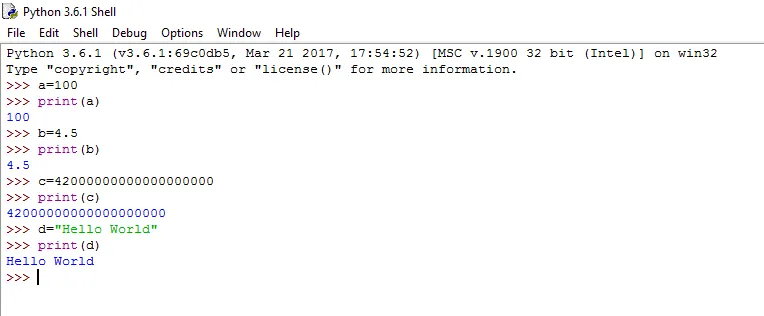
Simple statement can be execute in the Python compiler to test out the types of data, variable declarations and value assignment are as below:
1.2. Python’s Identifiers?
The most important part of variable declarations are the identifiers. There are few rules that a programmer must follow whenever a variable is declared or initialized. The common rules are an identifier must begin with a letter A to Z or a to z or an underscore (_) followed by zero or more letters, underscores and digits (0 to 9). Punctuation characters and symbols like @, $, and % are not allowed within identifiers. Basically ‘mynum’ and ‘Mynum’ are two different identifiers.
Plus keywords are not allowed to be use as identifiers for variable and function declaration. Example, this declaration is completely not allowed in Python programming as below:
break=100
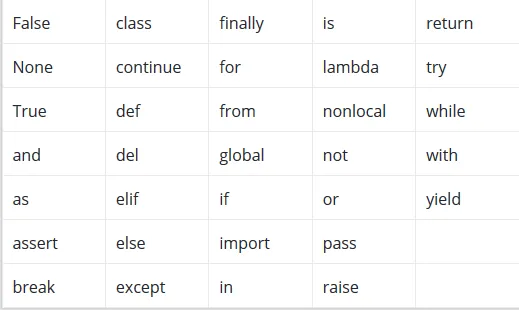
The above statement is wrong because ‘break’ is a keyword. Basically keywords are the reserved words in Python language. Below are the keywords in Python language.
1.3. Integers and Strings?
What is an basic integer?
Integers are numeric values and it is commonly shorten as ‘int’ as whole number. The whole number means its values can be positive, negative or zero. The ‘isinstance’ built-in function can be use for testing whether a value is proper integer or not. A sample statement can be used as below:
isinstance(7, int)
The statement above must return the result as ‘True’ from the Python shell because ‘7’ is an integer. Overall we can do mathematical operations with an integer using addition (+), subtraction (-), multiplication (*), division (/) and remainder(%). Here are some simple mathematical operations can be executed in the Python shell.
>>> 2+2
4
>>> 4-2
2
>>> 6+1
7
>>> 6+7-3
10
>>> 2*2
4
>>> 2*2*2
8
>>> -2
-2
>>> 8/2
4.0
>>> 4*4/2
8.0
>>> 4-4*2
-4
>>> 2-4
-2
>>> 10+10/2
15.0
>>> 5 % 4
1
Based on the above example, all mathematical operations will follow a certain order and it is called precedence. Basically the multiplications and divisions are executed first and then followed by addition and subtraction subsequently. That is the reason why 10+10/2 did not result in 10.0 for the above example. Another few more important points to notice are whenever a number is divided, it will result in a float number(Float numbers will be covered in the following section) and if a minus symbol is used in-front of a number, it will result in a negative number. Now the statement below will avoid any floating number results from division operations.
>>> 4 // 3
1
By using two forwarded slash(//) to divide any number will always result with a integer number. Another mathematical operations would be using two asterisk symbols (**) which will power the number for multiplications.
>>> 4 ** 2
16
>>> 4 ** 4
256
What is a basic string?
In Python programming, string is group or sequence of characters and characters are just symbol. For example, ‘h’ is a character but ‘happy’ is a string. A string can be declared with a statement below.
my_string = 'Hello'
The variable my_string holds the string value as ‘Hello’. String values can be assigned by enclosing characters inside a single quote or double quotes. To access the string values can be execute as below.
#first character
print('my_string’ = ', my_string[0])
my_string[0] variable holds the first character of the entire and value is ‘H’. The symbol ‘#’ is for commenting syntax in python programming. A string is sliced based on the indexes line below.
H e l l o -> String
0 1 2 3 4 -> index
For the string ‘Hello’ above, the index of this string will start at 0 and ends at 4. Once the variable is assigned with string, the value can only be reassigned with a different string value. String char...
Table of contents
- Learn Python Programming the Easy and Fun Way
- Contents
- Foreword
- About the Author
- Introduction : What is Python Programming?
- Common Usage of Python Programming
- Installation Steps For Python Compiler
- Chapter 1 : Values and Variables
- 1.1 What is a variable?
- 1.2 Python's Identifiers
- 1.3 Integers and Strings
- 1.4 Floating Numbers
- 1.5 String Manipulation
- Chapter 2 : Conditions and Iterations
- 2.1 Conditional Statements
- 2.1.1 The Guessing Number Coding Program
- 2.1.2 The Queen Card Coding Program
- 2.2 Looping
- 2.2.1 Running Numbers Coding Program
- 2.2.2 Simple Timer Coding Program
- 2.2.3 Bubble Sorting of Numbers
- 2.3 Control Statements
- 2.3.1 Sample Break Statement
- 2.3.2 Sample Continue Statement
- 2.3.3 Sample Pass Statement
- Chapter 3 : List,Tuples and Dictionaries
- 3.1 Lists
- 3.2 Tuple
- 3.3 Dictionaries
- Chapter 4 : Functions,Modules and Exception Handling
- 4.1 Functions
- 4.2 Modules
- 4.3 Exception Handling
Trusted by 375,005 students
Access to over 1.5 million titles for a fair monthly price.
Study more efficiently using our study tools.
Frequently asked questions
Yes, you can cancel anytime from the Subscription tab in your account settings on the Perlego website. Your subscription will stay active until the end of your current billing period. Learn how to cancel your subscription
No, books cannot be downloaded as external files, such as PDFs, for use outside of Perlego. However, you can download books within the Perlego app for offline reading on mobile or tablet. Learn how to download books offline
Perlego offers two plans: Essential and Complete
- Essential is ideal for learners and professionals who enjoy exploring a wide range of subjects. Access the Essential Library with 800,000+ trusted titles and best-sellers across business, personal growth, and the humanities. Includes unlimited reading time and Standard Read Aloud voice.
- Complete: Perfect for advanced learners and researchers needing full, unrestricted access. Unlock 1.5M+ books across hundreds of subjects, including academic and specialized titles. The Complete Plan also includes advanced features like Premium Read Aloud and Research Assistant.
We are an online textbook subscription service, where you can get access to an entire online library for less than the price of a single book per month. With over 1.5 million books across 990+ topics, we’ve got you covered! Learn about our mission
Look out for the read-aloud symbol on your next book to see if you can listen to it. The read-aloud tool reads text aloud for you, highlighting the text as it is being read. You can pause it, speed it up and slow it down. Learn more about Read Aloud
Yes! You can use the Perlego app on both iOS and Android devices to read anytime, anywhere — even offline. Perfect for commutes or when you’re on the go.
Please note we cannot support devices running on iOS 13 and Android 7 or earlier. Learn more about using the app
Please note we cannot support devices running on iOS 13 and Android 7 or earlier. Learn more about using the app
Yes, you can access Learn Python Programming the Easy and Fun Way by Elaiya Iswera Lallan in PDF and/or ePUB format, as well as other popular books in Computer Science & Software Development. We have over 1.5 million books available in our catalogue for you to explore.