Make the most of today's technology to give your students a more interactive, authentic, global learning experience! Connecting Your Students with the Virtual World shows you how to plan themed projects for every season, embark on virtual field trips, and get students in touch with other classrooms worldwide. This updated edition includes a key new chapter on taking video conferencing to the next level for optimal student engagement and collaboration, as well as new chapters on connecting through games and esports and connecting with parents. The book includes a wide variety of standards-based, step-by-step activities you can implement immediately.
eBook - ePub
Connecting Your Students with the Virtual World
Tools and Projects to Make Collaboration Come Alive
- 112 pages
- English
- ePUB (mobile friendly)
- Available on iOS & Android
eBook - ePub
Connecting Your Students with the Virtual World
Tools and Projects to Make Collaboration Come Alive
About this book
Information
1
Connecting Your Students in 2021 and Beyond
Be Connected—Be Engaged—Be Informed
Many of today’s classroom teachers know the importance of being connected educators and the fact that we should be modeling for our students how to become connected and be responsible global citizens. It is necessary, however, to have more of our teacher colleagues connected so that they can network with passionate educators all around the world. This will better facilitate the learning of the children we serve. We have grown as educators through our presence on Twitter. We have built strong global PLNs (personal or professional learning networks) that have enabled us to connect, share, and learn with passionate teachers, administrators, community members, and parents, as well as others interested in education. It has also provided us with the opportunity to connect our students with the world. With our students, however, we struggle to try to make these connections while covering the standards and preparing our students for the myriad of testing that is commonplace in most schools today. How can we fit it all together and make it work?
We will describe how the projects contained in our book can cover a multitude of standards, enabling today’s teachers to weave it all together in a way that is engaging, fun, and meaningful for our students as they prepare for their global futures.
In the “dark ages” of the 1950s and 1960s, we reached out to others outside our classrooms via telephones whose lines were connected to wall outlets and by mailing letters. The picture-postcard exchanges decorated bulletin boards and allowed us to correspond with the world outside the classroom walls. The 1970s and 1980s saw the beginning of the use of online message boards to communicate. The Email Around the World project in the late 1990s produced wonderful exchanges from faraway places (www.cybraryman.com/email.html). The Flat Stanley exchange began late in the 1990s and early 2000s and allowed classes to connect with one another via mail. However, what was lacking was a more personalized, “in the moment” exchange.
Connecting the Old-Fashioned Way
It is wonderful that technology enables us to connect easily and in the moment without having to wait. After the tech connection, though, it is nice to continue by resorting to the tried-and-true, old-fashioned ways of communicating. Having your students write personal letters and then sending them would be special. A couple of years ago Jerry’s oldest grandson said it was not fair that his sisters got mail and he did not. He was right; we have lost this special way of communicating that is personal. Save copies of the letters your students write. Create a bulletin board showing copies of the students’ letters and the responses they received. In some cases, companies send brochures and literature that really enhance the bulletin board.
Emailing
Once you have made a connection with another class, it is a good idea to maintain and build on the relationship formed to collaborate on other projects. One way to continue the connection is by using email. In 1999–2000, Jerry participated in an Email Around the World project. It was a fantastic way to connect with students all across the globe. It was long before the ability existed to connect in person via Skype or Google Meet or other such tools. Jerry made a great bulletin board (see Figure 1.1), which had a map of the world with the email responses showing where the connections originated. The actual email was connected by yarn to the country on the map where it originated. To see all of the emails that Jerry’s classes received in their 1999 Email Around the World project, visit www.angelfire.com/stars3/education/emailworld.html.
Today with the available technology, we can easily connect our students almost instantaneously to classrooms around the world. We believe all classroom teachers should flatten the walls of their classroom to communicate, collaborate, and create with other classrooms around the globe and with experts in the different fields about which the students are studying. Using the myriad of web tools accessible to them, teachers should be reaching out as often as possible to help their students build and strengthen their global connections and add to their personal learning networks.
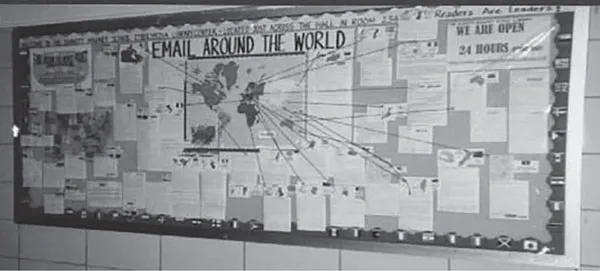
Figure 1.1 Email Around the World Project
We feel that it is extremely important when working with your students to connect with them at first and show them that you really care. You should follow this natural progression of teaching connections, starting small and building up to bigger connections. After teacher-to-student relationships are solidified, it is important that students connect with their peers in the classroom and build a sharing, caring community.
A very important first step is working with your students toward being a good citizen in our digital world. We cannot stress enough the importance of digital citizenship. Please periodically review with your students how to be responsible users of technology. Explain the need to be careful about what they post online. Children have to be conscious of their digital presence and the digital footprint that they are creating. Talk to them about proper netiquette when they are connecting online. Please also communicate with their parents and make sure they understand the importance of parents keeping track of what their children are doing online.
The next step is to connect your class with other grade levels and experts outside the classroom. Students should be able to get answers to their questions from experts. You can then connect your students with other classes around the country and the world to learn and share with one another. The initial connections can lead to future collaborations.
The question always asked is, “How do I connect my students to other classes around the country or the world?” This is a major concern among all grade levels. There are many different social media venues in which we can connect in today’s world—Twitter, Edmodo, Facebook, Instagram, and Voxer, just to name a few. There are groups available for any grade and any subject. Twitter, Facebook, and Instagram have communities that allow educators to connect to the grade level, or subject area they teach. It is important to remember to use the # when searching for the communities or searching for posts. Some examples of # are #engchat (English), #sschat (social studies), #historyteacher, #Langchat (foreign language), #Literacy, #Math, #Mathchat, #MusEdchat (music), and #PhysEd.
You can post to the appropriate grade level or subject area you are teaching and search through the community for specific resources. When you are looking to connect on a project, be sure to use the # so everyone in the community knows that you are interested in participating in your project. Twitter, Facebook, and Instagram have communities that are an easy way to get started becoming a connected educator.
Another good way to connect is to join communities on Edmodo.1 We recommend that you sign up for a free Edmodo account to take advantage of all it has to offer. Communities on Edmodo contain the main subject areas of language arts, math, science, and social studies, along with other communities including creative art, health and physical education, and special education. You can post or filter through these communities to find information or other educators to connect with around the world.
Twitter is another great way in which to connect with educators from across the world, and we have found it to be one of the best ways to become a connected educator. Twitter allows educators the ability to find many projects they can use in their classrooms. There are chats for most subject areas and grade levels. The schedule for Twitter educational chats can be found at bit.ly/educhatcalendar. Twitter is an easy way to connect with other educators or find a partner to do a project with. It is just a matter of using the appropriate hashtag (#) in order to find someone.
What is a hashtag? It is Twitter’s way of aggregating tweets about a common topic into searchable data. For example, if you were looking for information about the Daily Five and teaching fourth grade you can tweet: “Looking for information on the #DailyFive #4thchat.” Anyone who follows those hashtags will see the tweet come across on their timeline and could either respond to it or retweet it to others who might have a better knowledge of the subject. Another example would be if you were a middle school teacher teaching English and were about to start a study group on The Hunger Games; you might tweet, “Starting a book study on The Hunger Games. Anyone have any information? #mschat #engchat #edchat.”
We have found that an easy entry point to making connections at the elementary level is through Mystery Location Calls using Skype or Google Meet. In Chapter 3, we will explain in depth how to get started with Mystery Location Calls. Participating in a Mystery Location Call is an engaging and tech-infused way to have students practice their geography and communication skills. During the calls, students are learning about other parts of the country or world through either inquiry or yes-or-no questions. Mystery Locations Calls are fun and easy to run in your classroom. This book will examine ways in which to conduct a Mystery Location Call and explain the various jobs students have while conducting these calls. We will walk you step by step through the ins and outs of conducting a Mystery Location Call, starting with dividing your class into two groups to practice performing an actual Mystery Location Call. The step-by-step guide will give you the strategies that work best in the classroom.
What else is possible besides Mystery Location Calls? What can you do at different grade levels? We had discussed this point when we used to meet with our weekly Sunday night Google Hangout group, which consisted of teachers from seven different states who have done these calls with their classes. This book could not have been possible without the connections the authors have made with these wonderful educators. We have been working together over the last several years to come up with projects and activities to do as a follow-up to a Mystery Location Call or as an alternative to Mystery Location Calls. Through our connections on Twitter, Facebook, and Google+ (back when Google+ existed) and our own creativity, we have compiled a list of projects that teachers can move on to after they have begun collab...
Table of contents
- Cover
- Half Title
- Series
- Title
- Copyright
- Dedication
- Contents
- eResources
- Meet the Authors
- Acknowledgments
- How to Use This Book
- 1 Connecting Your Students in 2021 and Beyond
- 2 Taking Video Conferencing to the Next Level
- 3 The Practical Guide to a Mystery Location Call 2.0
- 4 Fall and Winter Projects
- 5 Spring and Summer Projects
- 6 Virtual Field Trips Revisited
- 7 Connecting Through Games and Esports
- 8 Connecting With Parents
- 9 How Will You Connect?
- Glossary
- Appendix: Flat Stanley Lesson Plan
- Resources
Trusted by 375,005 students
Access to over 1.5 million titles for a fair monthly price.
Study more efficiently using our study tools.
Frequently asked questions
Yes, you can cancel anytime from the Subscription tab in your account settings on the Perlego website. Your subscription will stay active until the end of your current billing period. Learn how to cancel your subscription
No, books cannot be downloaded as external files, such as PDFs, for use outside of Perlego. However, you can download books within the Perlego app for offline reading on mobile or tablet. Learn how to download books offline
Perlego offers two plans: Essential and Complete
- Essential is ideal for learners and professionals who enjoy exploring a wide range of subjects. Access the Essential Library with 800,000+ trusted titles and best-sellers across business, personal growth, and the humanities. Includes unlimited reading time and Standard Read Aloud voice.
- Complete: Perfect for advanced learners and researchers needing full, unrestricted access. Unlock 1.5M+ books across hundreds of subjects, including academic and specialized titles. The Complete Plan also includes advanced features like Premium Read Aloud and Research Assistant.
We are an online textbook subscription service, where you can get access to an entire online library for less than the price of a single book per month. With over 1.5 million books across 990+ topics, we’ve got you covered! Learn about our mission
Look out for the read-aloud symbol on your next book to see if you can listen to it. The read-aloud tool reads text aloud for you, highlighting the text as it is being read. You can pause it, speed it up and slow it down. Learn more about Read Aloud
Yes! You can use the Perlego app on both iOS and Android devices to read anytime, anywhere — even offline. Perfect for commutes or when you’re on the go.
Please note we cannot support devices running on iOS 13 and Android 7 or earlier. Learn more about using the app
Please note we cannot support devices running on iOS 13 and Android 7 or earlier. Learn more about using the app
Yes, you can access Connecting Your Students with the Virtual World by Billy Krakower,Jerry Blumengarten in PDF and/or ePUB format, as well as other popular books in Didattica & Didattica generale. We have over 1.5 million books available in our catalogue for you to explore.