IoT Kits, Board and Sensors, Arduino Tools, Development Steps, Interaction, Verification, Hardware Setup, Sketch Today, IoT is one term that is searched most on Google, talked most about on Twitter and written most about on Wordpress. It has already started influencing everyday life at an individual as well as business level. Smart Homes, Wearables Devices, Smart Cities, Smart Grids, Industrial Internet, Connected Car, Connected Health, Smart retail, Smart supply Chain, Smart farming are some of the popular IoT applications. Rather than just appreciating the impact of IoT applications on our lives, it is much more exciting to learn how to create them. However, learning IoT without an IoT Kit is like learning programming without a compiler. Hence rather than discussing IoT in general, this book shows you how to create working IoT experiments using KICIT IoT Kit. KEY FEATURES• Strengthens the foundations, as detailed explanation of topics are given. • Provides In depth explanation of complex topics and Questions.• Comprehensive coverage of various aspects of Iot and Arduino concepts• Covers various Arduino boards and shields• Simple language, crystal clear approach and straight forward comprehensible presentation• Adopting user-friendly style for explanation of circuits and examples WHAT WILL YOU LEARN• Internet of Things, Arduino Platform• Writing Programs for Arduino• LED Programming• Analog inputs and Various Buses• Arduino Ethernet Shield, IoT Projects, TianWHO THIS BOOK IS FORStudents pursuing BE/BSc/ME/MSc/BTech/MTech in Computer Science, Electronics, Electrical.AUTHOR BIOYashavant KanetkarThrough his books and Quest Video Courses on C, C++, Java, Python, Data Structures,.NET, IoT, etc. Yashavant Kanetkar has created, molded and groomed lacs of IT careers in the last three decades. Yashavant's books and Quest videos have made a significant contribution in creating top-notch IT manpower in India and abroad. Yashavant's books are globally recognized and millions of students/professionals have benefitted from them. Yashavant's books have been translated into Hindi, Gujarati, Japanese, Korean and Chinese languages. Many of his books are published in India, USA, Japan, Singapore, Korea and China. Yashavant is a much sought after speaker in the IT field and has conducted seminars/workshops at TedEx, IITs, IIITs, NITs and global software companies. Yashavant has been honored with the prestigious "Distinguished Alumnus Award" by IIT Kanpur for his entrepreneurial, professional and academic excellence. This award was given to top 50 alumni of IIT Kanpur who have made a significant contribution towards their profession and betterment of society in the last 50 years. In recognition of his immense contribution to IT education in India, he has been awarded the "Best.NET Technical Contributor" and "Most Valuable Professional" awards by Microsoft for 5 successive years. Yashavant holds a BE from VJTI Mumbai and M.Tech. from IIT Kanpur. Yadhavant's current affiliations include being a Director of KICIT Pvt Ltd. And KSET Pvt Ltd. His Linkedin profile: linkedin.com/in/yashavant-kanetkar-9775255Shrirang KordeShrirang is a Technology Expert. His product development experience spans across multiple countries and multiple companies like Bharat Electronics, Tata Elxsi, Philips Software, Persistent Systems and an ERP based Startup.He was instrumented in starting Technology Incubator at VNIT Nagpur. His areas of work are DSP/Embedded systems, Telecom systems, Android Systems and Cloud based Software developments. Shrirang has done his B.E. from VNIT, Nagpur and M.E. from BITS Pilani.
- English
- ePUB (mobile friendly)
- Available on iOS & Android
eBook - ePub
About this book
Information
Subtopic
Computer NetworkingIndex
Computer ScienceEXPERIMENT
EIGHT
ACCELEROMETER BASED ROTATION CONTROL
I shall now recall to mind that the motion of the heavenly bodies is circular, since the motion appropriate to a sphere is rotation in a circle.
- Nicolaus Copernicus
Experiment
This Experiment is about using Accelerometer / Gyroscope sensor to control the direction of rotation of a DC motor as per the change of orientation of the sensor. The single sensor contains both Accelerometer as well as Gyroscope. Accelerometer measures acceleration on one, two or three axes, whereas, Gyroscope measures rate of rotation around a particular axis.
Hardware Setup
This Experiment needs an Arduino Uno board, Application board, Motor Driver board, DC motor and Accelerometer / Gyro MPU-6050 board. These are shown in the Figures 8.1, 8.2, 8.3, 8.4 and 8.5.
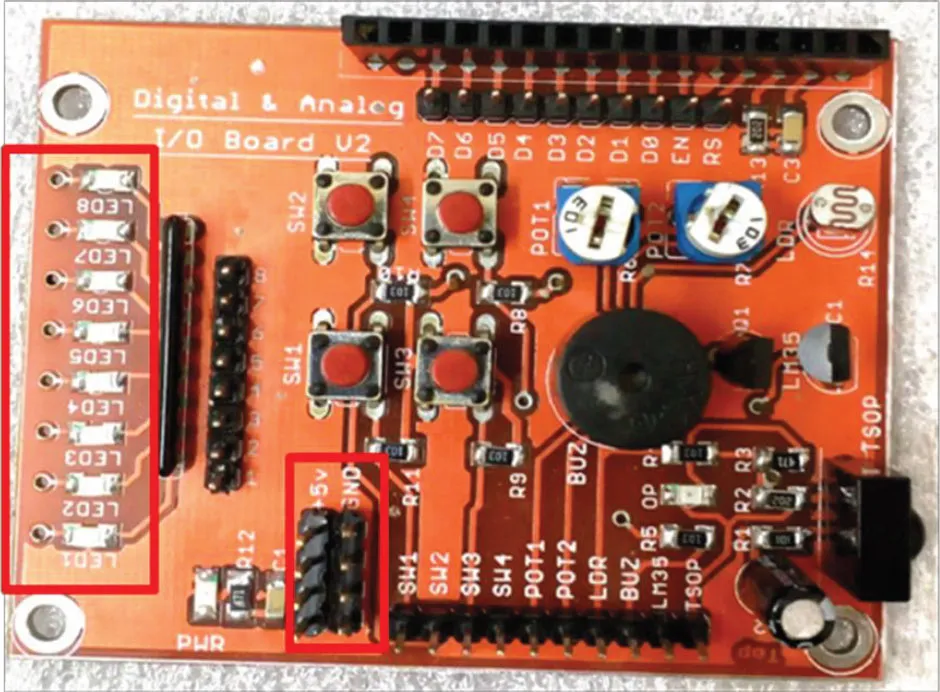
Figure 8.1: Application Board
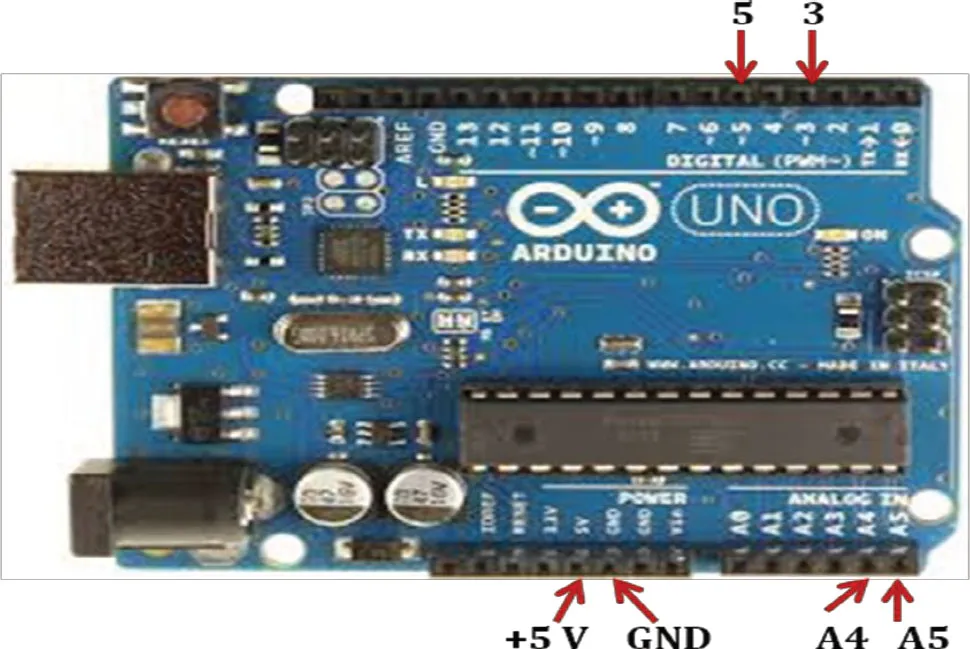
Figure 8.2: Arduino Uno
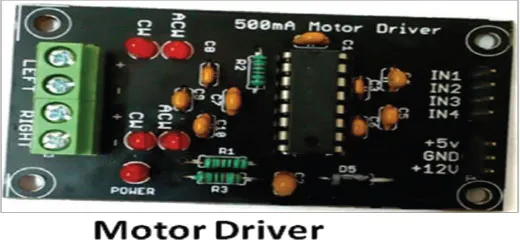
Figure 8.3: Motor Driver
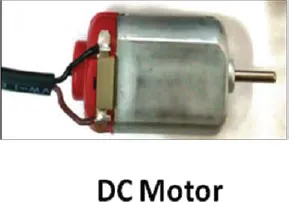
Figure 8.4: DC Motor
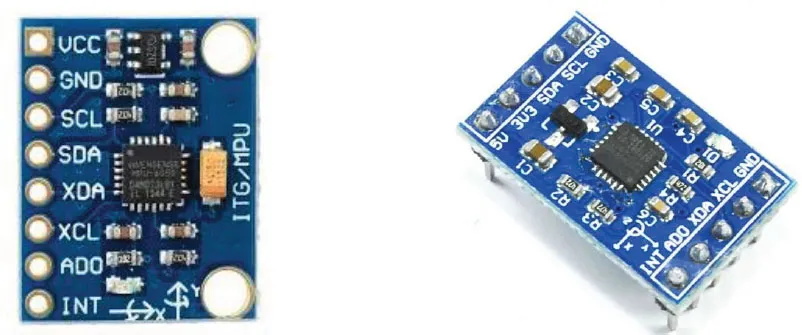
Figure 8.5: MPU-6050 Accelerometer/Gyro (2 different makes)
The pin connections shown in Figure 8.6 should be made. The Application board is mainly used to provide +5V and GND pins as part of the +5V and GND rails.
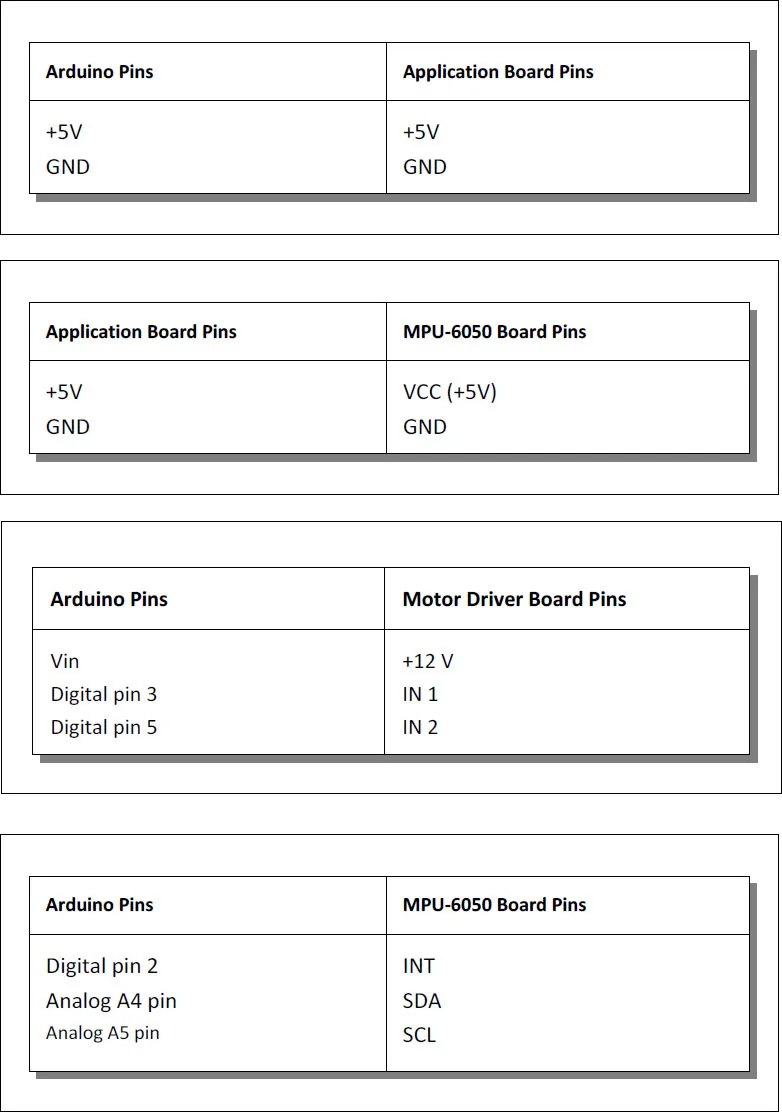
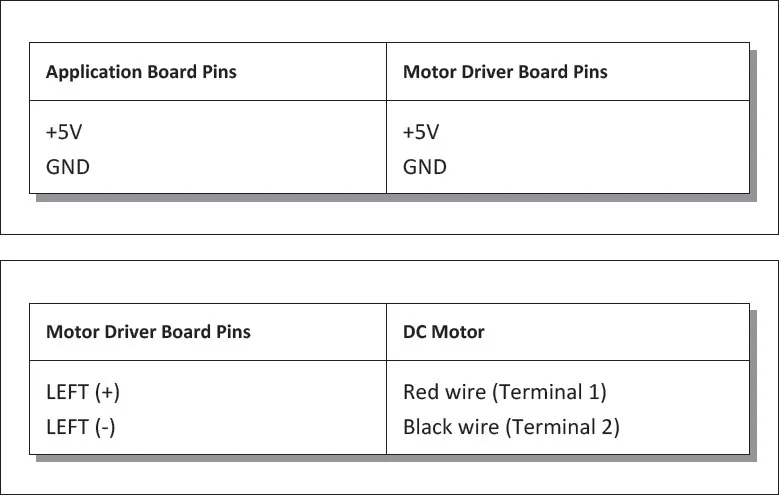
Figure 8.6: Pin connections
Software Setup
Jeff Rowberg has done excellent work in this area by creating a MPU-6050 Accelerometer / Gyro library. The Experiment makes use of this library. This library needs to be installed as given in the following steps:
Step 1: Download I2C dev library
Jeff Rowberg's I2C dev library is available at the following link:
https://github.com/jrowberg/i2cdevlib/tree/master/Arduino/I2Cdev
Step 2: Install I2C dev library
Copy I2C dev in the ‘libraries’ folder given by the path
C:\Program Files (x86)\Arduino\libraries
After copying, following files should be present in the folder C:\Program Files (x86)\Arduino\libraries\I2Cdev:
- I2Cdev.cpp
- I2Cdev.h
- keywords.txt
- library.json
Step 3: Download MPU-6050 library
Jeff Rowberg's MPU-6050 library is available at the following link:
https://github.com/jrowberg/i2cdevlib/tree/master/Arduino/MPU6050
Step 4: Install MPU-6050 library
Copy the MPU-6050 in the ‘libraries’ folder present in the path where Arduino IDE is installed. In our case the path was
C:\Program Files (x86)\Arduino\libraries
After copying, following files should be present in the folder C:\Program Files (x86)\Arduino\libraries\MPU6050:
- helper_3dmath.h
- library.json
- MPU6050.cpp
- MPU6050.h
- MPU6050_6Axis_MotionApps20.h
- MPU6050_9Axis_MotionApps41.h
- examples\ IMU_Zero\
- \ MPU6050_DMP6\
- \ MPU6050_DMP6_Ethernet\
- \ MPU6050_raw\
This Experiment uses example sketches MPU6050_raw and MPU6050_DMP6 as reference.
Step 5: Set the baud-rate
Change the baud-rate of the Display monitor to 38400.
Sketch
// Accelerometer/Gyro based rotation control for DC motor// This sketch considers MPU6050_raw example as reference/* =========================================================I2Cdev device library code is placed under the MIT licenseCopyright (c) 2011 Jeff RowbergPermission is hereby granted, free of charge, to any person obtaining a copy of this software and associated documentation files (the “Software”), to deal in the Software without restriction, including without limitation the rights to use, copy, modify, merge, publish, distribute, sublicense, and/or sell copies of the Software, and to permit persons to whom the Software is furnished to do so, subject to the following conditions:
The above copyright notice and this permission notice shall be included in all copies or substantial portions of the Software.
THE SOFTWARE IS PROVIDED “AS IS”, WITHOUT WARRANTY OF ANY KIND, EXPRESS OR IMPLIED, INCLUDING BUT NOT LIMITED TO THE WARRANTIES OF MERCHANTABILITY, FITNESS FOR A PARTICULAR PURPOSE AND NONINFRINGEMENT. IN NO EVENT SHALL THE AUTHORS OR COPYRIGHT HOLDERS BE LIABLE FOR ANY CLAIM, DAMAGES OR OTHER LI...
Table of contents
- Cover Page
- Title Page
- Copyright Page
- Dedication
- About the Authors
- Acknowledgements
- Table of Contents
- Preface
- Zero IoT Kit Overview
- One Led Pattern
- Two Switch Based Led Counter
- Three Analog I/O-Fade Leds Using Potentiometer
- Four Using Millis
- Five Remote Control Based Melody Player
- Six Using Eeprom to Control Devices
- Seven Motor Speed Control
- Eight Accelerometer Based Rotation Control
- Nine Wireless Connectivity
- Ten Send Email
- Eleven Digital Clock
- Twelve Wamp Server Based Temperature Logger
- Thirteen Internet / Intranet Based Led Control
- Fourteen Internet Based Temp. Logger with Tweets
- Fifteen Internet Based Home Automation
- Sixteen Street Light Control
- Seventeen Home Security System
- Eighteeen Water Level Monitor
- Nineteen Multicolor Control
- Twenty Internet Based Motor Speed Control
- Twenty One Soil Moisture Monitor & SD-Card Logger
- Twenty Two Arduino Pins and Concepts
Trusted by 375,005 students
Access to over 1.5 million titles for a fair monthly price.
Study more efficiently using our study tools.
Frequently asked questions
Yes, you can cancel anytime from the Subscription tab in your account settings on the Perlego website. Your subscription will stay active until the end of your current billing period. Learn how to cancel your subscription
No, books cannot be downloaded as external files, such as PDFs, for use outside of Perlego. However, you can download books within the Perlego app for offline reading on mobile or tablet. Learn how to download books offline
Perlego offers two plans: Essential and Complete
- Essential is ideal for learners and professionals who enjoy exploring a wide range of subjects. Access the Essential Library with 800,000+ trusted titles and best-sellers across business, personal growth, and the humanities. Includes unlimited reading time and Standard Read Aloud voice.
- Complete: Perfect for advanced learners and researchers needing full, unrestricted access. Unlock 1.5M+ books across hundreds of subjects, including academic and specialized titles. The Complete Plan also includes advanced features like Premium Read Aloud and Research Assistant.
We are an online textbook subscription service, where you can get access to an entire online library for less than the price of a single book per month. With over 1.5 million books across 990+ topics, we’ve got you covered! Learn about our mission
Look out for the read-aloud symbol on your next book to see if you can listen to it. The read-aloud tool reads text aloud for you, highlighting the text as it is being read. You can pause it, speed it up and slow it down. Learn more about Read Aloud
Yes! You can use the Perlego app on both iOS and Android devices to read anytime, anywhere — even offline. Perfect for commutes or when you’re on the go.
Please note we cannot support devices running on iOS 13 and Android 7 or earlier. Learn more about using the app
Please note we cannot support devices running on iOS 13 and Android 7 or earlier. Learn more about using the app
Yes, you can access 21 IoT Experiments by Yashavant Kanetkar,Shrirang Korde in PDF and/or ePUB format, as well as other popular books in Computer Science & Computer Networking. We have over 1.5 million books available in our catalogue for you to explore.