BlueJ Programming
eBook - ePub

BlueJ Programming

learn lots of logic based skill of BlueJ

  1. English
  2. ePUB (mobile friendly)
  3. Available on iOS & Android
eBook - ePub

BlueJ Programming

learn lots of logic based skill of BlueJ

About this book

A Beginners guide to learn BlueJ Key Features

  • Book contains 210 programming problems and solutions.
  • Book is devoted to those entire learners who face problem in learning BlueJ.
  • Each program is explained in simple way.
  • Book covers the program from basic level to master level.


Description
This book will help students to get standard BlueJ problem and solution. They will not have to worry while learning BlueJ practically. Moreover, this book will help teachers to get different problems and try to do those in different ways. This will help both beginners and expert to get idea and support while learning BlueJ.
Some of the coding problems in the book have been taken from the real life projects, which will be highly beneficial for the students.
Blue Java is the basic programming language would be better to learn before learning vast Java. This enables the learner to think logically, this enables learner to see Java Virtual Machine (JVM) working process. So, many critical features of Java can be tested at an early stage using Blue Java.
These programs won't make you topper anywhere; but practicing this programming problems will make you expert to solve any logical operation of any BlueJ program. What Will You Learn
This book had different programming problems from beginner to master. This book contains many examples question, which is asked at different process of examinations. This book will help you to find the solution of any associated program. Who This Book Is For
This book is aimed for students who want to learn BlueJ programming practically, for students of school. This book will help to see the basic programming problems, learn lots of logic based skill same for every programming language, just may need to edit little for different languages. Table of Contents
1. Introduction to BlueJ
2. What is BlueJ?
3. How to install BlueJ?
4. Programming Problems Topic
5. Programs & Solution
6. Conclusion About the Author
SK Wasim Ali learned BlueJ programming while he was student of class VI of CISCE Board school in 2002. He completed his post-graduation on Computer Science from the University of Burdwan, India in 2015. He had guided and trained many student of Computer Science while pursuing his education. He worked in several industries for sometime, but due to his passion for learning nature and training students, he left industry. He has good knowledge about different programming languages, data security and web.
Frequently asked questions

Yes, you can cancel anytime from the Subscription tab in your account settings on the Perlego website. Your subscription will stay active until the end of your current billing period. Learn how to cancel your subscription.
At the moment all of our mobile-responsive ePub books are available to download via the app. Most of our PDFs are also available to download and we're working on making the final remaining ones downloadable now. Learn more here.
Perlego offers two plans: Essential and Complete
  • Essential is ideal for learners and professionals who enjoy exploring a wide range of subjects. Access the Essential Library with 800,000+ trusted titles and best-sellers across business, personal growth, and the humanities. Includes unlimited reading time and Standard Read Aloud voice.
  • Complete: Perfect for advanced learners and researchers needing full, unrestricted access. Unlock 1.4M+ books across hundreds of subjects, including academic and specialized titles. The Complete Plan also includes advanced features like Premium Read Aloud and Research Assistant.
Both plans are available with monthly, semester, or annual billing cycles.
We are an online textbook subscription service, where you can get access to an entire online library for less than the price of a single book per month. With over 1 million books across 1000+ topics, we’ve got you covered! Learn more here.
Look out for the read-aloud symbol on your next book to see if you can listen to it. The read-aloud tool reads text aloud for you, highlighting the text as it is being read. You can pause it, speed it up and slow it down. Learn more here.
Yes! You can use the Perlego app on both iOS or Android devices to read anytime, anywhere — even offline. Perfect for commutes or when you’re on the go.
Please note we cannot support devices running on iOS 13 and Android 7 or earlier. Learn more about using the app.
Yes, you can access BlueJ Programming by SK Wasim Ali in PDF and/or ePUB format, as well as other popular books in Computer Science & Programming. We have over one million books available in our catalogue for you to explore.

Information

CHAPTER 1

INTRODUCTION TO BLUEJ

The development of BlueJ was started in 2000 by Michael Kolling and John Rosenberg at Monash University, as a successor to the Blue system. BlueJ is an IDE (Integrated Development Environment). Blue was an integrated system with its own programming language and environment. BlueJ implements the Blue environment design for the Java programming language.
Presently, BlueJ is maintained by a team at the University of Kent, England.

What is BlueJ

BlueJ is an integrated development environment (IDE) for the Java programming language, developed mainly for educational purposes. It is a small part of vast Java. BlueJ runs with the help of java development kit.
It is basically developed to support the learning and teaching of Object Oriented Programming Language. The main screen graphically shows the class structure of an application under development (in a UML-like diagram), and objects can be interactively created and tested. This interaction facility, combined with a clean, simple user interface, allows easy experimentation with objects under development. Object-oriented concepts (classes, objects, communication through method calls) are represented visually and in its interaction design in the interface.

How to install BlueJ

To install BlueJ, you need to download BlueJ first and Java IDK. Follow the steps. You can get the bundle from official website directly https://www.bluej.org/ . You can download the version you need for your specific system: https://www.bluej.org/versions.html .
There can be two states, either you had already installed JDK in system, so you just need to install BlueJ; so download the file less then 20mb size which is not bundle.
Else, if your system doesn't have JDK (Java Development Kit) installed, then download the Bundle package of BlueJ.
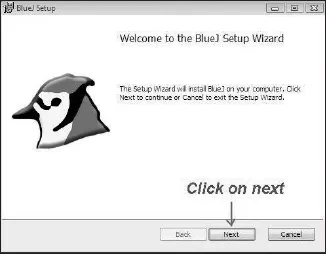
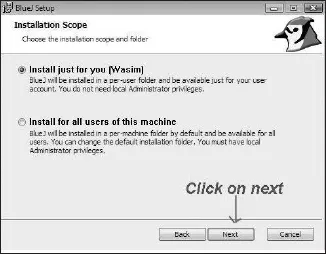
After downloading let's do installing. Follow the steps as per image.
Pic: 1
Pic: 2
Pic: 3
Pic: 4
Pic: 5
Pic: 6
Pic: 7
Pic 1: When BlueJ installing begins. Click on Next button.
Pic 2: Here you can choose installation type for single user or multiple users. I keep for single user. So, click on Next button.
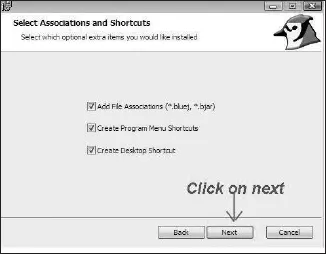
Pic 3: Select the extra options you want to get directly. Let it be selected all. Click on Next button.
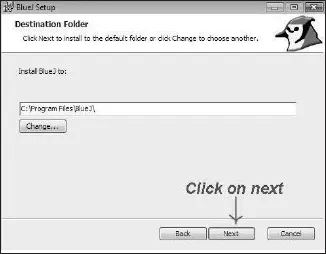
Pic 4: Select the destination folder, where you want to install BlueJ. You can select anywhere, you want. Click on Next button.
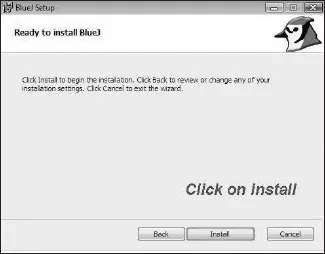
Pic 5: Now ready to install Bluej, so click on Install button.
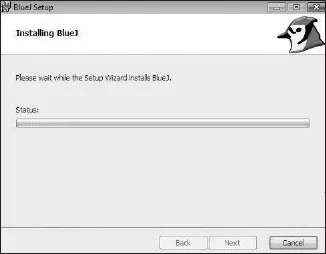
Pic 6: Your installation is in progress, please, wait for while.
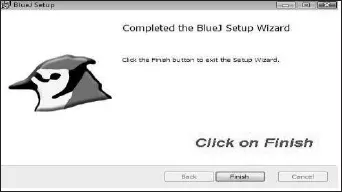
Pic 7: Installation completed. So, click on Finish button.
Now, to open BlueJ, Click on BlueJ icon on your screen.
Pic: 8
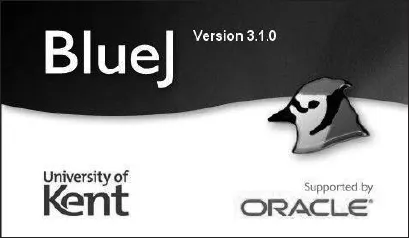
When BlueJ open, you can see where it's being maintained and who support it. Presently, it is maintained by University of Kent and Supported by Oracle Inc.
Pic: 9
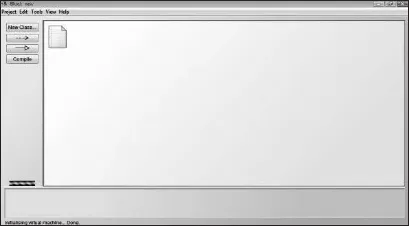
This is the area, where coding is not to be done. You can click on Project: New Project. Give a Project/Folder Name and click on Create. I have given Project Name "New", so showing "BlueJ: new" at above like title in Pic: 9.
Pic: 10
Pic: 11
Pic: 12
Pic: 13
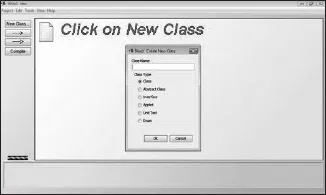
PicPic: 10 - Click on New Class, to create a class file.
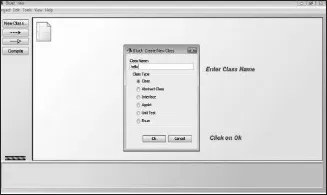
PicPic: 11 - Give Class Name in text box and Click on ok.
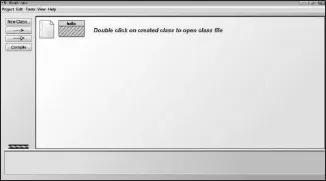
PicPic: 12 - Double click on created classes to open the class file.
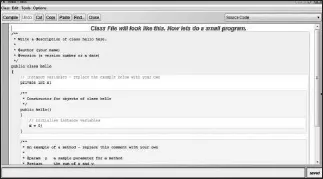
PicPic: 13 - Class file will look like this. Now delete everything auto-generated in page and write a code by self.
Pic: 14
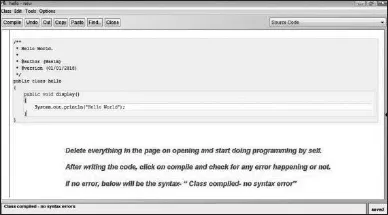
PicPic: 14 - I have written a "Hello World" program as an example to start with.
public class hello
{
public void display()
{
System.out.println("Hello World");
}}
After writing the code, click on compile button and check for any syntax error. If no...

Table of contents

  1. Cover
  2. BlueJ Programming
  3. Copyright
  4. Dedication
  5. Table of Contents
  6. Preface
  7. Chapter 1 : Introduction to BlueJ
  8. Chapter 2 : Programs & Solution
  9. Chapter 3 : Conclusion