Learning RabbitMQ With C#
eBook - ePub

Learning RabbitMQ With C#

A magical tool for the IT wor

  1. English
  2. ePUB (mobile friendly)
  3. Available on iOS & Android
eBook - ePub

Learning RabbitMQ With C#

A magical tool for the IT wor

About this book

Step by Step guide to develop solutions using RabbitMQ message queuing with.Net application. Key Features

  • How to Setup RabbitMQ on Windows
  • What are RabbitMQ Exchanges and its Types
  • What are Queues and Bindings
  • How to Create Users in RabbitMQ and Setting privilege
  • How to Publish /Read/Delete Messages Using C#


Description
This book is meant for developers, architects, solution providers, consultants and engineers, Primarily the book requires knowledge of C#, but it can also be understood by anybody with a bit of programming background. This book contains instructions on how to set up and Install RabbitMQ on Windows and how to use Web Management Plugin of RabbitMQ. It also discusses topics such as Exchanges, types of Rabbit MQ Exchanges and Queue along with Binding in RabbitMQ and creating RabbitMQ Users, Publishing/ Reading/ Deleting Messages Using C# What Will You Learn

  • RabbitMQ, its Setup, Exchanges, Queues, users and Binding.
  • RabbitMQ Virtual hosts, Connections, Channels
  • Publishing, Reading, Delete Message
  • Publish Message Using C# to RabbitMQ
  • Using RabbitMQ Direct Message Exchanges, Topic Message Exchanges, Fanout Message Exchanges and Headers Message Exchanges with.Net Application


Who This Book Is For
This book is for developers, architects, solution providers, consultant, and engineers to develop solutions using RabbitMQ message and queuing with.Net applications. Table of Contents

  • RabbitMQ Introduction
  • RabbitMQ Setup
  • RabbitMQ Exchanges
  • RabbitMQ Queues
  • Binding in RabbitMQ
  • RabbitMQ Users
  • RabbitMQ Virtual hosts
  • Connections
  • Channels
  • Publishing Message
  • Reading Message
  • Delete Message
  • Publish Message Using C# to RabbitMQ
  • Using RabbitMQ Direct Message Exchanges with.Net Application
  • Using RabbitMQ Topic Message Exchanges with.Net Application
  • Using RabbitMQ Fanout Message Exchanges with.Net Application
  • Using RabbitMQ Headers Message Exchanges with.Net Application
  • About the Author
    Saineshwar Bageri is a Software Developer working on.NET Web Technologies for six years. His expertise also includes Visual Studio, Team Foundation Server, Entity Framework, Unit Testing AngularJS and JavaScrip. He has been presented with MVP awards by Microsoft (2018) and C# Corner (2014-2018) for his contribution to the community. linkedin: linkedin.com/in/saineshwar-bageri-mvp-35200440
Frequently asked questions

Yes, you can cancel anytime from the Subscription tab in your account settings on the Perlego website. Your subscription will stay active until the end of your current billing period. Learn how to cancel your subscription.
At the moment all of our mobile-responsive ePub books are available to download via the app. Most of our PDFs are also available to download and we're working on making the final remaining ones downloadable now. Learn more here.
Perlego offers two plans: Essential and Complete
  • Essential is ideal for learners and professionals who enjoy exploring a wide range of subjects. Access the Essential Library with 800,000+ trusted titles and best-sellers across business, personal growth, and the humanities. Includes unlimited reading time and Standard Read Aloud voice.
  • Complete: Perfect for advanced learners and researchers needing full, unrestricted access. Unlock 1.4M+ books across hundreds of subjects, including academic and specialized titles. The Complete Plan also includes advanced features like Premium Read Aloud and Research Assistant.
Both plans are available with monthly, semester, or annual billing cycles.
We are an online textbook subscription service, where you can get access to an entire online library for less than the price of a single book per month. With over 1 million books across 1000+ topics, we’ve got you covered! Learn more here.
Look out for the read-aloud symbol on your next book to see if you can listen to it. The read-aloud tool reads text aloud for you, highlighting the text as it is being read. You can pause it, speed it up and slow it down. Learn more here.
Yes! You can use the Perlego app on both iOS or Android devices to read anytime, anywhere — even offline. Perfect for commutes or when you’re on the go.
Please note we cannot support devices running on iOS 13 and Android 7 or earlier. Learn more about using the app.
Yes, you can access Learning RabbitMQ With C# by Saineshwar Bageri in PDF and/or ePUB format, as well as other popular books in Computer Science & Programming in C#. We have over one million books available in our catalogue for you to explore.

Publish Message Using C# to RabbitMQ

In this part, we are going to learn how to Publish a Message to RabbitMQ using .Net Application and RabbitMQ.Client in step by step way.

Creating RequestRabbitMQ Application

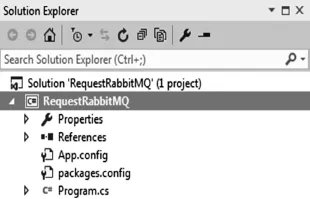
Let's create a simple console application with Name RequestRabbitMQ.
jpg
After creating application, we are going to add RabbitMQ.Client NuGet package.

Adding RabbitMQ.Client NuGet Package

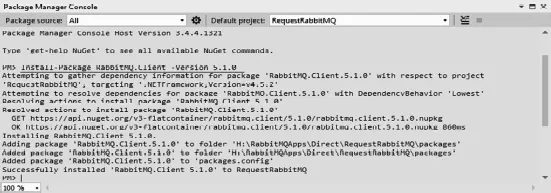
In this part for creating a connection with the RabbitMQ server to create request, we need to add RabbitMQ.Client package from NuGet Package.
Command to install: Install-Package RabbitMQ.Client -Version 5.1.0
jpg
After installing NuGet package of RabbitMQ.Client next we are going to create an exchange from web admin console.

Adding Direct Exchange

In this part, we are going to create an exchange for doing that we have first created a connection to RabbitMQ server using RabbitMQ.Client after creating connection next we have passed credentials along with HostName to connectionFactory after that we have created a connection by calling CreateConnection method, next to add exchange we have called method ExchangeDeclare method and passed parameters such as exchange name and exchange type.

Code Snippet

using RabbitMQ.Client;
using System;
namespace RequestRabbitMQ
{
class Program
{
static void Main(string[] args)
{
string UserName = "guest";
string Password = "guest";
string HostName = "localhost";
//Main entry point to the RabbitMQ .NET AMQP
client
var c o n n e c t i o n F a c t o r y = new
RabbitMQ.Client.ConnectionFactory()
{
UserName = UserName,
Password = Password,
HostName = HostName
};
var connect i on =
connectionFactory.CreateConnection();
var model = connection.CreateModel();
//// Create Exchange
model.ExchangeDeclare("demoExchange",
ExchangeType.Direct);
Console.ReadLine();
}
}
}
Let's check result by running application.
jpg
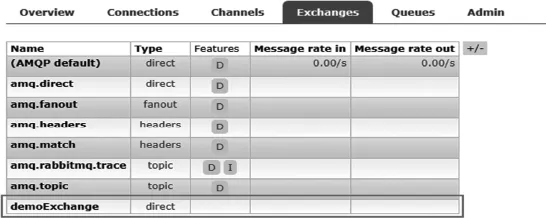
After adding exchange let's check web management plugin you will see we have successfully created exchanges.
jpg

Adding Queue

Now we are going to add a queue.
For doing that we are going to add call QueueDeclare method and pass parameters to it.

Method definition:

/// <summary> Declare a queue.</summary>
[AmqpMethodDoNotlmplement(null)]
QueueDedareOk QueueDedare(string queue, bool durable, bool exclusive, bool autoDelete, IDictionary<string, object> arguments)
First parameter is queue n...

Table of contents

  1. Cover
  2. Learning Rabbitmq With C#
  3. Copyright
  4. Table of Contents
  5. Preface
  6. Acknowledgement
  7. • RabbitMQ Introduction
  8. • RabbitMQ Setup
  9. • Installing Erlang
  10. • RabbitMQ Exchanges
  11. • RabbitMQ Queues
  12. • Binding in RabbitMQ
  13. • RabbitMQ Users
  14. • RabbitMQ Virtual Hosts
  15. • Connections
  16. • Channels
  17. • Publishing Message
  18. • Reading Message
  19. • Delete Message
  20. • Publish Message Using C# to RabbitMQ
  21. • Using RabbitMQ Direct Message Exchanges with .Net Application
  22. • Using RabbitMQ Topic Message Exchanges with .Net Application
  23. • Using RabbitMQ Fanout Message Exchanges with .Net Application
  24. • Using RabbitMQ Headers Message Exchanges with .Net Application