Learn about the Hardware and Software used in Computers, Operating Systems, Browsers, Word, Excel, PowerPoint, Emails, Printing, etc.Today, we are living in a computer age, where computers play a key role in our everyday lives. In addition to communication media like television, radio and newspaper, we now have another communication medium, i.e. computers. We use computers to email, to chat, for Internet browsing, for teleconferencing, for video conferencing, etc. We also use them for e-learning, e-commerce, e-banking, e-governance, e-ticketing and for many more things. So, fundamental awareness of computers is a must if we wish to lead a successful life. Computer Awareness is essential and an integral part of competitive and entrance exams. This book Computer Awareness- made simple has been specially designed for General competitive examinations like Bank PO, Clerk, SSC, Railway and various entrance examinations. KEY FEATURES• In every chapter the basics of the topics are defined first, followed by • Multiple Choice Questions with Answers• Including Previous Year MCQs with Answers• Tables, Facts, Notes, and Tips clear the concept and easy to memorize• 6 Practice Sets for self-improvement• At the end of this book the essential Abbreviations and Glossary used in Computers are appended• This book completely fulfils all the necessity of students appearing at competitive and entrance examination WHAT WILL YOU LEARN• Computer, its architecture, hardware- software, memory and its Security• Data Representation, Operating System• Programming and Database Concepts• Microsoft Windows, Microsoft Office• Data Communication and Networking• Internet and Its Services WHO THIS BOOK IS FORAnyone who wants to learn the basics of computer. This book will play a pivotal role in presenting all the basics of computer you need to become a better learner.AUTHOR BIOSoumya Ranjan Behera, a well-known author of computer and competitive books. He obtained his B.Tech degree in Computer Science and Engineering Technology from Biju Patnaik University of Technology, Odisha. He has more than seven years of experience in editing, research and writing booksHis Linkedin profile: linkedin.com/in/srbsom
- English
- ePUB (mobile friendly)
- Available on iOS & Android
eBook - ePub
About this book
Key takeaways
AI-Generated Insights
Insight 1
Describe the fundamental components of computer architecture, including hardware, software, and memory, and explain how data is represented within these systems.
Insight 2
Operate common operating systems like Microsoft Windows and utilize essential productivity applications such as Microsoft Office for various tasks.
Insight 3
Explain the principles of data communication and networking, manage basic database concepts, and identify key measures for computer security and internet services.
Information
Subtopic
Information TechnologyIndex
Computer ScienceCHAPTER 1
INTRODUCTION TO COMPUTER
A computer is an electronic device that is designed to work with Information. The term computer is derived from the Latin term ‘computare’, this means to calculate or programmable machine. Today, the word computer refers to computing devices, whether or not they are electronic, programmable, or capable of ‘storing and retrieving’ data.


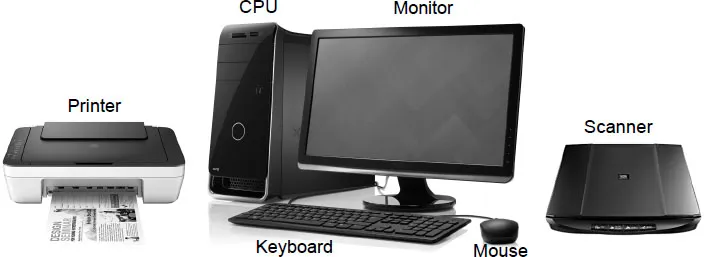
A Computer System
Functioning of a Computer
The four basic functions of a computer system are as follows
- Input: Transferring of information into the computer system is called input. It may be through a user input device - i.e. keyboard, mouse, scanner etc. or though previously loaded software/program, cd etc. It sends data instructions to the Central Processing Unit (CPU).
- Storage: The process of saving data and instructions permanently is known as storage. The data is first stored in the storage unit for faster access and processing.
- Processing: It involves manipulation of raw data into information. It is the core function of the computer system. It controlled by the Control Unit, the Arithmetic Logic Unit and Temporary Storage.
- Output: It is the function that allows a computer to display information to the user. It can be accomplished through the monitor (or other graphical display), printer, etc.
Features of Computer
The important features of computer are as follows
- Automatic (Spontaneous): The computers are automatic. It may execute the process without any involvement of user once they are assigned to a work.
- Accuracy (Authenticity): The degree of accuracy of computer is very high and every calculation is performed with the same accuracy. The level of accuracy is determined by the design of computer.
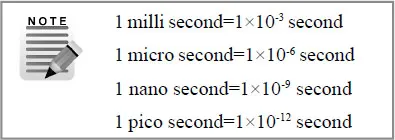
- Speed (Celerity): Computer can perform millions of instructions and even more per second. The computer present in the modern world has the speed of Nano and Pico second.
- Diligence (Attentiveness): A computer is free from tiredness, lack of concentration, fatigue, etc. It can work for hours without creating any error.
- Storage Capacity: A computer can store huge amount of data / information and retrieve any piece of this information whenever required. It depends on the capacity of hard disk (secondary storage).
- Reliability (Consistency): A computer is reliable, dependent and can be run for many years without loss of data.
- Versatility (Adaptability): Computer can perform different types of tasks simultaneously. It can do multiple tasks at same time.
- Plug and Play (PnP): Computer can detect and configure hardware and software component automatically.
Terms Related to Computer
- Hardware: It is the physical components of the computer. It refers to the objects that we can actually touch. e.g. monitor, keyboard, mouse, system unit, hard disk, mother board, etc.
- Software: It is a set of instructions / programs that tells the hardware what to do and how to perform the actions. e.g. word processor, operating system, etc.
- Data: It is a raw material of information. It can be unprocessed raw texts, numbers, figures, spreadsheets, etc.
- Information: Properly processed, organized, structured data is called information.
- Instruction: Any command given to the computer in the computer language is by the user is cal...
Table of contents
- Cover Page
- Title Page
- Copyright Page
- Preface
- Table of Contents
- 1. Introduction to Computer
- 2. Computer Architecture
- 3. Computer Hardware
- 4. Computer Memory
- 5. Data Representation
- 6. Computer Software
- 7. Operating System
- 8. Programming Concepts
- 9. Microsoft Windows
- 10. Microsoft Office
- 11. Database Concepts
- 12. Data Communication and Networking
- 13. Internet and Its Services
- 14. Computer Security
- Practice Sets (1-6)
- Abbreviations
- Glossary
Trusted by 375,005 students
Access to over 1.5 million titles for a fair monthly price.
Study more efficiently using our study tools.
Frequently asked questions
Yes, you can cancel anytime from the Subscription tab in your account settings on the Perlego website. Your subscription will stay active until the end of your current billing period. Learn how to cancel your subscription
No, books cannot be downloaded as external files, such as PDFs, for use outside of Perlego. However, you can download books within the Perlego app for offline reading on mobile or tablet. Learn how to download books offline
Perlego offers two plans: Essential and Complete
- Essential is ideal for learners and professionals who enjoy exploring a wide range of subjects. Access the Essential Library with 800,000+ trusted titles and best-sellers across business, personal growth, and the humanities. Includes unlimited reading time and Standard Read Aloud voice.
- Complete: Perfect for advanced learners and researchers needing full, unrestricted access. Unlock 1.5M+ books across hundreds of subjects, including academic and specialized titles. The Complete Plan also includes advanced features like Premium Read Aloud and Research Assistant.
We are an online textbook subscription service, where you can get access to an entire online library for less than the price of a single book per month. With over 1.5 million books across 990+ topics, we’ve got you covered! Learn about our mission
Look out for the read-aloud symbol on your next book to see if you can listen to it. The read-aloud tool reads text aloud for you, highlighting the text as it is being read. You can pause it, speed it up and slow it down. Learn more about Read Aloud
Yes! You can use the Perlego app on both iOS and Android devices to read anytime, anywhere — even offline. Perfect for commutes or when you’re on the go.
Please note we cannot support devices running on iOS 13 and Android 7 or earlier. Learn more about using the app
Please note we cannot support devices running on iOS 13 and Android 7 or earlier. Learn more about using the app
Yes, you can access Computer Awareness by Soumya Ranjan Behera in PDF and/or ePUB format, as well as other popular books in Computer Science & Information Technology. We have over 1.5 million books available in our catalogue for you to explore.