Programming Media Art Using Processing
eBook - ePub

Programming Media Art Using Processing

A Beginner's Guide

  1. 234 pages
  2. English
  3. ePUB (mobile friendly)
  4. Available on iOS & Android
eBook - ePub

Programming Media Art Using Processing

A Beginner's Guide

About this book

Programming Media Art Using Processing: A Beginner's Guide provides an entry-level exploration into visual design through computer programming using the open source and artist-friendly language, Processing. Used by hundreds of students, this learning system breaks lessons down into strategic steps towards fun and creative media art projects.

This book provides a linear series of lessons with step-by-step examples that lead to beginning media art projects, including abstract designs, pixel landscapes, rollover animations, and simple video games. Computer programming can be overwhelming for the first-time learner, but this book makes the learning of code more digestible and fun through a full color, well-diagrammed, and deeply explained text presentation. Lessons are rhythmically broken down into digestible parts with code annotations and illustrations that help learners focus on the details one step at a time. The content is legible, flexible, and fun to work with because of its project-based nature.

By following the lessons and producing the projects sequentially in this book, readers will develop the beginning foundational skills needed to understand computer programming basics across many languages and also explore the art of graphic design. Ultimately, this is a hands-on, practical guide.

To learn more about Margaret Noble's work, please visit her artist's website and educator website.

Frequently asked questions

Yes, you can cancel anytime from the Subscription tab in your account settings on the Perlego website. Your subscription will stay active until the end of your current billing period. Learn how to cancel your subscription.
No, books cannot be downloaded as external files, such as PDFs, for use outside of Perlego. However, you can download books within the Perlego app for offline reading on mobile or tablet. Learn more here.
Perlego offers two plans: Essential and Complete
  • Essential is ideal for learners and professionals who enjoy exploring a wide range of subjects. Access the Essential Library with 800,000+ trusted titles and best-sellers across business, personal growth, and the humanities. Includes unlimited reading time and Standard Read Aloud voice.
  • Complete: Perfect for advanced learners and researchers needing full, unrestricted access. Unlock 1.4M+ books across hundreds of subjects, including academic and specialized titles. The Complete Plan also includes advanced features like Premium Read Aloud and Research Assistant.
Both plans are available with monthly, semester, or annual billing cycles.
We are an online textbook subscription service, where you can get access to an entire online library for less than the price of a single book per month. With over 1 million books across 1000+ topics, we’ve got you covered! Learn more here.
Look out for the read-aloud symbol on your next book to see if you can listen to it. The read-aloud tool reads text aloud for you, highlighting the text as it is being read. You can pause it, speed it up and slow it down. Learn more here.
Yes! You can use the Perlego app on both iOS or Android devices to read anytime, anywhere — even offline. Perfect for commutes or when you’re on the go.
Please note we cannot support devices running on iOS 13 and Android 7 or earlier. Learn more about using the app.
Yes, you can access Programming Media Art Using Processing by Margaret Noble in PDF and/or ePUB format, as well as other popular books in Computer Science & Computer Graphics. We have over one million books available in our catalogue for you to explore.

CHAPTER 1

Designing Graphically with the Language of Code

GETTING STARTED & BASIC OVERVIEW

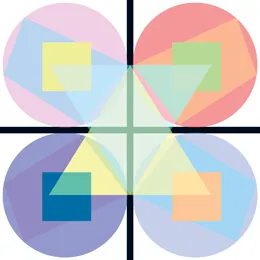
FIGURE 1.1
FIGURE 1.1Student project example: geometric graphic design. (Printed with permission from Michel Yanez.)
Install Processing for free on your computer; it works on Macs, PCs, and Linux.
Link: https:/​/​processing.org/​download/​
FIGURE 1.2
FIGURE 1.2
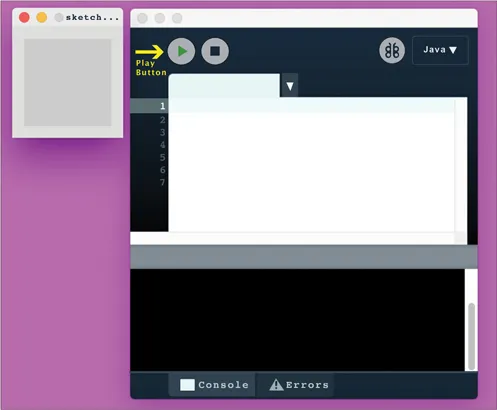
Once on the Processing web page, scroll down to the list of “stable releases” and try to install the most recent version of Processing on your computer. If you have difficulty installing this version, then try one of the earlier releases. The projects in this book will work fine across the various versions of Processing. Once installed, open Processing and press the play button. You should see something like this.
FIGURE 1.3
FIGURE 1.3
As shown in Figure 1.3, your Processing workspace has two windows. You enter text commands into the editor window and see your graphic results on the canvas window (also called the sketch window). You push the play button to test for results whenever you change the code.
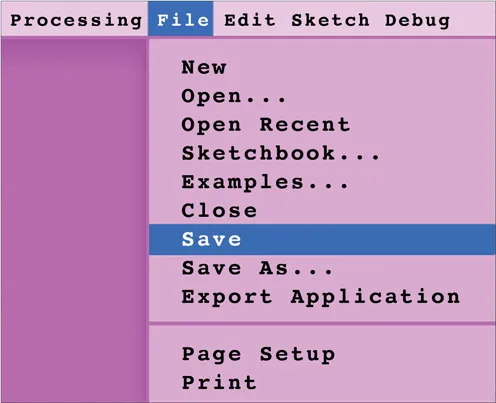
As you move through these tutorials, it is advised that you save all of your exercises and example files for future reference.
FIGURE 1.4
FIGURE 1.4
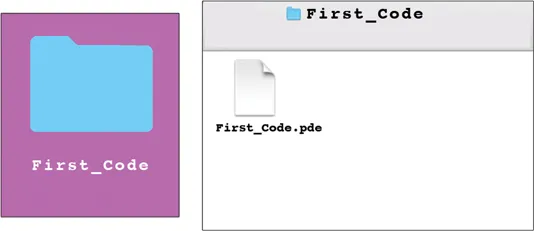
When you save a Processing file, you will notice that Processing automatically places a .pde file inside of a folder.
FIGURE 1.5
FIGURE 1.5
It is important that you keep this folder with the .pde file inside of it. Processing also requires that the folder and .pde file have the same name. When you have mismatched names between a file and a folder or separate this file path, you will get errors when opening your project.

LESSON 1.1: PIXEL GRID SYSTEM

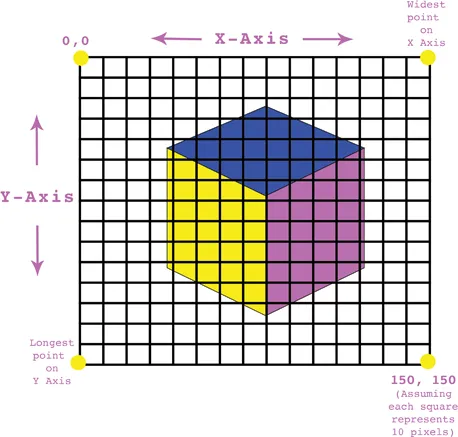
Processing uses a pixel grid system for plotting shapes on the canvas window. Every point on the screen is a pixel and each point is specified by the locations of x, y (horizontal and vertical placements).
FIGURE 1.6
FIGURE 1.6The longest point on the canvas is also called the height of the canvas.
The pixel grid system has its 0,0 coordinate in the upper left corner (this is different from beginning Algebra). The x-axis moves from left to right (0 to the specified width of your canvas). The y-axis moves from the top to the bottom, (0 to the specified height of your canvas.) This can be confusing because the “highest” point of your canvas is at the bottom of y...

Table of contents

  1. Cover
  2. Half Title
  3. Title Page
  4. Copyright Page
  5. Contents
  6. Acknowledgements,
  7. Contributors,
  8. Author,
  9. Introduction,
  10. CHAPTER 1 ▪ DESIGNING GRAPHICALLY WITH THE LANGUAGE OF CODE
  11. CHAPTER 2 ▪ CREATING RESPONSIVE ENVIRONMENTS
  12. CHAPTER3 ▪ AUTOMATED ANIMATIONS
  13. CHAPTER 4 ▪ ANIMATED COLLAGES
  14. CHAPTER 5 ▪ CONDITIONAL INTERACTIONS AND ROLLOVERS
  15. CHAPTER 6 ▪ EVENTS AND INTERACTIONS FOR SIMPLE 
GAMES: PART 1
  16. CHAPTER 7 ▪ EVENTS AND INTERACTIONS FOR 
SIMPLE GAMES: PART 2
  17. CHAPTER 8 ▪ MULTILEVEL ARCHITECTURES AND ARRAYS
  18. INDEX,