![]()
CHATER 1
Overview of Operating Systems
Objectives
• To explain what an operating system is
• To describe briefly operating system services
• To describe character and graphical user interfaces
• To discuss different types of operating systems
• To describe briefly the UNIX operating system
• To give an overview of the structure of a contemporary system
• To describe briefly the structure of the UNIX operating system
• To detail some important system setups
• To describe briefly the history of the UNIX operating system
• To provide an overview of the different types of UNIX systems
1.1 INTRODUCTION
Many operating systems are available today, some general enough to run on any type of computer (from a personal computer, or PC, to a mainframe), and some specifically designed to run on a particular type of computer system, including real-time computer systems used to control the movement of mechanical devices such as robots, tablet computers, and cell phones. In this chapter, we describe the purpose of an operating system and the different classes of operating systems. Before describing different types of operating systems and where UNIX fits in this categorization, we present a layered diagram of a contemporary computer system and discuss the basic purpose of an operating system. We then describe different types of operating systems and the parameters used to classify them. Then, we identify the class that UNIX belongs to and briefly discuss the different members of the UNIX family.
The people who use UNIX comprise application developers, systems analysts, programmers, administrators, business managers, academicians, and people who just wish to read their e-mail. From its earliest inception in 1969 as a laboratory research tool, it was further developed in the academic community, and then endorsed for commercial uses. In its version today, UNIX has an underlying functionality that is complex but easy to learn, and extensible yet easily customized to suit a user’s style of computing. One key to understanding its longevity and its heterogeneous appeal is to study the history of its evolution.
1.2 WHAT IS AN OPERATING SYSTEM?
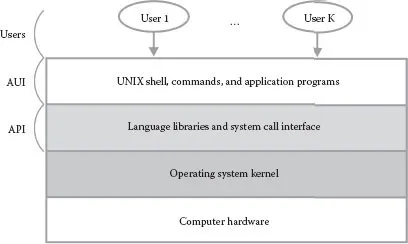
A computer system consists of various hardware and software resources, as shown in a layered fashion in Figure 1.1. The primary purpose of an operating system is to facilitate easy, efficient, fair, orderly, and secure use of these resources. It allows the users to employ application software—spreadsheets, word processors, Web browsers, e-mail software, and other programs. Programmers use language libraries, system calls, and program generation tools (e.g., text editors, compilers, and version control systems) to develop software. Fairness is obviously not an issue if only one user at a time is allowed to use the computer system, including single-user desktop systems, laptops, tablet computers, and cell phones. However, if multiple users are allowed to use the computer system, fairness and security are two main issues to be tackled by the operating system designers.
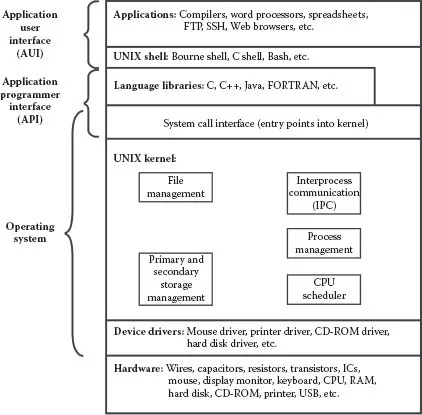
Hardware resources include keyboards, touch pads, display screens (may also be touch screens), main memory (commonly known as random access memory or RAM), disk drives, network interface cards (NICs), and central processing units (CPUs). Software resources include applications such as word processors, spreadsheets, games, graphing tools, picture- and video-processing tools, and Internet-related tools such as Web browsers. These applications, which reside at the topmost layer in the diagram, form the application user interface (AUI). The AUI is glued to the operating system kernel via the language libraries and the system call interface. The system call interface comprises a set of functions that can be used by the applications and library routines to execute the kernel code for a particular service, such as reading a file. The language libraries and the system call interface comprise what is commonly known as the application programmer interface (API). The kernel is the core of an operating system, where issues like CPU scheduling, memory management, disk scheduling, and interprocess communication are handled. The layers in the diagram are shown in an expanded form for the UNIX operating system in Figure 1.2, where we also describe them briefly.
There are two ways to view an operating system: top down and bottom up. In the bottom-up view, an operating system can be viewed as a software that allocates and deallocates system resources (hardware and software) in an efficient, fair, orderly, and secure manner. For example, the operating system decides how much RAM space is to be allocated to a program before it is loaded and executed. The operating system ensures that only one file is printed on a particular printer at a time, prevents an existing file on the disk from being accidentally overwritten by another file, and further guarantees that, when the execution of a program given to the CPU for processing has been completed, the program relinquishes the CPU so that other programs can be executed. Thus the operating system can be viewed as a resource manager.
In the top-down view, which we espouse in this textbook, an operating system can be viewed as a piece of software that isolates you from the complications of hardware resources. You therefore do not have to deal with the extremely difficult (and sometimes impossible for most users) task of interacting with these resources. For example, as a user of a computer system, you don’t have to write the code that allows you to save your work as a file on a hard disk, use a mouse as a point-and-click device, use a touch screen or touch pad, or print on a particular printer. Also, you do not have to write new software for a new device (e.g., mouse, disk drive, or DVD) that you buy and install in your system. The operating system performs the task of dealing with complicated hardware resources and gives you a comprehensive machine with a simple, ready-to-use interface. This machine allows you to use simple commands to retrieve and save files on a disk, print files on a printer, and play movies from a DVD. In a sense, the operating system provides a virtual machine that is much easier to deal with than the physical machine. You can, for example, use a command such as cp memo letter to copy the memo file to the letter file on the hard disk in your computer without having to worry about the location of the memo and letter files on the disk, the structure and size of the disk, the brand of the disk drive, and the number or name of the various drives (floppy, CD-ROM, and one or more hard drives) on your system.
FIGURE 1.1 A layered view of a contemporary computer system.
FIGURE 1.2 Software architecture of the UNIX operating system.
1.3 OPERATING SYSTEM SERVICES
An operating system provides many ready-made services for users. Most of these services are designed to allow you to execute your software, both application programs and program development tools, efficiently and securely. Some services are designed for housekeeping tasks, such as keeping track of the amount of time that you have used the system. The major operating system services therefore provide mechanisms for following secure and efficient operations and processes:
• Execution of a program
• Input and output operations performed by programs
• Communication between processes
• Error detection and reporting
• Manipulation of all types of files
• Management of users and security
A detailed discussion of these services is outside the scope of this textbook, but we discuss them briefly when they are relevant to the topic being presented.
1.4 CHARACTER (COMMAND LINE) VERSUS GRAPHICAL USER INTERFACES
In order to use a computer system, you have to give commands to its operating system. An input device, such as a keyboard, is used to issue a command. If you use the keyboard to issue commands to the operating system, the operating system has a character user interface (CUI), commonly known as the command line interface. If the primary input device for issuing commands to the operating system is a point-and-click device, such as a mouse, a touch screen, or a touch pad, the operating system has a graphical user interface (GUI). Most, if not all, operating systems have both character and graphical user interfaces, and you can use either. Some have a command line as their primary interface but allow you to run software that provides a GUI. Operating systems such as DOS and UNIX have CUIs, whereas Mac OS, OS/2, and Microsoft Windows primarily offer GUIs but have the capability to allow a user to enter a DOS- or UNIX-like terminal screen. Although UNIX comes with a CUI as its basic interface, it can run software based on the X Window System (Project Athena, MIT) that provides a GUI interface. Moreover, most UNIX systems now have a state-of-the-art X-based GUI. Mac OS X (Darwin), running on Apple products, is the most well-known GUI-based UNIX system. We discuss the UNIX GUI in Chapter 23.
Although a GUI makes a computer easier to use, it gives you an automated setup with reduced flexibility. A GUI also presents an extra layer of software between you and the task that you want to perform on the computer, thereby making the task slower. In contrast, a CUI gives you ultimate control of your computer system and allows you to run application programs any way you want. A CUI is also more efficient because a minimal layer of software is needed between you and your task on the computer, thereby enabling you to complete the task faster. It is also malleable and gives the user more control. Because many people are accustomed to the graphical interfaces of popular gizmos and applications such as Nintendo and Web browsers, the character interface presents an unfamiliar and sometimes difficult style of communicating commands to the computer system. However, computer science students are usually able to meet this challenge after a few hands-on sessions.
1.5 TYPES OF OPERATING SYSTEMS
Operating systems can be categorized according to the number of users who can use the system at the same time and the number of processes (executing programs) that the system can run simultaneously. These criteria lead to three types of operating systems:
• Single-user, single-process system: These operating systems allow only one user at a time to use the computer system, and the user can run only one process at a time. Such operating systems are commonly used for PCs. Examples of these operating systems are earlier versions of Mac OS, DOS, and many of Microsoft’s Windows operating systems.
• Single-user, multiprocess system: As the name indicates, these operating systems allow only a single user to use the computer system, but the user can run multiple processes simultaneously. These operating systems are also used on PCs. Examples of such operating systems are OS/2, Windows XP Workstation, and batch operating systems. Batch processing is still commonly used in mainframe computers, and most modern operating systems including UNIX, Microsoft Windows, Linux, and Mac OS perform some tasks in batch mode. Even smartphone operating systems including Android and iOS perform tasks in batch mode.
• Multiuser, multiprocess system: These operating systems allow multiple users to use a computer system simultaneously, and every user can run multiple processes at the same time. These operating systems are commonly used on computers that support multiple users in organizations such as universities and large businesses. Examples of these operating systems are UNIX, Linux, Windows NT Server, MVS, and VM/CMS.
Multiuser, multiprocess systems are used to increase resource utilization in the computer system by multiplexing expensive resources such as the CPU. This capability leads to increased system throughput (the number of processes finished in unit time). Resource utilization increases because, in a system with several processes, when one process is performing input or output (e.g., reading input from the keyboard, capturing a mouse click, or writing to file on the hard disk), the CPU can be taken away from this process and given to another process—effectively running both processes simultaneously by allowing them both to make progress (one is performing input/output [I/O] and the other is using the CPU). The mechanism of assigning the CPU to another process when the current process is performing I/O is known as multiprogramming. Multiprogramming is the key to all contemporary multiuser, multiprocess operating systems. In a single-process system, when the process using the CPU performs I/O, the CPU sits idle because there is no other process that can use the CPU at the same time.
Operating systems that allow users to interact with their executing programs are known as interactive operating systems, and the ones that do not are called batch operating systems. Batch systems are useful when programs are run without the need for human intervention, such as systems that run payroll programs. The VMS operating system has both interactive and batch interfaces. Almost all well-known contemporary operating systems (UNIX, Linux, DOS, Windows, etc.) are interactive. UNIX and Linux also allow programs to be executed in batch mode, with programs running in the background (see Chapter 10 for details of “background process execution” in UNIX). Multiuser, multiprocess, and interactive oper...