Chapter 1: What Is Moodle Workplace?
Here it is, a comprehensive guide to the new kid on the block: Moodle Workplace. You are invited to join this exciting journey through the latest variant of the most-used Learning Management System (LMS), Moodle.
Without further ado, let's get started. In this chapter, we will introduce Moodle Workplace and cover its various new key features. We will then compare this newly updated software with its little sibling, standard Moodle, and with Totara, the other popular Moodle distribution for learning in organizations and businesses. Then, we will explore Moodle Workplace's business model and its versioning policy.
So, we will cover the following topics in this chapter:
- Introducing Moodle Workplace
- Comparing Moodle Workplace and standard Moodle
- Comparing Moodle Workplace and Totara Learn
- Understanding Moodle Workplace's business model
- Understanding Moodle Workplace versions
Introducing Moodle Workplace
According to moodle.com/workplace, Moodle Workplace empowers "your team with an effective learning solution for training and development."
Moodle Workplace, or Workplace for short, is an open source LMS that has been developed by Moodle Pty Ltd. Workplace is based on standard Moodle and has extra features specially designed for corporate and organizational training, resulting in a powerful and flexible platform for workplace learning.
The main targets for Workplace are companies – from small to medium enterprises, all the way to global corporations and governments (regional and national), as well as public sector and non-governmental organizations, such as charities, foundations, and healthcare providers. However, Moodle Workplace is not limited to these entities: a university might make use of Moodle Workplace for the training and development of its employees, while using standard Moodle as their LMS for students.
The key features of Moodle Workplace are as follows:
Now that you are familiar with the key features of Moodle Workplace, let's compare it with its little brother, standard Moodle.
Comparing Moodle Workplace and standard Moodle
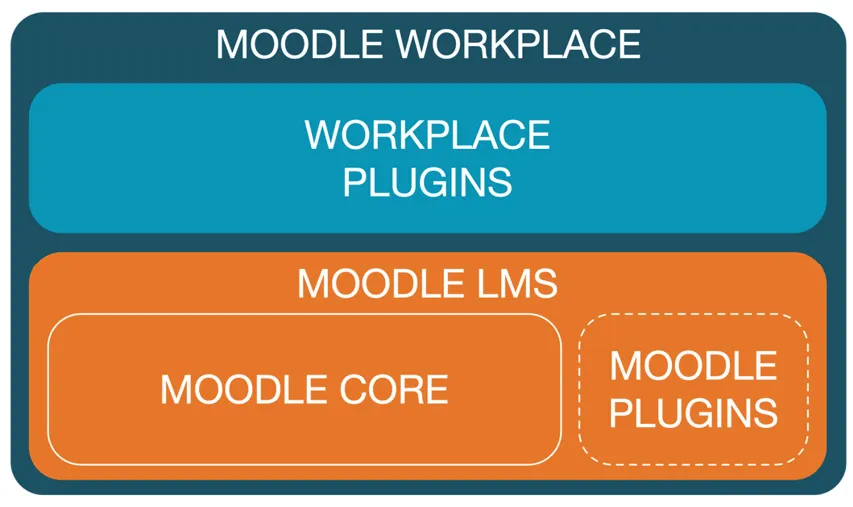
The usage of the term Moodle – both as a noun and a verb – has been synonymous with the leading open source LMS. However, there are multiple components in the Moodle product family, and the one almost everyone refers to as Moodle is technically called Moodle Core. The high-level components can be seen in the following diagram:
Figure 1.1 – Moodle Core versus Moodle Workplace
Let's have a closer look at each of the components in the preceding diagram.
Moodle Core or standard Moodle
Moodle Core is the original open source LMS, which has become the de facto standard worldwide in educational settings, particularly in schools, colleges, and universities. Since its inaugural launch in 2002, Moodle Core has become the benchmark that every LMS is measured against. It has won a wide range of international accolades and established itself as an ecosystem for a large number of educational tools and services.
Important note
Throughout the book, we are going to refer to Moodle Core as standard Moodle for simplicity and better readability.
Standard Moodle contains facilities for formative and informal assessment, synchronous and asynchronous communication and collaboration, grading, competencies, and much more. Various standards, such as SCORM, LTI, and IMS, have been adopted, and integration via numerous standard protocols is available, including SOAP and REST web services, Active Directory, and SAML.
A key ingredient to the success story of Moodle is its flexibility and customizability. In addition to hundreds of application configuration options, various elements can be tailored to your needs, including the look and feel of the LMS to represent the corporate identity of your organization. Think of Moodle as a massive box of Lego bricks, where you can either follow pre-built sets or build your own individual system. A major contribution to the latter is Moodle plugins.
Moodle plugins and Moodle LMS
While standard Moodle is a powerful and comprehensive LMS, very few sites solely rely on the base system. Instead, add-on modules are used to supplement the feature set of standard Moodle to customize the platform to individual requirements. These add-ons are called Moodle plugins and are mostly community-contributed additions to standard Moodle, extending its functionality for a specific use case. At the time of writing, there are over 1,750 (!) entries in the official Moodle plugins database at moodle.org/plugins.
There exists a plethora of third-party Moodle plugins that add new functionalities, fix problems, or integrate Moodle with external systems and cloud services. This also covers add-ons for commercial software popular in workplace settings, such as the following, for example:
- Office systems: For instance, Microsoft has developed a suite of plugins to allow Microsoft Office 365 usage within Moodle. This includes logging in via OpenID, access to OneDrive, integration with Office resources, and Outlook calendar synchronization.
- Web conferencing: Various commercial web conferencing suppliers provide plugins for their system to be used from within a Moodle course. Examples are WebEx, Zoom, and BigBlueButton.
- Video platforms: Streaming is a highly effective way to transport video content, which is already supported via basic integrations with YouTube and Vimeo. The Moodle functionality of the latter can be nicely enhanced using the popular Video Time plugin. Additionally, dedicated video platforms, such as Kaltura, also provide suites of plugins for smooth integration with Moodle.
Moodle LMS is effectively standard Moodle plus – optionally – one or many Moodle plugins.
Workplace plugins
Moodle Pty Ltd – the company behind Moodle – has developed a set of Workplace plugins that contain the key features of Moodle Workplace that sit on top of Moodle LMS. These plugins are the main focus of this book. All Moodle plugins still work in Moodle Workplace, with the rare exception of features that conflict with Workplace functionality.
Some of the Moodle Workplace plugins will make their way into standard Moodle over time, so Moodle LMS users can benefit from the investment that has gone into the Enterprise Edition of Moodle. The priority and timing will be determined through a collaborative approach with the Moodle community and Moodle Partners.
This section gave you a brief overview of the delta between standard Moodle and Moodle Workplace. Since Workplace is an extension of Moodle LMS, the differences are clear cut. This is different when it comes to Totara Learn, which we will cover in the next section.
Comparing Moodle Workplace and Totara Learn
Totara LMS is a subscription-based Moodle distribution that was launched in 2010 by Totara Learning (www.totaralearning.com). Initially, it was an extension to standard Moodle, plus some plugins, that was kept in lockstep with Moodle's releases until version 2.9. Moodle introduced competencies and learning plans in version 3.1, which conflicted with their counterparts in Totara. Totara LMS was renamed to Totara Learn, and new versioning was introduced that is currently at release 13 (see www.totaralearning.com for details).
Totara Learn is now part of a product family—Totara Experience Platform (TXP)—that comprises the following three interlinked components: