AutoCAD Plant 3D 2018 for Designers book introduces the readers to AutoCAD Plant 3D 2018, one of the world's leading application, designed specifically to create and modify P&ID's and plant 3D models. In this book, the author emphasizes on the features of AutoCAD Plant 3D 2018 that allow the user to design piping & instrumentation diagrams and 3D piping models. Also, the chapters are structured in a pedagogical sequence that makes this book very effective in learning the features and capabilities of AutoCAD Plant 3D 2018.Special emphasis has been laid in this book on tutorials and exercises, which relate to the real world projects, help you understand the usage and abilities of the tools available in AutoCAD Plant 3D 2018. You will learn how to setup a project, create and edit P&IDs, design a 3D Plant model, generate isometric/orthographic drawings, as well as how to publish and print drawings. Salient Features of the Textbook:Consists of 10 chapters that are organized in a pedagogical sequence.Comprehensive coverage of AutoCAD Plant 3D 2018 concepts and techniques.Tutorial approach to explain the concepts of AutoCAD Plant 3D 2018.Detailed explanation of all commands and tools.Summarized content on the first page of the topics that are covered in the chapter.Hundreds of illustrations for easy understanding of concepts.Step-by-step instructions to guide the users through the learning process.More than 9 real-world mechanical engineering designs as tutorials.Additional information throughout the book in the form of notes and tips.Self-Evaluation Tests and Review Questions at the end of each chapter to help the users assess their knowledge.Technical support by contacting [email protected] learning resources at http://allaboutcadcam.blogspot.com. Brief Table of ContentsChapter 1: Introduction to AutoCAD Plant 3DChapter 2: Creating Projects and P&IDsChapter 3: Creating StructuresChapter 4: Creating EquipmentChapter 5: Editing Specifications and CatalogsChapter 6: Routing PipesChapter 7: Adding Valves, Fittings, and Pipe SupportsChapter 8: Creating Isometric DrawingsChapter 9: Creating Orthographic DrawingsChapter 10: Managing Data and Generating reportsProject: Thermal Power Plant (For free download)Index
- English
- ePUB (mobile friendly)
- Available on iOS & Android
eBook - ePub
AutoCAD Plant 3D 2018 for Designers, 4th Edition
About this book
Information
Chapter 2
Creating Projects
and P&IDs
Learning Objectives
After completing this chapter, you will be able to:
• Create a new project
• Create a new drawing
• Create a P&ID drawing
• Add an equipment to a P&ID
• Assign a tag to a line
• Add valves
• Add instruments and instrumentation lines
• Add fittings
• Add off-page connectors
• Validate the P&ID drawing
• Edit the drawing
• Substitute components
• Convert AutoCAD components into P&ID Symbols
• Work with the Project Setup dialog box
Introduction
In this chapter, you will learn how to create a new project and a new drawing. Also, you will be briefly introduced to the P&ID module.
Project Manager
The PROJECT MANAGER is used to access existing projects, create new projects, add new drawings to a project, re-order drawing files, and modify the existing information in a project. It also allows you to export and import data, create project reports, include referenced drawings (xrefs), and link or copy files to the project folders. By default, the PROJECT MANAGER is docked on the left of your screen. Figure 2-1 shows the PROJECT MANAGER.
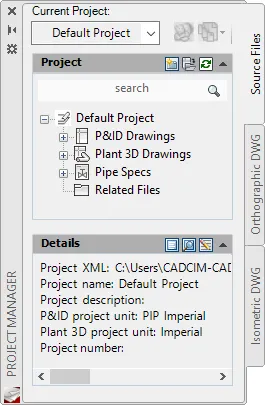
Figure 2-1 The PROJECT MANAGER
The PROJECT MANAGER contains three tabs: Source Files, Orthographic DWG, and Isometric DWG. The Source Files tab contains a project tree that displays P&ID drawings, Plant 3D drawings, Pipe Specs, and all related files of the project. The Orthographic DWG tab contains the list of all the orthographic drawing files. The Isometric DWG tab contains the isometric line diagrams of the plant layout.
CREATING A NEW PROJECT IN AutoCAD Plant 3D
To create a new project, choose the New Project option from the drop-down in the Current Project area of the PROJECT MANAGER. You can also create a new project by clic...
Table of contents
- CoverImage
- Front_matter_Plant_3D_2018
- c01_acad_plant_3D_2018
- c02_acad_plant_3D_2018
- c03_acad_plant_3D_2018
- c04_acad_plant_3D_2018
- c05_acad_plant_3D_2018
- c06_acad_plant_3D_2018
- c07_acad_plant_3D_2018
- c08_acad_plant_3D_2018
- c09_acad_plant_3D_2018
- c10_acad_plant_3D_2018
Trusted by 375,005 students
Access to over 1.5 million titles for a fair monthly price.
Study more efficiently using our study tools.
Frequently asked questions
Yes, you can cancel anytime from the Subscription tab in your account settings on the Perlego website. Your subscription will stay active until the end of your current billing period. Learn how to cancel your subscription
No, books cannot be downloaded as external files, such as PDFs, for use outside of Perlego. However, you can download books within the Perlego app for offline reading on mobile or tablet. Learn how to download books offline
Perlego offers two plans: Essential and Complete
- Essential is ideal for learners and professionals who enjoy exploring a wide range of subjects. Access the Essential Library with 800,000+ trusted titles and best-sellers across business, personal growth, and the humanities. Includes unlimited reading time and Standard Read Aloud voice.
- Complete: Perfect for advanced learners and researchers needing full, unrestricted access. Unlock 1.5M+ books across hundreds of subjects, including academic and specialized titles. The Complete Plan also includes advanced features like Premium Read Aloud and Research Assistant.
We are an online textbook subscription service, where you can get access to an entire online library for less than the price of a single book per month. With over 1.5 million books across 990+ topics, we’ve got you covered! Learn about our mission
Look out for the read-aloud symbol on your next book to see if you can listen to it. The read-aloud tool reads text aloud for you, highlighting the text as it is being read. You can pause it, speed it up and slow it down. Learn more about Read Aloud
Yes! You can use the Perlego app on both iOS and Android devices to read anytime, anywhere — even offline. Perfect for commutes or when you’re on the go.
Please note we cannot support devices running on iOS 13 and Android 7 or earlier. Learn more about using the app
Please note we cannot support devices running on iOS 13 and Android 7 or earlier. Learn more about using the app
Yes, you can access AutoCAD Plant 3D 2018 for Designers, 4th Edition by Prof. Sham Tickoo in PDF and/or ePUB format, as well as other popular books in Technology & Engineering & Mechanical Engineering. We have over 1.5 million books available in our catalogue for you to explore.