- 160 pages
- English
- ePUB (mobile friendly)
- Available on iOS & Android
eBook - ePub
About this book
Learn to make your own robots with this accessible, illustrated guide for robotics enthusiasts, featuring 13 unique robotics projects suitable for beginner to intermediate level. You’ve seen the sci-fi movies and dreamed of creating your very own robot. Now learn to build machines with your own hands that will move or perform tasks at your command.
Featuring brand-new projects and specially commissioned photography, this book uses easily sourced components to teach you simple electronics and programming. Learn to design and build your very own custom-made creations that can walk, draw or even guard your home.
Start with a space-age butterfly that skips along on its own or a robot that creates psychedelic patterns of amazing variety, then discover how to create a catapult bot that activates when movement is detected or construct an intelligent, all-terrain rover vehicle – the possibilities are endless.
Featuring brand-new projects and specially commissioned photography, this book uses easily sourced components to teach you simple electronics and programming. Learn to design and build your very own custom-made creations that can walk, draw or even guard your home.
Start with a space-age butterfly that skips along on its own or a robot that creates psychedelic patterns of amazing variety, then discover how to create a catapult bot that activates when movement is detected or construct an intelligent, all-terrain rover vehicle – the possibilities are endless.
Frequently asked questions
Yes, you can cancel anytime from the Subscription tab in your account settings on the Perlego website. Your subscription will stay active until the end of your current billing period. Learn how to cancel your subscription.
At the moment all of our mobile-responsive ePub books are available to download via the app. Most of our PDFs are also available to download and we're working on making the final remaining ones downloadable now. Learn more here.
Perlego offers two plans: Essential and Complete
- Essential is ideal for learners and professionals who enjoy exploring a wide range of subjects. Access the Essential Library with 800,000+ trusted titles and best-sellers across business, personal growth, and the humanities. Includes unlimited reading time and Standard Read Aloud voice.
- Complete: Perfect for advanced learners and researchers needing full, unrestricted access. Unlock 1.4M+ books across hundreds of subjects, including academic and specialized titles. The Complete Plan also includes advanced features like Premium Read Aloud and Research Assistant.
We are an online textbook subscription service, where you can get access to an entire online library for less than the price of a single book per month. With over 1 million books across 1000+ topics, weâve got you covered! Learn more here.
Look out for the read-aloud symbol on your next book to see if you can listen to it. The read-aloud tool reads text aloud for you, highlighting the text as it is being read. You can pause it, speed it up and slow it down. Learn more here.
Yes! You can use the Perlego app on both iOS or Android devices to read anytime, anywhere â even offline. Perfect for commutes or when youâre on the go.
Please note we cannot support devices running on iOS 13 and Android 7 or earlier. Learn more about using the app.
Yes, you can access Home Robotics by Daniel Knox in PDF and/or ePUB format, as well as other popular books in Technology & Engineering & Robotics. We have over one million books available in our catalogue for you to explore.
Information
02 SIMPLE ROBOTS
AVATAR
SCUTTLE BOT
GARDEN GUARDIAN
CATAPULT BOT
WALKING ROBOT
Using the BBC micro:bit to provide the brains for these cool projects, you will soon learn how to adapt the ideas to dream up your own brilliant robot designs.

AVATAR

Our previous projects all used simple mechanical and electrical components to allow our robots to move and interact with their environments. However, more complicated robots commonly use small devices known as microcontrollers.
COMPONENTS
1 BBC micro:bit
TOOLS
PC/laptop computer
micro USB cable
SNAPSHOT
Microcontrollers give robots more advanced functionality. They are like small mini computers. While theyâre not very good for familiar tasks like browsing the internet, they are excellent at doing or monitoring things repeatedly â they are brilliant at this because they can perform these tasks extremely quickly.
Microcontrollers need to be programmed for them to be able to know what tasks they should perform. Programming is commonly done using something that looks a bit like a strange text language, but this is not very user-friendly for new roboticists. Instead we will use a graphical programming language where we can build programs by dragging and dropping âblocksâ onto a screen.
If you have ever used the programming language âScratchâ at home or at school, you should feel confident about the programming part of these projects. If not, donât worry as this project is all about guiding you through writing your first program.

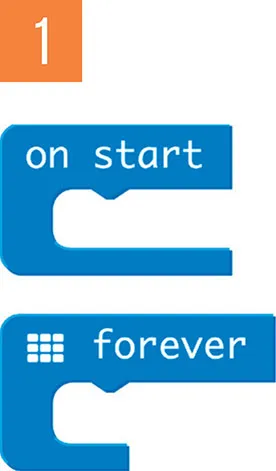
1 Launch the JavaScript Blocks Editor from the micro:bit website (microbit.org). When it loads, you should see a pane with a picture of a micro:bit, a number of tabs that contain different kinds of blocks, and a pane which contains two blocks âon startâ and âforeverâ. The âon startâ block, like its name suggests, performs tasks that should happen when your micro:bit is first switched on â this block is useful for setting the initial state of things. The âforeverâ block repeatedly executes the same tasks over and over again as fast as the microcontroller can go. This is why microcontrollers are great at doing simple tasks repetitively.

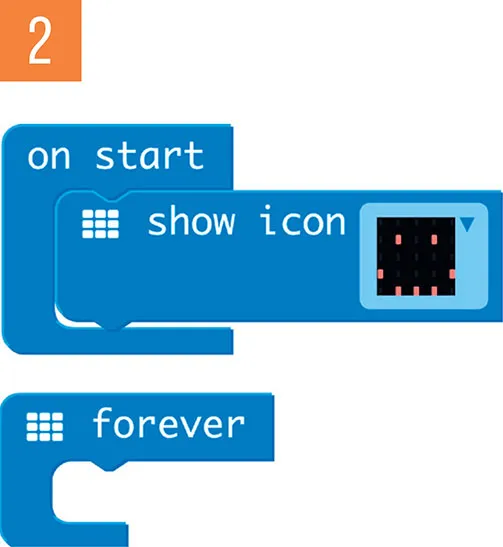
2 Click on the âBasicâ blocks tab and drag a âshow iconâ block onto the pane with the âon startâ and âforeverâ blocks. You will notice that the âshow iconâ block has a little notch in the top part of it, this means that it needs to be connected to something in order to work. Drag and release the âshow iconâ block so that the notch connects to âon startâ block. If you have speakers plugged into your computer, you should hear a âclickâ sound. The pane with a picture of a micro:bit should now change to show an image of a heart. This pane simulates the running of your program and is useful to test things without having to keep downloading your program to your micro:bit. Click the heart icon thatâs currently on display in the âshow iconâ block and click on the happy face. You should see that the simulator now updates itself and instead of showing a heart, it is instead displaying a happy face.

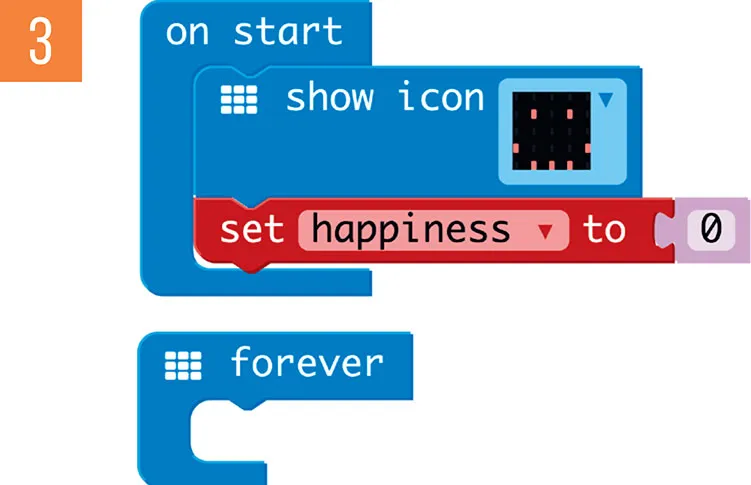
3 Frequently when programming we need our program...
Table of contents
- Cover
- Title Page
- Contents
- Introduction
- 01 Basic Bots
- 02 Simple Robots
- 03 Smart Makes
- Resources
- Index
- Copyright