Leverage Google Analytics to make data-driven decisions to shape your marketing strategy Key Features
Learn how to navigate the Google Analytics interface and reports.
Understand the working of the Google Analytics platform.
Understanding 'Traffic Sources' in Google Analytics.
Learn how to use Segments in Google Analytics.
Understand how Cross-Device reporting works in Google Analytics.
Description This book will help you learn everything that you need to know about Google Analytics. We will start by setting up the account and updating the settings. Then, we will go through the main reports in Google Analytics will dive deep into the analysis. We will then analyze the users, their behavior, and their sources. This analysis will improve your business and website results. We will also go through the fundamentals of relating Google Analytics data to your marketing strategy. We will explore live examples of analysis with real Ecommerce data and learn approaches to analyze our data. At the end of the book, we will go through the Conversions section in Google Analytics. By the end of the book, you will be able to make informative decisions based on data related to your website visitors. What will you learn
Learn how to set-up a Google Analytics account.
Understand how to read all the reports in Google Analytics.
Perform complex analysis based on the data in the reports.
Learn how to relate the Google Analytics data to your marketing strategy.
Read and analyze Conversion reports based on real Ecommerce data.
Who this book is for This book is designed for business owners and webmasters who want to use Google Analytics to make better decisions and improve their sales. Table of Contents 1. Google Analytics Step-by-step setup. 2. Google Analytics reports explained. 3. 7P's of Marketing and Google Analytics. 4. Your audience – your business. 5. The heartbeat of the Google Analytics: Acquisition & Behavior Reports. 6. Conversions. The final goal. About the Author Grigor Yovov is a certified Google Ads and Google Analytics expert and a bachelor in Marketing. He has over 20, 000 students from 153 countries in the world's biggest learning platform Udemy, where he creates courses related to Google Ads, Google Analytics and Business Development. In 2011 he founded his own digital marketing agency called Business Trend serving clients all around the world. Your Blog links: http://howtoads.com/ Your LinkedIn Profile: linkedin.com/in/grigor-yovov-digital-marketer
Google Analytics is an important tool for data analysis. It provides a variety of information regarding the behavior of the visitors to your website. In this course, you will learn how to set up your Google Analytics account. We will cover all that’s needed to understand the platform structure and the marketing concepts that will allow you to use Google Analytics data for business decisions. It is important to learn how to professionally analyze all the Google Analytics reports for your business and we will help you master this skill. We will go through how to use other Google products in combination with Google Analytics. For example, you will learn how to use Google Search Console integration to improve SEO results and learn how to use Google Ads integration to improve PPC advertising. You will also understand and implement digital marketing concepts based on data using the Inbound Marketing approach.
In this course, you will learn how to create a Google Analytics account, how to properly set it up, and what the Google Analytics data structure is. At the end of this course, you will have your Google Analytics running smoothly with all the settings needed. You will be able to observe even the real-time behavior of your visitors. This initial phase is important for the good functioning of the platform for the needs of your further analysis. In addition, some of the steps in the chapter will prevent you from losing important data form your account. You will always have a backup of your data.
Structure
In this course we will cover:
Setting up a Google Analytics Account
Admin settings for Google Analytics
Creating views and backing up your account
Objectives
At the end of this chapter you will have:
Functioning Google Analytics account implemented on your website.
All the settings needed for the proper functioning of the account.
Backup view of the account so that you will have your data protected.
Setting up a Google Analytics account
In this section, we’ll set up a Google Analytics account. It is very easy and as a result, you will have a well-functioning website tracking system in no time.
Google Analytics helps you get information about your visitors, where are they from, what traffic source they have used to reach your website, what pages they are most interested in, and many others. Google Analytics is not just a measurement tool. It can show your website visitors’ behavior in data relations and paths that are crucial for the business and the marketing strategy.
To set up a Google Analytics account:
Go to https://marketingplatform.google.com/about/analytics/. Here’s how the page should look like:
Figure 1.1: Google Analytics Platform
Google Analytics is a trademark of Google LLC
Click the Start for free button in the upper right corner of the page.
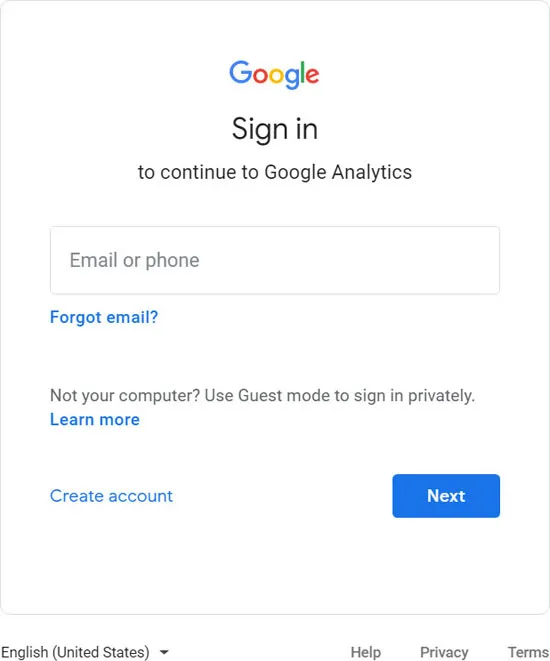
If you already have a Google account you can sign up for analytics right away. If you don’t, then you need to create one. In that case, just click the Create Account link as shown in the following screen, and follow the instructions:
Figure 1.2: Sign Up
Google Analytics is a trademark of Google LLC
Once you have your Google account you can enter the credentials and click Next.
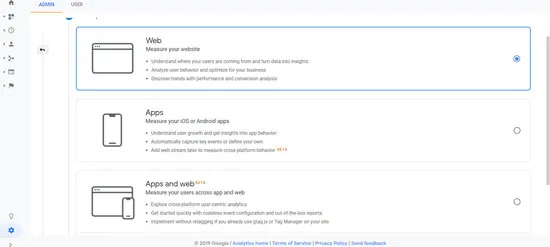
Then you will be prompted to fill a form, as shown in this screen:
Figure 1.3: Choose your property
Google Analytics is a trademark of Google LLC
First, you need to select an option based on the purpose you will use Google Analytics for - whether you want to track website traffic, mobile app traffic, or cross-track both.
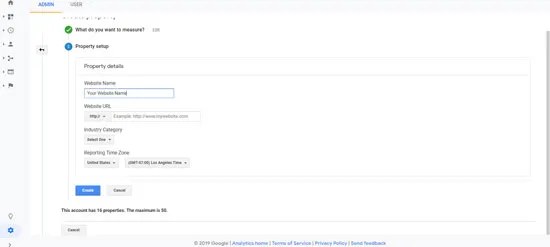
Next, you’ll see several fields to fill in:
Figure 1.4: Website name
Google Analytics is a trademark of Google LLC
Website name: This field is for your internal account use. It will not affect the actual tracking of data and you can name it as you want. It can be, https://mywebsitedomain.com, mywebsitedomain.com, MyWebsiteDomain, or even, MyWebsiteDomain – eCommerce. You can pick whatever you feel comfortable with.
In the next field, however, you need to specify the exact URL of your website. It needs to be: https://mywebsitedomain.com
Note: Do not forget to choose the correct “Https” or “Http” option form the dropdown menu.
Next, from the dropdown menu select the category that applies to you the most.
In the end, pick up a time zone. It is very important to select the time zone that your business operates in. This will guarantee that the results in your analytics are displayed according to this time zone. Let’s assume you are located in the United States but your website sells goods in the United Kingdom, in London. In this case, it is more appropriate to set London time instead of your own. In that way, the data in your Google Analytics will be more accurate. For example, let’s say your London customers buy more goods in the morning hours from 9 am to 11 am and you have a 7 hours difference from the London time zone. If Google Analytics uses your time zone in the United States then the data will show that the buyers are active in the time span of 2 am to 4 am which doesn’t make sense. That’s why you need to set up the time zone according to the location your business operates in.
After you have selected the correct time zone, you can click Create.
Congratulations! You have created your first Google Analytics account.
Installing the tracking code
Now we are just a step away from tracking your visitors. In this section, we will go through the installation of the Google Analytics tracking code on your website. This is the way Google collects the data from your website to turn it into graphs and charts.
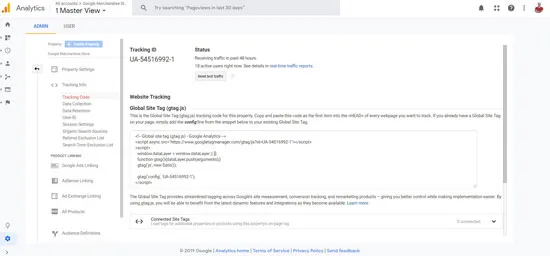
Once your Google account is created, you’ll see your tracking code and tracking ID as displayed in the following screen. The exact location is the ADMIN tab | Tracking code:
Figure 1.5: Tracking ID
Google Analytics is a trademark of Google LLC
There are two types of information you will get here. The Tracking code and the Tracking ID:
Tracking code: This is a piece of code that contains your unique tracking ID. Placed on the right spot on each of your website pages, this code is activated when a user lands on your website. It starts sending information that refers to your unique ID, this way Google Analytics detects which account to populate with data.
Tracking ID: If you are using a platform like WordPress as an example it often has plugins that already have installed the tracking code to your website but missing the unique tracking ID. In this scenario, you need just your tracking ID. When placing it in the plugin admin area it completes the code and starts tracking your website visitors just like in the first scenario. Here’s how your tracking ID should look like UA-54516992-1.
Every account has a unique tracking ID. You’ll get your uniqu...
Table of contents
Cover Page
Title Page
Copyright Page
Dedication Page
About the Author
About the Reviewer
Acknowledgement
Preface
Errata
Table of Contents
1. Google Analytics Step-By-Step Set Up
2. Google Analytics Reports Explained
3. 7P’s of Marketing and Google Analytics
4. Your Audience – Your Business
5. The Heartbeat of Google Analytics: Acquisition and Behavior Reports
6. Conversion Analysis
Trusted by 375,005 students
Access to over 1.5 million titles for a fair monthly price.
Study more efficiently using our study tools.
Frequently asked questions
Yes, you can cancel anytime from the Subscription tab in your account settings on the Perlego website. Your subscription will stay active until the end of your current billing period. Learn how to cancel your subscription
No, books cannot be downloaded as external files, such as PDFs, for use outside of Perlego. However, you can download books within the Perlego app for offline reading on mobile or tablet. Learn how to download books offline
Perlego offers two plans: Essential and Complete
Essential is ideal for learners and professionals who enjoy exploring a wide range of subjects. Access the Essential Library with 800,000+ trusted titles and best-sellers across business, personal growth, and the humanities. Includes unlimited reading time and Standard Read Aloud voice.
Complete: Perfect for advanced learners and researchers needing full, unrestricted access. Unlock 1.5M+ books across hundreds of subjects, including academic and specialized titles. The Complete Plan also includes advanced features like Premium Read Aloud and Research Assistant.
Both plans are available with monthly, semester, or annual billing cycles.
We are an online textbook subscription service, where you can get access to an entire online library for less than the price of a single book per month. With over 1.5 million books across 990+ topics, we’ve got you covered! Learn about our mission
Look out for the read-aloud symbol on your next book to see if you can listen to it. The read-aloud tool reads text aloud for you, highlighting the text as it is being read. You can pause it, speed it up and slow it down. Learn more about Read Aloud
Yes! You can use the Perlego app on both iOS and Android devices to read anytime, anywhere — even offline. Perfect for commutes or when you’re on the go. Please note we cannot support devices running on iOS 13 and Android 7 or earlier. Learn more about using the app
Yes, you can access Google Analytics Kickstarter Guide by Grigor Yovov in PDF and/or ePUB format, as well as other popular books in Computer Science & Data Mining. We have over 1.5 million books available in our catalogue for you to explore.