Build robust and secure applications using the building blocks of Docker Key Features
Understand the fundamentals of Containers.
Understand the working of the entire Docker ecosystem.
Learn how to utilize Docker Networking capabilities to its fullest.
Learn how to secure Docker Containers.
Get familiar and work with Docker Enterprise Edition.
Description The book starts by introducing Containers and explains how they are different from virtual machines, and why they are the preferred tool for developing applications. You will understand the working of Images, Containers, and their associated Storage and will see how all the moving parts bind together to work synchronously. The book will then focus on Docker Swarm, the mechanism for orchestrating several running Docker containers. It then delves deeper into Docker Networking. Towards the end, you will learn how to secure your applications, especially by leveraging the native features of Docker Enterprise Edition. What will you learn
Learn how to use Docker Images.
Get to know more about Docker Storage.
Learn how to use Volume plugins in Docker services.
Learn how to deploy a service to the Swarm.
Learn how to manage, scale, and maintain containerized applications.
Who this book is for This book is for anyone who is looking to learn Docker. It is also useful for professionals who are looking to build and deploy web apps using Docker. Table of Contents 1. Introduction to Containerization and Docker 2. Containers and Images 3. Storage Drivers and Volumes 4. The Container Network Model and the Docker Bridge 5. Docker Swarm 6. Docker Networking 7. Docker Security-1 8. Docker Security-II About the Authors Saibal Ghosh has spent a substantial part of his career working with databases. However, in the last few years, he gravitated towards the cloud, cloud security, and newer technologies like Docker and Kubernetes. He has developed a deep understanding of these concepts and technologies bolstered by the insight gained from many years of experience working with applications, databases, storage and infrastructure, and the understanding of how data is stored, moved, and secured. He currently works as a Principal Architect in Ericsson India Ltd. and spends a substantial amount of time playing around with Docker and Kubernetes. He holds numerous certifications around applications, databases, cloud, and cloud security and is also a member of Leader's Excellence, Harvard Square. Your LinkedIn Profile: https://www.linkedin.com/in/saibal-ghosh-mle%E2%84%A0-ccsk-prince2-%C2%AE-469b0a7/
Containerization is now in vogue in the software development world as an alternative or even as a complement to virtualization. Basically, containerization allows us to encapsulate (containerize) software with all its dependencies and the run-time environment in such a way that it runs uniformly across different infrastructures and platforms. Running software in containerized environments generally use fewer computing resources than running software within different virtual machines, since the latter requires a separate copy of the operating system to run on each virtual machine. In the coming days, we can hardly envisage any software being developed, which does not leverage the functionalities of containerization in some form.
Structure
Life before Containerization
Concept of Containerization
Benefits of Containerization
Docker
Docker engine
Docker Hub and Docker Registry
Linux and Windows Container
Microservices and Containerization
Security in Docker
Objective
After studying this chapter, you should be able to understand what containers are, its usage and benefits, how Docker came into the picture, and how large applications are developed using a microservice-based architecture and Docker.
Life before Containerization
Way back in the early 2000s, applications ran on servers, and we had to provision enough computing capacity to ensure that all our applications ran without any problems on these servers. However, it was not a static situation, and from time to time, businesses needed to grow their applications or add new applications, in which case they needed to increase the capacity of their servers, or worse go out and get new servers. So, at any given point of time, the IT team had to make an educated guess on how much capacity they would require in the coming months and provision accordingly, and this was a never-ending process. To ensure that the servers were big and powerful enough to take care of all the currently running applications as well as be prepared to meet the future growth, the IT operations team generally erred on the side of caution and often bought servers which were much bigger than the current requirement, resulting in a huge sub-optimal usage of those servers. It was not uncommon to see servers use as low as 10-15% of their full capacity. It was an enormous wastage of computing power, and by implication, company resources.
So, what next? Around 2005, we started hearing about something called virtualization.
Suddenly we had a situation where the next time we needed to add new applications or grow the current applications; we were not required to go out and buy new servers, instead, we could now leverage the functionalities afforded by the virtualization technology to use the spare capacity available on the servers to run numerous business applications and save money by optimizing the use of the servers. However, virtualization or running VMs on the servers came with its own set of downsides; every VM required its dedicated operating system (OS). The OS, in turn, consumed computing resources, which kind of ate into scarce resources; each OS needed its maintenance, patching, and so on. The OS often required a separate license, and worst of all, for all VM based applications, there was a performance penalty, since the VM based applications were almost always slower than the applications running on bare metal. While virtualization was a step in the right direction, it was certainly not manna from heaven!
Concept of Containerization
The foundation of containerization lies in the Linux Container (LXC) Format. LXC is an operating-system-level virtualization method for running multiple isolated Linux systems (container) on a control host using a single Linux kernel.
The fundamental difference between VMs and containers is that a container does not require its own OS, thus inherently making it much more lightweight than a VM. In fact, all containers on a server or a host share a single OS, thus freeing up a huge amount of computing resources such as storage, CPU, and RAM. A VM is slow to boot and takes a relatively long time to start up. Containers, on the other hand, are fast to startup and extremely lightweight. In fact, containers can have sub-second launch times!
So, with containers, we are not only guaranteed speed and agility but also, we save on potential license costs of the operating systems, as well as bypass the hassle of maintaining several operating systems. And this, to put it very simply, optimizes return on investments and translates as net savings for the company.
The container is lightweight because it shares the machine’s operating system kernel and does not require the overhead of associating an operating system with each application. Naturally, containers are much smaller in size than a VM, thereby allowing us to have many more containers in the same host as compared to the number of VMs that we could potentially have.
This is just one part of it. The other part relates to software development. We have all had experiences where we developed a piece of software, tested it out on our test systems, and everything ran just fine, still, when it was deployed in the production environment, something did not work out, and either the application ran slowly or sub-optimally, or worse, failed outright. It just did not run at all.
After numerous hours of doing a root cause analysis, we finally discovered that there was a library missing on the production environment, or the production environment had a different level of patching as compared to the test system, or something else did not match between the test and production environments leading to the fiasco.
With containerization, we have found a way out of this problem. Containerization simply eliminates this problem by bundling (containerizing) the software code together with the related configuration files, libraries, and other run-time dependencies required for it to run. The package of software code or container is separate from the operating system and other dependencies and can easily be ported to other environments and will run uniformly and consistently across platforms. We write the code once, containerize it, and run it a thousand times anywhere. This portability is extremely important as it allows us to develop code in any computing environment and then transfer it just about anywhere, secure in the knowledge that when we run it, we will get the same consistency, uniformity, and performance that we did in our original computing environment. This is indeed great news!
However, it is not as if the concept of containerization was invented overnight, and it became a sensation. The concept of containerization and process isolation has been around for some time now. But the emergence of the open source Docker Engine in 2013 -a lightweight, powerful open source containerization technology combined with the workflow for building and containerizing of applications really ushered in the era of containerization. The research firm Gartner projects that more than 50% of companies will use container technology by 2020. And frankly speaking, that’s quite an overwhelming number.
Benefits of Containerization
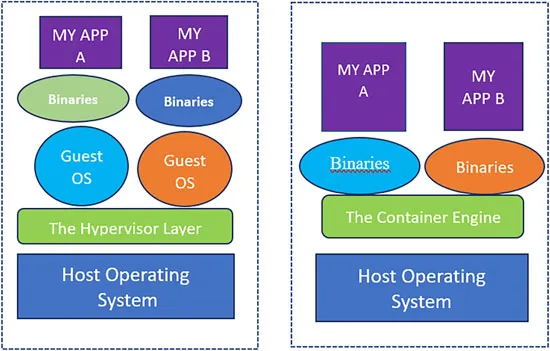
So, lets now take a step back and see how containerization benefits us. As discussed earlier, compared to virtual machines (VMs), containers have a significantly smaller resource consumption footprint than a VM. Since the containers share the same OS kernel, we can pack in many more containers in the same host or server as virtual machines. Thus, it’s really a no brainer that containers any day will be a more prudent choice for application development compared to VMs. Let’s have a look at the following graphic. The graphic makes a minimalistic resource usage comparison between a virtual machine and a container.
Figure 1.1
As we can see, the VMs have the hypervisor layer as well as individual operating systems for each application, thereby having more layers between the application and the host operating system. On the other hand, it is easy to see that there are fewer demands on the server in the case of containers. This is a key point. It simply means that we can fit in many more containers in the same server than VMs and continue to enjoy superior performance! As we can see, the containers do not have their individual operating systems; it simply uses the host operating system kernel to get their work done.
The second benefit that the container provides us is because they are so lightweight, given the fact that they do not have a dedicated operating system for each container, they are much more nimble and agile than a traditional VM as far as starting and stopping go. As mentioned earlier, we can launch containers in sub-second times, and that is quite understandable-simply since there is no operating system to boot, our app starts loading immediately.
Now coming to security in containers-containers have a concept of namespaces. We are going to discuss this in detail later, but for the moment, let us understand that typically in a container, our applications are sandboxed and will not communicate with each other unless we configure them to. This provides a built-in security mechanism and helps to keep our applications safe. Additionally, if, by any chance, a malicious piece of software somehow finds its way into a container, it will not be propagated to other containers.
Another key advantage of a container over a VM is the developers can use the exact same environment for both development as well as production. We had briefly discussed this earlier as well. We all know that a common stumbling block in the development world is that an app developed on the developer’s laptop doesn’t run on the production server for the excellent reason that the environment on the developer’s laptop and the production server do not match. With containers, we have just solved this issue in one step.
Since the run time environment is literally packaged along with the container, we have eliminated the variable of having a different run time environment in production, as compared to a test or a lab environment, which could impact how the application runs, provided it does so in the first place! Additionally, we can use containers for continuous integration/continuous delivery (CI/CD) pipeline integrations, helping developers become more productive and efficient.
Another advantage of containers is that it typically runs as a single service. For example, we can have a service for our database, a service for our web applications, a service for say, an application running analytics, and so on and so forth. We have already seen that there is a benefit of keeping our services isolated, but at the same time, we would like to have another dimension to the story, so to say. We ought to be able to scale up/down our services as and when required. Fortunately for us, containers can both scale up and scale down, and we also have a mechanism in place to orchestrate and harmonize, such as scaling up or scaling down. Docker has a native clustering and orchestrating solution known as Docker Swarm. While there are other popular clustering and orchestration tools in the market, like Mesos and Kubernetes, DockerSwarm is a pretty nifty tool in itself.
Docker
Ok, let’s start with the basic question: What is Docker?
Docker is a product of Docker Inc., a San Francisco based organization started by Solomon Hykes. Initially, it was started as dotCloud to leverage the containerization movement.
The most common way to understand Docker is to consider it as a piece of software that creates, manages, administrates, and orchestrates container. It runs both on Linux as well as Windows. The software is developed as part of the open-source Moby project on GitHub. Moby is an open-source project created by Docker to advance the software containerization movement. It is a project for all container enthusiasts to experiment and exchange ideas. As Solomon Dykes, the CEO of Docker Inc, said, “Docker uses the Moby Project as an open R&D lab.”
To go a little deeper, Docker isn’t a single monolithic application. Instead, it is made up of components like containerd, runc, InfraKit, and so on. The community works on the individual pieces as well as the composite whole, that is, Docker, and when it’s time for a release, Docker Inc., the company, will package them as one homogeneous unit and release it.
Let’ see how Solomon Hykes, the former CEO of Docker Inc, explains it:
“We needed our teams to collaborate not only on components but also on assemblies of components, borrowing an idea from the car industry where assemblies of components are reused to build completely different cars.”
Hykes went on to explain that Docker releases would be built using Moby and its components. At the moment, there are more than eighty components that are combined into assemblies.
The Docker Engine
The Docker Engine works on the principle of a client-server application. It can either be downloaded from Docker Hub, or we can...
Table of contents
Cover Page
Title Page
Copyright Page
Dedication Page
About the Author
About the Reviewers
Acknowledgements
Preface
Errata
Table of Contents
1. Introduction to Containerization and Docker
2. Containers and Images
3. Storage Drivers and Volumes
4. The Container Network Model and the Docker Bridge
5. Docker Swarm
6. Docker Networking
7. Docker Security-1
8. Docker Security-II
Trusted by 375,005 students
Access to over 1.5 million titles for a fair monthly price.
Study more efficiently using our study tools.
Frequently asked questions
Yes, you can cancel anytime from the Subscription tab in your account settings on the Perlego website. Your subscription will stay active until the end of your current billing period. Learn how to cancel your subscription
No, books cannot be downloaded as external files, such as PDFs, for use outside of Perlego. However, you can download books within the Perlego app for offline reading on mobile or tablet. Learn how to download books offline
Perlego offers two plans: Essential and Complete
Essential is ideal for learners and professionals who enjoy exploring a wide range of subjects. Access the Essential Library with 800,000+ trusted titles and best-sellers across business, personal growth, and the humanities. Includes unlimited reading time and Standard Read Aloud voice.
Complete: Perfect for advanced learners and researchers needing full, unrestricted access. Unlock 1.5M+ books across hundreds of subjects, including academic and specialized titles. The Complete Plan also includes advanced features like Premium Read Aloud and Research Assistant.
Both plans are available with monthly, semester, or annual billing cycles.
We are an online textbook subscription service, where you can get access to an entire online library for less than the price of a single book per month. With over 1.5 million books across 990+ topics, we’ve got you covered! Learn about our mission
Look out for the read-aloud symbol on your next book to see if you can listen to it. The read-aloud tool reads text aloud for you, highlighting the text as it is being read. You can pause it, speed it up and slow it down. Learn more about Read Aloud
Yes! You can use the Perlego app on both iOS and Android devices to read anytime, anywhere — even offline. Perfect for commutes or when you’re on the go. Please note we cannot support devices running on iOS 13 and Android 7 or earlier. Learn more about using the app
Yes, you can access Docker Demystified by Saibal Ghosh in PDF and/or ePUB format, as well as other popular books in Computer Science & Information Technology. We have over 1.5 million books available in our catalogue for you to explore.